
Confirm & Pay Form

Where do I update this section on the Confirm & Pay form? Clearly missing the wording for step 1...
Another question --
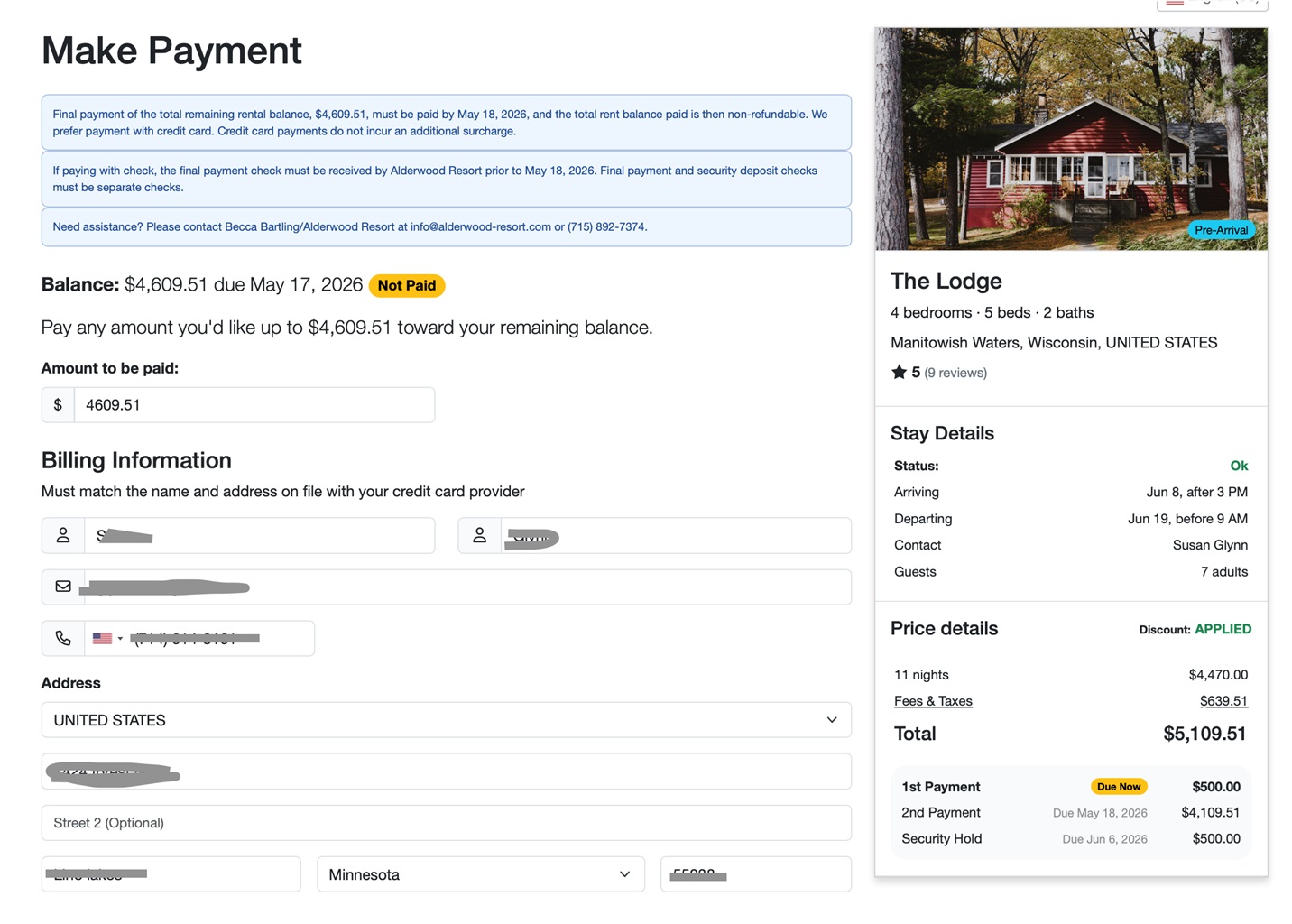
I'm using the BUPAY link from a template email to send guests here to make changes to their final payment if desired. However, I've noticed it says 1st payment (due now) which is incorrect. This guest has already paid their 1st payment (non-refundable deposit) and needs to pay the 2nd payment. Why does it say "due now", basically asking for another 1st payment?
Additionally, "Pay any amount you'd like up to $4xxxx toward your remaining balance."... I do not want my guests to be paying random amounts like they have a product on layaway. They are supposed to make a 1st payment (non-refundable deposit) and a 2nd payment (remaining balance). How do I remove that phrase?

Hey Becca!
Where do I update this section on the Confirm & Pay form? Clearly missing the wording step 1
It looks like the instructions field is blank. You can update this by going to Settings > Payment Methods > click into the Manual/Offline payment method you've created > enter information in the Instructions box, and save the changes
I'm using the BUPAY link from a template email to send guests here to make changes to their final payment if desired. However, I've noticed it says 1st payment (due now) which is incorrect. This guest has already paid their 1st payment (non-refundable deposit) and needs to pay the 2nd payment. Why does it say "due now", basically asking for another 1st payment?
This is a known issue that our team is working on resolving. It shouldn't affect the amount the guest is charged, and it's just a display issue. We should announce in our Changelogs when the issue has been resolved.
Additionally, "Pay any amount you'd like up to $4xxxx toward your remaining balance."... I do not want my guests to be paying random amounts like they have a product on layaway. They are supposed to make a 1st payment (non-refundable deposit) and a 2nd payment (remaining balance). How do I remove that phrase?
The BUPAY link gives the guest the option to pay any amount they want to, up to the full amount that's due, so there wouldn't be a way to remove that phrase. If their final payment is due, it will require them to pay the full amount. But if their final payment isn't due, then that link will have that phrase and allow them to enter any amount, up to what's due.
Thank you! That fixed my check issue.
One follow up question related to my screenshot, I see it says "Discount: Applied" even when there is no discount on the guest's charges. Is that error going to be addressed soon?
Hi Becca!
Our team is aware of this and is currently working on getting it fixed. When we release a fix, we should list it in our Weekly Release notes