
Blog
Latest Activity...
Hey, did you know that we...? 7 replies

My trial is also about to run out. Like so many other owners the VRBO/HomeAway changes have decimated our revenues. I'm thrilled with Owner Rez. I do have a couple of questions though:
1) I saw mention of Owner Rez in talks with VRBO to allow import of guest reviews. Is there any chance this will ever happen? We have great reviews and would love to be able to bring them over
2) Does Owner Rez have any plans to introduce a review widget. I am in the process of trying to enable reviews on my site and would love to be able to do it through owner res.
Welcome, FirstData users! OwnerRez can now take credit card payments via Payeezy! 0 replies

Like FirstData and the Payeezy gateway? OwnerRez now fully integrates with the FirstData/Payeezy gateway for credit card processing. All transaction types (payments, security deposits, refunds, voids) fully work.

Like the other credit card gateways we support, head over to Settings > Payment Methods to get started. Select "Add Payeezy" and then fill in the details.
We've written up a quick support article on how to find your API credentials for Payeezy. If you have any other questions, don't hesitate to ask.
QuickBooks Online support expanded to include Customer contact info, Department/Location tracking and multiple Currencies 1 reply

Very interesting post for Intuit Quickbooks.
Holiday settings for Fridays, Mondays and "All Weekend" 0 replies

Have you ever noticed that your holiday settings and rules don't kick in right because someone left the day before a holiday? For instance, the guest books Memorial Day weekend but they depart on Sunday (not Monday) so OwnerRez doesn't think it's a holiday booking. You and I know that it is, but the software lets it go by.
You can now configure your holiday settings to stretch across weekends depending on which day the holiday falls on.
Go to Settings > Holidays and click the top Change button. You'll notice that a section for Friday and Monday has been added.
But notice the options available. You can now select this little guy:

To be clear, this does not mean that the guest will be charged multiple times for the same holiday. It's still just one holiday even if the booking hits on all four days.
Notice on your calendar, that the holiday now shows across the holiday.

We encourage users to set the "all weekend" option on all four day types: Fri, Sat, Sun and Mon. Holiday weekends always have a lot more demand than normal weekends. Anyone booking on those weekends should be subject to your holiday rules and fees, even if the guest leaves before the actual holiday.
QuickBooks Online support expanded to include Customer contact info, Department/Location tracking and multiple Currencies 1 reply
Thanks for all the great feedback on our new QuickBooks Online integration.
This morning, we released another update that expands that integration by adding more options.
Guest Contact Info → Customer Contact Info
The single most resounding request was for Customer records in QuickBooks to have contact information such as phone number, email address and address information. We did that.
The QuickBooks customer now shows those items when the booking syncs across. Every time our sync runs, the system checks and updates the customer information. So if the email or phone number changes in OwnerRez, the customer record will update on the QuickBooks side as well.
Please note that only the default email address, default phone number and default address are sent to QuickBooks. If you have multiple emails or phone numbers, only the top one is sent across. If you have need of more than that, please contact us and let us know.
Location Tracking
Several users requested location tracking. While we already supported class tracking, QuickBooks also has department level tracking which is also called "location" tracking for some business types. This allows you to track invoices to a location or region, even if you're already tracking line items to classes.
To flip this on, go to your Settings > QuickBooks and adjust the settings to start tracking Locations.
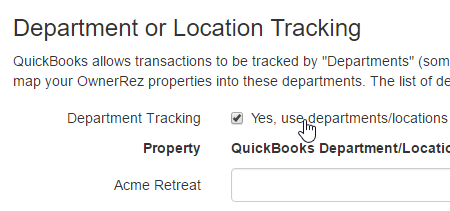
You will need to use the "Refresh Account Info" button at the top of your settings to bring in your QuickBooks Locations since our system has never retrieved those in the past.

After you do that, the Location to Property mapping can be completed, where you will set a property to the specific location that you want its invoices to go to.
Multiple Currencies
We found working with non-US QuickBooks users that non-US accounts are different than US accounts. QuickBooks requires a wider array of currency settings for non-US accounts that can make multi-currency users a bit tricky.
If you have properties in different countries, where each property accepts a different form of currency, you can now configure your QuickBooks settings in OwnerRez to support that. Simply check the Multi-Currency option and then set each property to the currency you want it to use.

Please note that this will not change the currency for any other part of OwnerRez such as reporting, taxes or credit card payments. This currency setting is only used for QuickBooks syncing so that new customers and invoices are created in QuickBooks with the correct currency flagged.
Please continue sharing your problems or preferences with the QuickBooks integration feature. We have some other ideas already pending. As always, we prioritize new development based on user feedback.
Guest reminder emails for payments and security deposits 13 replies
On the 2nd part... there are several ways you can tell them about the security deposit ahead of time. You can use the email responses (either when responding to the inquiry or later sending the quote email). There are email templates you can amend to change the default messages that out for those responses. So, for instance, you could include a paragraph that warns them about the security deposit.
-Michelle
Guest reminder emails for payments and security deposits 13 replies
Nancy, the reminder emails (that this blog post talks about) is exactly for the situation you're talking about.
If no scheduled payment is entered, the system will send this reminder email WITH A LINK to the guest for payment. So no need to do anything on your part - the reminder email (if you have it turned on) will ask the guest at the appropriate time automatically.
Whether they pay by check or credit card depends on which payment methods you have configured. Go to Settings > Payment Methods and add credit card type (like the SecureNet one you mentioned) and a check type too. If you add a check payment method, guests will see information about where they should send checks to.
-Michelle
Guest reminder emails for payments and security deposits 13 replies

Glad to see this here because I was just coming to ask about this.
I was updating a booking for which I've already received a $500 reservation deposit by check. I filled out the first payment and indicated I'd gotten paid by check. I clicked on Schedule New Payment to get the second (final) payment set up 60 days prior. I set the dates I wanted the reminder sent. However, I don't know at this time whether the guest would like to pay by check or credit card. So I tried leaving that part blank, but it would not allow me to save the payment request without including a credit card number.
It would be great if we could schedule it to go out without indicating which payment they need to make, I'd like to leave that up to them. This is also important down the road when I have international clients and I might suggest different ways to pay altogether than what I suggest to US clients.
So is it possible for me to schedule a second payment and not include the credit card number? That would be very helpful.
I also have a question about security deposit information. I would like to include information for them about how the security deposit will be reserved when this second payment notice goes out. Up until this time, my quotes to them haven't includes security deposit information at all. I don't want to surprise folks with the information about needing to reserve a security deposit. I'd like to communicate that to them somehow in advance so they know what to expect. In addition, I have some repeat clients whom I do not want to charge security deposits. I need to make sure I have that option as well. Not sure yet if I do, I haven't gotten that far yet in booking since most of mine are many months away yet.
Thanks!
Guest reminder emails for payments and security deposits 13 replies
Happy Thursday, everyone!
I wanted to take a second to talk about something that users have been asking about for a few weeks - the payment reminder emails that are automatically sent to guests.
What's the deal with reminder emails?
If you have guests that pay by check or PayPal, no second payment or security deposit is automatically scheduled. How do those guests remember to send their second payment?
Maybe you entered a manual booking and forget to schedule the second payment?
The system now sends payment reminder emails for any booking where there's an outstanding balance and second payment is not already scheduled. Payment reminder emails are sent 10, 5 and 1 day(s) before the due date of the second payment. The due date is based on the quote or property billing rules for that booking.

You can control how the reminder emails look through email templates. Want to change the wording, add styling, add other fields, remind the guest about other booking information at the same time? You can. Go nuts with your own custom template.


This template exists for both payments and security deposits.
Again, the reminders are sent 10, 5 and 1 day before the due date of the payment or security deposit, and only where no scheduled payment or security deposit already exists.
But what if I don't want this? How do I turn it off?!
We've already gotten a lot of feedback about this feature, and some users were pretty unhappy that guests were getting blasted with (possibly untrue or irrelevant) reminders about payment.
To combat that, we made sure to include a lot of options for turning it off and every level: properties, quotes or bookings.
For a particular booking, if you know the guest never needs any of these reminders, you can turn them off under the Payment and Security Deposit tabs. Just hit the Skip button.

If you want it skipped for someone before they even book, you can do that on the quote you send them. Go into the quote billing settings and flip it off there. The booking that results from the quote will automatically have the reminders turned off.

If you never ever want reminders going out, for any reason, you can kill them globally on the property. Open the property, go to Rules and turn them off.
Remember that there is a setting for both the payments and security deposits. You need to turn them both off anywhere you're disabling them.
Manual bookings ask you about the reminders right on the create page
To make it even easier to kill reminder emails, the manual create-booking page asks you right when you're creating the booking if you want the guest to get a reminder.
This mitigates the problem of you, for instance, bringing in a manual booking from Airbnb and then forgetting to turn off the reminders. You're asked immediately when creating the booking.

The default setting for these checkboxes depends on what the property is set to. If the property has reminders disabled, the create-booking page will have them disabled by default.
How can we do payment reminders better?
As soon as this feature went live a few weeks ago, a lot of users sent in feedback. Some loved it - it saved them having to remind guests offline - but other users hated it and didn't want to nag or bother guests about paying when that was already covered other ways.
We do feel that payment and security deposit reminders emails are a necessary feature in OwnerRez. We've seen many situations where having a reminder would have saved problems. For instance, a 2nd payment wasn't scheduled and the booking wasn't fully paid when the guest showed up on arrival day.
But how can we do it better? Talk to us and send ideas. We already have some upgrades we'd like to do around this process, but your feedback is valuable. Contact Us or add posts to the forums; we're listening.
Hey, did you know that we...? 7 replies
Thank you for all these great new additions!
My trial runs out tomorrow and I am ALL IN with you guys. Thank you for everything.
Hey, did you know that we...? 7 replies
So much going on, so little time!
Once again, we've found ourselves pushing out so many new releases and updates that haven't taken the time to announce it to everyone! I wanted to take some time this morning to list the updates, fixes, enhancements and tweaks (yes, those are all different types of things :-) that have gone out over the past several weeks.
This is by no means the entire list of bugs fixed or changes made, but the following items are new features that everyone should really know about. These new features can help you be more versatile or save time in your work. Please take the to read through. Drum roll please...
Rules for Minimum Stay (both Night & Holiday Night) have been added to Seasons
A lot of users mention that they have different Minimum Stay rules per season. You might require 5 nights during High Season but allow 2 or 3 nights on Low Season. You can now do that. Open any season and check out the new Rules section.

If you have Minimum Stay specified at the property and season levels, both, the season rule will override the property one.
The guest also sees a specific warning with the season name when the rule kicks in.
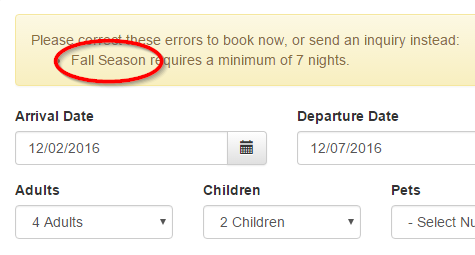
We are planning to add more rules to the season level, so that you can allow or block things during different parts of the year.
Field code for the quote table without payment links or footer text
You can now include the quote table (that block of text that shows the guest their name, info and charges) without showing any payment links.
Some of our users like to give the guest a quote, but, until they've vetted the guest, they don't want the guest to be able to pay or do anything else. You can now do that.

When the field code transforms, at render time, the entire bottom area of the quote block is gone.

This is also useful for sending information to someone else about the guest (the owner, if you're a manager) to keep them up to date but include payment links.
Time Zone can now be set per Property
Each property can now have its time zone set. Open one of your properties, and click Change under General Info. Select the time zone for that specific property.

You may have properties in different time zones, so you want to remember that this is a per-property setting, not a global time zone setting for your account.
Why did we do this? There are features that require displaying time for the property or coordinating calendar information, and time zone is an important aspect of this. You'll more about this below.
Standard Check-In and Check-out times can now be defined per property
Most users know that bookings can be marked for early check-in or late check-out. Without those set, the booking times are considered "standard". Well, what is "standard" exactly? Now you can define it.
Like time zones, above, you can now configure the standard time that your guests are supposed to check-in and checkout, and you can do this per property.
Open a property, click on Rules and look at the "Defaults" section.
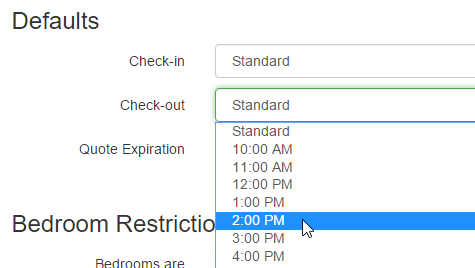
You are not required to set these times. You can simply leave them as "Standard" on the property and the guest will be shown "standard" as text where check-in/out times are displayed.
But if you'd like for the property to use specific word, set the check-in/out times and you'll be good to go.
iCal Links now correctly show Check-In time, Check-out time and Time Zone per property
Do you share your iCals with other people, like a housekeeper? Previously, we hard-coded iCal event times (arrival/departure time) to the same time per day. This caused calendar complications with some users. Even for those users who don't care about time, we like to be specific and exact here at OwnerRez.
So we overhauled iCals to do time correctly. Your iCal links will now correctly embed the correct check-in/out time, either based on the booking or property defaults, and also show the correctly formatted time zone if it's set on the property.
Custom iCal Links can now include notes and custom booking fields
For those iCal power users, who are share information with staff, you can now embed your custom booking fields and notes.
You have to specifically mark, on the custom iCal Link, that you want to include notes and fields.

When you do, your third party calendars will show everything we have for notes and fields.
Please note: this only applies to custom iCal Links for the property. The default iCal Link never shows any private booking information of any kind.
Field code for Check-In and Check-Out specific times
You can now show the "11:00 AM" or "Standard" specific check-in/out times in templates or agreements using new field codes. These field codes only specify time, not dates, and can be used on the property or booking level.


These can be used as a great little reminder in a pre-arrival or pre-departure email sent to the guest or to staff.

Guest payment form for now allows dynamic options for entering custom amounts
This one was long overdue.
Say the guest wants to make a second payment on their booking, but not the final full amount. Or say that they want to split up their payments between friends in the group. Or say that you entered a manual booking and want the guest to make a payment but only their first deposit, not the entire amount.
You can now do all that using the same payment form as before.

Send that payment link to the guest, and depending on the booking due date and other factors, they will see new amount fields where they can enter how much they want to pay.

The booking's balance and due date are checked to determine if (and how) these "how much" amount fields are shown. Quickly:
- The top "first payment of" option shows if the booking has never had a payment
- The top "first payment of" option shows the x% of whatever the quote or property billing rules are set to
- The entire section only shows if the second payment due date has not already passed
- If the second payment due date has passed, a hard-coded amount is shown on the page as "what will be charged"
Collect custom field data directly from the guest during quote acceptance
Have you ever wanted to ask the guest other information when they're accepting the quote and paying? Now you can.
Custom field definitions now include settings for whether the guest should be presented with the field while they're submitting their information and whether or not you require a response.

When the guest gets to the Point of Contact page during quote acceptance, they are then asked about the field definition.
If you've set the field to be required, they have to enter something. When the booking is created, this information is stored on the booking just like it would be if you had entered it yourself.

Text color on Book Now/Inquiry widget can now be set to a non-black color
Some users have websites with darker background colors. Our widgets are designed to have transparent backgrounds which allows the website's background color to come through and make sure the widget matches.
This is a problem however for websites that have dark, or fully black, backgrounds because the widget has black text. Unless you know how to use the CSS Override field, the label text won't be readable.
We've added a Text Color setting to the Book Now/Inquiry widget that allows you to quickly pick a different color for text (field labels).

Field codes for guest phone(s)
You can now show the guest's phone number (or multiple numbers) in templates or agreements using new field codes. These field codes are similar to the guest email address field codes. If you go with multiple, it will show in a comma separated list.

Four-digit decimal places for charge rates
Some users have tax rates that are 3 or 4 digits. Even though most currencies round to 2 digits, it's important you are able to display a 3 or 4 digit decimal rate to the guest. If your tax rate is really 5.449% as mandated by the state or county, then that's what should be shown.
You can now do that. In bookings and quotes, the Rate field on charges will accept up to 4 decimal places without rounding. The Amount field still rounds to 2 digits when calculating the amount.
Widget settings have expanded to include lots of logic and display options
Don't want the rate to calculate on your booking widget? Or perhaps you want the rate only if there are no rule violations?
Want to require a phone be entered?
Want to validate the inquiry fully before allowing them to even send an email?
Want to allow wide-open inquiries for even no-date requests?
Check out the widget settings now. There are a lot of new options.

That's it for now
Lots of other stuff going on, but I wanted everyone to know about these specific feature updates so that you can go make them work for you right away.
As always, if you've seen other change in the system and have questions, or just want to chat about it, please let us know.
The new HomeAway fees, irate customers, media coverage and what you can do 2 replies

I agree with Nancy. And I've been told about HomeEscape.com as an owner-centric alternative. I just put my listings up there, we'll see what happens.
The new HomeAway fees, irate customers, media coverage and what you can do 2 replies
Homeaway Communities has some pretty active forum threads. They have allowed them to remain on the site, but I believe they do delete some of the comments.
There is a class action suit filed by one gentleman, filed in Texas where HomeAway is based.
There's a lot of scuttlebutt about starting up owner-owned and operated sites for listings. Also a lot of little startups are appearing. I personally don't think any of these will gain any traction in the short run. My hope is that a bigger player steps in soon and just creates a mega-classifieds service and is satisfied with taking in subscription fees. To me the guest fee wasn't the most egregious problem, it was the gradual and incessant need for Homeaway/VRBO to control and micromanage the owners' business. The stick vs. the carrot approach is also not working for them. The first good high profile alternative that appears in the marketplace, and you'll see a mass exodus of homeowners. In the meantime, many of us are beefing up our websites, using social media, and diversifying as much as we can.
The new HomeAway fees, irate customers, media coverage and what you can do 2 replies
Most of the people who follow this blog are already well aware of the new service fees that HomeAway has imposed on travelers.
Large media outlets are beginning to pick up on the story. From the Chicago Tribune:
Online travel giant Expedia purchased HomeAway last year for $3.9 billion, and the new fee is widely seen as a means of squeezing profit from the deal
Make your voices be heard, folks!
What can I do?
Search around and find communities that are protesting. Even if you don't want to blog or write openly about it, you can join the community and like/vote/encourage them to keep at it.
The Consumer Affairs website has a very active discussion about the situation.
There is a "Just Say No to VRBO" group on Facebook you can join.
What other protest websites or forums have you found? Add them to the comments below.
What do you know about the company managing your vacation rentals? 1 reply

This unfortunate chain of events happened several years ago. To the best of my knowledge, no one was ever prosecuted--the management company was accepting reservations and taking deposits and payments the afternoon before they closed--they had to know they were closing and took the money anyway. That is theft under Florida law--I am a former Florida state prosecutor and I know what it takes to prove theft. The prosecutors failed to do their duty--both Federal and State.
What do you know about the company managing your vacation rentals? 1 reply

I was just chatting with an OwnerRez user who told me about a terrible situation that happened to him. The company managing his vacation rentals just closed and isn't returning any refunds to guests or payments to owners!
CBS 24 in Atlanta covered the story:
If you plan to vacation along the Gulf Coast between now and Labor Day the condo you booked may not be available.
CBS Atlanta has learned a popular rental company in Panama City Beach, a popular vacation spot for many Atlanta residents, has closed its doors unexpectedly this week.
Conyers resident Jon Meier owns a condo on the coast and received an email this week from his rental management company, Oaseas Resorts, saying the company will be closing due to "management issues and economic conditions, including cash flow."
Owners say they haven't received rent payments for June or July and Meier is out roughly $10,000.
"So it absolutely infuriates me that somebody is holding or has removed thousands and thousands of dollars from my pocket," Meier said.
A former Oaseas employee sent this email to condo owners saying the company would not refund money to guests.
Oaseas management said they didn't anticipate the situation.
"We knew the economic conditions and so forth and other things were causing pain, but everybody thought it would work. Then it got to the point that it was wiser for us to start to close it down," Oaseas manager Thomas Duggan said.
Meanwhile, another Panama City Beach rental company, Emerald View, organized Operation Save Face. They've identified 50 condo owners willing to donate their units for next week.
"Somebody needs to help these guests because they saved their money all year to come down here and enjoy it," Emerald View manager Tom Donahue said.
Oaseas Resorts informed the public in a news release that they could contact The Resort Collection of Panama City Beach if they wanted to re-book.
CBS Atlanta News checked with The Resort Collection and they said you can book, but it's not free.
Also, Panama City Beach police said they are conducting a criminal investigation into the matter.
Oaseas Resorts also shut down the properties they manage in the Smoky Mountains.
Wow!
Didn't anticipate cashflow?? That's preposterous. Guest money should always be held in escrow by the management company. The management company should never be using guest payments to fund their general operations. This is obviously a case of fraud and hopefully the police will investigate thoroughly and the company owners will be prosecuted.
But what's the take-away here?
If you're currently using a management company, maybe you should think about stepping out on your own. Management companies can collect, and sit on, tens of thousands of dollars for your properties. In the high months of summer, if they suddenly go bust or someone swipes all that money, where does that leave you?
We created OwnerRez specifically because we didn't like the shenanigans of management companies. In our case, it was mostly about laziness and attention to detail, but fraud can happen too!
OwnerRez has all the tools you need for managing your properties quickly and professionally just like any management company can do, and, in fact, often a lot better. You can use triggers and auto-responders to respond quickly and send messages on a scheduled basis. You can take credit cards and get renter agreements signed without lifting a finger.
Stop paying that percentage, stop tolerating laziness and financial risk, and start running your own operation. It's easy!
QuickBooks integration has arrived 9 replies
Southern Florida, I flipped Canada on for our QB app integration. Looking at the docs, I don't see any reason it wouldn't work. Could you try it out and let me know what you find? It should move your bookings and payments into QB perfectly fine. Let me know, ~Sam
QuickBooks integration has arrived 9 replies
Hi Southern Florida, that's a great suggestion. I *believe* that it's just a matter of flipping on other countries, but I'll note that down in our dev roadmap to check into for you. It may require some additional testing and such on our side. If there's no major issues, we'll get that turned on for you.
QuickBooks integration has arrived 9 replies

I was glad with the Online Quickbooks integration but when I tried to integrate OwnerRez told me that my Canadian version of QuickBooks isn't integrated yet.
Does OwnerRez have plans to integrate the Canadian version as well? Because, I assume, that OwnerRez should have some Canadian clients as well (probably second after the U.S. clients...)...
QuickBooks integration has arrived 9 replies

Totally understand, thank you for putting that feature on the list!
Wendy
QuickBooks integration has arrived 9 replies
Short answer is yes, but it may take awhile. QB does have a "web connector" that can be used to to keep Desktop up to date, and there's good documentation for it. But it's also a matter of priority. As usual our development roadmap keeps growing faster than we can work on things! :-)
QuickBooks integration has arrived 9 replies
Ok, that's a bummer, do you think you'll be trying to adapt it to the desktop after you get the online version done?
Thanks,
Wendy
QuickBooks integration has arrived 9 replies
Wendy, we'd love to support QB Desktop but it's really hard to build integration in a way that is as seamless and powerful as the Online version. With Online, our system just talks to their system directly under the covers. Everything moves right across with zero interaction from you. There is **supposed** to be a way to do that Desktop too but, at the moment, we're focusing on the Online version. Best, ~Sam
QuickBooks integration has arrived 9 replies
Will we be able to integrate with the desktop version of quickbooks?
Love this idea!
Thanks,
Wendy
Imported bookings are now free! 4 replies
Yes, that's exactly right. You are not charged for anything done in the first 30 days.
-Michelle
Imported bookings are now free! 4 replies

Hi, thanks for the fast reply
So if for some reason I can't get an excel export from Kigo, if I manage to input all my bookings manually within the 30 day period I won't be charged? That's what I understood from your post but just want to be sure.
Thanks
Sarah
Imported bookings are now free! 4 replies
Hi Sarah,
Thanks for reaching out!
It sounds like you'd want to us our Excel import (Tools > Import Bookings from Excel) instead of the iCal import. Our Excel import gives you the ability to import a lot more booking detail and preserves all the information you're talking about.
Does Kigo have any export options you can use to prepare your bookings in Excel? CSV would work too if they have that. You can convert CSV to Excel very easily.
Imported bookings are free, but manually created bookings are not. However, if you're still in the first 30 days, which you appear to be, then ALL bookings are free no matter how they are entered.
Is there anything else I can help you with?
-Michelle
QuickBooks integration has arrived 9 replies
OwnerRez can now sync booking and payment records automatically with QuickBooks without you lifting a finger!
If you use QuickBooks Online to manage your accounting, you'll want to set this up immediately. Go to Settings > QuickBooks to get started.

After you click the Connect button, you'll be redirected to Intuit's website where it will ask you to login, select your QuickBooks company (if you have more than one) and authorize OwnerRez to make changes.
The process is dead simple, and if you're already logged into QuickBooks, you won't even have to type anything. Just a couple clicks.
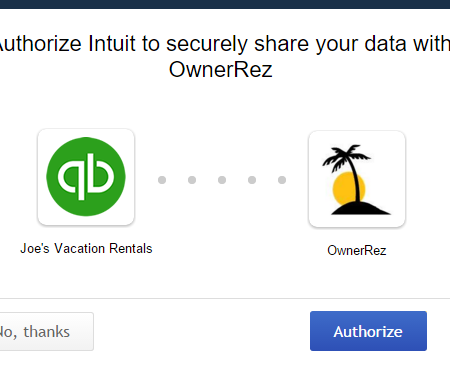
After you've clicked Authorize, you'll be redirected back to OwnerRez where we'll show you the authorized connection and present you with a page where you can map your charge line items, taxes and properties.
Take a minute to read over the mapping options. The options allow you to specify how invoices and payments will be created on the QuickBooks side from your OwnerRez bookings. It's important that you get the mappings right. If you don't understand the mapping options, please contact us directly for help.
Which bookings will be synced?
Once QuickBooks is configured for a property, all bookings that are changed thereafter will start syncing with QuickBooks. Even changing the name or guest count on the booking will trigger a sync.
To keep track of whether a booking has synced or is still pending, and to see the result of the sync, visit the QuickBooks tab under the booking.

You can also manually trigger it to sync from the same page.
If you have historical bookings that you want synced to QuickBooks, you'll need to manually trigger each one by visiting the booking > QuickBooks page and clicking the Sync Now button. If you have more than few bookings, let us know and we'll bulk update them all from our side.
What exactly is synced with QuickBooks?
When any bookings are created, updated or canceled in your OwnerRez account, our system will create corresponding updates in your QuickBooks account.

Specifically, each OwnerRez booking is mapped to a single "invoice" in QuickBooks and payments are synced as well. If you search QuickBooks with your OwnerRez booking number, you should find a corresponding invoice with the same number.

That invoice will have the same payments in QuickBooks that you see in OwnerRez.
What type of financial transactions are not included?
For the moment, refunds and security deposit are not synced with QuickBooks, only payments are. This is because there are several ways "credits" can be recorded in QuickBooks and the way you do your accounting makes a difference. Security deposits, likewise, would create complications, so we've left them out too.
We do not create "deposit" records in QuickBooks because there is no way for OwnerRez to know which payments settled together or if you deposited them at different times. You will need to manually record deposits on your own, though having OwnerRez payments automatically entered should make that process significantly easier.
There are many ways of mapping data or displaying transactions. If you have a different way of doing things, and our sync isn't playing ball, please let us know so we can create options for you.
Imported bookings are now free! 4 replies
Hi,
I am trying to onboard to Ownerrez (moving over from Kigo) and I have 113 bookings to import which are future bookings for this year, so I need to keep all the renter details within the booking.
I know using the ical import won't import the booking data, which is fine - my plan was to import the dates, then add the details manually.
However the import function BLOCKS OFF the dates, it doesn't create a booking that I can edit and add the data.
If I add each booking manually, will I be charged? I have already paid for each booking in Kigo, I don't want to have to pay twice.
Any help with the unboarding process greatly appreciated.
Sarah
Imported bookings are now free! 4 replies
Our new import tools have been really popular. Turns out, everyone wants to use our awesome reporting to look at their old records (or data in other systems). Yay!
But we quickly heard the same question from lots of people - are the imported bookings going to cost me? And the answer was yes. That stopped a lot of people from importing historical data. After all, you might have a thousand bookings to bring in, which means a heck of an invoice.
Not anymore!
Now, imported bookings are free. Whether they're imported by iCal or Excel or some other format, they won't cost you anything. Your monthly invoice now shows a new line item for "imported bookings" and they'll be free like blocked-off time.

And keep sending feedback about the import process. We've fixed or enhanced dozens of things over the past week since everyone started using it. Let us know what else you run into that doesn't work or that hangs you up.