
Blog
Latest Activity...
Integration with DPGO 1 reply

We are happy to announce that we've partnered with DPGO to offer our OwnerRez users another dynamic pricing option.

DPGO is a dynamic pricing tool for hosts, vacation rental owners, and short-term rental managers. Their AI-driven software analyzes over 200 market data parameters.
Similar our other dynamic pricing integrations, DPGO will create spot rates automatically in your OwnerRez account every day or whenever their algorithms deem it necessary. One of the major differences of DPGO is that you must be listed on Airbnb to use their dynamic pricing system. Their database is comprised of all USA and Canadian Airbnb listings.
Manage prices and availability rates with data-driven insights and knowledge of your target market.
Get started with DPGO by visiting the DPGO website and check out the OwnerRez support doc for how to integrate OwnerRez with DPGO.
San Antonio VRMA, Honolulu Changes STR Definition, Strasburg Rental Ordinance, Summit County STR Conversions 0 replies
Happy Friday!😃
It's been a little while since we've posted an industry news because we've had SO MANY UPDATES to talk about. If you missed our recent product updates, be sure to take a look at the Midsummer Updates series we've posted over the past couple weeks. The series covers all of the product updates that were released back in July and August. There were 9 parts, beginning with this one, and it's worth the time to read about the dozens of new updates.
The San Antonio VRMA conference is next week! If you're in the area, join us Monday, October 4th from 6:00pm - 9:00pm, at Prost Hous! Come say hi and enjoy a cold brew or a mouthwatering appetizer buffet on us. While we're talking about VRMA, they recently announced to their members that they are partnering with Vrbo to include rental property owners, many of whom self-manage bookings through platforms such as Vrbo. This decision was made to enhance professionalism in short-term vacation rentals and encourage owners to share their expertise.
The Honolulu County Planning Commission proposed a new bill that would change the definition of a short-term rental from 30 days to under 180 days. That doesn't sound very short...🤔 This will specifically affect those in residential areas, however these changes would need to be approved by the Honolulu City Council prior to implementation.
Strasburg, VA Planning Commission has introduced a new short-term rental ordinance intended to regulate STR's and enforce a 6% transient-occupancy tax. This would also require one additional parking space per guest room for both owner-occupied and non owner-occupied properties.
Summit County, CO housing department has made conversion plans for short-term rentals. The idea behind this is to increase the number of affordable housing units in Summit County. One of the proposed strategies would be to convert short-term rentals into long-term rentals for local residents. The details are not yet solidified, but the department would like to roll out the program on October 15th.
User Profile: Villas in Jamaica 0 replies
From time to time, we showcase OwnerRez users that show exemplary work. Not only does operating a vacation rental business take a lot of time, but also a huge amount of effort. This week we spoke with Fred from Villas in Jamaica. Fred's website and operation can be found at villasinjamaica.com. Below are the questions we asked and his responses.
Can you tell us a little bit about your history?
Fred: We've been in the Vacation Rental business for over 30 years...Our core business was retail travel agency, tour operator and hotel & villa representation / non traditional properties in Jamaica.
 |
 |
What is your background?
Fred: In a past life I was a musician and built guitars for years. I also have a background in Real Estate sales & management. I have been in this business for 30 years, and have done a ton of researched for years. From the top to the bottom, OwnerRez is hands down is the best software out there. It can handle all the strange curve balls that other systems simply don't have the tools for. Our website is from OneRooftop, but we don't use the booking engine, we use OwnerRez because it works so much better. Other booking engines can't do the arbitrary things that OwnerRez can! They try to cram their hotel model into the vacation rental environment, which leaves something to be desired.
What is drew you to Jamaica?
Fred: Back in the day Reggae Music and Jamaican culture. We represent properties exclusively in Jamaica where I also own a home. Jamaica is unique in the vacation rental business because all the properties are all fully staffed. You get to connect with the staff so you have a better understand of the area and a unique experience. We handle 300+ homes and they're all fully staffed as a standard!
What do you love most about the VR business?
Fred: Gives me an opportunity to make available the experience of staying in a private home instead of traditional hotels. Great for families, special event, birthday and weddings. Once stay at a vacation rental once or twice, you'll be doing it in the future. Vacation rentals off much more privacy vs in a hotel, which is a huge plus for a lot of people trying to get away.
What do you dislike the most about it?
Fred: The ever changing marketplace. Also the fact that very large businesses in the travel industry come in and try to merge into the vacation rental space. They don't do a great job and misrepresent the industry.
How do you use OwnerRez to manage your business?
Fred: We have been using the Ownerez booking engine for decades...After endless research they are the best! We aren't even using OwnerRez to the fullest extent.
What is the most useful feature that OwnerRez offers?
Fred: Flexibility on how rate data is used - no close second. OwnerRez has a product that can handle all different rate values and situations. The system can accommodate my rates and display them how I want, I don't have to adjust to the system. For that reason OwnerRez is the best!
>>>>>>
Thanks, Fred! We wish Villas in Jamaica much success as they continue to manage their business and thrive in the vacation rental industry!
Star Rating on Google, New Charges Grid, Other Rooms (eg. Kitchen), Disable Rates on Websites, Property Sharing Between Accounts 5 replies

XENOS Guest-Frie said:
Previous we could simply add them via phone or desk top, based on the rules. Now there are several additional steps that are required to change commission, change the expense line and also then not publish to owner statement. Is there anyway to keep the current enhancement with also keeping the rules set up in the Surcharges section?Hi Xenos, I'm confused about your question. The changes to the charges grid was purely cosmetic. We changed where the text boxes and buttons are for mobile and tablet displays, but they are all still there. If you click the Action button on mobile, you'll see that you can still edit the entire line item from description and amount to commisson and expense. Can you explain a bit further where exactly a text box or drop-down is not filling like it was before?
Star Rating on Google, New Charges Grid, Other Rooms (eg. Kitchen), Disable Rates on Websites, Property Sharing Between Accounts 5 replies

Very much appreciate your constant improvements. The charges enhancement has some flaws that I have found. We have many uses for early / late check in and out charges. Previous we could simply add them via phone or desk top, based on the rules. Now there are several additional steps that are required to change commission, change the expense line and also then not publish to owner statement. Is there anyway to keep the current enhancement with also keeping the rules set up in the Surcharges section? That would be very much appreciated as this new process is time consuming and leaves room for errors.
Thanks for the consideration.
Star Rating on Google, New Charges Grid, Other Rooms (eg. Kitchen), Disable Rates on Websites, Property Sharing Between Accounts 5 replies
Happy Hump Day, everyone! 🐫 This week we've released 19 updates which include some great new features that I'm finally able to talk about! There are some meaty enhancements as well, so let's get right to it!
New Features
Have you ever noticed how Google shows a star rating and review count next to certain search results? It tends to be things that are commonly reviewed like products, vendors, lodging and so on. That got us thinking - how do we get our OwnerRez websites doing the same thing, and how do we make it dynamically change based on the reviews in OwnerRez? When someone searches for your property and it comes up on Google or Bing, it should have your star rating on it based on the number of reviews and average star count you have in OwnerRez. So we got it work and made that happen!
If you have an OwnerRez website, it will now show a review star rating in Google search results. Here's a quick example.

Couple of quick things to point about this... The star rating will only show on Google search results that are these pages on your website:
- Your home page
- Your reviews pages (if you have one showing)
- Specific property pages
So stuff like your FAQ or Availability page won't have a star rating on them when they come up in Google search results.
Another important thing is to understand how the star rating and review count are calculated.
On the home page and reviews page, the star rating is based on the total reviews associated with your website properties which not necessarily all of the reviews in your OwnerRez account. You may have reviews associated with disabled properties, or your website may not show all of your properties. Only the properties on the website will contribute to the review count and star rating.
The individual property pages only show a star rating and review count for that specific property. In the above screenshot, it shows a 4.7 star rating on 137 reviews for the Bear Timbers property page. Those numbers are specific to the one Bear Timbers property, not the other properties managed on the same website.
Last important note on the star rating and review count. What Google or Bing choose show on their search results is entirely up to them. They may stop supporting star ratings, or change the format, at any time. OwnerRez has no control over what Google shows or how it is displayed. They may also have a reason for not showing your star ratings on your website's search results even though they show it on other user's websites. We cannot contact Google about that or force Google to show something different; all we can do is publish the star rating and review count according to the spec they have defined. Also, it can be days or weeks for Google's search index to update - again, this is controlled by Google, not OwnerRez. No matter when you got a new review, Google will update their search index based on their own schedule, and we cannot accelerate that timeline on our side.
Speaking of websites, we added a new setting on websites to disable rates. This may seem minor, as new features go, but it's a bigger deal than you think. A lot of users who use our websites like to customize the experience of where/how guests see prices and they didn't want the min/max rates or other others of the site showing rates at all. If you know how to use CSS, you can change the styling on the website to hide parts of the page, and we host a page of CSS hacks to help people get started with that, but we decided that this deserved it's own setting. It's requested frequently and is hard to disable everywhere.
You can find the new rate display setting on the website's general settings page. About half way down, in the "Display" section, you'll see a new Rate Display field with some options:

You can select between a calendar and table rate type, or you can select none to turn off all the rates everywhere.
Airbnb recently started supporting the concept of "Rooms" on listings where you can define any ad hoc room in your vacation rental, in addition to bedrooms, and show photos for the new rooms as well. Booking.com does this as well. To support this, we've just released an update that let's you define ad hoc "rooms" in OwnerRez. We split off bedrooms from the Amenities tab under properties and made it a unique "Rooms" tab instead. Any existing bedrooms you had will still show under the new Rooms tab.

Click the Change button, and you'll see a similar layout to what we had before under the Amenities tab. If you scroll down to the bottom, you'll see a new section called "Other Rooms" with an "Add Room" button next to it. This is where you can add ad hoc rooms.
When adding your rooms, notice that there is a Type selector with dozens of options. Make sure to select the option that best describes your room.
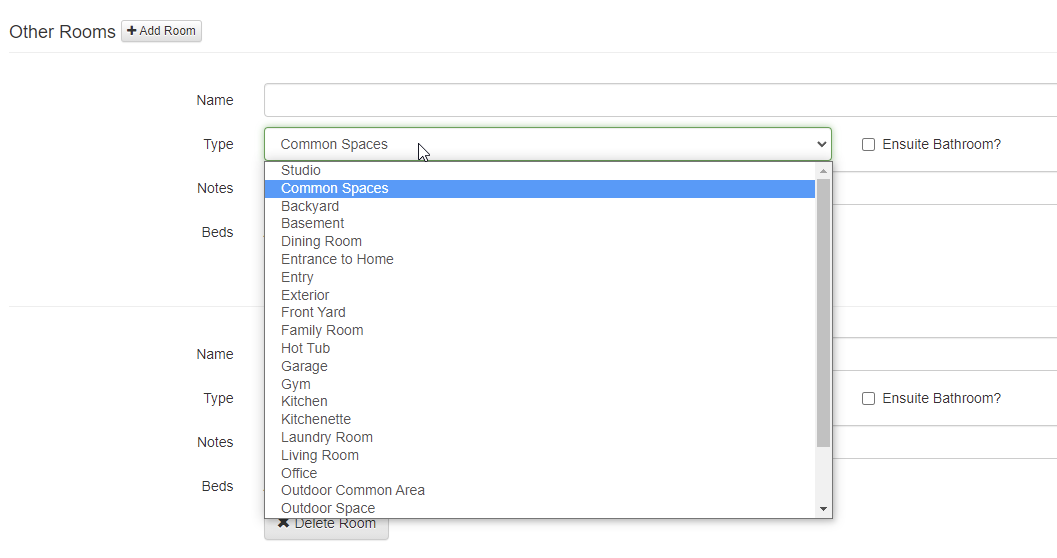
In the future, we may have certain fields that show dynamically based on what you select here. For instance, selecting "garage" might ask you how many garage doors are there, and selecting "kitchen" might ask you to select appliances. We're also planning to link photos to the rooms you create here, so you can show actual pictures of garages, kitchens and so on. This will then push to Airbnb, so that they can show it automatically on their side. Those changes are coming soon.
In the meantime, notice that you can add beds and bathroom information to ad hoc "other rooms". This is where you would define common areas where guests can sleep. For instance, you might have a sleeper sofa in the living room that is part of your official sleep numbers. Don't add an official bedroom for that because that isn't accurate and would increase your bedroom count erroneously. Instead, add an "other room", set the type as "Living Room" and then click to add beds and select a sleeper sofa. This will make sure the rooms stay accurate but increase the sleep numbers appropriately.
Last, let's talk about our new Property Sharing feature.
A couple years ago, one of our awesome users in the Smoky Mountains area (Blue Mountain Cabins) decided to start hosting a local property alliance on their website. They knew a bunch of other OwnerRez users in their area, and they decided to band together and make a common web page, using OwnerRez widgets, so that they could show information about each other's cabins. The idea was to direct guests to other good owners in their area if their cabins weren't available, and create a group of owners that work together and share calendars. Over time, the alliance grew, and they now have close to 100 properties being shown on each others' websites.
To aid in this endeavor, we worked with Blue Mountain to hack up a setting that would allow our Property Search and Ribbon Calendar widgets to show other users' properties on their widgets. As you can see on the Smokey Mountain Alliance web page, the Property Search widget at the top and the Ribbon Calendar widget at the bottom show many properties on the same single widget. This happens because of a secret setting that we put on those widgets and then manual work we do to authorize and link other properties to their account.
Other OwnerRez users have wanted to set up the same kind of property sharing alliance in other regions of the world. We've told them no because we didn't want to do a lot of work by hand, but recently we decided to make this a self-service feature in OwnerRez itself. You now create and join Property Shares in OwnerRez!
To get started, go to Settings > Property Sharing (under the Website section of settings). You'll notice two tabs - "Shared With Me" and "Join A Share". If you click on Join A Share, you'll see any shares that other OwnerRez users have created. It looks like there are four as of the time I am writing this.

The "Published By" column is the OwnerRez user that created the share. This is the user that owns the share and will manage it for all of the users in the local alliance. By requesting to join it, you are asking that user to accept and show your properties, and it's up to them whether they will approve or deny your request.
If you want to create your own property share, you can do that on the "Shared With Me" tab. Please note that only one property share should be created in each local alliance. If you are working with another OwnerRez user to create an alliance of local owners, you do not each need to create shares. Only one user will create a share, and then that user will create widgets, and pass around the widget embed code so that all users in the same property share are hosting the same widget. You will share the same widget, not create separate widgets.
Creating a Property Share is very simple and only requires a name and description.
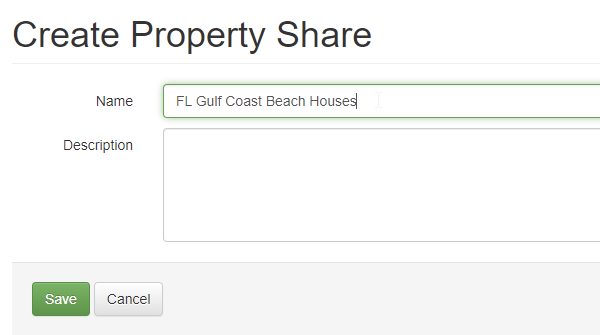
This is basically the public information you want other users to see when they look in the directory of all property shares on the "Join A Share" tab. Once you save your new Property Share, it will be publicly available for any other user to see and request access to.
After saving, the Property Share page will show you the name and description up top with some options to disable or delete it, and then a list of associated properties at the bottom.

By default, there won't be any associated properties because no other users will have requested access yet.
When other OwnerRez users go to the Property Sharing area, they'll now see your new share showing in the list and they can click the "Join" button to request access.

When a user does click the "Join" button, they'll see a list of their properties so that they can select the ones they want to be included on your property share.

On the requesting side, when you select properties to be included, the Status will change to "Pending".
If a property has no public Property URL set, the property cannot be included in your selection. All shared properties must have a public URL so that the shared widget (ie. the one all users in the share will use) show the URL for where guests should go to get to your website. If a property has no public URL, guests won't have anything to click on when they see your property in the list.
After you select the properties you want to be included, click Save and then contact the user who owns the property share and let them know that you requested access.
Please note that if you are the owner of the property share, you must request that your own properties be included and then approve those as well. Your own properties are not included by default until you "Join" them to the property share.
Back on the approving side, you'll see new properties showing up for you to approve. You can select them and approve or deny at any time.

The final part of property sharing is knowing where to use the property sharing publicly. This part is really simple. Property sharing works with all multi-property widgets. If you go to Widgets in the Settings area, and click the Create button, you'll see two widgets that are multi-property type widgets:
- Ribbon Calendar
- Availability/Property Search
If you create one of those, and drill in, you'll notice that the "Properties" field now allows you to select individual properties (like before) or property shares.

This tells the widget that instead of showing your own properties, you want it to show properties that are part of the property share. To be clear, only the property shares that you control can be selected here, so you must be the owner of the property share. If your properties are shared with someone else's property share, that other user is responsible for creating the widget and linking the property share to it. You cannot do that for them. That user will then provide you with the widget code or URL so that you can host the widget on your website.
We know this new Property Sharing area is a bit rusty, and we'll have another update out soon to correct some of the styling issues that have come up. In the meantime, you can begin creating property alliances in your local area and telling your friends. Remember though, in order to join it, the other owner has to be an OwnerRez user too!
Enhancements & Tweaks
As we work to update OwnerRez's overhaul design, we've started looking for areas of the system that haven't been updated in many years and have a super-old design. In order to do some major design updates, we first have to find those super-old areas and bring those up to the current design, which then will allow us to blanket-update everything in a comprehensive way. One of those super-old areas is the charge line items you see on bookings and quotes. This past week, we released a detailed update of the charges grid that brings it to the modern era. In particular, it now works well on mobile and tablet devices, adjusting accordingly to the available browser window.
To see it in action, open any booking and go the Charges tab, then click Change.

Right off, you'll notice some changes. The charges grid now expands to fill the entire width of the screen, making it easier to see and type changes, and all buttons, columns and text boxes follow our more-modern look and feel.
You still have the same controls you had before, but we've added a few new ones. For instance, on the left side of each rows, there's a drag handle that you can use to instantly re-order line items. Simply click on it and drag the row up or down and the line item will move accordingly.

To add new line items in the middle, simple click Add Charge at the bottom and then use the drag handle to move the row up to where you want it to be.
If you have a table or phone, you'll notice some major differences there too. On a tablet, the charges grid resizes to fill the space correctly while staying large enough to work on.

You'll notice that an "Action" button appears on the far right of each row with a Remove option inside that will delete the line item. If you're a PM, you'll notice that the Commission and Expense columns are gone and there are "Set Commission" and "Set Expense" options inside the Action button. Clicking those will open a window where you can set commission and expense amounts.
Now pull out your smartphone and take a look. The design is different there too.
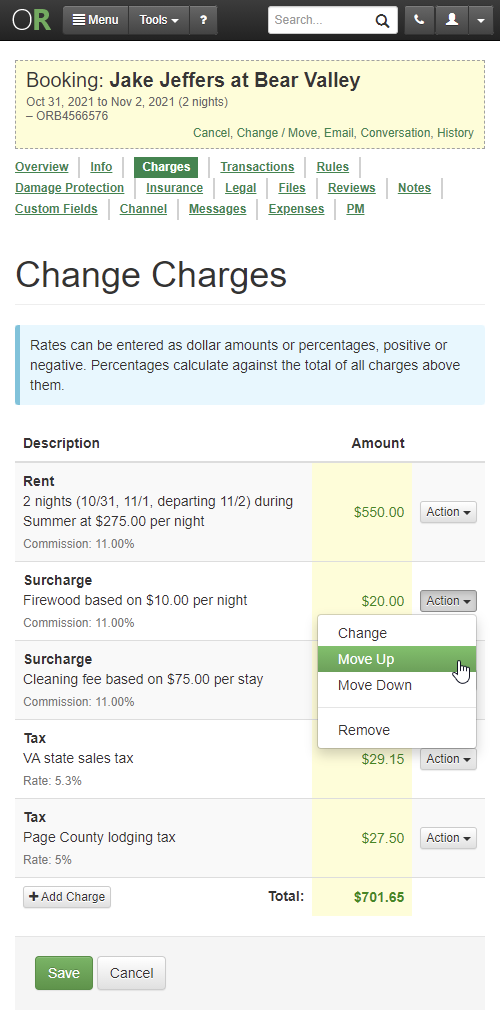
On mobile screens, all of the text boxes are gone, and the Action button has a "Change" option on each row. We did this because it was too difficult to squeeze in the text boxes next to each other, and stacking them on top of each other was confusing and ugly. So we streamlined it all away into a Change window that shows you a single line item at a time for editing.
The Type, Description, Rate text boxes are all there, and the Commission and Expense fields are too if you're a PM.
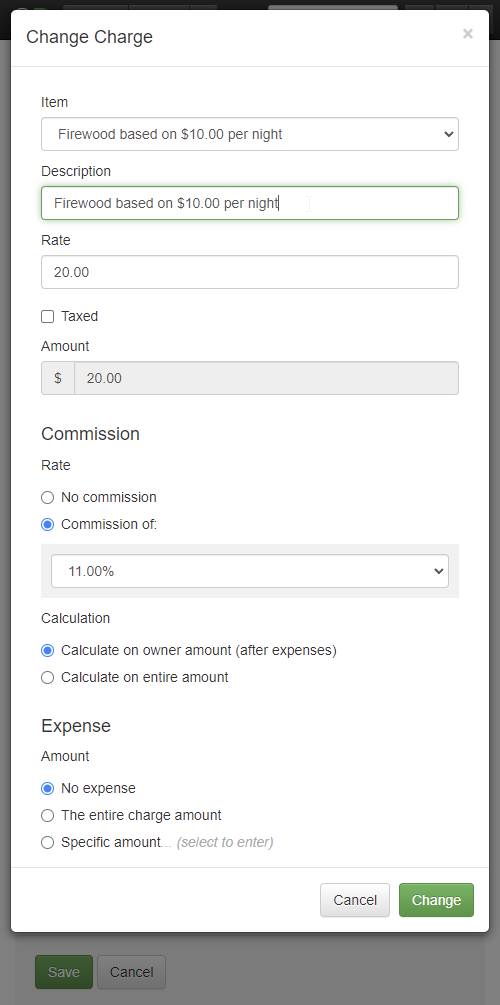
This should make it easier to edit charge line items on small screens. Enjoy!
While we were making design changes, we noticed some other areas that needed work. A few weeks ago, we overhauled the rate calendar significantly to change the colors, day style and how rates and rules were set. The feedback has been largely positive except for one thing - mobile screens. The changes added too many items to the screen which forced mobile screens to run out of space. This past week we corrected that and updated the rate calendar to maximize space on mobile screens.
Pull up the rate calendar on your mobile device, and you'll see that it looks much sleeker and a full month of days shows without having to scroll up or down.

The top tab are gone and the "Set Rate" and "Set Rules" middle button area has been collapsed to one line. The legend on the right is collapsed as well. This allows a full month to show easily, so that you can make your selection without doing a lot of scrolling.
Once you select your days, the "Set" button will light up and allow you to pick options inside it. The options are the same as before, only inside that button if you're on a small screen.

Saving space on mobile screens got us thinking that we should do the same thing elsewhere, so we took a look at all the Settings area pages and removed the yellow bar at the top.
Instead of the old ugly yellow bar with the dotted line around it, we now show a breadcrumb link to "Settings" right in the page header. If you drill in further, you'll notice the page header include another link to the area you'll in as well. For instance, here's how it looks if you go to Taxes, and then drill in to create a new tax.

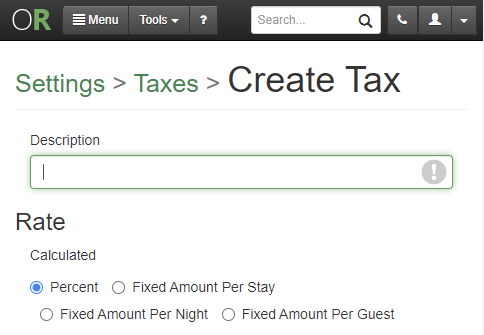
If you need to go to a different Settings page, click the link and go back to the Settings area and find the other page you're looking for. This saves an inch or two of space at the top of every page in the Settings area, when on mobile screens, without losing functionality. To be clear, this is only on mobile screens. On larger screens, the left sidebar still shows, though we are anticipating making changes to that as well in the future.
Enough about design! Let's move on to a smattering of other tweaks and enhancements, in no particular order...
Enjoy our Listing Quality Analyzer tool? We do too! This week, we added another check to LQA for overlapping Length of Stay (LOS) discounts. We noticed that some users have LOS discounts for periods of time, and sometimes the time periods overlap in ways the user didn't intend. You don't want LOS discounts to "stack up" with the guest getting multiple discounts and Airbnb doesn't allow it anyway, so we now warn you if we see that happening.
Previously, it was possible to have a Maximum Nights setting in your property rules, but also have a Minimum Nights in seasons or spot rates that were higher than the Maximum Nights length. This was difficult to find if you have a bunch of properties, but it makes the channels choke because the Minimum Nights rule ends up being bigger than the Maximum Nights allowed when we go to push rules to the channel. We added some validation to the property rules page that will show you this and stop you from saving a Maximum Night rule that is smaller than your Minimum Night rule even if that Minimum Night rule was set on a season or rate calendar elsewhere.

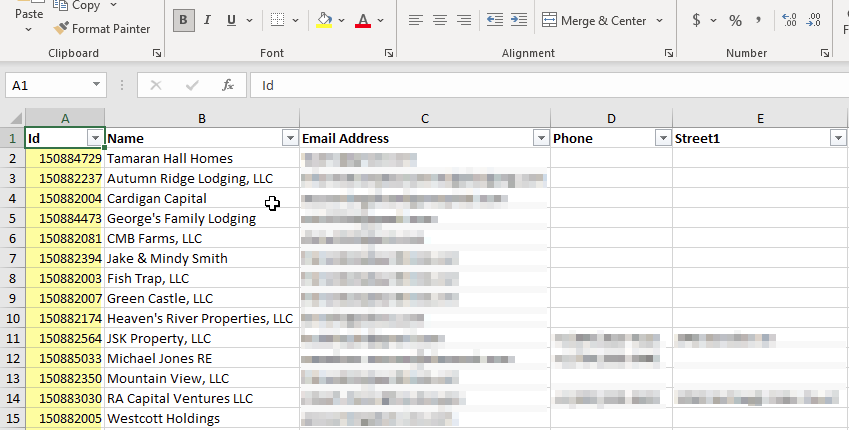
Our Excel import for expenses requires an owner ID when importing certain types of expenses, but where do you find the owner ID? Before there wasn't any easy place to find the owner ID, so we changed that. We now show the owner ID when exporting owners to Excel. Go to PM > Owners > Export and open the Excel file that is downloaded. You'll see a new column on the left called ID. That's the one you need.
Did you know OwnerRez has a really fast, powerful search engine built into the app? Yep, that search box that rides in the top menu is what I'm referring to. Every time you get an inquiry, quote, booking, guest, payment, refund or security deposit, the internal search engine updates instantly. You can search on names, addresses, phone numbers, email address - lots of stuff - and the results appear in less than a second. You can also filter your results by type of record and property. One thing we noticed however was that it wasn't possible to sort the results. The default sort was a bit random, so we added a sort option to the search page so that you can specifically select to sort by newest or oldest. By default, the results are ordered by newest.

Do you use a website powered by OwnerRez? If so, you'll want to check this out! This past week, we made a couple of tweaks to add clarity and information to your website.
You probably already know that every OwnerRez website has a built-in Test Location that can be used at any time. The Test Location is a URL that we host where you can see your live website even if your live domain name isn't ready or is pointing somewhere else. However, sometimes users give out the Test Location URL when linking from other places because they don't realize they aren't on the live domain name. To help with this, we now show a special warning bar on the website when you are looking at the website via the Test Location.

If you have a live domain name configured for your website, you'll also notice a new "Sitemap" field showing on the overview page of the website. There's a friendly copy button next to it too so you can copy/paste the Sitemap URL to other places.

For those that are curious, "sitemaps" are XML files that websites publish which tell search engines what URLs (or pages) the website contains. Sitemaps are basically a directory or guide containing all the URLs that the website owner (you!) wants search engines to know about. Some SEO tools like Moz, ahrefs or Google Webmaster Tools may ask for your sitemap, so we've published it publicly for you to copy/paste whenever you need it.
A quick pro tip on this... Search engines like Google and Bing should already know what your sitemap is because they pick it up automatically from your robots.txt file. Wait, what--?!? What the heck is "robots.txt" file?! That's another thing we publish automatically for your website. Go to your OwnerRez website really quick and type in "/robots.txt" after the domain name (eg. https://www.shenrent.com/robots.txt) and you'll see what I mean. That gobbledygook is a web standard, and OwnerRez provides it automatically for all websites. Notice that your sitemap is mentioned in there too.
A few weeks ago, we put out a sweet little batch update for QuickBooks that lets you bulk find and turn off, turn on, or re-sync bookings on your own. It works great, but we noticed an scenario that it didn't handle - bookings that were associated with an old now-disabled QuickBooks connection aren't updated. Even if the property for those bookings was remapped to a new QuickBooks connection, the batch update just ignored them. To fix this, we updated the QuickBooks batch update screen to change the "turn on" setting into "update to match current settings".
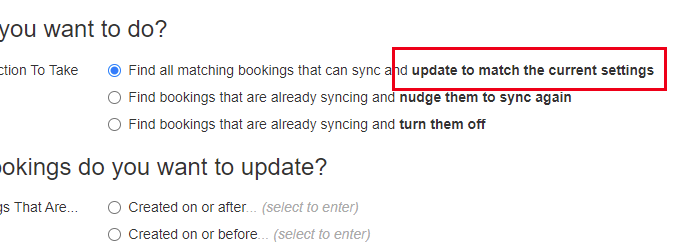
This is more accurate because it will either turn on bookings that are off or switch a booking from an old QuickBooks connection to the new connection, depending on what your current QuickBooks property mappings are set to.
Bug Fixes
Optimized merge emails on Booking.com wrong room. We send out automatic system alerts when Booking.com bookings have issues or can't be merged into OwnerRez correctly, and we found some scenarios where the messaging was wrong or not ideal. There was a "skip message" being set on merge booking emails for each room, but there were additional rooms that could be processed so we're now clearing that message when the changes are processed. Also, Booking.com merge wasn't handling cases where a booking changed properties, so we updated our code to detect that like we already do for Airbnb bookings.
The plural of couch is.... "couchs"? There was a typo in the bedroom amenities list when multiple couches were entered as beds. This has been fixed.
Show beds regardless of bedrooms. We noticed an issue on our hosted website where if a property has no bedrooms, the "Bedrooms" section of the amenities was not shown. While this is technically correct, we still wanted to show where the guest is supposed to sleep so we changed "Bedrooms" to "Sleeping Arrangements" and made sure to always show beds from the other rooms that have places to sleep.
Better PDF rendering for modern styling and content. There are a number of places in OwnerRez that create PDF files on demand. Downloading renter agreements and owner statements are two examples of where PDFs are created on the fly. We noticed that some content styling (what is technically referred to as CSS) was showing incorrectly on the PDF version. For instance, there were super large logo images in the PDF that were supposed to be smaller. Our PDF rendering engine hadn't been updated in many years, so we overhauled it with a new version. The new PDF rendering engine handles modern content and styling perfectly.
Unique "Rent" Mapping Per QuickBooks Property, See Listing Status on Vrbo API, Default Agreements and Triggers for New Users 0 replies
Wait, what's this - a product update post on the weekend?? Yep, we're still churning them out! This one is pretty small and covers 10 updates we did a few days ago, but we wanted to get it out the door quickly so that we could settle into the new week. Another update will drop this upcoming Monday, and we'll be back to our normal once-per-week output. No more playing catch-up.
If you haven't seem them already, read about the new "refundable" type security deposits, quotes holding dates and QuickBooks batch post I put out a few days ago, and then the awesome rate calendar overhaul post a few days before that. Today's update covers just a few minor enhancements and bug fixes. Let's get to it!
Enhancements & Tweaks
Our recent overhaul of security deposits was pretty huge, and we noticed a couple things we needed to tweak after putting it out. One of those was massaging how users did their own own "refundable" surcharges to do an RDD by hand. While that is still allowed of course, we wanted to make sure it flowed well with the new RDD changes that are now built into OwnerRez, so we made some tweaks. To be clear, you can still use your own "refundable" surcharges without turning on our new security deposit features. Entirely up to you!
A few weeks back, we fixed a bug in our our QuickBooks integration to allow you to set a different Rent mapping per property if you had a multi-currency account. This was because QuickBooks requires that the currency for Product or Service Items be the same as the Invoice currency which means that your "Rent" line has to be able to be changed. Right after we released that, we realized that everyone should be able to set a different Rent mapping per property, whether the account is multi-currency or not. So we did that!
When you edit your property mappings now, you'll see an option at the top to use multiple Rent mappings, and then down below there will be a Rent Mapping column for each column.

To be clear, turning on multi-currency no longer has any impact on the Rent mappings per property.
Here's another enhancements that was made after a new feature came out. A few weeks ago, we added support for the Vrbo Property Status API. OwnerRez now shows you, on-demand, what your property status and URL is on Vrbo as returned to us by Vrbo's system live. That got us thinking - why not add that as the "Status" column on the Vrbo API dashboard in OwnerRez just like we do for other channels (eg. Airbnb)? So we did!
When you open your Vrbo API dashboard in OwnerRez now, you'll see a new Listing Status column there.

This new Listing Status column is for display purposes only. You cannot activate or disable listings on Vrbo from our API dashboard. To do that, you still have to use Vrbo's control panel or reach out to Vrbo's PM support group.
Last enhancement for today... We know there are a lot of steps for new users to complete. We're working to reduce that barrier to entry as much as possible, so we just updated the system to automatically create a default agreement along with an email template and trigger as soon as a user signs up. The system already used a "default" agreement if none exist so that guests have to sign something, but we wanted to take the additional step of dropping it into each new user's account so that there is something to read and edit. Same with the email template and trigger that asks channel guests to sign agreements after booking on a channel - it's now in there by default. If you're an existing user, this won't mean very much, but I wanted to mention it anyway.
Bug Fixes
LQA check for missing city. Our Listing Quality Analyzer tool already validates for Street and Country, but Vrbo also requires City, so we updated the LQA tool to look for that as well. If you don't know what the the LQA tool is, drop everything and go check it out. It's a great way of seeing what's wrong with your OwnerRez account or what we recommend you update.
PDF are allowed. Some PDF attachments were confusing our file upload subsystem causing it to reject them as invalid type. Well it is valid, so we allow those now.
The order of tag groups on search widgets. Previously, when you used tag groups to create custom filters on search widgets or hosted websites, the list of tag groups that showed in the drop-down filter live was in a random order. We fixed this to make it alphabetical order.
Agreement editor should look more like final agreements. Stylistically, there were some differences between between the editor for agreements and the final agreement render. We've cleaned those up so it should be much closer now.
Brivo phone number errors will not appear. If Brivo gives us an error because your guest's phone number is too long, we'll now tell you that, instead of telling you "Unknown lock error." Super helpful, right?
Extra comma in file validation when attaching files to Airbnb message thread. Just what it says. The extra comma has been removed.
Rate Calendar Overhaul - New Colors, Formatting and Hover Cards, Adjust Rates by Relative Amounts 3 replies
Evelyn E said:
I would like to stress that the main calendar is so in need of improving so that it scrolls past the end of the months. This will the transition to each month more seamless and easier to see those reservations that fall on the month end/month beginning. Any time frame when you will get to this?Thanks for the nudge. We have been tracking that issue for awhile but haven't gotten to it yet. There's more to that than meets than eye in terms of work. But we know it needs an update to allow more-continuous scrolling for month ends.
Rate Calendar Overhaul - New Colors, Formatting and Hover Cards, Adjust Rates by Relative Amounts 3 replies
Great idea!
Integration with SUPERHOG 6 replies
OwnerRez and SUPERHOG are proud to announce a new partnership that offers OwnerRez clients the ability to validate guests and provide a protection policy which covers bodily injury and damage to your property.

SUPERHOG enables a growing ecosystem of Hosts, Operators and Guests to make their online activity safer, providing a tech-based AI-supported toolkit including:
- Biometric recognition
- ID verification
- Screening technology
- Embedded protection (£1,000,000 guarantee + damage deposit)
When a guest books through OwnerRez, SUPERHOG will send out a link that requires them to upload a photo of their government issued ID. SUPERHOG uses biometric recognition technology to confirm the ID is real and screens the individual through their database. If the screening comes back with no negative results, the guest is then cleared and good to go. If negative results come back, you are then notified and can make your decision to continue on with this guests or not.
Most OwnerRez users know that we already offer a great damage protection product for vacation rentals which covers guest damage while the guest is at your property. Damage Protection is an extremely important and valuable product that has saved many homeowners and PMs a lot of tears!
But what about bodily injury to your guests or the structure of your vacation rental itself? This is where SUPERHOG fills the gap to protect you against the following:
- Damage to your place caused by guests
- Damage to your belongings caused by guests
- Your legal responsibility for bodily injury to guests
- Your legal responsibility for damage to common areas, like building entrance halls and neighboring properties, caused by guests
SUPERHOG uses technology and data to create trust between strangers and de-risk their interactions.
Get started with SUPERHOG by visiting the SUPERHOG website and check out the OwnerRez support doc for how to integrate OwnerRez with SUPERHOG.
Refundable Security Deposits, Quotes Can Hold Dates, Batch Update for QuickBooks Sync 0 replies
Today, I'm excited to talk about some major new features, just released in the past couple weeks, which are really going to knock your socks off! 😵 You can finally do "refundable" type security deposits, and you can make quotes hold dates.
New Features
OwnerRez has always had a built-in Security Deposits, and they're really simple to use. You define an amount you want held, and a few days before the guest arrives, the system puts a hold on the guest's card just like hotels do when you show up at the front desk. If the card fails, the guest (and you) are notified and there are a variety of settings you can configure to customize the process. A couple years ago, we added the ability for them to be auto-released with settings for that as well.
But there have always been two major flaws with our security deposits.
- Any money kept from the security deposit was hidden in the system. Most reports didn't show it, the booking's transaction history doesn't let you see it as a payment or do payment related things (like void or refund it later) and the booking's charges don't reflect the additional amount. PMs couldn't keep or remit it to the owner. You would get the money, but the accounting of it was non-existent.
- The second major flaw is the "hold" process itself. Many vacation rental owners and PMs don't trust the hold because holds expire quickly and our automatic re-authorization process does not always work. Many owners and PMs prefer to collect the deposit weeks or months prior to arrival which isn't possible with a hold.
In designing the overhaul, we made sure to fix both of these issues.
Security deposits can now be collected as refundable payments (instead of holds), and the accounting is very clear and shows payments/refund transactions when money is kept. Let's step through the changes!
If you already do the original "hold" style deposits, you've probably already seen the accounting changes. If you release the hold completely, keeping nothing, the security deposit will look largely the same as before. You'll see some words like "(Hold)" and "(Fully Released") added to the security deposit transaction, but nothing else.

We added these words to make it clear what the type and state of the security deposit is when you get to the page. On the far right, the Amount column also shows if it's been released, but we found that users not noticing that and asking a lot of questions.
If you keep part of the hold, you'll notice bigger changes. Directly inside the security deposit transaction, a payment will show for the amount that was kept. This payment is just like any other payment in OwnerRez in that you can drill into it, void it, refund it and see it on payment history reports. It's technically correct to show the kept amount as its own payment because that's what's going on under the covers - the processor is collecting a new payment linked to the authorized hold.

The payment also shows if you drill into the security deposit transaction with a helpful link so that you can jump over to the payment record.

If you follow the link and go to the payment, there's a link there too pointing back to the associated security deposit.

Change your mind after keeping part of the security deposit? No problem! You can now void or refund the part you kept from the security deposit hold. Since the amount you kept is now a regular payment, you can go to that payment and void or refund it like any other. The same buttons for Void and Refund are shown and they work like any regular payment. You can see the voided or refunded transactions as well both on the Transactions tab and the CC Processing History report.
Speaking of reports, the Payment Detail report now shows the money you kept from security deposits because that money is a regular payment like any other.
Now let's switch gears and talk about a different side of security deposit accounting...
In order to see the payment from the money kept, you also need to have some kind of charge (or set of charges) to offset why there is extra money received for the booking. Previously, we had a "Guest Explanation" field where you could type in why you were keeping money but no real way to link charges to that. The guest explanation was hidden on the security deposit, and the charges never changed. This creates further problems if you're a PM because there's no way to specify whether the money kept goes to the owner or PM, or whether there's a linked expense. This area has been totally overhauled. Now, when you enter an explanation for why the money is held, you are given additional settings to specify commission and expenses and what you enter there is turned into real charges on the booking's Charges tab.
The release page looks similar to before, but if you're a PM you'll see additional fields for commission and expense.

Then when the security deposit is released, the charge are updated and the explanation and amount are added to the bottom of the booking's list of charges.

This allows the booking's total charges and total received amounts to balance out while keeping everything transparent. If you don't like how it looks or need to reverse something, you can do that at any time. Simply edit the charges and make your changes.
Another major change was with the type of security deposit itself. As mentioned above, the "hold" style deposit isn't for everyone. Many users, particularly those with very expensive homes, prefer to actually collect funds as a payment which are held weeks or months in advance of the booking and then later, at the convenience of the owner or PM, refund the deposit when they're comfortable with everything.
So we added a setting to security deposits where you can specify that it be a "refundable" type instead of a hold. If you go your property rules and look at the security deposit section, you will now see this option showing.

The same settings shows on quotes and bookings as well in their respective rules areas. This "refundable" type of security deposit takes a full payment, instead of an authorized hold, just like any payment as soon as it is reserved. The money never expires because the funds are actually transferred to your bank account right away.
The release settings for "refundable" security deposits work the same way as holds. You specify a certain number of days after departure and the system will notify you and release based on that schedule. The release involves an actual refund being sent back to the guest, and the system will show that refund underneath the security deposit on the booking's Transaction tab.

Each of those payment and refunds lines, inside the security deposit, can be clicked on and viewed like any other regular payment and refund transaction. Like the "hold" style security deposits, these payment and refund transactions are linked to the security deposit so that you can quickly see what happened.
In the event that the entire "refundable" deposit is kept, there won't be a refund transaction at all because the entire original payment was kept. That would look the same as above but without a refund, like this:

If you're worried about the funds being auto-refunded too quickly, please note that the system sends you numerous reminders before the money is refunded. You have plenty of time, and plenty of warning, to stop it before that happens. As with holds, there is an easy way to open the security deposit and extend the release period for up to a week longer, and you can do that over and over and as many times as you want.
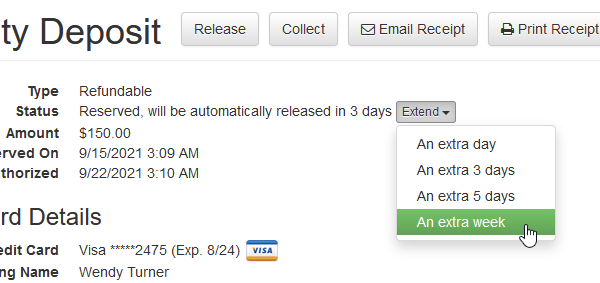
If you'd rather not auto-schedule the security deposit, but would rather take them manually, you can do that too. The booking's Transaction tab now includes both the refundable and hold type security deposits as options in the Security Deposits menu.
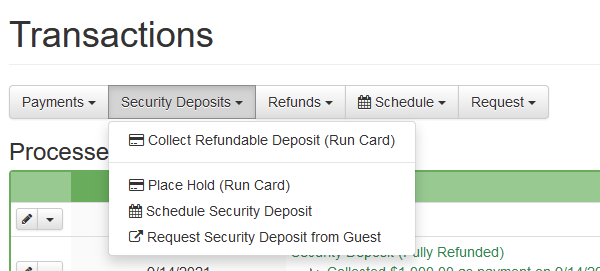
By default, the option at the top (above the line) will be the same as your rules for the property, but the other option will be there as well below the line. In the above example, the property rule is set to "refundable" type, so "Collect Refundable" is the top option in the list and "Place Hold" is below that.
If you accidentally click one type instead of the other, the screen will show you which option you are doing and allow you to switch from one to the other right in line:
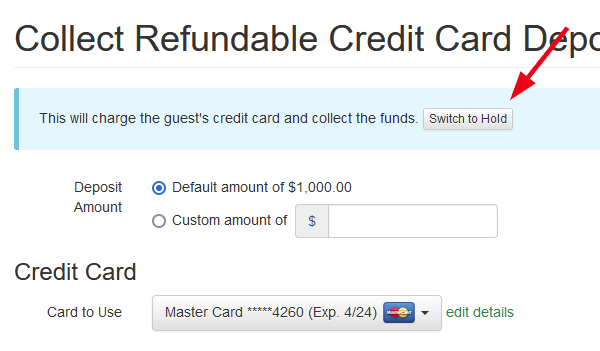
Let's move on to the next new feature which is the ability for quotes to hold dates. This has been requested for a long time, and we're happy to announce that it's out.
Previously, when you sent someone a quote, anyone else could book the same dates. Most of the time, that's what you want because guests request quotes all the time without moving forward, and you don't want the property blocked until you know whether they're going to move forward or not. You might even create a bunch of quotes for the same dates, leaving it up to whoever books them first. However, there are times when you want to specifically hold dates for a single guest. Maybe you know the guest personally or they booked from you before. You can now do that.
To make it work, simply create a new quote, and you'll notice a new option you can select right under the dates that says "Hold these dates so that other guests cannot book these dates while this quote is active".

This option is pretty self-explanatory, but it's important to know what happens under the covers when you select this.
The first thing that happens is that a block is created on the calendar. This is a regular block like any other where you can see it right on the ribbon or month calendar. This block works like all blocks in that guests cannot book the dates, and channels, iCals and other integration partners see the block as well. To the entire world, it looks like the dates are blocked.
Second, the quote is linked to the block so that the quote can manage the block whenever the quote changes. If the quote expires, the block is automatically removed. If the quote is booked, the block is removed and replaced with the real booking. If the quote changes dates, the block changes date along with it. There's a permanent relationship between the block and quote.
Lastly, when the guest goes to open the quote and submit payment, the quote allows them to "pierce through" the block and book the time even though no one else can. If the booking is finalized (ie. payment is approved) the block is swapped out for the block and the quote goes to the normal "booked" status.
If you look at, hover over or drill into the block, you'll see information linking it back to the quote. This should remind you instantly why that block is in place.
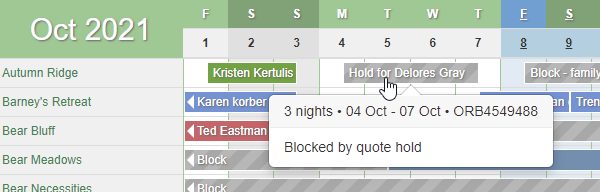

If you no longer want the quote to hold the dates (perhaps the guest has taken long enough and you want to open the time up to other people) simply edit the quote and change the dates so that the "hold date" option is no longer selected. That will cause the block to fall away. The quote itself will still be valid, but the dates will no longer blocked.
Need to find quotes that are holding dates? You can do that now too. We've added a status to quotes that will show if dates are held, and you can filter for that status on the quotes list as well.


The last new feature is with our QuickBooks integration. Our customer success team will probably be the happiest group of people that hear about this new feature because it will remove a lot of manual work they do in the background.
Like most of our global settings, when you connect our QuickBooks integration or configure it, it does not automatically turn on your existing bookings to sync with QuickBooks whether they are in the past or future. This follows our normal habit of not touching existing bookings so that changes to your configuration only affect new bookings that are created from that point forward. However, the QuickBooks integration area had no batch tool where you could bulk find and update existing bookings, so users had to reach out to our help desk and ask us to that for them. To solve this, we built a batch update tool for QuickBooks that allows you to find large numbers of bookings, turn them on, turn them off, or nudge them to sync again.
To see it in action, go to the QuickBooks area in the Settings menu, and you'll see a new Batch Update button above the list of your QuickBooks connections. Click that button and you'll see our standard batch screen.

Select the action you want to take (turn on, turn off, re-sync existing) and then use the date filters to target which bookings should be included. Click "Show Bookings" and the system will pull up a list of bookings that match the date range so that you can take a look at them prior to updating them.
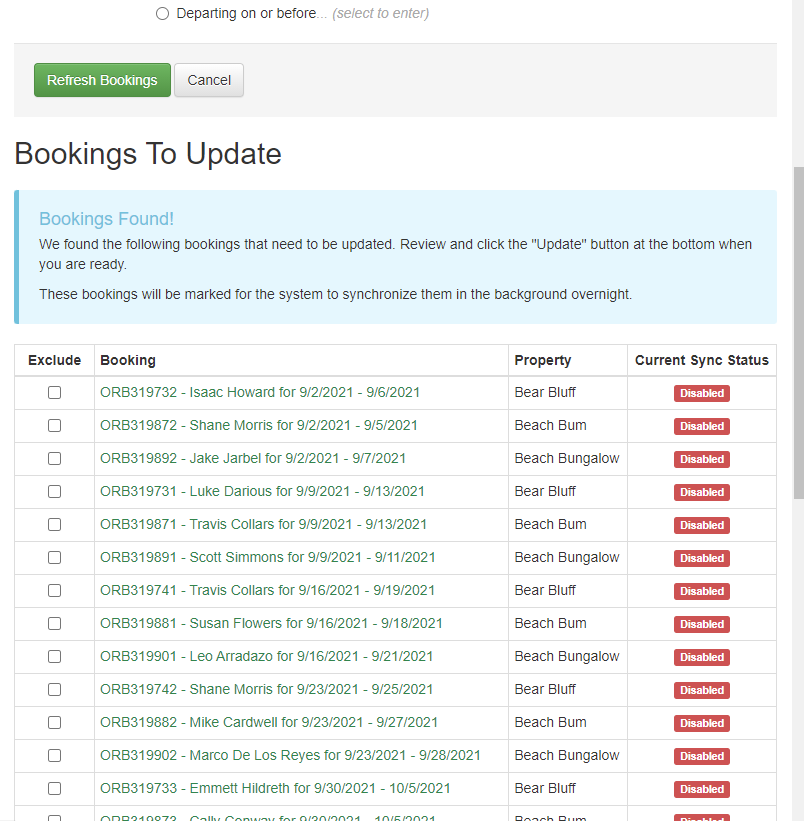
Too many bookings in the list? Select the ones you want to exclude or change your date filters at the top and refresh the list again. Once you're ready to go, scroll to the bottom and smack the button to continue. While you wait, the system will run through and turn on/off/resync those bookings as you requested.
When you mess with your property mappings in a QuickBooks connections, we'll automatically detect any bookings that need to be updated and auto-redirect you to this batch update tool with the recommended bookings to fix.
Enhancements & Tweaks
While we were in there working on the new QuickBooks batch feature, we also added a Starting Date field to QuickBooks connections, so that you can draw a line in the sand where you want to your bookings to start. Previously, there was no way to determine which bookings would sync and which wouldn't. As is our normal practice, we don't turn bookings on to sync just because you change global settings, so when you connect or update your QuickBooks connection, it does not change pre-existing bookings. Only bookings created after that point would be turned on for syncing. The new batch update, mentioned above, allows you to turn on many bookings in one go, but we felt like users still needed to establish a starting line so that new bookings could be compared to that point in time.
The new Starting Date field is directly on the QuickBooks connection. When you go there, you'll see that field next to others.
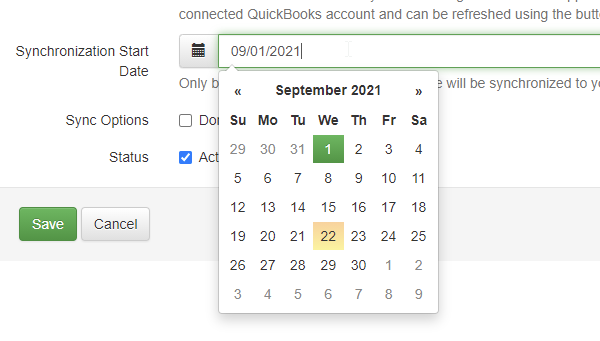
This also fixes the problem of importing historical bookings and having the QuickBooks sync turned on for those. In the past, once your QuickBooks connection was turned on and syncing, if you imported old bookings, those old bookings would start syncing as well, creating invoices in QuickBooks that you don't want. You'd have to go those bookings, turn off the sync manually and remove the records from QuickBooks. The new Starting Date prevents that because the old bookings would be before the date you enter.
While we were working on quotes holding dates (mentioned above in the New Features area), we saw something else we wanted to add to quotes. You can now convert blocked-off time to quotes directly. So if you've held dates for someone by manually blocking-off the time, go to that block and you'll see a Convert To > Quote option.

This will take you to the standard Create Quote screen, and the "Hold these dates" option will be automatically filled in so that the quote that is created continues to hold the same dates that you had before. When you save, the system will remove the manual block, create the quote and make sure the dates are held (if you kept that option selected) all at once. This will help you quickly convert your old manually-held blocks over to quotes for anyone that you're waiting on to book. You can then email them the quote and let them "pierce through" the block automatically.
Bug Fixes
Create triggers on BDC bookings firing before payment fees. We noticed a situation where Booking.com bookings would send "booking created" trigger messages before all of the payment fees were recorded. Payment fees were just recently added for Booking.com bookings, and our trigger messages were firing before the payment fees were being recorded. This caused some email templates to be incorrect. This has been fixed.
Default URL for properties that are removed from hosted sites. Previously, when you changed a hosted website to remove a property, that property's default URL was not getting reset. The property URL would still continue to point at the hosted website even though the website no longer contained any references to that property. This has been fixed.
Fault the guest if pending RTB is cancelled for payment. When Vrbo bookings are cancelled, they have to be marked if they were cancelled by the host or guest because it makes a difference in terms of reputation and fees. But sometimes, bookings are cancelled automatically because they are RTB (request to book) mode and the booking was never finalized. Previously when that happened, we always set it to canceled by guest, but Vrbo informed us that RTB can't always go by guest, so we made it go by host instead. After all, most of the time, an RTB fails because the host does not accept it. However, we recently noticed that some RTB bookings are auto-cancel after payments have been attempted problems - the guest tries to pay and it fails and the guest does nothing to correct it. When that happens, we now detect it and mark the RTB as cancelled because of the guest. This is fair since the cancellation was the fault of the guest and not the host.
Rate Calendar Overhaul - New Colors, Formatting and Hover Cards, Adjust Rates by Relative Amounts 3 replies

I got along fine with the rate calendar as it was but DO APPRECIATE THE IMPROVEMENTS. I would like to stress that the main calendar is so in need of improving so that it scrolls past the end of the months. This will the transition to each month more seamless and easier to see those reservations that fall on the month end/month beginning. Any time frame when you will get to this? I think this is an improvement many OR users are anxious to see. thank you.
Rate Calendar Overhaul - New Colors, Formatting and Hover Cards, Adjust Rates by Relative Amounts 3 replies
Happy Hump Day, everyone! 🐫 Today, we're going to cover some work we did just a couple weeks ago that focused mostly on the rate calendar.
We're into September updates now, so we'll switch back to the normal weekly format. A quick mention though - in case you missed it, be sure to take a look at the Midsummer Updates series we've been posting over the past couple weeks. That series covered all the products updates that were released back in July and August. There were 9 parts, beginning with this one, and it's worth the time to read about the dozens of updates that were put out during that two month stretch.
New Features
Our rate system has undergone a number of major changes over the years. In fact, check out the original rates announcement from more than 10 years ago! A week later, we talked about recurring and specific-date seasons for the first time, though they were actually called "rate overrides" at the time. Wow, those posts make me feel old.
Over the following years, we changed that to a list system where seasons and seasonal rates could be created, and then about 18 months ago we dumped that and moved to a matrix-style seasonal rate editor which is vastly easier to work with and prevents a lot of common missteps.
Along the way, we introduced spot rates so that users could simply "paint over" the seasonal rates with anything they wanted on an ad hoc basis as well as use dynamic pricing engines that do the same. This led to a central Rate Calendar in the Settings area that became the home for where you go to see and change rates. Even if you use seasonal rates to price periods of the year at a time, you probably still look at the Rate Calendar to get a sense of how your weeks and months look with unavailable dates mixed in. This allows you to instantly select some gaps in between and price those days with spot rates so that you can quickly increase or decrease the rate and minimum night rule to attract a larger market. If no spot rates are set, the seasonal rates show through. If no spot rules are set, the seasonal (or property) level rules show through.
As we've watched how users have used the Rate Calendar, we made a list of changes we thought would improve the experience, and we're happy to announce that those changes are now out live! The Rate Calendar has been significantly overhauled in color, formatting and information.
To see the changes, go straight there: Settings > Rates.
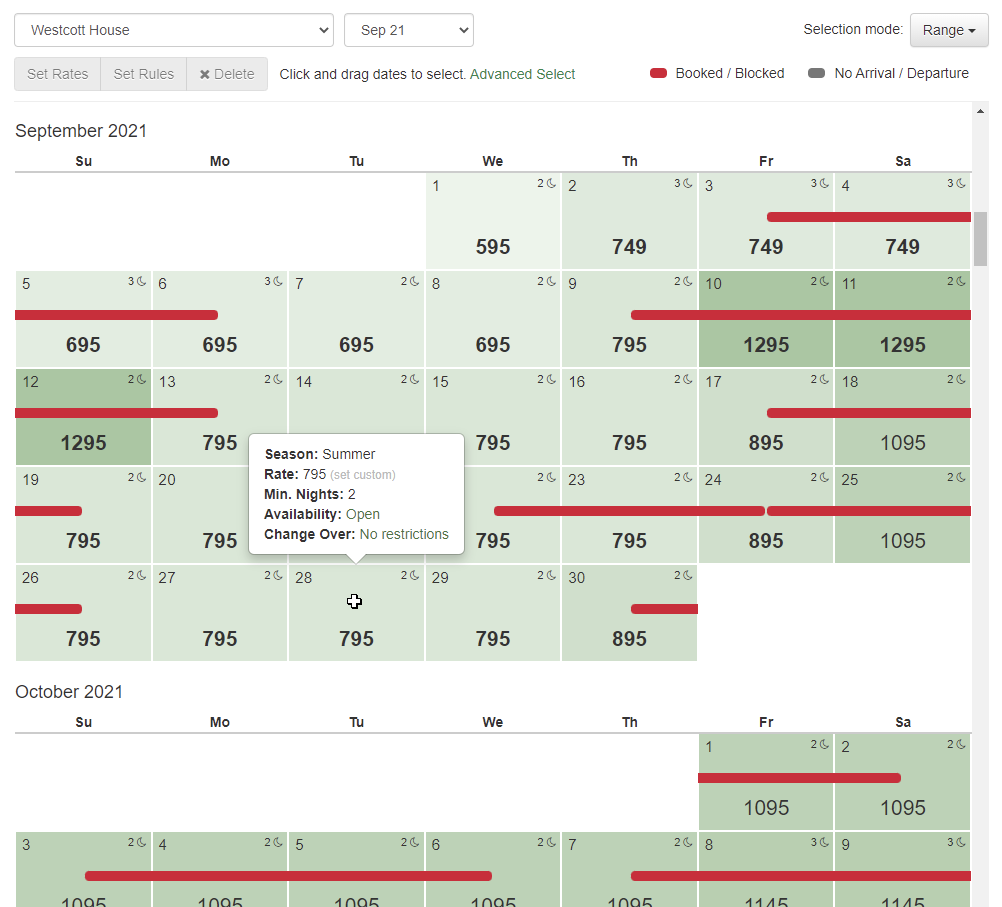
The above screenshot shows a number of the improvements that were made, but there's more there than you may realize, so I'll break it down in detail...
Less-Obtrusive Booking/Block Indicator
Previously, if a day on the Rate Calendar was booked or blocked, we colored the entire day, so there was no room for any other shading, coloring or information in the background. As we started designing other things we wanted to do, we realized that the booking/block indicator needed to be far less obtrusive.
Now, when a day is booked or blocked, you'll see a slim red ribbon inserted through the middle of the day, denoting that the period is taken, but it won't impact the information and formatting for that day or the days around it.

To be clear, this red ribbon only appears for true bookings or blocks, not other virtual blocks like gap rules or change-over restrictions. So a guest trying to book your property on your website or on a channel like Vrbo might see that a day is unavailable because there's a forced gap next to a different booking. That would not appear on this Rate Calendar as a red ribbon. However...
Virtual Blocks for Gap Rules and Change-Over Indicators
Changing the booking/block indicator made us think - why not add virtual blocks as well?! So we did!
As the owner or PM, any time you're looking at your calendar, you really want to see other restrictions in addition to true bookings or blocks, but you also want to be able to distinguish whether it's someone actually staying there or a different distinction. With that in mind, we decided to add another block indicator for rule restrictions like gap rules or change-over restrictions and use a gray color to distinguish it from true blocks and bookings. Here's an example of a booking after I turned on a forced gap rule of "1 night between bookings".

These virtual blocks will show for any rule where the day is not able to be booked because of your property settings. The most common example of these is:
- Arrival or Departure Restriction - occurs when you have a day of the week set so that guests cannot arrive, depart or both.
- Gap Restrictions - occurs when you are forcing a certain number of days between bookings. You might not allow back to back bookings because it's too hard on your cleaners to prepare the property between bookings.
Hover Cards
No matter how well we design the Rate Calendar, there's still information you just can't know by looking at it, but you need that information to tell a bigger story. We added hover cards to each day cell, so that as you move the mouse over each day, the full details of that day are clear. You don't have to click on the day; a simple hover will do the trick.

The hover card, shown above, gives you 5 categories of information:
- Season - the primary season that the day falls into. If multiple seasons exist, it will show the primary one that OwnerRez is using given our season selection rules (specific date over recurring, priority status, etc)
- Rate - the rate amount for that day and where it comes from (seasonal or a custom spot rate)
- Minimum Nights - the required number of nights for that day and where it comes from (seasonal or custom spot rate). If no reason is given, then it's the default rule for the current property.
- Availability - whether the property can be booked or blocked and a warning about guests arriving/departing.
- Change-Over - whether the property can have arrival or departure and why. Gap rules and arrival/departure restrictions, set on the season or property, are the most common reasons.
The hover card works on mobile devices too even if a mouse isn't present. To see it, long-press on the day cell and the hover card will appear.

Intuitive Day Cell Layout
One of the very first things we changed, in this overhaul of the Rate Calendar, was the text layout on each day cell. The old design was confusing when it came to what the rate was, how many nights were required and even what the day of the month indicator was. We studied some general calendar systems and decided that the day of the month number should be in the top left corner, the rate should be centered in the middle and much larger in font size and the night rule should be top right with an icon denoting nights. Here's how the day layout looks now:
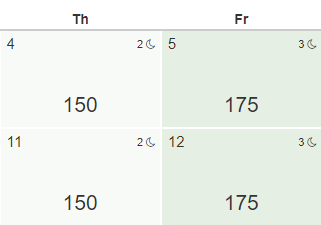
When looking at the small numbers at the top of the day cell, your eyes instantly understand which one is the night rule because of the little moon icon, and the large centered rate amount at the bottom is pretty obvious as well.
The rate amount will be bold if it's a spot rate instead of the seasonal rate bubbling up.

The same bold format is applied to the minimum nights rule if the minimum night rule is custom set as a spot rate.

Heat Map Shading
Since we're talking about formatting, let's talk about all that green color.... Each day has a different shade of green based on where the rate falls relative to the property's pricing overall. This gives you a heat map feeling as you look at the calendar and causes your eyes to instantly pick up where there are high or low-priced days. Darker shades of green are higher-priced days and lighter shades of green are cheaper-priced days.

As you select and change rates, the coloring will instantly change as you do your work to reflect a new heat map of colors. If you set higher rates on certain days, the lower-priced days around those days will instantly change shades and vice-versa.
The heat map coloring works no matter if your rates are spot rates or seasonal. Notice in the previous screenshot how the Monday days show a non-bold price, which means that those days have a seasonal rate (ie. no spot rate was set), yet the green shading is calculated on that as well. Because the seasonal rate is $150 on those days, Monday is the cheapest day and gets the lightest shade of green.
If you're wondering why your Rate Calendar has an even shade of green across the months you are looking at, it's because your high and low amounts are probably more rare or occur outside the time period you're looking at. Or, your high and low price really aren't the true high and low. For instance, if you have some nights of the year without a rate (ie. the rate is $0 because you never set it) then the lowest rate is really 0, and those 0-night rates will have the true lowest shade of green. Here's an example using the same dates and rates in September as the previous screenshot.

Notice that the days in September are priced exactly the same as the previous screenshot but the green is much more plain and even across the month of September. Why? Notice the month of August above it and the month of October below. August has higher rates and October is way down at 0 where a couple of nights weren't priced at all. Because of this, the heat map is skewed in coloring because the true high and low rates are outside of September, so what you see in September is medium even though the rates do vary inside the month.
Separate Rate and Rule Action Buttons
We noticed some confusion on how rates and rules were set in the past, and we wanted to add additional ways to set rates, so we separated Rates and Rules into separate action buttons.
Now, after you select the days you want to change, you'll see both "Set Rates" and "Set Rules" light up as possible (but separate) actions you can click on.

The Clear button was changed to "Delete" to remove any confusion about whether that button clears the set rate amount or clears selection. You now have a "Clear Selection" link to the side of that which will clear your selection, and the new "Delete" button will open a window asking if you want to remove rates, minimum night rules or both.
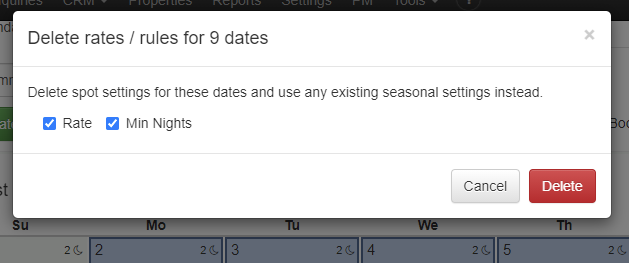
Setting rates and rules each opens their own windows where you can do that independent of the other. There is no need to set a custom rate and rule for the same night unless you want to. If the minimum night rule isn't set, the season or property rules will be used as always.
Set Rates by Relative Amounts
Another upgrade we made is in how you set the rate amount itself. After we split the "Set Rate" action to its own button and window, we had plenty of room for more rate options, so added the ability to increase or decrease the rate by relative amounts.
To see why this matters, imagine wanting to select 6 months of week days (ie. no weekend days) and decrease those nights by 20% across the board. How would you do that? In the past, you could select those nights, using the Advanced Select function, but then you'd have to set the amount by putting in a single fixed amount. That one amount would then be applied to the entire 6 month selection. We wanted to add the ability to increase or decrease rates by an amount relative to whatever the current rate was across the selected period, so the Set Rates window now has those options.

Here are the Set Rate options that are now available:
- Set nights to exact amount - this is the same as what we used to offer before. Every night in your selection will be overwritten to the exact amount you enter.
- Increase nights by percentage - this is a 0-100% selector that will bump up the current rate of each night, relative to whatever that night's rate is, by the percent you select.
- Decrease nights by percentage - same as above, but each night will decrease instead of increase.
- Increase nights by amount - this is a flat amount that you can enter which will bump up the current rate of each night, relative whatever that night's rate is, by the flat amount you enter.
- Decrease nights by amount - same as above, but each night will decrease instead of increase.
This gives you a ton of flexibility in still adjusting lots of days but maintaining what was there without painting over it too harshly.
Okay, that pretty much wraps up the new work done on the Rate Calendar, and we hope it makes a big difference in your ability to find, set and manage your rates in OwnerRez! In the near future, we plan to add arrival and departure restrictions as rules on spot rates, so that you can set those restrictions directly without going through season or property rules. We also plan to add maximum night rules to spot rates and show where dynamic pricing engines (like PriceLabs or Beyond) are setting nightly rates by showing that on the hover card.
Bug Fixes
You can use angle brackets if you really want to... If you have HTML like content in your property names (which basically means bold, underline, colors and other types of rich-text formatting), you might have hit an error on the Settings > Check-In / Check-Out page. All better now!
Midsummer Updates Part 9 - Newly Overhauled "Empty Units" Report, Updated "Available Nights" Report, and Bug Fixes 0 replies
Hi everyone! We're back with another update this morning. This is Part 9 of our Midsummer Updates series which is appropriate because there are 9 updates in this one from the week of August 30. We have one new feature and one enhancement, both of which are about reporting, and then about half a dozen bugs to go through.
New Features
We added a great new report called "Empty Units" that is designed to show you available holes between bookings and blocks. But wait, you say -- didn't we add an Empty Units report a few months back?!? Yes, we did, but that report has been moved to something different (see the enhancements section below), and we overhauled the "Empty Units" concepts. After it was out for a few weeks, we realized that we need to change Empty Units to be a different kind of report. What users really needed was a report that showed all available time, including hours, between time blocks along with what was happening at each of that available time.
The use case for an "Empty Units" report is that you have something to do where you need to get physical access to the property. You might need to schedule maintenance or set up an event, and you're asking yourself "when is the next time I have more than 12 hours between bookings?" Or perhaps, you want to see time coming up that is really short - like turnaround days with 3 hours between bookings. This new Empty Units report will show that.
To see it, head on over to the Reports menu, find the Empty Units report and drill in. The date criteria at the top is the period of time you're looking within, and it defaults to a 30 day period starting with today. Below that, you can filter it to a min/max number of hours you're looking for. For instance, you might need at 3 days coming up at one of your properties, so you'd enter 48 hours in the minimum hours side. The report will show you all gaps coming up, at the property, when you have at least 48 hours open.

Notice the new columns that it shows. On the left, it shows "Empty For" with the period of time you have left until the next booking comes in (or the next blocked-off time begins). Next to that, it shows you when that begins and what happens at the end - is a guest departing or arriving, does a block begin, etc.
The report also shows a series of warnings on date ranges that are out of the ordinary. These are the warnings that are shown:
- Early Check-In - shown if the empty period ends before a booking where the guest is allowed to arrive earlier than usual.
- Late Check-Out - shown if the empty period begins after a booking where the guest is allowed to stay later than usual.
- No Time - shown if you have two bookings or blocks abutting each other with no time in between. This could happen if you granted late check-out and early check-in back to back without realizing it. It could also happen if your property rules don't have a specific check-in or check-out time configured.
- Same-Day Booking - shown if the empty period is sandwiched between two bookings that occur on the same day (guest leaving in the morning and a different guest coming in the same day).
At the top of the report, there are filters for these as well. So let's select "Same-Day Booking" as a filter and see where it occurs across several properties in the next 30 days.
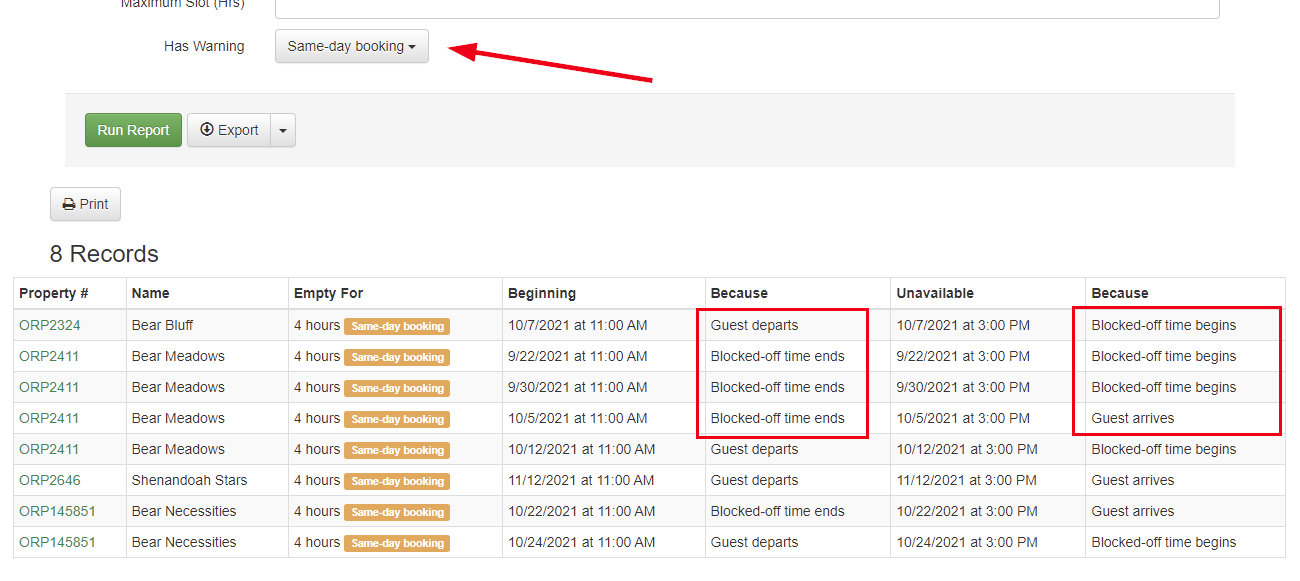
Notice that in some cases, the "same-day" warning is showing because the guest departs and then the property is blocked off. The system sees that as a same-day issue but in reality the property is simply blocked off after the guest departs.
Using the date range, hours and warning filters, you can also search for potential problems. I'll select early check-in, late check-out and less than 48 hours to see if any property has unusual check-in granted while being less than 2 days open. And I've found one:
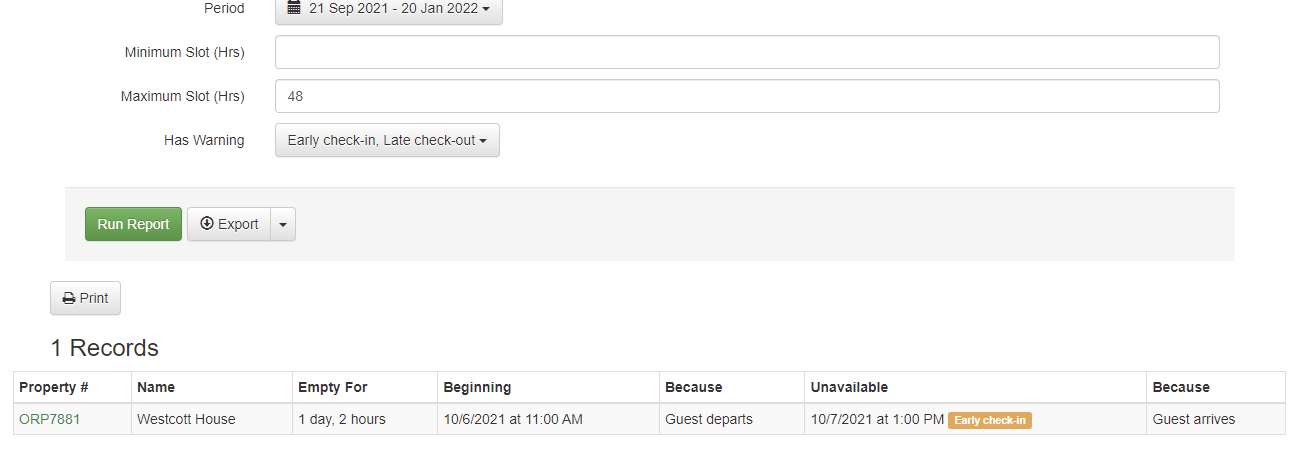
Since its not a same-day situation, this is probably okay, but if it was same-day, it would show you that as well as a low number of hours available.
If you're wondering why specific check-in/out times are not showing and you're seeing "standard" text instead, this is because your property rules are not configured with an exact check-in/out time. Go fix that in your property rules and then come back and run the report again.
Enhancements & Tweaks
As I mentioned above, the old Empty Units report was replaced, but we didn't get rid of the old version entirely. We realized that it was still useful because it shows the number of missed nights during a date range which is important so that users can get a sense of the missed opportunity (or missed cost) of what they could have booked. So we created a new report called "Available Nights" in the same Stays Reports area and moved the same functionality and columns over from the old Empty Nights report. We also added a "# of Nights" columns so that you can instantly see where the big gaps are across properties and date ranges. If you export this report to Excel, this will help you not have to create a formula for that as well.
The grouping will show you the total missed nights per property or owner, so that you can quickly see which property or owner is having difficulty.

In the future, we are planning to add actual cost columns to this report so that you can see what the ADG and ADR (average daily gross and average daily rent) amounts are for those missed nights. This will give you a real financial amount to consider in terms of the amount lost by not booking these nights. That's not out yet, but feel free to bug our Feature Request forum about it.
Bug Fixes
Financials options on portal access grant are only applicable to calendar info. Statement views should be used to control what is visible in the statements.
Agreement links in editor are better. Links to disabled agreements might still appear in template emails. We've improved the editor so that if you are linking to a disabled agreement, that will be clearer.
Recalculate commission less awkward. If you've recalculated commission before, you might have seen the wording on the form change after you submitted it. Functionally everything was fine but that behavior was weird... Now it's not.
Vrbo change to New Listing Discount. Vrbo changed the data response when they updated the New Listing Discount API. We updated our code to match.
"Show Total" on PM Commission? Last week, we added the ability to turn Totals on and off on statements. We noticed that "Show Total" was disabled on the PM Commission field, even though PM Commission is a numeric value, so we turned that on.
Notify user if a disabled room is booked on Booking.com. Previously, if some rooms of a hotel were enabled and others weren't, and you got a booking for a disabled room, you can get a weird error: "Index was out of range. Must be non-negative and less than the size of the collection. Parameter name: index". We fixed this to detect that the room is disabled and send the user a message about it.
Midsummer Updates Part 8 - Bulk Copy Owner Settings, Visual Icon Picker for Websites, Full Print on Emails, Totals on Statements 0 replies
Got a case of the Monday's? Don't let that stop you from enjoying another round of the Midsummer Updates series! We're at Part 8 and covering 14 updates from the week August 23. This is a tidy little update but packs in some important stuff, so off we go!
New Features
Need to copy owner settings and preferences from owner to another? You can now do that. We added a new "Apply To" button on owners that allows you to quickly push settings and preferences from one owner to others. To see it in action, go to any owner and drill in to the owner's overview page. At the top, you'll see a new Apply To button. Click that and you'll see a simple batch page with some options auto-selected.
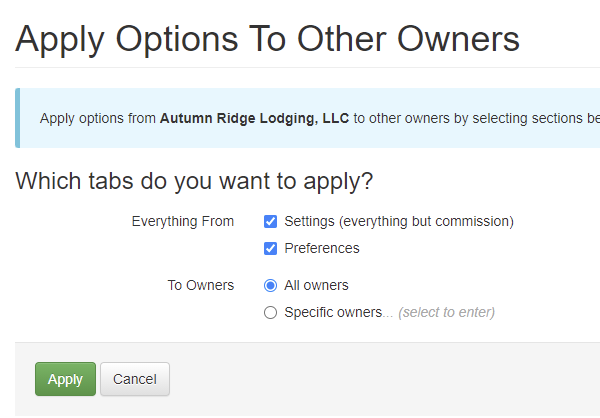
The options here should be self-explanatory. The "Settings" and "Preferences" that it mentions are the same as the two tabs, named the same, that you see when editing an owner.

Everything on those two tabs will be copied except for the commission percentage. Once you've made the update, the system will auto detect and redirect you over to the Batch Update Commission page in case there are any bookings that need to be updated.
Another nice little feature is the new Print button we've added to emails in the Communication History area. This might seem like a minor thing, but it actually solved an issue that a lot of users were having. If you go to Communication History > Email and drill into any message, you'll see that Print button up top.
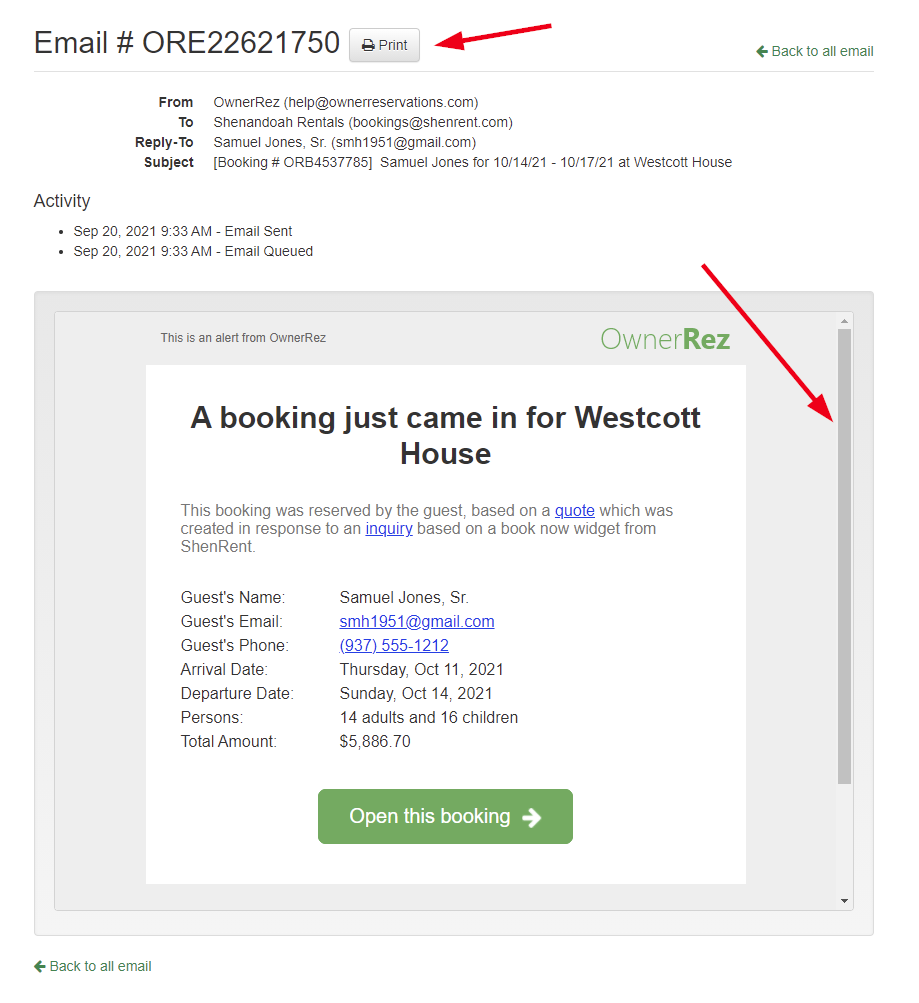
The work here was in making sure the print-out was actually clean and complete. In the screenshot above, notice the scroll bar on the right side of the email body. This was creating a nasty-looking print-out where part of the email body was getting cut off. We had to re-engineer this page so that browsers would print the email in full detail no matter how long the body is. You now get a nice clean print-out.

While we were working in there on email bodies, we changed links in the email body to always open in a new window when clicked. This prevents the current email body frame from redirecting to wherever you clicked instead of popping up a new window or tab.
If you use our excellent hosted website, you've probably spent some time customizing the header and menu areas. By the way, here's an excellent video about how to do those header and menu customizations. In the process of making those changes, you may want to include some icons for things like email or phone links, and we support that. However, in the past, you had to use a text-based way of searching which was difficult and confusing. We changed this to show a visual icon picker to our hosted website headers where you can search by text and see the result as you type. To see it in action, go to your OwnerRez website settings, click into the header area and notice the drop-down option under the Icon column.
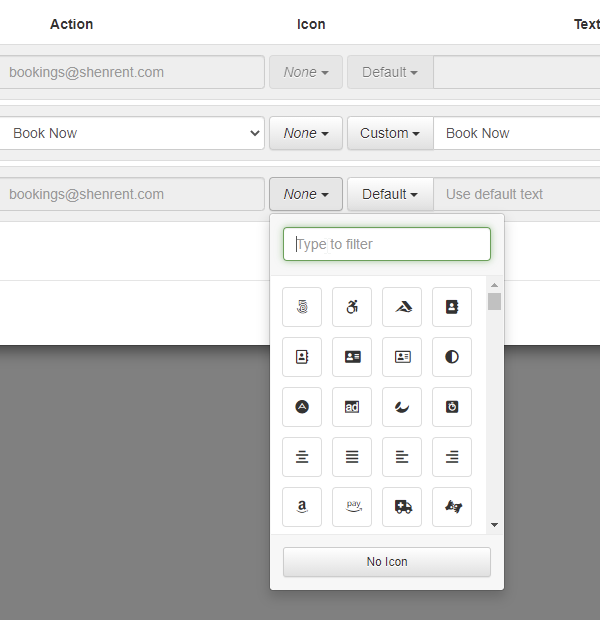
You now get a friendly search box as well as an immediate view of the results. As you type, the list will change to show you which icons are available. Here's what I get when I search for "email":

Sure enough, those look like email icons! Select the one you want, and you're off and running. Remember to click Save then refresh your website live and take a look! If you already had icons in place before, no worries - the same icons will be there. You'll just see the visual drop-down version now instead of what was there before.
Enhancements & Tweaks
Are you a PM that uses our statement systems to send your owners monthly statements? If so, you can now set whether owners statements have "Total" values on certain columns. Head over to Statement Views and check out the new "Show Total" option on every column.
 This option works exactly as it sounds like. If the column is a numeric value (eg. dollar amount, number of nights, guest count, etc) a "Total" value will show at the very bottom of that column, summing all the values above it across the bookings that are included in the statement. The "Show Total" option is not available on text values like Guest or Property Name because there is no way to sum those values.
We've spent a ton of time over the years building the world's best channel manager for vacation rentals, and we've been rewarded by the channels (and our users) accordingly. One of the things that makes our channel management so good is that we look at every edge case, detect it, build settings for it (if necessary) and try to be transparent to our users about what's going on and how to work with/around the issue. In this update, we did some work to further enhance that clarity. We now show much better error messages for Booking.com emails, we allow certain actions to be "reprocessed" depending on the channel and action, and our support staff has easier tools to see and respond to conflicts that occur in the process. Unfortunately, there isn't a set of screenshots I have to show you these changes visually, because much of the work is internal and on the support side, but it deserves a mention!
Bug Fixes
We messed up the messed-up option... Apparently the "I messed up" option on property owner configuration was not saving the newly selected owner. You could change anything else, but not the owner. We'll hold our hands up for that one!
Updating scheduled security deposits with new-but-bad credit cards. We noticed an issue where when guests used the "new card" form to submit new credit card info, the system was updated existing scheduled security deposits and payments with the new card data, then verifying the card, the card would fail and the billing info would be deleted. That caused a domino affect where scheduled security deposits and payments were having good billing info replaced with bad billing info or none at all. This has been fixed.
Broken link on Third Party Alert email. Previously, if a Third Party Alert recipient unsubscribed, the user or recipient would see broken links in the Third Party Alert notification emails. We fixed this to show a correct message.
Bad amount stats on bookings with multiple payments on same day. We noticed that when two payments were scheduled on the same date, and one fails and the one succeeds, the booking amount stats (ie. the "Total Amount" and "Total Paid" type numbers) wouldn't save properly. This occurred based of a bug in how bookings update and then save the update information in order. This is now fixed.
Listing site on blocked-off time. In the times before, we allowed changing the listing site (ie. channel) on blocks. We're not sure when this changed - probably when we built the new change/move form on bookings - but users pointed out that that functionality was needed and we agreed. It's back now!
Try, try again. As many of you know, Airbnb is sometimes down when importing data into OwnerRez. When importing listing content, for instance, it will sometimes freeze or crash because OwnerRez is attempting to crawl your live Airbnb listing and Airbnb might be down at the moment, or it might be a temporarily glitch. We now detect this and attempt to retry before gracefully failing out with a message to the user.
"Not present" matters. Airbnb sometimes includes "not present" amenities in the list of amenities which means.... the amenity doesn't exist. Our listing importer for Airbnb was mistakenly adding those amenity because it didn't notice the "not present" flag.
Season applicability on Rate Tester. With overlapping seasons, it's possible that a rent-only discount is applicable to a season that isn't part of the charges generated, but still is applicable by dates. To clarify this situation, we made some changes. When displaying "season" in the Rate Tester tool, we first filter that down to seasons where the discount is actually applicable, not just the one from the rate, so that it is not confusing if the rate and discount applicable seasons are different.
Midsummer Updates Part 7 - New Listing Discount for Vrbo, Link to Filtered Property Searches, Booking.com Payment Fees 2 replies
Hi Alece,
That has actually been done in a (not yet documented) updated that went out a week or two ago. We did a massive overhaul of security deposits that included "refundable" types versus holds and also rebuilt the security deposit model to use actual payments and refunds that you can see after the fact. It also allows creates charges for you in the main charges grid for whatever the kept amount is with corresponding commission/expense settings.
Midsummer Updates Part 7 - New Listing Discount for Vrbo, Link to Filtered Property Searches, Booking.com Payment Fees 2 replies

"Security deposit "kept" amount in Net for Commission column. The "Net for Commission" shows PMs and owners what the final owner amount was that the PM commission was calculated on. This is useful for a bunch of reasons, mostly for reporting. We noticed that it was including the "kept" amount from security deposits even though that wasn't really true, so we removed it."
Sometimes the kept amount DOES go to the PM. What's really needed is the ability to note how much (either $ or %) should go to PM vs. the owner of any security deposit kept amount.
Webinar 9/28: OwnerRez/Beyond - Using Technology and Data To Manage Your Portfolio Effectively 0 replies
On Tuesday 9/28, OwnerRez will be hosting a webinar with Beyond to discuss using technology and data to manage your portfolio effectively.
In this fireside chat with Ken Taylor, Direct of Operation at OwnerRez, and Ryan Saylor, Revenue Management from Beyond (formerly Beyond Pricing), we will talk about:
- How to best utilize technology and data to enhance your portfolio
- Some must do’s to make sure you’re growing your revenue and staying competitive in your market
- How short term rental property managers automate and analyze their listings
The session is free to join, but you need to use the sign-up for OwnerRez/Beyond webinar link to register.
You can find all of our past and upcoming webinars on our Webinars page.

Midsummer Updates Part 7 - New Listing Discount for Vrbo, Link to Filtered Property Searches, Booking.com Payment Fees 2 replies
Are you enjoying the daily barrage of update posts as much as I am? 😀 Of course you are! Here we go on Part 7 of the Midsummer Updates series. This one covers 25 updates from the week of August 16th.
New Features
Have you heard about the "new listing discount" that some channels provide? Basically, you add a new property (ie. listing) and there's a period of time when you can elect to show a "20% off for new listing!" or something similar on the channel side. Vrbo offers this for new listings, and (since OwnerRez is an elite partner of Vrbo 😇) they provided us with a New Listing Discount API that our users can use to check your eligibility and enroll in the discount right from the VRBO channel dashboard in OwnerRez.
To get started, go to the Vrbo dashboard in OwnerRez and look for the Actions menu on the right side of each property mapping. Inside, you'll see a "New Listing Discount" option.

Click that, and a window will open that will show your listing's eligibility and allow you to enroll (if eligible) in the New Listing Discount program.
As the name implies, this is for new listings only. If you try to enroll a listing that has been live for more than 90 days or a listing that has more than 3 reviews, it's not considered a new listing and enrollment isn't available. Our window will show you that.
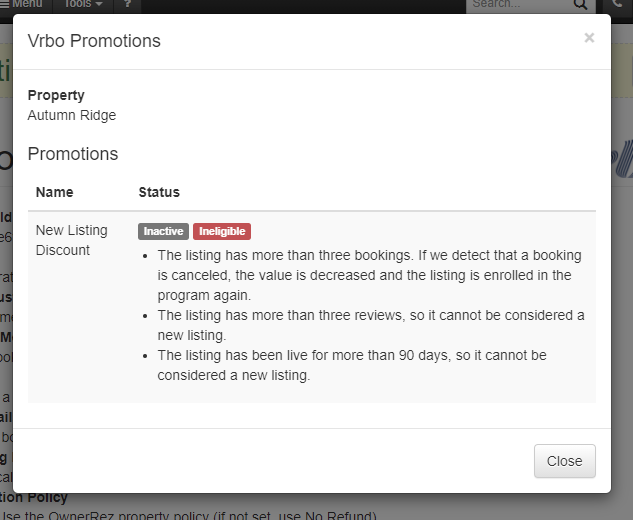
If your listing is eligible, the window will show that and, if you haven't enrolled in the New Listing Discount program, there will be a green "Enable" button there as well. It will look like this:
 On the Vrbo side, when a guest is searching for properties, they'll see the New Listing discount as a label on the search page like this:
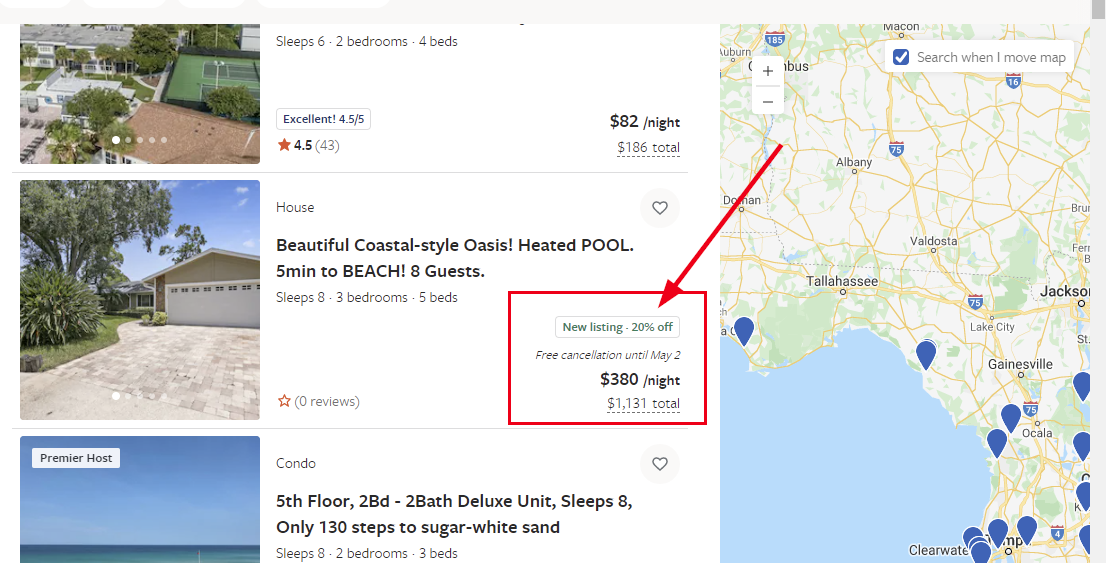 Then, when the guest drills into your listing, they'll see the New Listing discount in several places on the property page as well.


Enhancements & Tweaks
If you use Booking.com to take bookings, you may have noticed that they sometimes charge fees on payments, not just the commission fee on the booking at large. So we upgraded our Booking.com API code to detect and bring in payment fees in addition to commission. Any new payment fees will be shown in the Fees area on the booking's Transaction tab.
If you use an OwnerRez hosted website, you know that there's a property search page where your guests can look for available properties based on dates and basic search filters (eg. bedrooms, guest size). However, there are times where you need to link to different types of searches or where you want other pages on the same website to drill into the search page with specific search parameters. For instance, you might want to link to all "3+ bedroom" properties from a different menu. To support this, we updated the property search page on hosted websites to detect search values in the URL, so you can now pass your search values from one page to the next. Like widgets, this is done with "or_xxxx" formatted search values.
For instance, if you wanted to have your search page load with properties that are available between June 1 - 5, for 10 or more guests with 4 bedrooms and at least 3 bathrooms, you could add URL parameters like this:
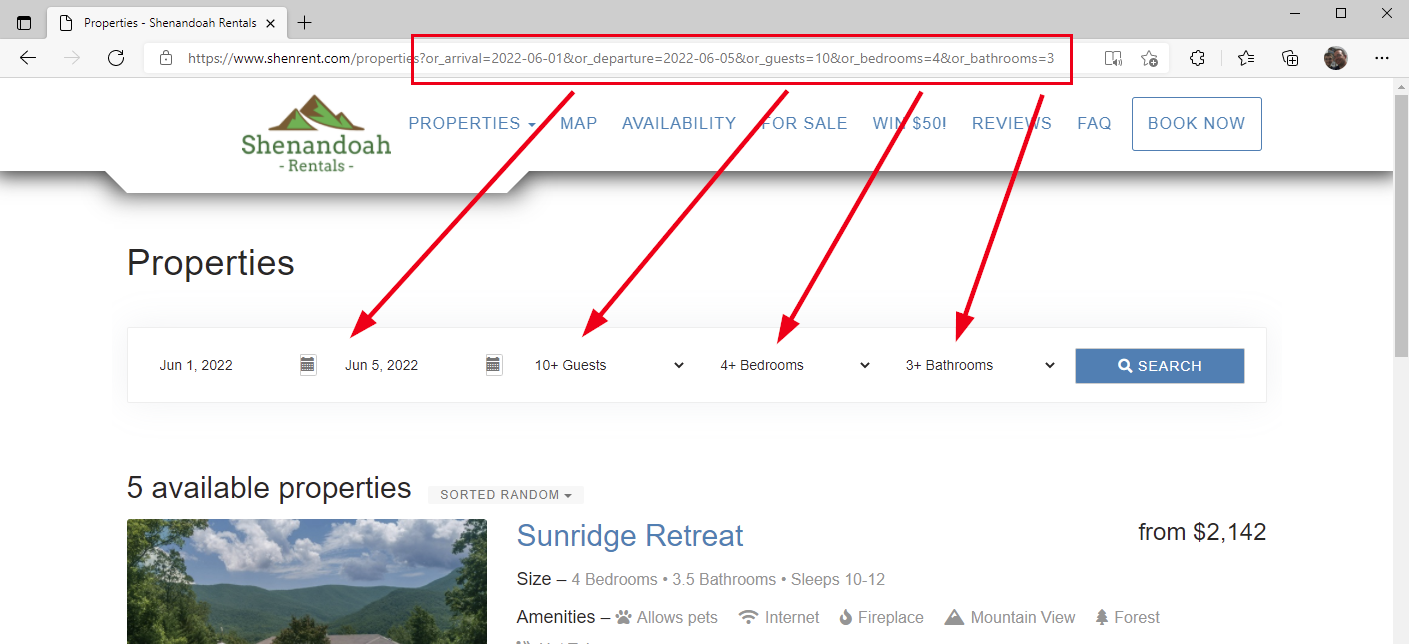
For a full list of search values, look at the Field References section of our Prepopulating Widget Fields support article. The list of values is the same as what you see there.
Did you know we have a batch update page for Damage Protection? Yep. As with all OwnerRez settings, when you turn on Damage Protection, pre-existing bookings are not automatically updated. This is a precaution so that pre-existing bookings are not unintentionally changed until you want them to be. But you probably want many pre-existing bookings to have Damage Protection, particularly those that arrive in the future. The Batch Update for Damage Protection page allows you to do that. However, this is kind of a hidden thing, and we wanted to draw your attention to the pre-existing future bookings that are affected by your changes, so when you change Damage Protection settings, we now redirect to the batch page and highlight the future bookings that need to be fixed.
Bug Fixes
Redirect on adding existing domain. Sometimes it's easy to forget what tasks you've already completed. We get it! So we'll smartly redirect you to the domain you already added if you try to add a verified domain a second time.
Channel booking windows now match property booking windows. The booking window editor on channel settings was confusing for most people... so we made it the same as the one on the property.
Theme it up! If no payment method is configured for a property, we were displaying the user's email address. But what if you had configured a theme with a different email address? Now we'll display that instead.
Use more accurate examples when previewing agreements. When you preview an agreement, if there are no bookings to use as a sample, we generate filler values for all booking merge fields. Where appropriate, we now get what we can from the property.
Don't leave me dangling! If you use our property search widget, you might have noticed that selecting a new page leaves your window scroll position at the bottom of the list. That's weird. We've stuck in a helping hand to pull you back to the top of the list in that scenario.
Security deposit "kept" amount in Net for Commission column. The "Net for Commission" shows PMs and owners what the final owner amount was that the PM commission was calculated on. This is useful for a bunch of reasons, mostly for reporting. We noticed that it was including the "kept" amount from security deposits even though that wasn't really true, so we removed it.
Allow refunding even if you no longer accept that card type. Maybe you used to accept American Express or another card type. If you received a previous payment using that brand of card, you should still be able to refund to it, even if you've disabled it since.
External icon instead of magnifying glass. In the hosted website settings area, we show links that will open the Live and Test website URLs in a new window, only the icon we were using was.... a magnifying glass? That bothered us, so we changed it to the "open in new window" icon that we use everywhere else.
Don't reset the first Airbnb connection when trying it again. We noticed an issue where the connection credentials (username/password information) would reset for an Airbnb connection when a different OwnerRez user attempted to connect to the same Airbnb account. We fixed this to detect it, show a duplicate account warning and the original account will continue to work correctly.
Rounding on cancellation policy long form. Previously, the spelled-out form didn't include fractions and the numeric form rounded-off decimals, so a 96.7% cancellation fee can end up reading "ninety-six percent (97%)". This has been fixed.
Booking.com bookings need a correct property. We noticed that when a Booking.com room was linked to one property and a booking came in, then that property was disabled, and a new property was linked to the same hotel... the system wasn't properly moving the booking to the new property, or at least creating a duplicate booking. This has been fixed. The booking will now properly update, in this situation, to move to the new property.
Airbnb bookings with "unknown" cancellation policy. When Airbnb released the Firm cancellation policy, they were sending "unknown" as the cancel policy for several months... until we reported the bug and their dev team fixed it. 😜 They fixed it a couple days ago, so we updated our system to detect the correct "firm" code and update existing bookings to have the back-correct the cancellation policy.
Better door code error messages. We already send out an email when door codes can't be generated, but we noticed some situations where we could provide more information. For ResortLock, we are now detecting "pin already taken" as the failure reason and changing the "What should I do?" bullets to be correct (rather than suggest regeneration which won't work). We're also detecting "phone already taken" and suggesting that the user try again without a phone number.
Gracefully handle deletion problems when deleting Verified Sender Domains. When you create a Verified Sender Domain in OwnerRez, you're also creating domain names with our underlying email provider. Our system works with theirs to verify DNS records so that delivery is more successful.
Stripe restrictions. Sometimes Stripe may restrict accounts from making live charges. We now detect this during the test phase when adding a payment method, so those restricted accounts can now test their connections same as everyone else.
Tighten up the Airbnb in-rate tax setting. We noticed that people were turning on the Airbnb in-rate tax setting when they shouldn't. According to the Airbnb dev team, in North America at least, taxes are only ineligible in NYC and Vancouver. So we made the in-rate tax setting harder to set.
Don't preempt Airbnb quotes before they are booked. The way we originally built it, when an Airbnb quote occurs, we were issuing a block and switching it to booked after Airbnb notified us of the booking. But doing that meant that the quote was set to "preempted" status which was incorrect. We changed this to detect this scenario and stay in a pending status.
Friendly message on Channel Bridge when trying to download ORB's. When using Channel Bridge, users often try to download reservations by "ORBxxxx" number which errors during the download as there is no such booking. The "ORBxxxx" number is an OwnerRez number. We fixed this so that if the number starts with ORB, we show a friendly message on the page immediately before even attempting to start the download.
Allow pending dates to be changed for Booking.com bookings. I'm not sure why we didn't allow this before, though it probably was because Booking.com is a bit opaque about when/how they do things, and we didn't want to upset the apple-cart. We've changed this so that you can now change (ie. increase) the "Pending Until" date when bookings auto-cancel, even if they are Booking.com bookings. Booking.com bookings still have to be cancelled on the Booking.com side, but this affects what OwnerRez does in terms of sending emails and warnings.
Don't merge channel bookings into direct bookings. When channel bookings come in, we attempt to find and merge them with existing bookings. This occurs both at first connection and when new bookings come in thereafter, depending on the channel and type of booking. We noticed that it as occasionally trying to merge with direct bookings (ie. non-channel bookings) where the direct booking had payment and refund info. We put an end to this, so that direct booking info wasn't overwritten.
Disabled properties in Airbnb tax dashboard. Previously, we were showing disabled properties if the disable property was linked to an Airbnb listing (even though it is now disabled). We are no longer showing those.
Rapid-fire Airbnb booking requests and confirmation problems. Suppose there's an Airbnb booking request that comes in and then a booking confirmation (for the same property and request) in short order, what happens? Well, what used to happen is that OwnerRez would do an availability check and temporarily block the dates for the request but then a second later the booking confirmation would come in and crash off the block, even though the booking was for the same block and by the same guest. We now detect this and make sure these rapid-fire scenarios are handled.
Midsummer Updates Part 6 - See Vrbo Property Status, File Details, Copy Website Templates, Field Codes in Guest Form Messages 0 replies
Hi again, from the Product Update desk! ☕️ This week, we're machine-gunning out posts, trying to catch up our Midsummer Updates series and get back to our normal weekly write-up. Monday, we put out Part 4 covering updates from the end of July, and Tuesday we covered early August with Part 5. Today, we're going to cover 14 updates from the week of August 9th.
New Features
So this is kind of cool... Vrbo gave us access to a special new "property status" API which is simple and works exactly like it sounds - it shows information about your listing on the Vrbo side. Wondering if your property is "live" on Vrbo yet? This API will tell you that.
To see it in action, go to your Vrbo API dashboard in OwnerRez. Inside the Actions button on the far right is new a "Check Status" option.

Click that option and a "Check Status" window will open that will show information about your listing on Vrbo.

The information you see in this window is how Vrbo sees your property. The "Vrbo Status" for instance is the status on Vrbo's side (eg. Active, Inactive, Paused, etc), not OwnerRez. If you're wondering what your Vrbo listing URL is - maybe you're trying to update your listing #'s in OwnerRez - this window will show that. Again, this information comes from Vrbo based on what their system has on file and is not controlled by OwnerRez. Ignore the Checkpoints table at the bottom of the window. That's basically a bunch of nerd-speak for some specific people that need to see it. 🤓
Enhancements & Tweaks
Some of our users have multiple websites for their websites. They might feature different properties in their own websites, or they might manage properties in different regions of the world and not want to mix them on the same site. When working with our hosted websites, you spend a lot of time selecting the template you want and customizing the header and menus. To help this be easier for those with multiple sites, we added a quick copy tool for websites templates. If you go to the header area of your hosted website and click on "Pick A New Template", you'll now see your other websites in there as templates you can copy.
Be careful to read the note there - this will override all your site headers, theme and layout but not the menus or pages.
Over in messaging, we noticed that it was hard to tell what type of file is attached, so we now show the file name, size and a link to the original file on message templates. This provides some immediate context on what kind of file you attached.
While we were in messaging, we also noticed that guest messages can get associated with the wrong booking depending on which booking occurs. If you have a guest with multiple bookings in the past 30 days (or in the future), it may be confusing to send a predefined template via Airbnb or SMS. No longer. We now detect this conundrum and prompt you to select which booking to fill in for the template. You'll know when this happens, because you'll see a window pop up asking which booking the template is for, like this:
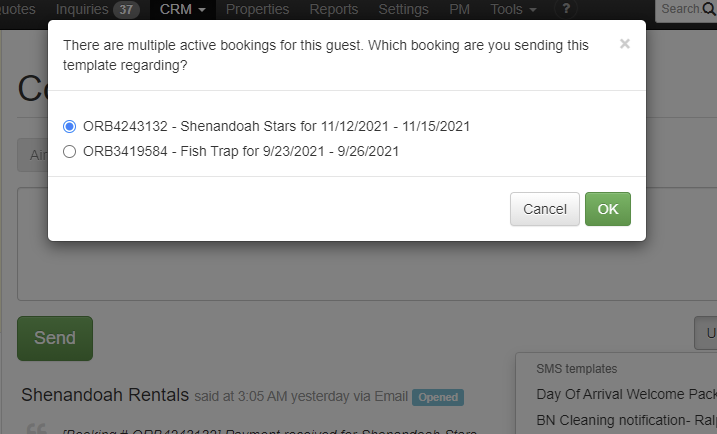
Did you know you can change the helpful blue messages that show at the top of the guest forms? We call these "Form Messages" and you can see them on the top of every guest form as you move from page to page. This thing:
By default, we show our own hard-coded version, but you can change them at any time. Additionally, you can use field codes to show dynamic content from the property. To make these even more powerful, we just added the ability to insert field codes for quote and booking information in these form messages, which greatly expands the power of these form messages. You can address the guest by name, show booking dates, amounts and so on - same as any email template or renter agreement. Maybe you just want to personalize them a bit, like this:

Bug Fixes
Check access when refreshing RemoteLock codes. Recently, we added a "use existing code, just refresh it" option in the Door Lock > Batch Update. However, on the refresh for RemoteLock, we don't actually update locks if they've changed, so they may not be working still. We fixed this to check the people with access and delete any accesses that aren't currently valid.
Link SMS messages to the right guest. We noticed that when sending SMS messages, we always looked for the phone number when the SMS message was sent out of OwnerRez and then used that number to link it to the correct guest. However, there are times when 2 or more guests can have the same phone number on their contact info. So we now check which guest you're looking at, and link it to that guest conversation rather than the phone number.
Improve portal user access granting. Trying to grant access to a user you granted access to before? It's ok, we understand what you meant. We'll let you do that now.
QuickBooks invoice duplication. In some edge cases, you might have seen duplicate invoices created in your QuickBooks account for one booking. This has been fixed.
Multi-currency support in QuickBooks requires separate rent items per property. If you have multi-currency turned on for your QuickBooks Online account, you might need to also configure a separate service item along with the a separate currency. We discovered a bug where some properties had currency settings that were not allowed, on the QuickBooks side, because the Product or Service Item that was used for rent had a different currency setting on it. This is now fixed. You can now select a separate Product or Service Item for "rent" for each property so that it aligns with your currency settings. You can find this on the property mappings dashboard in your QuickBooks connection settings.
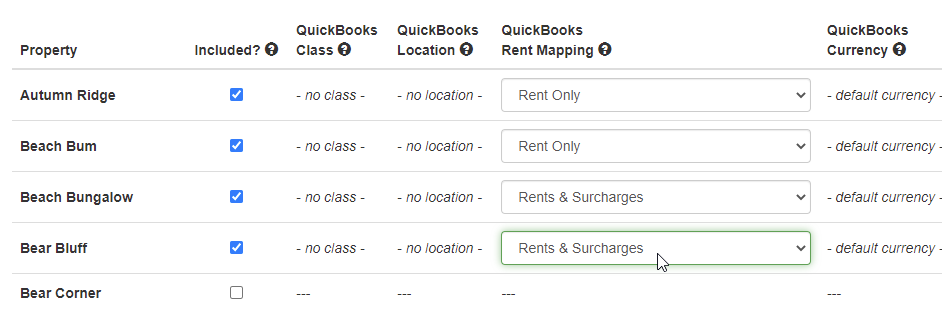
PM batch lock/unlock bookings before a date. Is this a bug or just an enhancement? Previously, when using our PM > Batch Update PM Lock tool, you could only do an "on or after date" update which doesn't help if you want lock old bookings up to a certain date. We've added an "on or before date" option to fix this.
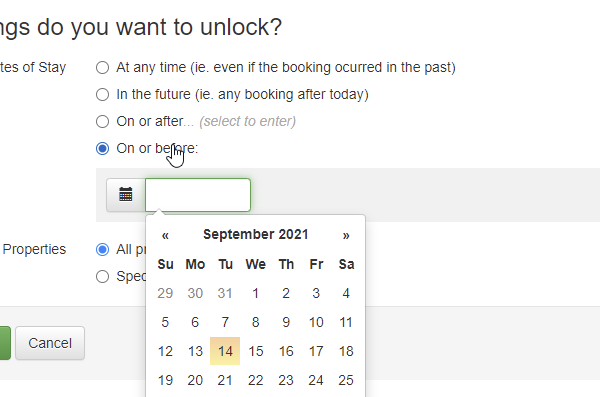
Clarify Request Payment form to discourage URLs. We noticed a situation where users sometimes misunderstand the usage of the guest payment forms and put links in them that don't belong. We decided to handle this more elegantly. We changed the text on the form to mention "additional instructions" and then pointed out that the URL (the built-in one that the window provides) should be given to the guest. We also added validation to the instructions box to check for URLs pasted into the text.
Midsummer Updates Part 5 - New Excel Import for Fees, FindRentals Listing Links, Secure Staging URLs for Sites, File Validation 0 replies
As we continue to chug through our Midsummer Updates series, let's look at the week of August 2nd which produced 13 updates. This will be Part 5 of the series.
New Features
As with Part 4 of the Midsummer Updates series, this update was small with a bunch of minor tweaks and bug fixes, but we did add a cool new feature, so let's hit that one first...
We added a brand new import for Transaction Fees that will allow you to quickly bringing CC processing fees, channel fees or any other booking-based fees that you want to bring into OwnerRez. To find the new import, go to the entire page of import/export options under the Tools > Import/Export menu. Find the Import Transaction Fees from Excel option.

Drill in and you'll see our standard import page with the template and instructions at the top. Click on the Excel template to download it and open it, and you'll see 8 columns.

These columns are pretty self explanatory, but make sure to read the comments on the "Show On Owner statement" and "Show On PM Statement" columns. Basically if either of those is "don't create expense", then both of them must be. The first three columns are used to track which booking the fee belongs to. One of those columns must be filled in (ie. all 3 cannot be blank).
Enhancements & Tweaks
Now for the tweaks, in no particular order...
If you use FindRentals as a channel, you can now click on your listing links in the FindRentals API dashboard like other channels. This will help you go directly to your FindRentals listing, from OwnerRez, with having to know the URL of the FindRentals listing or even the listing #.

This is done automatically, by the way, so there's nothing for you to do after you set the property mapping and go live on FindRentals. The links will just start working on their own.
By default, all of our hosted websites get their own staging URL so that you can play with your website as much as you want without a live domain name on it. However, this is just a staging URL and not intended to be your live public domain name that you give to guests. Because of that, and the fact that the staging URLs are dynamic, we never had them under SSL (https). We just changed that to add SSL (https) to all staging URLs for our hosted websites whether you a live domain name or not.
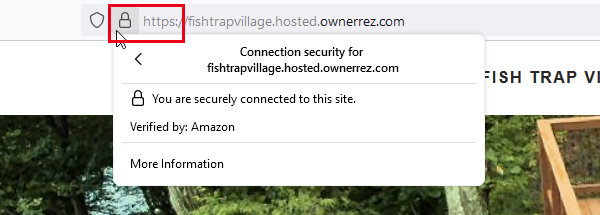
To be clear, this update only affected the staging URL, not the live domain name. OwnerRez has always required and self-generated SSL (https) certificates for live domain names, and that has not changed. Incidentally, this also takes care of the upcoming nasty notice Google is planning to show on websites that don't use SSL (https) in the near future. We're not sure when that's going to happen, but it was announced a few months ago.
Why can't you change cancelled bookings? We've always stopped cancelled bookings from being edited in the interface because "this booking is cancelled" but some users pointed out that this is unnecessary. Changing the title, listing site or other info for a cancelled booking doesn't really affect anything else, so we now allow you to do whatever you want with cancelled bookings same as any other.
In the last update, we expanded our auto-created listing sites to create one for business URLs in your themes, but this week we tweaked it slightly to call it "My Website" in your custom listing sites if there wasn't a different name. This should help it stand out on your quotes or bookings as "My Website" instead of a long raw URL. You can change this at any time by visiting Custom Sources under Settings, finding the listing site and changing the display name.
We now validate file types when uploading files into OwnerRez. Before, we had very loose restrictions and basically just looked at size. What type of file it was, or what was in it, was entirely up to you. We now check a number of things on the file and only allow common business formats (eg. PDF, Word, Excel, text, image formats) while restricting others. If you do try to upload a non-approved format, you'll get a friendly message telling you that.

Bug Fixes
Additional Guest Fees require Guest multipliers. Configuring a surcharge of type "Additional Guest Fee" without a Guest multiplier will cause problems for your Vrbo listings. It also doesn't make much sense, so we made that required. We also emailed a few users that had that in place and asked them to fix it.
Disabling properties that have websites. We noticed that there are times when a user wants to disable a property, but there's a hosted website associated with it. To be clear, I'm referring to the awesome Hosted Websites that OwnerRez has internally. And to be even more clear, I'm referring to single property websites where the entire website is there to showcase a single property. This creates problems since the website can no longer show property data for the one property that it was designed to showcase. We now warn the user about this and disallow disabling properties if a single-property website is still pointing at it.
What types of images are supported? Now if you try to upload an unsupported image type, we'll tell you, and we'll suggest some supported types. That's us, always looking for ways to be helpful! 🤓
Security over-reach on batch operations. This one was kind of funny... We spend a lot of time on security and infrastructure, such as watching for attacks or situations when a user or bot is hammering OwnerRez with a lot of requests and our system smartly shuts that down. However this kind of "auto-throttling" was stopping users from doing certain batch operations such as when selecting a lot of bookings and deleting or cancelling them from the batch window. This is now fixed.
Corrupted Excel when exporting properties. We noticed a situation where exporting properties would produce a corrupted Excel file (ie. the Excel file could not be opened by Excel). This was caused by some of the rich-text content that we were exporting out with the property. We cleaned this up and it should not continue to happen.
All reviews have guest names. Previously, the main reviews list and review view page (ie. the one you see when you click into a review on the list) were a bit confusing when they were linked to a booking and had no display name on the review itself. Our display name logic, for the guest name to show publicly, would fall back to first name and last initial of the guest if linked to a booking or "a guest" if no booking, but it's not shown on the reviews list or view page. We fixed this to work the same way there.
Midsummer Updates Part 4 - Fast-Select Properties, More Auto-Created Listing Sites, Field Code for Min. Age of Renter 0 replies
Hi, everyone! This is Part 4 of our Midsummer Update series, and it covers 15 updates from the week of July 26th. 🌞
While there are no major new features in this update, we did add a number of cool little tweaks that will help you work with existing features faster!
Enhancements & Tweaks
Over time, we notice little things where a subtle change will speed up the user's workflow. We call these click-reducers. The idea is that you can do the same work without clicking on as many buttons or pages. We gather those click-reducers together and then hit them all at once. This update had a few of those click-reducers in it...
Have you ever wanted to select a bunch of properties when changing your settings, and you were annoyed because you had to individually click each property in the list? If you're a PM that manages a lot of properties, you know exactly what I mean. Now you can use Shift+click to select a range of properties all at once when updating your settings. Whether you're selecting 5 properties or 50, you can make those changes faster and get back on with life!

This was put in place across the settings area - from season to payment methods - but if we missed a spot, or you see a different field that should work the same way, let us know.
Do you have different taxes set up for different channels based on which channel collects/remits taxes for you? If so, you're not alone. And before, it was confusing to know which of your taxes was the one to click on because you might have the same "5% sales tax" in the list multiple times. Once you click in, you then see that it applies to all, or just Airbnb or only effective at a certain date. To help with this, we added a Listing Site column to the Taxes list so that you can see right off which tax is for which channel. This should reduce a couple of clicks on your part.

When editing Check-In, Check-Out and Time Zone settings, you now see the account culture (ie. language and currency) and click to edit that from the Time Zone settings page. New users often wonder where the language and currency settings are when they end up on this page, so we now display it along with a quick link.
A few months ago, we started auto-creating listing sites based on where bookings come from. If you use our Hosted Websites or widgets, we'll automatically detect the listing site that the site or widget came from and auto-match it to your listing sites or auto-create and match a new one on the fly. This is a really cool feature and we wanted to expand it to other areas of the system, so we now auto-create custom listing sites for the Business URLs you enter in your account themes. All you have to do is update the "Business URL" field in the account theme, or in a secondary theme, and we'll automatically detect that and make sure you have a custom listing site for the same URL.

For those of you that are PMs, did you know you can import lists of owners from Excel, or if you already have owners update them from the same Excel spreadsheet? To make this easier, we updated our owner export spreadsheet to mirror the import version. This makes it easier for you to export a list of owners, make your changes (directly in the same Excel sheet), then import it right back into OwnerRez.
Wondering which of your properties use which themes? You can now see the associated properties right on the Themes list without clicking in. For most of you, that will only be the one main account theme, so it will just show "All" under properties.

In keeping with our patterns elsewhere in the interface, we've added an "Export" button on the Seasonal Rates tab of the Rates settings. This will take you to the corresponding Seasonal Rate Export to Excel function.
That's it's for click-reducers. Let's wrap it up with a couple of enhancements that went out in this update...
Sometimes when you're going fast, it's easy to fat-finger or copy/paste the wrong information. We noticed some strange lat and long coordinates on property addresses, and when digging in, it looked like the user simply made a copy/paste error. We now validate the lat and long coordinates for all property locations to fall within the logical range.

It's pretty common to refer to the minimum age of the renter in renter agreements and emails. Since that's a setting in our property rules, we figured we could automate that for you, so we've added a field code called {PMINAGE} which will render the minimum age of the renter. If you don't know what field codes are, check out our Field Codes support article or Field Codes video walk-through. Now, if you go change the minimum age in your rules, your renter agreements and emails will automatically follow suit without you having to manually adjust those. That's assuming, of course, that you use this new field code. 😉
Bug Fixes
Just remove those expenses... If you unmanage a booking that has charge linked expenses, then try to adjust the charges, you'd hit an error. All better now!
Show booking tooltip below booking for properties at the top of the ribbon. If you had only a few properties, the ribbon tooltip appeared above the booking instead of below. This would make tall tooltips overlap off the screen. Fixed now.
Support import for Vrbo listings with no rates. Some Vrbo listings have no rates. You'd see an error if you tried to import those listings before, but no more. We now safely detect this case and continue with the import (informing you at the end, of course).
Treat Airbrb "pre-approval" as special offers for charge calculation. We noticed that pre-approvals were being handled as special offers by Airbnb under the covers, so Airbnb won't send us standard fees for those. We added some logic that will back out the configured fees even though they're not sent by Airbnb. This is similar to how our Channel Bridge logic will make your surcharges appear in OwnerRez even if the guest didn't see them because they were baked into the rent rate.
Airbrb inquiries are sometimes booked. We noticed that when Airbnb inquiries were booked, our system was actually voiding the inquiry part and marking them as voided. That has now been fixed and booked inquiries from Airbnb now properly show that in the interface.
Changeover days on booking widget calendars. Was it always liked this or was there a regression? We're not sure, but it looked weird so we changed it. Specifically, we changed the way changeover days look on the date calendars that show on Book Now widgets. There was a weird highlight effect happening, and we removed it.
Request To Book mode & Offline Security Deposits for Airbnb, Copy Seasons Forward, Rate Excel Import, New Vrbo Amenities (Wifi!) 5 replies

I just got a phone call from Airbnb with the same messaging as Syed ("I see you've put in your listing that you are collecting a security deposit, which is fine, but this must be done through the Resolution Center and collecting funds outside of Airbnb is a violation of the terms of service").
I asked the agent to contact me through Airbnb or email with a follow-up (I wasn't able to find the help article that effectively authorizes this [https://www.airbnb.com/help/article/2827/what-is-the-airbnb-policy-for-collecting-fees-outside-of-airbnb] in time while the agent was on the phone), so we'll see, but I may need to reach out to your support for help if they insist I'm wrong.
So freaking frustrating dealing with Airbnb. I've started marking my Airbnb rates up to try to push more traffic to Vrbo instead, but all that seems to be happening is I'm getting fewer bookings total. :(
Webinar: OwnerRez Focus Session On PM 1 reply

I found this webinar most useful, but I still have a lot of questions. I think it would be beneficial to go through each PM setting commission setting to learn how each work, to ensure we are choosing the right setting and able to use to Owner Statements. Seems like a great feature, but I get lost easily. Thanks!
Webinar 9/14: OwnerRez/VRScheduler - Cleaning Services - How they work & why they are useful 0 replies
On Tuesday 9/14, OwnerRez will be hosting a webinar with VRScheduler to discuss Cleaning Services, how they work & why they are useful.
Some larger operations have more complicated scheduling needs, including housekeeping, maintenance, and other support staff calls. To meet this need, OwnerRez has partnered with VRScheduler, the calm way to manage vacation rental staff and operations. We'll sit down with Jill Mason, CEO of VRScheduler, to discuss how cleaning services work & why they are useful.
The session is free to join, but you need to use the sign-up for OwnerRez/VRScheduler webinar link to register.
You can find all of our past and future webinars on our Webinars page.
Integration with StayFi 1 reply

Is there a way to add a Tag to email addresses that come into OR from StayFi?
Integration with StayFi 1 reply
We're pleased to announce that we have partnered with StayFi. This will allow OwnerRez users to easily provide their vacation rental guests with a Wifi access point that asks for their name and information before connecting (like you see in hotels and airports)!

StayFi allows you to provide a better WiFi experience for vacation rental guests. StayFi uses a cloud-managed mesh WiFi system that is easy to install and simple to monitor. You can easily monitor all your networks remotely and prevent WiFi complaints from guests.
Create your own custom branded WiFi splash page that every guest uses to log into your vacation rental’s WiFi.
- Get guests to agree to WiFi Terms of Use
Use code OWNERREZ when signing up for StayFi to get 50% off your first 3 months of service.
Get started with StayFi by visiting the StayFi website and checkout the OwnerRez support doc for how to integrate OwnerRez with StayFi.
OwnerRez San Antonio Hangout 0 replies
Join us in San Antonio, Monday October 4th from 6:00pm-9:00pm, at Prost Hous!
Since a lot of industry people will be in town at the VRMA Conference, we wanted to get a chance to mix and mingle with everyone. Bring your friends and don't be shy! Come say hi while enjoying a cold brew and a mouthwatering appetizer buffet on us.
The Little Rhein Prost Haus is located at La Villita overlooking the San Antonio River Walk. (231 S Alamo St, San Antonio, TX 78205)
Please RSVP using the form below or by going to the event page. Lock in your spot before tickets run out!
Integration with InsuraGuest 6 replies
Hi Scott, you would need to check with InsuraGuest about what their prices are. We don't publish price sheets (or other pricing info) for our partners - that's really on them to do. I agree that they should show clear pricing somewhere, and we'll pass along a note on our side to request that they add that. In the meantime, I'd send them a message if you're interested in using their service. This blog post was only intended to alert everyone that, if you want to use InsuraGuest, you can now do that directly via an integration.
Integration with InsuraGuest 6 replies

Again, where is the information on how much this would cost? Why the whole blog about it without sufficient info provided? Their website is super vague on every page! They want us to sign up before even having a clue what the costs and terms and conditions are. Really frustrating!