
Blog
Latest Activity...
Facebook Availability and Book Now/Inquire Widgets 6 replies

Looks like your facebook page needs at least 2k likes before you can install this app. I got an error message: "This Page does not have permission to install the custom tab."
New OwnerRez pricing for 2021 46 replies

Sorry I didn'T quote in the earlier message, here it is:
Paul W said:
Tarki said:
One thing though, I find it unfair and misleading when the only way of having multiple users in your system is to have premium Property Management module with a fee.That's actually being discussed internally and has before in the past. The idea is to split out portal access to a different feature (from PM) and call it Multi-User that allows portal access and some other things. I don't have any ETAs or promises on that, but it's highly requested on a regular basis and we understand how it stinks for non-PM users to need to pay for PM just to get multi-user access.
New OwnerRez pricing for 2021 46 replies
I'm wondering if there is any progress in this area?
Regards,
New OwnerRez pricing for 2021 46 replies

This unannounced (for us) price increase is extremely disappointing. Our pricing has just doubled and we just re-built our web site using your system about 7 months ago. We are a small player with just a handful of cabins on one property that only rent for about 3 months of the year, We do not use or need your channel management module and only need the booking and calendar functions. Your pricing before doubling was a stretch for our budget and is now by far our largest expense. We would have never invested the money in building a web site based on your software if we knew this price doubling was coming before we even experienced our first rental season using your software. Now we feel like we like you have us over a barrel because to change to another system will cost us another 30% or more of our annual profits if we want to make a switch.
We feel taken advantage of and very frustrated!
Webinar 4/13: OwnerRez/Airbnb - Offline Security Deposits and Request to Book 0 replies

On Tuesday 4/13, OwnerRez will be hosting a webinar with Airbnb to discuss offline security deposits and request to book.
Until recently you could only take instant bookings, and security deposits were held by Airbnb. Now you can hold security deposits and choose to take instant bookings or request to book.
The session is free to join, but you need to use the sign-up for OwnerRez/Airbnb webinar link to register.
You can find all of our past and future webinars on our Webinars page.
Encyclopedia of Vacation Rental Smart Door Locks 8 replies

Chris I didn't see Brivo in the list. They would be in the category of ZWAVE. They have a "gateway" / "controller" that connects to devices via ZWAVE. I have found the controllers that we have seem to have a better range than the VERA plus we were using prior. The integration that OR has built is OK... we were integrated with RemoteLock prior and Vera seemed to have issues getting the codes into the locks sometimes. So far (knock on wood) we have not experienced that issue with Brivo. They are NOT a lock manufacturer but rather a platform that supports ZWAVE devices. We use all YALE locks and have many different models. They are all controlled without a problem.
Custom Redirects on Websites, Inquiry Parsing for SMTP Headers, Big Houfy Improvements, FindRentals Coming Soon, and Bug Fixes! 0 replies

Happy Thursday, everyone! We took last week off on writing the product update, but the updates never stopped! So today we'll cover two weeks which includes 8 updates last week and 13 the week before. Let's get to it!
New Features
If you use OwnerRez to host and manage your website, you know that there's a "redirect" feature on every website. This allows you to handle old pages and make sure that your SEO concerns are managed properly. Our redirects features is powerful - you can do partial or exact matching, and you can redirect to dynamic pages, properties or custom pages. But there's a different scenario that users have been asking for and that's the ability to create a custom URL that redirects to a page outside of your website. You might want to create a dummy URL on your site (like http://www.mysite.com/Special2021Campaign) to give out in mailings and look professional, but you want that to redirect to a completely different website. You can now do this. Go to the same Redirects tab in your website settings and you'll see a new fourth option for Custom URL.

A great new feature we're happy to talk about is that our first-class channel integration list is about to grow again! The team at FindRentals.com has been working with us for a few months to become a first class channel, which means you can push all your content, rates, rules, etc directly to your Find Rentals listings and keep everything up to date. All booking/inquiry traffic comes back to OwnerRez directly. In other words, like Vrbo. Now, the Find Rentals integration won't provide direct bookings and guest credit cards like Vrbo, but it will send inquiry emails directly into OwnerRez for you to process. It's a great integration, and we're excited to add Find Rentals to our channel management family.

We'll have more information coming out shortly about the Find Rentals integration and how to get started in a standalone blog post.
If you're a DIY'er, you might be sending inquiry emails from your own website or local/regional listing site and need to route those inquiry emails into OwnerRez. We've had custom parsing for inquiry emails around for a long time, which looks for a special text format in the email body, but we wanted to add a more-durable option that allows custom emails to be parsed even if the body or design of the email changes. So we added a new parsing feature that will identify inquiry emails by looking at the SMTP headers in the message. If this sounds like technical mumbo-jumbo, that's because it is! Most of our users won't ever need to know what this is, but if you're a techie or DIY'er and like to roll your own code, check out our new support article about SMTP headers and custom parsing. If you pay a local/regional website to send inquiry emails to OwnerRez, tell them to update their emails to send in this new format.
Enhancements & Tweaks
Can you believe it - only two enhancements to talk about this week!
First the big one. We've been working with the Houfy team on updating our Houfy channel integration to be more of a seamless first-class channel experience. In particular, we've identified several keys areas that would make the integration seamless which are:
- Making sure the Houfy listing is up and fully active after doing the initial mapping
- Don't require the user (you!) to set a base rate on the Houfy listing, but pull that from the OwnerRez rates
- Have the Houfy listing pull in more rates and fees from the OwnerRez connection (pet fees, extra guests, cleaning, etc)
- Include more OwnerRez amenities on the Houfy listing
- Make sure that Houfy listings send inquiry emails to OwnerRez and not do bookings on the Houfy side that don't come into OwnerRez
We are happy to announce that these items are now finished. The Houfy team has worked hard and we are happy to see the results. If you had listings on Houfy previously that were incomplete or partially mapped, go back to the Houfy control panel and take a look. They should now show as complete. Or you can use the channel manager page on their site to do a fresh pull. Your amenities and rates should be much more complete and inquiry emails should be flowing into OwnerRez.
We'll be covering more of the Houfy changes in an upcoming special blog post, and reaching out to Houfy users specifically, but we wanted to share this exciting news here in the product update post as well.
Finally, we shortened some of our field codes. The part of the field code that you can see (like "{BARR}") is not supposed to be easily readable or recognizable as the primary goal. Field codes are designed, first and foremost, to be short so that they fit well in templates. We noticed that in some recent updates where we added field codes, they started getting pretty long. For instance, booking cancellation text was using "{BCANCELLATIONPOLICYSPECIFIC}" which eats up way too much room in the editor. We shortened that the cancellation ones to BCANPOL, BCANPOLFULL and BCANPOLDATES. If you don't know what a particular field codes will render, check our our field code list for names and detailed descriptions. When we shortened these, we also updated all your templates and documents to use the new shorter ones, so don't worry about anything that referenced the older longer format. You should be good to go!
Bug Fixes
MasterCard numbers can start with 2. Did you know that MasterCard credit cards can be issued with a number that starts with "2"? Yep, it happened recently, and we saw some MasterCard transactions failing because our accepted-card logic was rejecting them out before they could even hit the processor. That is updated now, so your newfangled MasterCard will now work.
WordPress Plugin is premium too. We noticed that our pricing page did not mention the WordPress Plugin, so we updated the language on the Websites tile to mention WordPress as well.
Hosted website page Facebook image setting should fallback to the site setting. In some cases, hosted website pages were not properly using the site configuration for the Facebook image, even if the "Site setting" option was selected.
Gap night rules are more important than weekend night rules. We found an issue where date validation (ie. the code that checks to see if the guest is allowed to book certain nights based on your rules) was not allowing a weekend to be booked because the weekend required 3 nights. However, there was a gap night rule that allowed 2 nights during that period, and that should have taken priority. Now it does.
"Rollin" -> "Roll-in" While we were rollin' along, a savvy user pointed out that it's a "roll-in shower" amenity, not a "rollin shower." A shower on wheels sounds dangerous to us, so we fixed that.
Update Converge integration to reduce intermittent void errors. We've been chasing an error that sometimes occurs on voiding security deposit holds with a Converge (Elavon) payment method. While we can't be absolutely certain we've buried this particular bug, we are hopeful that the changes here will reduce or eliminate them going forward.
Consider excluded strings when skipping cancellations on calendar imports. Did you know you can configure "excluded text" on calendar imports (iCal) in OwnerRez? I didn't either. But you can! Basically, this means that you can define special pieces of text that, if found, will make our calendar import engine skip over the block or booking. This is extremely useful in combating irregularities or errors with certain channels and calendar systems (who shall remain nameless). We found a small issue where the excluded text wasn't being considered when evaluating cancellations. That is now fixed!
Missing Airbnb cleaning fees. For some reason, Airbnb started dropping cleaning fees on a few bookings, and we've been struggling to find the pattern. The fees were being charged to the guest and shown to the guest, but the Airbnb control panel stopped showing them on the host side, so Channel Bridge wasn't picking them up. You might have run into this recently if you ran a Channel Bridge import and got the nasty "Total owner amount doesn't match total charges amount" message. To get around this, we started detecting if the difference in amount matches the cleaning fee and now create a cleaning fee to match if our import believes that is the issue.
Airbnb percent charges incorrectly calculating on discounts. We noticed that when Airbnb charges have multiple surcharges or discounts being "backed out of" rent, they would create high percentage amounts that caused the lower charges to be higher than they should be. We redesigned the Airbnb "back out of rent" process to tally up the total surcharge and discounts, and figure out the total percentage before attempting to back anything out of rent, then distribute the amount backed out of rent evenly across the multiple surcharges or discounts.
PM and owner statements use your preferred date format now. We've allowed you to select your preferred date format in Settings > Culture for some time. However, there are places in the system that don't yet honor that selection. PM Statement rendering was one such place, but that has now been fixed.
Disallowed gaps on the last booking. What makes a "gap" exactly? It's the space between two bookings, which means that the last booking that a property has (ie. the one furthest in the future) has no gap after it. We found a scenarios where our "disallowed gaps" rule was kicking in after the last booking, so we fixed it.
Vrbo payments not de-duping during Channel Bridge import. Recently, Vrbo stopped including a reference number on their payments in the control panel which is what Channel Bridge finds when it crawls through the Vrbo interface. Previously, we used that payment reference number to know whether it's a channel-managed payment so we can de-dupe it (ie. not include it) if the date changes. When they dropped the reference number, our code would still de-dupe if the date and amount were the same but not if the date changed. To fix this, we're not creating payment tokens ourselves to identify which payment was the same from before.
Commission on Booking.com charges. We noticed a bug where the default commission percentage wasn't being applied to charges on Booking.com bookings. This is now fixed.
Change BTBAL to BTTRANS and BTNETBAL to BTNETTRANS. These two merge fields were causing confusion, and rightly so. Balance is the wrong term when they actually represent what has been received. We've renamed them so they are less confusing. We also updated all templates system-wide to use the new names.
Channel bridge warnings could be clearer. Some users were confused by the warning on the channel bridge rate pushing page. We've softened up the warning so it should be more clear that rates can still be pushed for non-API integrated properties.
PriceLabs & Vrbo Webinars, Vacation Rentals Boom, Vrbo Fast Start Program, Phoenix Rejects VR Measures, Hawaii Lacks Car Rentals 0 replies
Happy Easter!🐇
Next week we have three webinars scheduled. Tuesday 4/6, we sit down with PriceLabs to discuss pricing strategies for 2021. Wednesday 4/7, we'll talk with the team at Vrbo about new traveler trends and have a Q&A section. Last but not least, Thursday 4/8, join us for a live demo Q&A on OwnerRez.
Airbnb and Vrbo are seeing huge numbers of reservations. People are taking spring break trips and planning ahead for summer. Vrbo believes that this a "real boom period for leisure travel". Similarly Airbnb said, "guests are increasingly looking for ways to safely reunite and meaningfully connect with loved ones". Good thing OwnerRez makes it so easy to list your properties on both channels.😉
Vrbo has introduced it's Fast Start program. This will increase the visibility of new properties in the first 90 days of listing. They will also display a review score calculated from the reviews on other travel sites. Vrbo had piloted this program with 1,600 U.S. based hosts seeing a 25% increase in bookings. Join in on our webinar next week to learn more.
Phoenix, Arizona lawmakers have decided to reject any remaining measures that would put restrictions on vacation rentals. This is due to the measures only working as a "Band-Aid" fix to a more complex problem. Currently there are no more committees set to meet this year to regulate vacation rentals.
Due to the increase in travel, Hawaii is having a rental car shortage. Business exploded mid-March as everyone started to take spring break vacations. Since there are so little cars available, the daily rates have shot up to $600 or more a day in some cases.
Encyclopedia of Vacation Rental Smart Door Locks 8 replies

Can you update this? For example - are you supporting Smart Things.
Webinar 4/7: New Traveler Trends and Q&A with Vrbo 0 replies
On Wednesday 4/7, we'll sit down with the team at Vrbo to discuss new traveler trends.
This webinar will include a Q&A section to answer any and all questions you have for Vrbo.
The session is free to join, but you need to use the sign-up for New Traveler Trends and Q&A with Vrbo webinar link to register.
You can find all of our past and future webinars on our Webinars page.
Integration with DACK (No Longer Supported) 2 replies

I could find virtually NO information on the DACK site. Interested in thermostat integration, it mentions it, but does not say which brands etc
Integration with DACK (No Longer Supported) 2 replies

looking forward to implementing this new integration!
Hawaii STR's Outperform Hotels, Florida Spring Break Spike, Lake Tahoe's New Ordinance, Joshua Tree Attracts Travelers 0 replies
Happy Friday!
This week we had our Focus Session On Channel API Connections webinar. If you missed it, no worries! You can rewatch the entire session here.
Some good news from the island of Hawaii: Vacation rentals outperformed hotels in February. The Hawaii Tourism Authority performance report for the month of February showed vacation rentals just under 50% occupancy, while hotels were at about 30%. The report also showed that the average room rate for vacation rentals was $242, whereas hotels averaged a daily rate of $259.
Osceola County, Florida, has seen a huge spike in vacation rentals over the past three weeks. Officials from Old Town say Saturdays and Sundays are seeing better numbers than prior to the pandemic. During the weekdays, hotel occupancy has increased to 50% and 60% capacity, and weekends are up to 80% or even completely booked in some cases. International travel has not picked back up yet, however huge spikes in vacation rentals have been reported in Florida as locals and people from other states seek vacation over spring break.
Washoe County, Nevada, has implemented an ordinance for short-term rentals. Incline Village in North Lake Tahoe is the key focus for these new rules with more than 90% of the county's homes being short-term rentals. The new ordinance establishes a permit system for short-term rental hosts, sets occupancy limits, implements quiet hours, requires enforcement on rules about house parties, parking violations and litter.
Joshua Tree, California, is attracting many travelers by promoting desert escapes in well-known national magazines. The Morongo Basin is in the midst of a land-buying boom, driven by revenue from Airbnb rentals and those living in LA looking for a change of scenery. Tourism has more than doubled since 2011 when 1.4 million people visited Joshua Tree.
Add-On Discount Codes, SMS to Non-Guest Numbers, Better Excel Imports, Better Tag Filters, Channel Bridge Info on Bookings 4 replies
Welcome! Thanks for reading it and the kind words!
Add-On Discount Codes, SMS to Non-Guest Numbers, Better Excel Imports, Better Tag Filters, Channel Bridge Info on Bookings 4 replies

So do I! Thanks for all the improvements.
Add-On Discount Codes, SMS to Non-Guest Numbers, Better Excel Imports, Better Tag Filters, Channel Bridge Info on Bookings 4 replies

Great work! Thanks!
Add-On Discount Codes, SMS to Non-Guest Numbers, Better Excel Imports, Better Tag Filters, Channel Bridge Info on Bookings 4 replies

I look forward to reading these updates each week! Thank you for all your hard work, OR team!
Integration with DACK (No Longer Supported) 2 replies
Integration Disabled
We are no longer official partners with DACK, and we do not support the software integration that DACK developed for OwnerRez. If you used this integration, it will no longer work after August 2022. This separation was caused by a violation of OwnerRez's partnership agreements and general business practices. We apologize for any inconvenience.
The DACK integration allows OwnerRez users to provide guests an app with mobile key entry, thermostat and hardware control, on-demand amenities and more.
DACK is a complete Post-Booking Platform. It is a comprehensive software solution for optimizing guest experience, generating incremental revenue, and saving operational time and costs.
With the DACK guest app and operator dashboard, you are enabled to offer, control, and automate a wide range of processes that ultimately help you develop a better relationship with your guest and promote repeat bookings.
Here is a list of what DACK can provide for your business:
- Allow guests to check-in remotely and access their unit via auto-generated keycodes and/or digital key
- Save time and energy by automating lights and thermostats
- Boost incremental revenue with fully customizable upsells like early check-in, bike rentals, groceries, and more
- Reduce call volume and demand on your staff by providing intuitive and customizable property guides that can include helpful video and images
- Capture more detailed guest feedback directly in the app throughout a guest’s stay and after checkout
- Easily populate your local guide with tours & attractions from local vendors
Get started with DACK by visiting the DACK website and check out the OwnerRez support doc for how to integrate OwnerRez with DACK.
Webinar 4/6: OwnerRez/PriceLabs - Pricing Strategies for 2021 0 replies
On Tuesday 4/6, OwnerRez will be hosting a webinar with PriceLabs to discuss pricing strategies for 2021.
Managing prices and availability easily with data driven insights and automation rules can help you effectively run your business.
In this webinar, we'll cover:
- Intro to PriceLabs and dynamic pricing
- How dynamic pricing works
- Some pricing strategies to implement in 2021 (using PriceLabs or not!)
- Q&A
The session is free to join, but you need to use the sign-up for OwnerRez/PriceLabs webinar link to register.
You can find all of our past and future webinars on our Webinars page.
Add-On Discount Codes, SMS to Non-Guest Numbers, Better Excel Imports, Better Tag Filters, Channel Bridge Info on Bookings 4 replies
Happy Thursday, everyone! We've been hunkered down for the past several weeks, beavering away on work, and we've stacked up an impressive 57 updates to talk about! No new features but lots of great enhancements and bug fixes.
Enhancements & Tweaks
We'll first cover updates to discounts, SMS, Travel Insurance, imports and Airbnb. Then, we'll run through another dozen-or so miscellaneous updates. Here we go...
The update to discounts was small but super important. When creating code-based discounts, you'll notice a new option for "remove all other discounts" right below it.

This new option allows you to specify whether the discount code will replace or add-onto other automatic discounts that are applied. Consider common discounts for things like Last Minute or LOS (length of stay) bookings. These are automatic discounts that kick in when the booking is close to arrival or has many nights. If the guest also puts in a discount code, do you want that LOS discount, giving them a weekly or monthly rate, to fall off or be included? This option lets you decide on each discount code you enter. It is recommended that you select this "remove all other discounts" option if you're not sure. Typically, when someone is putting in a promo code, you only want that code to apply and nothing else. Need it to be different for a particular guest where you're giving them both discounts but nobody else? No problem - just create a special quote for that guest with anything you want!
One thing we noticed a few weeks back is that the "Email" tab under bookings was a little funky. To be clear, it's been funky for a long time and needs to be completely overhauled, but we noticed that recently it's turned into a dumping ground for anything messaging related. SMS and Airbnb trigger show there too even though the tab is called "Email". So first, we changed the tab to be called "Messages". But we also noticed that when you wanted to send an SMS message immediately, the page either redirected to the guest conversation with nothing showing or it showed an SMS compose screen with the wrong template loaded. We changed that so that the booking Messages tab now lets you compose a proper SMS message and load the correct template based on the trigger you're trying to send. It works the same as composing email. You see a full page-width editor with the trigger template loaded for you and, from there, you can make changes and send it out.

This means you can also send SMS trigger messages to non-guest numbers on the booking just like email. It's common for SMS triggers to be sent to non-guest numbers because the trigger is designed to alert yourself (as the host or PM) or a third party (like a cleaner) about the booking. This new booking > Messages > Send page for SMS now allows all that to work.
Over in Travel Insurance world, a few changes were made to clarify messaging and comply with some updates from the carriers.
Travel Insurance is not allowed to be purchased on the same day as arrival nor for a stay of longer than 90 nights. This has been the case for some time, but our validation logic wasn't checking for this and showing it to guests, so the guest would attempt to buy Travel Insurance and then get a nasty error message from the carrier. We now check for day-of-arrival and 90+ day stays and show a friendly message disallowing Travel Insurance to both you and the guest, depending on where in the interface you are, and properly update our Not Available logic on triggers and other things. To be clear, the 90+ day restriction is for Travel Insurance only. Damage Protection can be purchased for bookings of any length of stay as that is billed at a 30 day multiple. Damage Protection and Travel Insurance are two totally different things and have totally different policies and rules.
We also noticed that there were some places where our validation logic was not allowing Travel Insurance but not showing the exact reason why. We clarified those places as well so that you (or the guest) have more transparency into seeing why you can't buy it.
The last Travel Insurance change was an increase in rates. CFAR (Cancel For Any Reason) was increased to 10.8% as of March 15 at midnight. This was a change mandated by the underlying carriers (eg. Nationwide, Berkshire) and not RentalGuardian or OwnerRez. As always, this type of rate change is handled automatically by OwnerRez, so there's nothing you need to do here. However, you should be aware of the change so that you can answers questions that guests have if they ask about costs.
Over the past few months, a lot of our changes have been designed around handling the large growth OwnerRez is going through. You'll notice that the "New Features" section of these blog posts has been sparse while the enhancements, tweak and bug fixes are bulging. This is on purpose. We've been working hard to optimize our audit logs, messaging, error handling, channel syncing and other "chatty" features so that we can continue offering our wide array of powerful, transparent features while handling large spikes in growth and traffic. Part of that has been focused on imports and bulk-update operations. As new users continue joining at a fast rate, we want to minimize the time and effort it takes in moving properties, bookings and other records into our system and allowing more data to be brought over. Here are some changes we've made to importing.
In our new Excel-based property import, we removed the lat/long columns and instead geo-code the address automatically if the address is new or changed. This removes confusion and streamlines the process. The vast majority of addresses can be easily and accurately geo-coded off of the address itself and adding the lat/long columns adds confusion and bad data. If the automatic geo-coding is incorrect or missing after the property import is finished, you can always fix that on the property's Location tab yourself.
In the same Excel-based property import, we added columns for size/area and shared space types. The size/area column is for showing your square footage (or meters) on the property which is pushed to a lot of channels via API. The shared space type is for specifying whether the property is an Entire House, Private Room, Shared Room which is also pushed to channels, particularly Airbnb. You can now import this via Excel directly.
While we were in there, we realized that our Excel template could be smarter. We added drop-down values to some of the columns where a known type is supposed to be specified. (I didn't even know Excel could do that - did you?)
 We haven't added type drop-downs for all import templates everywhere, but we'll update our Excel templates over time to make this a standard. Right now, you can see them in the Excel template for importing properties.
While we were working on imports, we also updated the Custom Fields import (via Excel) to ignore empty values. This was causing some issues, so we changed the import engine to skip past the empty ones.
Another thing we noticed was that imported bookings were being rejected when host and guest fees were included but no charges. We updated this so that you can now import bookings that have host and guest fees even if the charges are set to zero (0).
We also improved our support for better date parsing in Excel imports, and this applies to all Excel imports across the board. Warning, I'm about to get nerdy here... Excel can be frustrating in how it stores and presents data. A cell might have a date value (eg. "3/4/2021") but the value might seem ambiguous to our system when we parse it out. Does 3/4 mean March 4th or April 3rd? Both are correct depending on how the user wrote it at the time. Complicating things even more, Excel might convert columns into dates when the user never intended them to be. If you own "3-4" properties, and enter that in Excel", you might end up with "March 4 properties" instead of "3-4 properties". Excel offers an OADate format that attempts to store dates based on the original user's input and not convert the date from text. We updated our parsing logic to look for OADate values in Excel first before converting from text in date columns. This should keep imported date values more consistent and correct across all of our Excel imports.
Over on exports, we noticed that the Excel export for reviews wasn't including the Private Feedback field, so reviews did not include that when exporting to other systems or sharing with a friend. We have updated our Excel export for reviews to include the Private Feedback field.
It wouldn't be a complete week without Airbnb API updates, would it! 😀 We love the Airbnb API because it's a real-time push-based integration where users can watch their changes show up instantly on their live Airbnb listings, but there's a lot of moving parts and updates, so we're constantly improving it. Here's what we did recently...
Airbnb is migrating their message threads (ie. guest conversations) to a new type of ID and we already built support for that in months past. This past week, we went ahead and migrated all Airbnb message threads in OwnerRez to the new ID type. This may not mean much on the surface, but it demonstrates why OwnerRez is a preferred partner of the channels - we proactively work on being ready for the next batch of changes coming down the pike.
Another under-the-covers change for Airbnb is that we now support their "asynchronous" calendar batch update API. This allows OwnerRez to make faster and smoother calendar updates across all Airbnb API-connected users' accounts.
We have a really cool Airbnb listing import, and it's heavily used by new users to bring in property content like photos, amenities and descriptions. This import process works by navigating to your live Airbnb listing and "screen scraping" the data that we see. We then clean up and normalize that data and map it to your new property in OwnerRez. We notice that "aparthotel" room types on Airbnb were not importing property. Some of the characteristics of an aparthotel are different than the traditional vacation rentals, apartments and regular listings you see on Airbnb. We updated our Airbnb listing import process to handle aparthotel room types so those can now be brought in to OwnerRez!
We noticed that multiple discounts weren't "backing out of" rent properly for Airbnb bookings, so we updated that too. Now we total up your OwnerRez discounts, calculate what that means against your rent and then distribute that evenly to each discount. For instance, suppose you have an Airbnb booking that is $500 in rent but we see that there were two OwnerRez-based discounts of 10% and 20% surcharge that affected that $500. We now follow these steps:
- Total the percents and get 30%
- Calculate that out of the total: 500 x 30% = 150
- Distribute the 150 amongst the ratio of discounts:
- The 10% discount would get 10/30 x 150 = 50
- The 20% discount would get 20/30 x 150 = 100
- Rent would end up being 350
We noticed that for the "Display Exact Location" setting, we were telling Airbnb to use exact location if you had the property lat and long values set, no matter if you specified that you want to show an approximate location. We now make sure to check if you want the exact location shown when updating Airbnb no matter if lat and long are set.
The last thing we did for Airbnb was to add a Listing Quality Analyzer check for security deposit amounts. Airbnb only allows a range of $100 to $5,000 USD for the security deposit amount, so if your OwnerRez security deposit rules are outside of that, we now show an error message on Listing Quality Analyzer for the security deposit amount. We also warn if the property or user uses a non-USD currency because we don't have a way to check the amounts on that given the differences in currency exchange rates.
Tags have been a big hit, and as we've watched how users use them, we've adjusted how they work. We recently changed the filters on lists and grids to that you now have two filter options for tags: Has Tags and Does Not Have Tags.

This gives you the ability to fine-tune your tag filtering for whitelist or blacklist situations or both at the same time. For instance, you may want to select all bookings that are tagged as "need-ID" but exclude those that are tagged "owner-booking". You can now do both at the same time by using both tag filters concurrently. This new set of tag filters can be found on all lists or grids that have tags including bookings, quotes, inquiries, properties, contacts (ie. guests) and owners.
Ever wanted to see if a Channel Bridge file was already imported for a booking, how many times, or when it happened last? Now you can. Bookings already have a "Channel" tab, so we added Channel Bridge data to the same location. If you click on the Channel tab, it will show when Channel Bridge ran last and whether it succeeded or failed.

In the above picture, the top booking is a booking that is not API-connected to the channel and only shows the Channel Bridge import. The bottom booking is API-connected and shows the API-connected stuff along with Channel Bridge stuff next to each other. Over time, we plan to add more information here.
With PMs now using our new "exclude" option on statements, we added Shift + Click so that you can select a range of line items in two clicks. This works the same as most other apps you use such as Gmail when selecting a range of emails. Click one to select the first row, then go down to the end of the range and hold the Shift key while clicking again. Every row in between will become selected. This works on owner statement and PM statements when in preview mode.
Ever wondered about the channels' cancellation policies when configuring your cancellation policies in OwnerRez? Ever wanted see how Airbnb/Vrbo discussed the policy in more detail? When setting cancellation policy on the channel, you can now see a link to the channel's help article about their cancellation policy. Open that in a new tab and you can compare the channel option in OwnerRez to how the channel describes it on their side.
When guests book your property and make payment by PayPal, the payment process is a little different because the guests has to use the PayPal website to authorize payment and OwnerRez can't store a card on file. Because of that, our quote-to-booking guest forms have to present information differently. We noticed that for last minute bookings, guests didn't have a way of handling the security deposit if a security deposit is required and the user would have to take care of this in a second step. Now, when guests finish booking after paying with PayPal, we show them information about the security deposit and a link they can use to authorize that via PayPal right on the booking confirmation page. You might still need to follow up and prod them to send the security deposit, but at least they see it right away and in-line with the booking confirmation.
Speaking of payments, we also changed our default "Sent Payment Request Form to Guest" system message to include a raw link in the body after the clickable link. We did this because certain channels (ahem-- Booking.com) will strip links or re-style them without showing the actual link. You don't want the guest to get a plain-text message with the words "Payment form booking" without actually being clickable.

Now, when Booking.com intercepts the message and strips the clickable link, the plain URL will still show in the message that the guest gets. Of course, this may not look as pretty as it did before, and if you don't like it, you can change the system message to use your own email template instead.
Stripe got a little love this past week. We noticed some usage patterns around the new Stripe integration and 3D Secure stuff, so we made some adjustments.
First, we upgraded the Stripe integration to support Direct Processing (ie. using raw credit card numbers from guests) for guests, but we always allow them internally. This gives you the flexibility of bypassing tokenization and running raw cards if you need to from inside the OwnerRez control panel.
Then, we upgraded the integration to show friendly error messages when switching between multiple Stripe accounts in tokenized mode. Tokenized mode means that OwnerRez doesn't have the raw card number on file, but we have a secure token representing the card number that is stored by Stripe. If you change Stripe accounts, those tokens no longer work and you need to know that. You can certainly request payment from the guest again, but the old card info that was stored on the booking can no longer be used.
Finally, we clarified the Stripe documentation to remove references to the "Processing Unsafely" mode because that is now handled inherently by the latest version of the Stripe integration. You can still turn that on if you'd like, but the Stripe Connect model makes it no longer necessary and we encourage all Stripe users to join the Stripe Connect model as soon as possible.
Here are a couple of final updates that made it out the door this week:
The Payment Detail report now shows Arrival, Departure and Booked date columns in addition to the other columns that were already there. We plan to overhaul our reporting area and add the ability to select columns, but for now we wanted to show the booking dates as many users use the Payment Detail report for reconciliation. Knowing when the booking occurred can help with reconciliation.
You can now set door lock codes on blocked-off time if you have the Manual Door Lock integration configured. There are many use cases for blocked-off time and they often represent friend or owner bookings. We plan to add owner-type bookings and other things to help with this, but it doesn't harm anything to set door codes on blocks, so we went ahead and put that in place.
Bug Fixes
PM statements use your preferred date format now. We've allowed you to select your preferred date format in Settings > Culture for some time. However, there are places in the system that don't yet honor that selection. PM Statement rendering was one such place that has now been fixed.
Legal Agreement preview and examples values. Our preview windows (ie. the thing that pops open and shows you how your templates look in real life) is pretty cool. It shows you real bookings, properties and other records you can use to load your preview. However, when it doesn't have real stuff to use, it uses "example values" which is a nice way of saying dummy data. The example values helps you see how your field codes will look so that you're not staring at blank nothingness while editing your templates. However, over on Legal Agreements, the preview button wasn't loading example values. As long as you had bookings on file, you wouldn't see this because the real stuff is used. We fixed it so that the preview window falls back to use example values on Legal Agreements just like everywhere else.
Analyze Listing on one property. When you drill into a property, there's a prominent button at the top called "Analyze Listing". This button takes you to the Listing Quality Analyzer where you can see all the errors, warnings and info about your property. However, it's suppose to only automatically load the one property you started from, not all of them. We fixed this so that it only shows the on property.
Clarity when deleting Airbnb listings. There's a Delete button on the Airbnb API settings page that lets you select and delete listings, and when you delete them, you're deleting the actual live Airbnb listings. This only works for listings that are currently synced to OwnerRez properties. Instead of attempting to delete a property/listing that isn't synced, and seeing it blow up, we now show a proper message telling the user that the listing cannot be deleted because it's not synced.
Can now delete owners after deleting ownership history. We discovered a bug that would sometimes prevent you from deleting an owner even if that owner had no property ownership history. We've fixed it.
Inquiry "Quote" buttons should finish up at the same place. A savvy user pointed out that the "Quote & Email" button on an inquiry finishes up at the quote overview, while the "Quote" button places you on the inquiry "quoted" tab. This can be confusing when working through several inquiries, so we made it more consistent. Both work flows will now finish up at the "quoted" tab on the inquiry.
Cancel button on templates. We noticed when adding or changing templates, specifically channel or SMS templates, the "Cancel" button was going to the wrong place. This is now fixed.
The case of the missing ".carousel" links. Since we create and manage websites for our users, we spent a lot of time looking at SEO and website analysis. After all, your website is your marketplace and how you appear online matters enormously. We've noticed for awhile that link and SEO analysis tools (eg. ahrefs) tell us that we are linking to ".carousel" pages on our hosted websites and those .carousel pages are broken. But what .carousel pages?? We've never been able to find them. We finally figured out what they were seeing and fixed it. If you're curious, the photo carousel or "Hero Unit" on the website home page works by using ".carousel" references to move between photos. The way this was built, it gives the impression that we're linking to a page with that name. We removed those references and made the photo carousel work a different way.
Renter agreement signature time zones. When a guest signs the renter agreement, we stamp a permanent signature block on the top and bottom of the renter agreement and render it to PDF. As part of the signature block, we include the exact date and time that the signing happened. Before, we were using eastern time for everyone but we now render the signature time in the local time zone of the property or user's account.
Themes use field codes too. Recently, we updated our field codes list to make Contacts (ie. Guests) show their own unique field codes and add others. In the process, we updated thousands of existing references throughout the system. Turns out, we forgot to check all the places in Themes that use field codes (like Legal Agreement header or footer sections). This is now fixed.
Number of hours in which time zone? When you specify rules about time, it matters where you live, where the guest lives and where OwnerRez's servers are located. After all, if the guest's time zone is 15 hours behind yours, and you require 12 hours of notice on same day bookings, does that mean they can book at check-in time? 🤔 What if both you and your guest live in the same time zone, but your time zone is 15 hours behind where OwnerRez's servers are located? We noticed some places where rules were being evaluated against OwnerRez time and not the time of the property/user's account. We fixed this so that now your rules are evaluated in your time zone and OwnerRez and the location of the guest don't matter.
Property owner configuration showing invalid fields. Under certain circumstances, owner configuration on a property was showing invalid fields like "from the beginning of time." These options now only appear for the very first owner added to each property.
Vrbo numbers might have letters. When Vrbo decided to close its HomeAway brand, many users still had HomeAway-specific listing numbers. Those listing numbers typically started with "ha" like "ha12345". Our Excel imports, for things like Reviews and Channel Bridge, match against listing numbers but they were struggling to find properties in OwnerRez depending on how the Vrbo/HomeAway number was written. We updated this to strip all letters first, then match on the numbers only.
OwnerRez logo on the Airbnb connection login. When you go to connect the Airbnb API to OwnerRez, you're taken to a special Airbnb page that asks you to login to Airbnb and authorize OwnerRez as your channel manager. The OwnerRez logo on that page was showing the old palm tree, so we updated it to the newer green "OR" logo.
Infinite loop in search when highlighting non-alphanumeric terms. Our full-text search feature allows you to search across your entire OwnerRez account quickly from one place. It's very fast and returns results that are highlighted for the terms you searched on. We noticed a situation where non-US users were searching on non-alphanumeric characters and our search engine was stripping the other characters, taking the empty term and attempting to highlight it which created an infinite loop. Nasty little bug! But thankfully we found it, and it's all good now!
Adding a manual review with no listing site. When adding a manual review (ie. recording it in the control panel by typing it in yourself) we noticed that the page would crash if no listing site was selected. We fixed this.
Allow any kind of italics in the rich-text editor. Our rich-text editor supports italics, but there are different kinds of italics under the covers that can produce the same result. This has to do with the HTML5 standard and the way "elements" are deprecated or upgraded over time. Our rich-text editor was forcing all italics to use the new <em> standard which was breaking our icon support for FontAwesome icons. We changed the rich-text editor to allow both the new <em> style of italics and the old <i> style as well. Live and let live!
Links in trigger forecast. Did you know you can "forecast" what messages your triggers will send? Yep! We have a really cool screen that will show you what messages will be sent, in the future, for the bookings coming up. You can narrow it down to certain templates and trigger types, and you can bulk select and skip ones if you want. On that page, the trigger forecaster links to each template in the list of results, but we noticed that the link for channel templates was broken. That is now fixed.
Monthly rate in rate without matching rules. We found and fixed an issue where a "Monthly" rate was shown in the rate table (in the Rate widget or Rate table section of a hosted website property page) even if the monthly rate didn't match the rule.
Switching from system to custom listing site. When editing an inquiry, quote or booking, you can select the Listing Site that the inquiry, quote or booking came from. Often, this is set automatically by a channel or integration point, but you can also do it manually. We noticed that if you switch the listing site from a system one (like Vrbo) to a custom one (like My Hawaii Rentals) you would get a crash message. This has now been fixed.
Which properties have duplicate mappings? When you go to map your listings, we check whether there are duplicate mappings and show a message. We noticed that this was a bit opaque, so we now show the property numbers in the message so you know which properties we're referring to.
Surcharges don't have to be unique. A long time ago, we "fixed" an issue where multiple cleaning fees or other same-name surcharges were being picked up by doing an inline de-dupe when selecting surcharges. This was a rare edge case, but it was still in there and it started causing problems. It's no longer necessary, so we removed it. You can now have multiple pet fees, cleaning fees, or anything else on the same booking with the exact same description if that's how you have it set up. And if you do run into that, look at your surcharge settings (the property or channel criteria, etc) and fix it there.
Running reports with inactive owners or properties. You can make owners or properties inactive (ie. disabled) but what happens when you view historical data? We noticed that some reports were crashing when running reports with inactive owners or properties, particularly when those owners or properties were in the filters. We fixed it so that it now works correctly.
PM Webinar, Airbnb’s Most Wish-Listed Rentals, Vrbo $20 Vacations, Amsterdam Overturns Ban, PMS Breakdown Article 0 replies
Good news, it’s Friday!😃
This week we had our highly anticipated Focus Session On PM Webinar. Paul Waldschmidt, CEO of OwnerRez, walked through how to set up owners, calculate commission and generate monthly statements quickly and easily. If you’ve ever wanted to learn more about the PM module, go check that out!
Ever wanted to know what the most wish-listed Airbnb in each state is? Well now you can! Airbnb put together a fun list of properties with everything from a tree house in Georgia, to a big hollowed out potato in Idaho.
Netflix and Vrbo have teamed up to offer $20/night vacation rentals to help families find awesome places to stay on the budget of a kid’s allowance. These “kid-tastic escapes” include properties with mini golf, arcade rooms and bowling alleys!
The court in Amsterdam has overturned the ban that prevented three districts from hosting vacation rentals. The Burgwallen-Oude Zijde, Burgwallen-Nieuwe Zijde and Grachtengordel-Zuid districts are now allowed to operate by applying for a holiday rental permit.
We found an interesting article from someone who tried many different PMS systems and chose OwnerRez. They break down step by step why OwnerRez was the best option for their business. If you’d like to read the opinion of someone who’s gone through all the details of PMS systems, this is worth a read.
Webinar: Focus Session On Channel API Connections 0 replies
On Wednesday 3/24, join us for a focus session on channel API connections!
Glen Ruggiero will show how to set up the API connection for channels like Vrbo and Airbnb. Configuring an API connection allows you to transmit your property content, rates, rules, availability and more!
The session is free to join, but you need to use the sign-up for OwnerRez API Focus Session link to register.
You can find all of our past and future webinars on our Webinars page.
OwnerRez is now an official Corporate Sponsor of VRMA 1 reply

Congratulations!
Warren Beach Rentals
OwnerRez is now an official Corporate Sponsor of VRMA 1 reply
OwnerRez is now a corporate sponsor of VRMA! We've wanted to be a sponsor for a few years now, and we finally pulled the trigger. This means OwnerRez is now sponsoring both major industry associations - VRMA and ASTRHO. Whether you're a PM or homeowner, OwnerRez will be there.

For those of you that don't know who VRMA is, The Vacation Rental Management Association (VRMA) works worldwide to increase public awareness of vacation rentals. They provides best-in-class education, networking, and professional development opportunities to make a difference for you and your business.
VRMA works with policymakers to develop fair balanced regulations that benefit the global vacation rental marketplace. This is more important than ever with many local city council's placing ordinances on vacation rentals. Those property managers can rely on VRMA to provide sound advice and resources to combat these issues.
We are proud to be a sponsor and hope that many of you find VRMA to be a useful tool for your business.
Integration with Chekin 0 replies
We're pleased to announce that we have partnered with Chekin. The integration allows OwnerRez users the ability to provide automatic and contactless check-ins for guests.

About Chekin
Chekin helps hosts to automate and digitize the entire check-in process from the booking confirmation till the check-out.
They include identity verification using biometric match as an extra step in online check-in.
Hosts can save time, money and comply with the legal requirements by managing everything online.
Here is a list of reasons to use Chekin:
- Guests registration and identification
- Online payments
- Remote access
- Data sending to authorities
- Upselling and much more.
Get started with Chekin by visiting the Chekin website and check out the OwnerRez support doc for how to integrate OwnerRez with Chekin.
Webinar: OwnerRez Focus Session On PM 1 reply
On Tuesday 3/16, join us for a focus session on the PM module!
Paul Waldschmidt, CEO of OwnerRez, will show how to set up owners, calculate commission and generate monthly statements quickly and easily.
The session is free to join, but you need to use the sign-up for OwnerRez Focus Session On PM link to register.
You can find all of our past and future webinars on our Webinars page.
Douglas County Cracks Down On Illegal Rentals, New Airbnb Hosts Earn $1 Billion, Cathedral City Phasing Out STRs, Covid Vaccines 0 replies
Happy Saturday!😃
This week we had three webinars! The first was our Dynamic Pricing Industry Expert webinar, where we discussed all the things to look for when selecting a dynamic pricing option. We highly recommend that anyone who is interested in dynamic pricing, watch the replay here. The second webinar was our weekly Demo Q & A session, and you can sign up for the next one here. Lastly, we had our ASTRHO Membership & Premier Host Benefits webinar, the replay can be watched here. There are a lot of informative webinars scheduled for March, you can view them all here.
If you live in Douglas County and operate an illegal vacation rental, you could be fined $20,000 and subject to a permanent ban from managing a vacation rental in the future. This change is one of nearly 50 different policy decisions Douglas County discussed Thursday. Another policy that may be implemented states that if someone falsifies a permit, they can be subject to criminal charges and receive a $20,000 fine. Douglas County is cracking down!
A new report from Airbnb explains how those with financial struggles, due to the pandemic, were able to stay afloat by renting out all or sections of their home. In fact, new Airbnb hosts who joined once Covid hit have collectivity earned more than $1 billion around the world! In the United States, new hosts in California earned $67 million, new hosts in Florida collected $42 million and New York new hosts earned $36 million. According to the same report, half of all Airbnb hosts have used their earning to stay in their homes and about 29% have used their Airbnb income to pay for their rent or mortgages.
Cathedral City, California has voted to phase out short-term rentals that are not home shares by January 1, 2023. This resolution also established a minimum-stay length of three nights, reduced occupancy to 10 guests and prohibits the use of outdoor amenities after 10:00 pm.
Now for some hopeful news! President Joe Biden has stated that the US should have enough vaccines by the end of May to treat every adult. This announcement came after Johnson & Johnson’s single-shot COVID vaccine received FDA approval for emergency use. Hopefully we can all get vaccinated and take a much needed vacation.🌴
Vrbo Becomes an Only Child, Tag Columns on Exports, New Import for Owners 0 replies
Hey everybody, time to talk updates! This week, we've got a tidy little set of updates (about 16) to go through, all of which are enhancements or bug fixes. No new features to talk about, but the little stuff is important too! 💪
Enhancements & Tweaks
This was a small housekeeping week, so let's hop from lily pad to lily pad here in no particular order...
A long time ago, we mentioned getting rid of all references to "HomeAway". The parent company Expedia made it clear awhile back that they were shifting everything to the Vrbo name, and they even removed the homeaway.com domain name (it redirects to vrbo.com). We started the process of merging everything on our side to "Vrbo" (and spelled exactly like that) but the project got back-burned for awhile. We have now completed the process.
As you click around the app now, you'll notice that channels and settings now only reference "Vrbo" with the new Vrbo logo.

Even the listing site options in surcharge and trigger criteria only show Vrbo now. HomeAway is gone. The added benefit here is that you only need to select Vrbo to make sure your surcharges or triggers hit all HomeAway/Vrbo/Expedia bookings. In the past, some users would select HomeAway but not Vrbo and a trigger might not be sent to a booking that was specifically flagged as Vrbo. Now that they are merged, that should no longer happen.
Last fall, we forced everyone to move to the new rates system. For awhile, we kept the Legacy rates under the covers and watched the transition from old to new. After watching everything for a few months, we have now fully removed all references and code to the old Legacy rates system. I hope you're enjoying the new rates system! If not, let us know where the pain points are.
As tags are used by more and more users, we continue to find new places they can be used. This past week we added tags to Excel exports. Which exports, you ask? All of them of course! Any record that can have tags applied to it will show those same tags as columns on the Excel export.
Let's supposed you have two tags on your properties: Rural and Small and Cozy. When you export your list of properties to Excel, you'll see two columns at the end of the export with column names "Tag - Rural" and "Tag - Small and Cozy". Each row will have a true or false in the tag column depending on if the tag applies to that property.
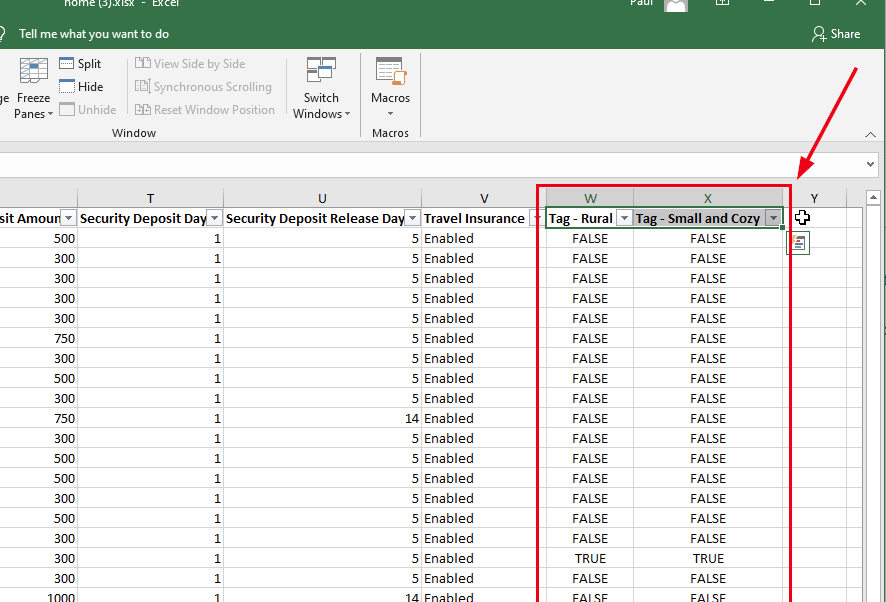 This is super useful because it allows you to group, pivot and filter your export data by tags. While you may not have many properties, these tag columns will also show on bookings, quotes and guest exports which might have thousands of rows.
For you PMs, we also created a new Excel import for owners. You can now import owner records in bulk by using Excel. The new owner import is similar to our other Excel imports and can be found in the same area (Tools > Import/Export).
Recently, we updated our search page to be more powerful, find more items and show clearer search results. However, we noticed that the search page was redirecting to the guest record (ie. the guest conversation) and not the booking when most of the time the user is searching for booking information. We changed this so that searches that show bookings will stay on the search page and not redirect automatically. This will allow you to decide if you want to view the guest or booking instead of the system deciding for you.
We tweaked Booking.com prices to start extra guest fees at 1 instead of 0 even if your extra guest fees start at 0 (ie. you charge for all guests). We had to do this because Booking.com does not support 0 guests in the base price. Our API connection with Booking.com was returning errors for users that charge extra guest fees for all guests, so we set the minimum to 1 included. Sorry if this affects your pricing, but you'll have to take it up with Booking.com!
Bug Fixes
Airbnb requires max nights now. Airbnb no longer allows passing an empty value (ie. unlimited) for maximum nights, so we now pass 365 if your max nights rule is open-ended. To be clear, this was a bug with Airbnb, not us, but we "fixed" it anyway.
PayPal error messages. When connecting PayPal to OwnerRez, there are a variety of reasons you might get an error message - for instance your PayPal account is not a Business account or is too new. Instead of showing a general crash message, we now parse the inner error message being sent back from PayPal and attempt to show a clearer message.
Current dates are free when moving booking. When moving a booking, the move screen showed the current booking dates as unavailable, but that's not really accurate. If you're moving the booking, the current dates are also free as well because you could select other dates and then decide to switch back to the current dates. This has been fixed.
Require http or https on links. You've probably noticed that our link editor has improved greatly over the years. By link editor, I'm referring to the button that lets you create clickable links when editing an email template. You can select custom links or field codes. We noticed that sometimes links are being entered without a fully qualified URL - for instance, yahoo.com instead of http://www.yahoo.com. While both typically work in a browser, our editor has problems with the former and will sometimes change the URL under the covers. We changed this so that links are forced to include the http or https part of the URL.
Link editor not showing custom. Speaking of the link editor, we also fixed a situation where the link editor would open but not show "Custom Web Address" as the type when the link was a user-entered link.
Platform email addresses aren't real. Our CRM system is careful not to store platform emails (ie. the proxy email addresses the channels use like susy.123456789@messages.homeaway.com) on the guest record. This is because these email addresses aren't real and have zero value for marketing and future contact. However, we noticed a place in our payment system where platform email addresses were being saved after processing new payments. All good now!
Search not searching. We found and fixed a situation where some bookings were not sending guest names to the search system properly. This is fixed now. We are working on upgrading our search tools and looking forward to some more-powerful text-searching features in the future.
Previewing account system alerts. We noticed that some account system alerts (like payment collected or payment refunded) were not previewing correctly. Not cool, dude.
Rate calendar with no properties. Before you couldn't do that. If for some reason all your properties were disabled and you went to the rate calendar - bang, crash, boom! We fixed it. Now you're greeted by message to go turn on some properties first.
PM Statement expense criteria. Last week, we overhauled PM statements to have all the same settings that owner statements do. Only the expense criteria wasn't actually working as designed. All better now!
Webinar 3/4: ASTRHO Membership & Premier Host Benefits 0 replies
On Thursday 3/4, we'll sit down with the team at ASTRHO to discuss their membership and the premier host benefits.
ASTRHO was created to provide short-term and vacation rental homeowners easy access to education, community, experts, perks and benefits.
Anyone who attends the webinar will get 3 months of Premier Host Membership for free!
The session is free to join, but you need to use the sign-up for ASTRHO Membership & Premier Host Benefits webinar link to register.
You can find all of our past and future webinars on our Webinars page.
San Diego Caps Rentals, Hawaii Below 50% Capacity, Cancun Vacation Rentals Beat Hotels, Webinars Announcement 0 replies
Happy Friday!
Yesterday we released a huge blog that covers all 59 updates we pushed out. That's right, 59! We highly recommend checking that out. Now, let's dive into some industry news.
San Diego City Council pushed forward a yearly cap on vacation rentals. This cap would cut the volume of vacation rentals by as much as 30 percent. This new regulation still needs a second vote of the council before becoming a law. For all areas except Mission Beach, rentals would be capped at 1 percent of the city's total housing units, which equates to around 5,400. Mission Beach would have a much more generous rental cap due to its long history of vacation rentals.
The Island of Hawaii continues to have low tourism numbers. In January 2021, big island vacation rentals dipped below 50 percent capacity. On the other hand, hotels on the island had an average of 23.3 percent occupancy. Hopefully we can all get vaccinated and take a trip to Hawaii later this year.
In Cancun, vacation rentals are seeing higher occupancy than hotels. Hotels in the area are hovering around 30-40 percent occupancy, while vacation rental are seeing 40-50 percent on average. The influx of vacation rental travelers is most likely due to the ability to work remotely. According to Airbnb, many travelers who book outside of peak season tend to stay 28 nights or more.
Next week, OwnerRez will host not 1... not 2... but 3 webinars! The first is our Dynamic Pricing Industry Expert webinar with Alexander Shartsis, former Perfect Price CEO. If you've ever wanted to know more about dynamic pricing, this is the webinar for you. Then we have our weekly Demo Q&A session; come say hi! Our third webinar of the week will be with ASTRHO to talk about their membership and premium host benefits. Bonus (because we're so awesome): if you come to the webinar, we'll give you 3 months of premium for free!