General Help and Questions
Latest Activity...
Recommendations on a smart lock? 5 replies

Yep, it's a tradeoff for sure. eRentalLock is nice because you can generate the codes automatically in OwnerRez (based on the algorithm) but it doesn't require a Wifi connection. I use that at a couple of my properties and it's been rock solid.
The other one I'd recommend if you do want Wifi is RemoteLock. The nice thing about Wifi is you can see the access log dynamically. And most of them are pretty safe for guests because the codes are programmed in advance. So as long as the code is programmed, even if Wifi is down at the time the guest arrives they will still be able to enter based on that already programmed code.
I wrote up a bunch more about the details and tradeoffs of different lock types here: https://www.ownerrez.com/blog/encyclopedia-of-vacation-rental-smart-locks
Field Codes 3 replies
The insert field popup shows whatever is relevant to the current template. Note that there are different tabs of information there (property, booking etc) where the check in info would be related to the booking not the property, and you can also filter down in a tab to find stuff by name.
You can find the exhaustive list of all codes here: https://www.ownerrez.com/support/articles/field-codes
Hosted website glitch? 4 replies
Yep, the holiday list right now is official federal holidays, but there are so many more lists we could add. Do you know of a standard list of vacation rental industry holidays for US or elsewhere? That's the other side of it -- holidays vary so much based on location some things like Christmas and Valentines day are nearly universal but many others are not.
You can't set a repeating holiday based on day of month. They're all based on dates of year because most tend to change. What you'd do is create one and fill out say 10 years of dates.
Recommendations on a smart lock? 5 replies

I use erentallock. I dont want any dependency on wifi or power if it goes down and the guest is stuck outside. If you get it, get the slightly more expensive lock. Ask them the reason!
Recommendations on a smart lock? 5 replies

Hello,
I'm looking to upgrade an "unconnected" keypad deadbolt with a connected deadbolt that integrates with Owner Rez. Does anyone have any recommendations on manufacturer and Model? I'll need some sort of connectivity obviously, should I go towards wifi/zwave/zigbee/all of the above?
Thanks in advance for the opinions!
Kent
Field Codes 3 replies
The "Insert Field" in the Email Templates only shows a handful of field codes.
Where is the full list? like check in date, check in time, etc?
Early Check-In/bag dropoff. 1 reply
Something that would be useful, is email templates/triggers which give some kind of control over the Early Check-In logic. This may exist, but not sure how to do or synthesize. For example
If some one checks in the same day that another checks out ==> no early check-in or early bag drop-off is possible.
If not ==> early check-in/bag drop off possible. 1) perhaps with advance request. 2) perhaps payment required for either.
It would be useful to direct an email template/trigger based on this.
Perhaps even a switch or custom code that is/is not possible within an email template?
Hosted website glitch? 4 replies
I am a little surprised given the importance of Mother's Day and Valentine's Day in the vacation rental industry, that is is not a default holiday.
I realize that it is not a day off/formal holiday, but they can be huge travel days for VRs.
Anyway how do I set up a custom holiday that will always be the second Sunday of each May? (Mother's Day - USA) and third Sunday in June (Father's Day)?
ARDi damage insurance 2 replies
Yes, you can have a different coverage per property. For bookings in the same property it has to be the same coverage, but different properties can be different.
ARDi damage insurance 2 replies

I do not have it turned on, but was wondering if I can specify different coverage amount per different property? or they all have to be the same?
Amenities question 1 reply
Ahh, good catch. Those were still displaying in some cases when the text was empty or zero length string even though there wasn't a value entered.
Fixed.
Hosted website glitch? 4 replies
Yep, those are driven off the holidays you select in the system.
Go to Settings > Holiday Lists and subscribe to some (and/or add your own custom holidays).
Listing pictures 1 reply
No ETA yet, still in the dev queue.
Amenities question 1 reply
I am on the page of one of my properties on the hosted website. The use of the information icons is a bit disturbing. Some, such as the setting & view category, have information icons(I) . But there is no ability to put information in them, so not sure why they are there.
Others, such as under kitchen, there's an information icon for ones I have no information added, so why offer the icon?
And many have no ability to have an information icon even though it might be useful. For example under other, I selected concierge. I would love to have an information icon to tell them limitations or a charge for it's use.
Templates and Triggers and Reports, o my! 4 replies
after booking, I run channel bridge and import the OTA booking with triggering of rental agreement e-sign, welcome email etc. Once the renter gets an OR email, they have my direct email address, phone etc. So they can communicate with me directly. Some chose to still email me via vrbo, for example. I don't particularly like that but I can always just reply via reply-to from my email inbox.
I Want To Try Channel Bridge But I'm SUPER Nervous 2 replies

You cannot use Channel Bridge with Evolve because it requires direct access to the VRBO or Airbnb account that your properties are listed in. If you cannot login to VRBO and see the VRBO bookings directly - the ones that Evolve manages - then Channel Bridge won't be able to see or download them either.
Channel Bridge won't mess anything up. It's basically a sophisticated copy and paste tool for grabbing booking/guest data out of VRBO and filling it in to OwnerRez. It merges with the bookings you already have in OwnerRez.
Here's a copy/paste blurb we use in tickets:
>>>>>>>>>>>>>>>
You are importing bookings from VRBO but they are "empty" and just have date and guest name. This is because for calendar imports (such as with VRBO or Airbnb) that is the only information that is contained in the calendar sync. However, we created a tool called Channel Bridge that will download booking/guest information for VRBO and Airbnb bookings. Read more about that here:
https://www.ownerrez.com/support/articles/channel-bridge
And here is how to install it:
https://www.ownerrez.com/support/articles/channel-bridge-install
The workflow steps are:
1) The booking occurs on Airbnb or VRBO
2) A few minutes after, our system automatically imports it in, blocking the calendar
3) The booking in our system will have basic information such as dates, guest name and phone number if it's Airbnb, but not much else
4) Later (the same day or later in the week) you then run Channel Bridge to download and "bring in" the rest of the booking info which you can do later at any time
We also have direct/API integrations available for Booking.com, TripAdvisor, CanadaStays and VRBO/HomeAway depending on your size. Some like Booking.com will work for any number of properties. Others like TA and VRBO/HomeAway require 5 or more properties.
Hosted website glitch? 4 replies
I'm looking at the availability tab at top of my hosted website. It shows a gray box which indicates holidays. However, neither Memorial Day nor the 4th of July seem to be gray for that column. Is this International? Do I have to throw a setting to make this work?
Listing pictures 1 reply
Recently, you talked about updates to your picture functionality. Any progress on this?
Templates and Triggers and Reports, o my! 4 replies
JTVRs said:
3) you said deal with the guests before booking. Obviously, for instant booking on the listing site, they only booked. I'm assuming that the OR template will take care of everything (normal) and they just contact me through the listing site communication systems for post booking questions and issues?
It's up to the guest how they want to contact you. Some like using the VRBO or Airbnb message thread (cause of the phone app or whatever). If they do that, it goes through the platform, and you have to answer on the platform. Others will respond back to you by email when you email them. In OwnerRez, we tend to push/encourage users to use the direct email side as that is more versatile and an open standard.
JTVRs said:
8) so the payment rules are only for direct booking or it also handles abb, BDC, VRBO, fk payment processing?
Payment rules are for direct bookings or channel bookings that come in through API integrations (which are basically like direct bookings). It's where you have a card on file and you are the one collecting payment (eg. not Airbnb).
I Want To Try Channel Bridge But I'm SUPER Nervous 2 replies
1) Get rid of Evolve. They also charge your guests high commissions, have a questionable reputation, only do the easy stuff Ownerrez does, and they control your reviews and prevent you from using Booking.com.
2) Read the channel bridge help and forum article(s). You can search on the Support page.
I Want To Try Channel Bridge But I'm SUPER Nervous 2 replies

I see there is something called Channel Bridge here and I wouldn't mind trying it to reduce the calendar sync issues and the amount of manual work I'm doing to manage my property. However not being a highly technological person, I'm very nervous that either I'll mess it up or that I won't like it and then I won't be able to easily go back to the regular calendar sync way of doing things.
Also, I use Evolve, and I'm not sure Channel Bridge will work with them.
Thoughts? Opinions? Experiences?
Thanks!
How to define Field Codes 10 replies
There is a lot more than just field codes involved to use the full power of Ownerreservations. The full set of provided templates and triggers, making custom ones such as a welcome letter. The agreement and sending it out and collecting signatures. hosted websites which I highly recommend for several reasons. channel bridge, effectively filling out the entire profile for each property (there is a lot more than just the description!). Pricelabs/dynamic pricing. working with the listing sites. Dealing with quotes, bookings or instant booking. Trip insurance for guests. guest emails. pricing. updates. pictures. reviews. taxes. reports. etc.
That is why I suggested that support link. It will lead you to a lot of stuff including things you might not have considered.
go to each menu item on the top of the booking area. look at and study each carefully.
Some wander through here with blank stares.
This is a powerful utility, but only if you read everything thoroughly several times and grasp it and use fully.
I am on about my 4th gyration, as I was delayed in starting my properties due to buying a second multifamily.
Chris and Paul and several regulars on the forum can answer questions. Chris and Paul are great - they even told me so! *wink*
How to define Field Codes 10 replies

Thanks so much, Paul and JTVRs! I did search extensively before I posted my query, but did not see anything that answered my question. However, it does appear that I got ahead of myself - now I'm just going to go through my setup in order. :)
How to define Field Codes 10 replies
Hi Julie,
Great question. All the field codes - the main list of default field codes - come from rates, rules and settings already in OwnerRez. In the case of first payment amount and when the second payment is due, look at the property rules. Open and property > Rules tab> Change button and look at the First Payment and Second Payment section. What you put there defines what will render out in those field codes.
And here's a support article for all the field codes in OwnerRez and what they are:
https://www.ownerrez.com/support/articles/field-codes
How to define Field Codes 10 replies
I would suggest you not to swallow around one Topic at a time. You should consider going through the following link topic by topic. You might not need the quote stuff.
Otherwise you might encounter a dozen other things you cannot do or might miss out on.
There is also a search area on top that might help.
https://www.ownerrez.com/support
How to define Field Codes 10 replies
Hey all!
I'm new to OR and trying to get my legal agreements set up, using OR's wonderful default agreement as my foundation. However, I cannot for the life of me figure out how to define the field codes. For example:
"If the booking is made more than {BSPDAY} days in advance of the arrival date, a payment of {BFPPOA} is taken by Owner at the time of the booking."
How/where do I define that BSPDAY should be 30 and BFPPOA should be 50% (or whatever)? Do I need to create them all in the Custom Field Definitions panel?
Thank you!
Expedia not recognized as an OTA 3 replies

I agree. VRBO lists their properties under Expedia which is different. We list our property separately in Expedia and a channel manager as great as Booking.com would be highly expreciated.
Templates and Triggers and Reports, o my! 4 replies
Great responses. Just seeking a little clarification
3) you said deal with the guests before booking. Obviously, for instant booking on the listing site, they only booked. I'm assuming that the OR template will take care of everything (normal) and they just contact me through the listing site communication systems for post booking questions and issues?
8) so the payment rules are only for direct booking or it also handles abb, BDC, VRBO, fk payment processing?
Templates and Triggers and Reports, o my! 4 replies
Yep, great questions and will answer right here for the edification of everyone! Answers:
1) The built in templates trigger when the associated event occurs in the system. Most of them, like dates changed, check-in/check-out changed, payment request, renter agreement request. etc. are linked to actions you (the owner) do in OwnerRez, so you'll see the option to send those emails out and optionally edit them before sending.
There are a few ones that will go out automatically during the reservation process -- Booking - send confirmation to guest, payment receipt, Renter Agreement - send archive copy to guest. And then payment receipts will be sent if an payment is processed automatically.
Payment reminders and security deposit reminders will go out if a) you have them enabled and b) there is no automatically scheduled payment -- those are to make sure that a manual payment isn't forgotten.
And if a booking is in the pending state because "check is in the mail", then the pending reminders will go out until you record a payment or clear the pending flag (covered in more detail in (4) below).
2) There's not a sandbox system. Instead, create test quotes with yourself as the guest and run them through to bookings. Then void the payment and cancel the booking. That way you can see how everything works end to end. If you're doing credit card payments you can change the charges down to a couple bucks beforehand so it doesn't hit your card for a large amount, or create a check or custom instructions payment method for testing and deactivate it after.
3) No, platform messaging doesn't go into OwnerRez currently. We have plans to add a whole unified inbox system, but that is a large undertaking. For now, deal with the guest before booking on the platform, then after booking you have all of the scheduled and triggered templates going out to their email automatically from OwnerRez.
4) Pending is for bookings payments you would take outside OwnerRez like checks, Venmo, Zelle etc. For those, when the booking is made we mark it pending with an auto cancel date if you don't record the payment by then.
For cancellations and cancellation policies, we don't enforce a specific policy on you and cancel and refund are two separate operations in OwnerRez. For OTA's, they'll have a cancellation policy and handle that as they process the payment for you. For direct bookings, cancel the booking in OwnerRez and refund according to your policy.
5) The amount due is based on the total charges for a booking. You can filter the List tab for bookings that have a balance due. If you're using credit cards, this will all be handled automatically -- first payment processed on booking, balance processed when it is due based on your rules on the Rules tab of each property (like 30 days before arrival), and you and the guest will both get emails if a payment fails.
6) For OTA's, some have a review link you can send via email, otherwise you'd handle that directly in the OTA system. For direct bookings, there's a review link/request email you can send to the guest.
7) To send gap night emails to current guests, use a template like this: https://www.ownerrez.com/support/articles/fill-gap-hole-nights. It's not going to automatically apply the discount, just get the guest to circle back with you and then you can add the charge when they confirm.
8) Yes, any payment > 0.
9) Not currently a way to filter the list down, but that's a good idea.
10, 12) Yep, listing site fees are what they take from the guest and what they take from you. If you want a charge by charge report, use the Line Item Pivot report.
11) For taxes, set them up in Settings > Taxes under the Pricing section. That'll assess the percentage on direct bookings and they'll show up as charges. Then use the Taxes report or Line Item Pivot report later to tally them up and prepare your remittance.
13) We don't have a specific additional guests list feature (it's on the todo list). You could add custom fields for that during checkout: https://www.ownerrez.com/support/articles/capture-additional-fields-on-checkout-quote-acceptance -- but that is just a text box and doesn't have any way to validate that it's an actual email address.
14) We pull as much as info as we can from listing sites, but VRBO is the only one that'll give you the real guest email (you can pull this in to OwnerRez through channel bridge: https://www.ownerrez.com/support/articles/channel-bridge). Some other smaller listing sites do this too, but BDC, ABB, etc are all going to give you a pass through email address that only works during the booking.
For those channels, set up a template/trigger like this: https://www.ownerrez.com/support/articles/airbnb-request-for-contact-info-real-email-address-and-signed-renter-agreement which will get them to sign the renter agreement and in the process provide their real email address (the renter agreement signing process will capture updated contact info for any future booking, but won't let them update contact info if a booking is in the past).
Description field - heading 3s - bolding not working? 3 replies
Ahh, I see what's going on. The editor theme is slightly different than what's on the hosted site. The hosted site headers are a medium bold, not the very heavy bold shown in the editor. To my eye that looks better than the heavier bold which is why the hosted site theme does that by default.
Keep in mind also that listing sites are going to use a plain text version of that description.
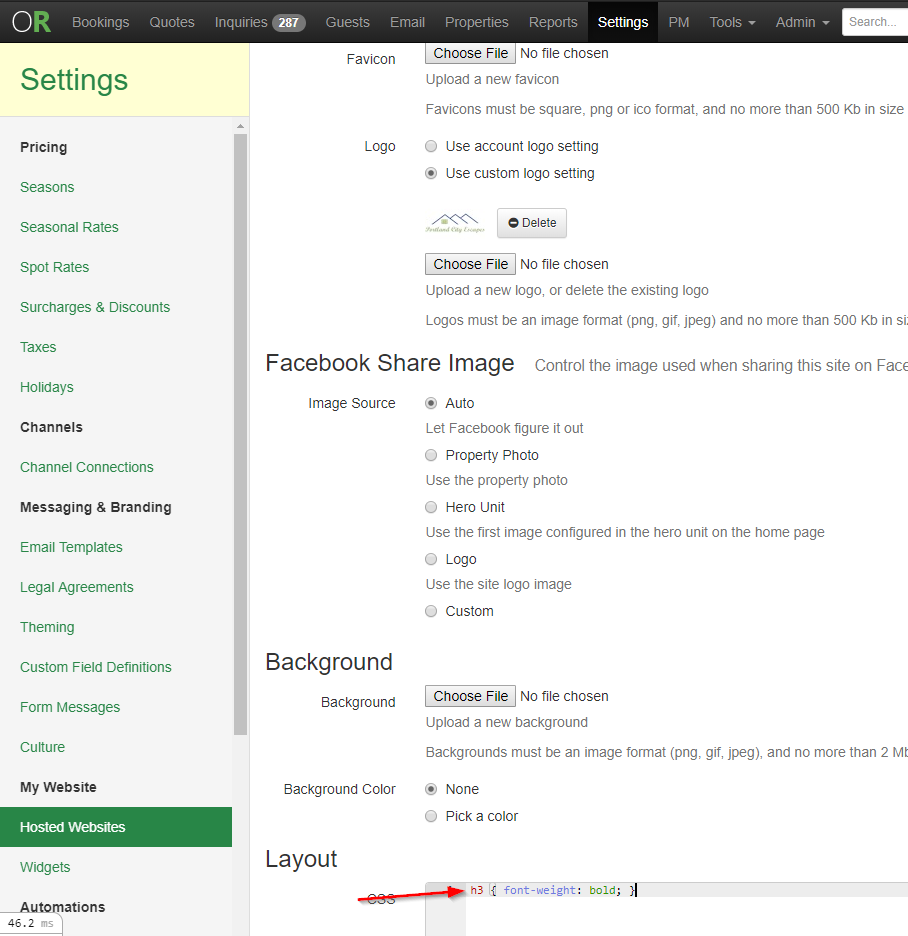
If you want to bolden up the <h3>'s on the hosted site, edit the site settings and add this CSS in the Layout section:
h3 { font-weight: bold; }