
Blog
Latest Activity...
OwnerRez now supports 11 new payment gateways 3 replies

So... this might be a sensitive question ... but what is the consensus of the best gateway to use? Does anyone have any favorites? Right now I am using Sage (I think a long time ago when I joined Ownerrez I was able to use it free if I used Sage payments). if you go on their 'virtual terminal', it is pretty much that... a old terminal dump bolted onto a web page ... it seems like. I want to change my bank account that receives $ but the interface is so poor, there is no guidance on how to do that. I am wondering if there is a better gateway out there? Maybe one that has an interface that is not 1980's style? Anyone have any preferences?
OwnerRez now supports 11 new payment gateways 3 replies

This post is pretty old -- we're up to 20 gateways now: https://www.ownerrez.com/support/articles/payment-methods -- is yours any of those?
If not, which gateway is it? Sometimes a processor will support other gateways like Authorize.Net or eProcessing Network and/or they have different named gateways.
OwnerRez now supports 11 new payment gateways 3 replies

I have a gateway but it is not listed. Can I still use this or do I have to set up a new account with one of the 11 accounts you list?
Diana
Trigger Enhancements and Forecasting 0 replies
We just released a new update for Triggers that adds several powerful features and lays the groundwork for new criteria. Here's what's new:
- Payment Status criteria
- Send before triggers the first time criteria matches
- Send create triggers on VRBO reservation import
- Trigger forecast
- Renter Agreement Signed trigger event
- Exclude Listing Site/Property/Season criteria
Payment Status criteria
We've had a Paid in Full trigger event for awhile, and that works well for some situations. However, there were a lot of situations where you wanted to send the email on a certain date but only if the booking was paid in full. There were other cases where the booking got flagged as paid in full but wasn't -- like some listing site transaction imports.
The new Payment Status criteria handles those situations by allowing you to create a days before arrival trigger but only send it if the booking matches the paid in full criteria.
Combined with the next item -- send before triggers the first time criteria matches -- you can make a property details email that will go out a certain number of days before arrival, but only if the booking is paid in full. And if the booking were to be paid in full after that time it would send later rather than fizzling out.
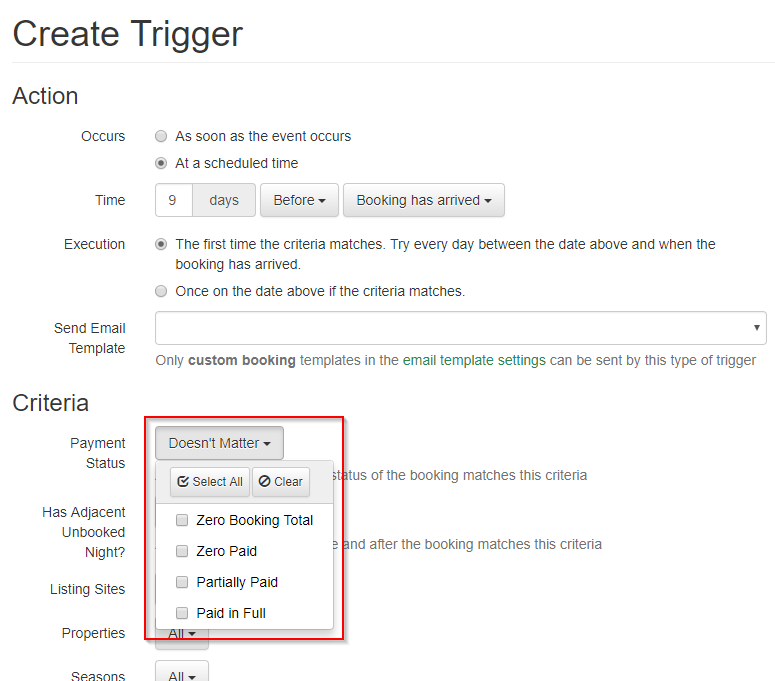
Definitions:
- Zero Booking Total: the total of the booking charges is $0. This can happen for bookings where you're not tracking an amount in OwnerRez, such as ones from listing sites, donated bookings, friends and family, etc. Using this criteria you can target those booking as well as the paid in full bookings.
- Zero Paid: There is an amount due on the booking, but no payments.
- Partially Paid: There is an amount due on the booking and some payments, but it's not paid in full.
- Paid in Full: The booking has charges and they have been fully paid.
Send before triggers the first time criteria matches
In the past, date based triggers have always only executed once, on the day they are due. If they don't match the criteria for whatever reason on that day, or the booking is a last minute booking that was made after that day, the trigger is never sent.
We added a new option to run the first time criteria matches on before date events. This is the new default. This option will send the first time that the criteria matches between the initial day and the event day (i.e. arrival or departure). It'll only send once, but will have a chance to send after the initial day.
For example, if you have a trigger with this option enabled, for a welcome email template set to go out 14 days before arrival and a booking was made 10 days before arrival, the trigger would be sent the next day after the booking was made (9 days before arrival). Without this option, the trigger would never be sent because 14 days before arrival criteria would never match the booking.
Another example combined with the Payment Status criteria above. With a trigger set for Payment Status: Paid In Full, to go out 20 days before arrival, and send the first time the criteria matches. If the guest misses the last payment and doesn't make it until 15 days before arrival, that trigger would now be sent 14 days before arrival rather than fizzling out and never being sent.

Send create triggers on HomeAway/VRBO reservation import
Airbnb includes a proxy email address on their iCal feed, which our Calendar Import handles. This lets you set up a trigger for a request for contact info and renter agreement signature that goes out automatically.
HomeAway/VRBO does not include the email address in their iCal feed. Instead, we have an Import Bookings from HomeAway/VRBO function under Tools > Import/Export that populates the guest contact info.
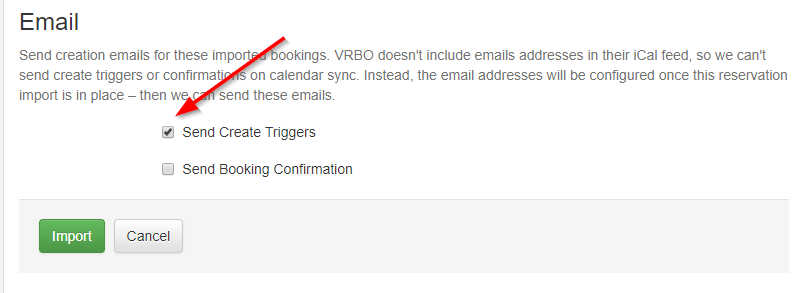
We just added an option to send create triggers and/or booking confirmation emails when importing that file. You could always do that by hand before, but this will automatically send those emails when the guest email address is populated during the reservation import process.
Trigger Forecast
You've always been able to see the status of triggers on a booking by booking basis to see what's been sent, what will be sent later, and what can't be sent because criteria doesn't match, it was skipped, etc. But there was never a way to get a bird's eye view on what triggers were doing in the system and the overall emails that would be sent.
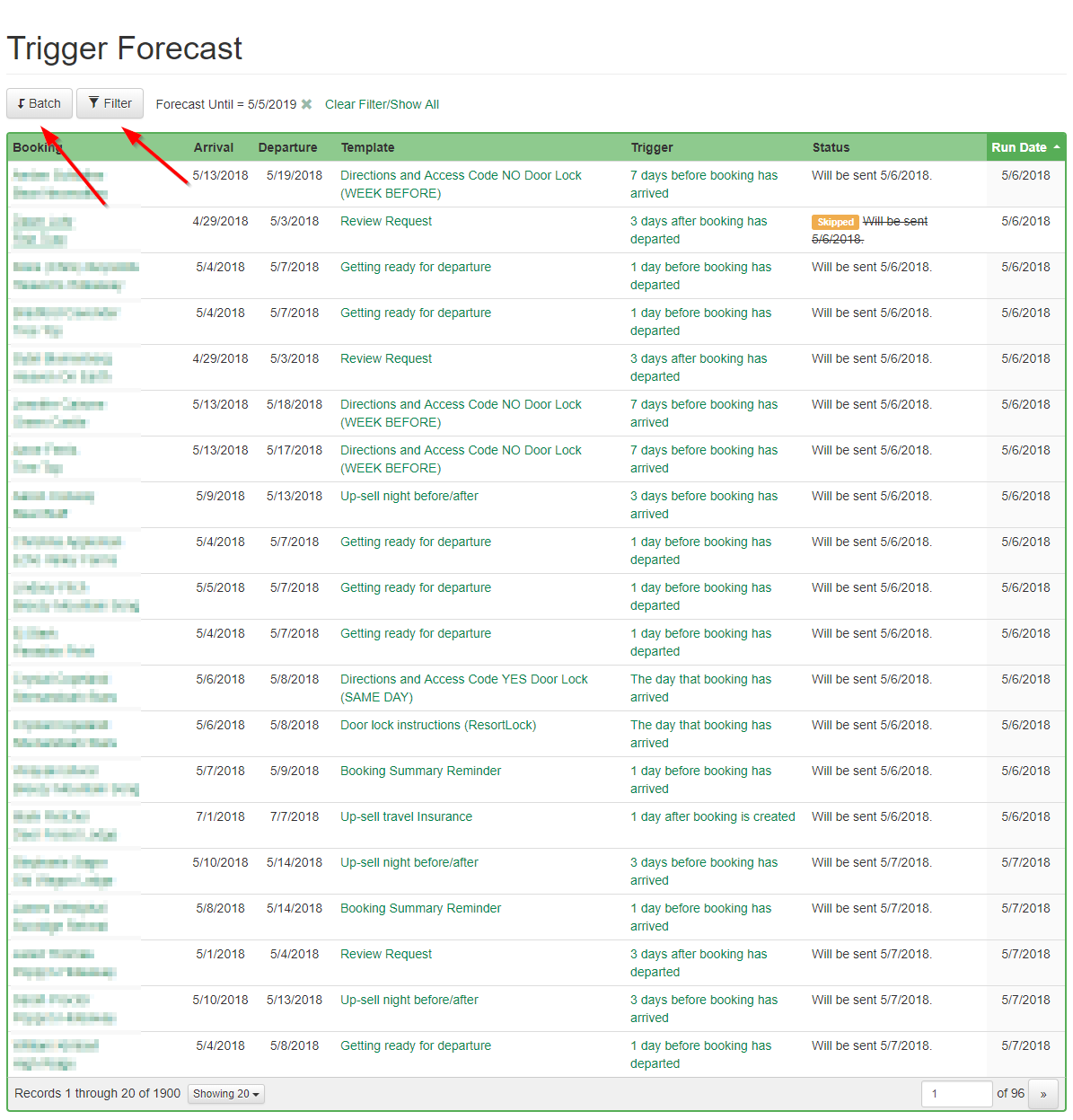
That changes today. While developing these changes, we started to build an internal debugging tool to check and make sure that all triggers were configured properly. We realized that it would be very useful for everyone, so we polished it up and added it to this release! To access it, go to Settings > Email Triggers and click the Forecast button.

This opens up the Forecast grid, which shows all triggers that may go out in future, when they will go out, or why they won't go out. You can click into any booking, template, or trigger to make changes.
You use the Batch button to do bulk skips or un-skips of triggers. The Filter button will winnow down the list to a specific template, trigger, property etc. and only view triggers sent for those specific options.
Renter Agreement Signed trigger event
We've had a trigger on renter agreement signed for a few months, but haven't announced it yet. This dovetails nicely with the option to send create triggers on HomeAway/VRBO reservation import. You can now create a request for contact info and renter agreement signature, send that out on booking create for Airbnb and HomeAway/VRBO, then create an additional booking completed template and send it out when the renter agreement has actually been signed.
Exclude Listing Site/Property/Season criteria
We've had these criteria on triggers for awhile, but there were only two options: All or Specific. Many times you want to target everything but a couple of listing sites or properties. So we split the criteria options for all of these to "All", "Everything but" and "Only". That lets you target everything you used to (All is the same as the old All, Only is the same as the old Specific). The new "Everything but" lets you target everything but a few listing sites, properties, seasons, etc.
This is currently available on Triggers and Taxes but will be applied to other items like Rates and Surcharges over time as well.
Setting up and understanding payments by check 10 replies
Go to the Transactions tab of the booking, find the scheduled payment and click on it in the list. Then you can delete it from there.
Setting up and understanding payments by check 10 replies

Ho do I cancel a scheduled payment?
Send trigger emails based on the listing site (eg. sending "Airbnb clean-up" emails) 4 replies
Yep! Use the preview link you get from the request e-Signature button on the Legal tab of the booking and you can see what it looks like.
Everything that would be required on a quote checkout on the contact info page is also required on the signing link page. The only time it's not required is after the booking has arrived, to make sure the guest doesn't go back and change things later.
Send trigger emails based on the listing site (eg. sending "Airbnb clean-up" emails) 4 replies

When the guest gets the link to the rental agreement, are they forced to fill in address, custom fields etc?
I have been having Airbnb guests send me mailng address, list of guest names and other info that would go into my custom fields during a normal booking. Then I send them a link to the rental agreement to sign, marking them as having paid by CC other.
I've setup email trigger a week before arrival asking for a credit card for security deposit since I can't or don't collect it at signing.
QuickBooks integration has arrived 9 replies

Its really nice information for accounting transaction. Thank you for sharing this information. It is useful information for us.
Here, Our best support team are available anytime for solving accounting problems.
Please visit our website and freely call to us 1-866-296-8224
https://www.axpertadvisor.com/
Introducing the "Vacation Rental Tools" project and importing reviews in bulk 6 replies

id love vrbo and fb imports- watching for that!
Encyclopedia of Vacation Rental Smart Door Locks 8 replies
That's very cool with the scenes and other ZWave devices -- I may have to check into that for my own house! :-)
If you want to shoot an email to help@ownerreservations.com with the API details, I'll have a look and see what we can do. Does it take username/password or something more complex like OAuth?
Encyclopedia of Vacation Rental Smart Door Locks 8 replies
Chris Hynes said:
We don't support Vera yet, but that's something we're researching.For now, use a booking custom field to track the ones you generate and merge them into the email. We'll keep you posted as we get into Vera.
I have a Vera system as well. I have a Vera Edge for each of my rental properties and one for our own home. It is a great system and incredibly robust (it never really fails). The nice thing about it, is that it controls most other ZWave devices (such as wall switches, dimmers, thermostats, etc). There is a fairly active community who write add-ins for it, so now my zwave system also controls my pool (heater, lights, filter, etc). You can also do a lot with scenes. (ie. I have it such that if it is nighttime and you come home, when you open the lock, many lights in the house turn on). Also my yard lights go on based on the sunset time of each day, so they are never on too early or late. It is pretty easily controllable using a regular browser from anywhere in the world and the best part is that there are no subscription fees. If anyone wants some advice on it, feel free to contact me as I have a few years of experience with them.
As far as the door locks go, there is an API that will allow you to read and write to the lock. There is some significant security to reach this API through the web, but it is certainly do-able.
You can create multiple lock pins. As per the custom field in OREZ,, this is exactly what I do. Mind you, I am finding it onerous to continually create new pin codes for each guest and manage that process. I get lazy and start re-using pin codes and then update them in OREZ on the custom booking field.
If you guys are looking to use someone as a 'guinny pig', I am happy to offer my services. You can use my home lock (accessible through the web as well) as long as you do not lock me out! Ha Ha
More Gallimaufry 2 replies
Yep, the payment data import is only as good as the data HomeAway provides. It sounds like they've improved it over time, so it might be worth reviewing their sheet again to see if its right.
If you have alternate payments, though, it doesn't have any usable information other than the guest fee -- which we have a separate option to import.
The reservation import is separate from the payment import and updates the contact info only, not any charges/payments, so you can pick and choose which is useful to you.
More Gallimaufry 2 replies

Thank you, I do not use them, but folks on HA forum said multiple times that HA payments download spreadsheet is wrong. so wonder what it would do if imported. I never used theirs, i enter everything manually also because their ss is not clear on what has been paid and what is outstanding. the new mess they have reportedly created iwth damage deposit that they now hold, but reportedly it is still included in spreadsheet as if it was deposited to owner. .
More Gallimaufry 2 replies
We're now well into Fall, with the nights longer and the mornings crisper. Leaves are changing to brilliant colors, or perhaps already have. The perfect time for our monthly Gallimaufry.
Gallimaufry (n): A collection or hodgepodge of things with no apparent unifying theme.
Previous gallimaufries: June, July/August, September.
We've already announced Vacation Rental Tools, with TripAdvisor reviews download and import reviews from Excel. If you missed it, go read up on that and try it out!
New listing sites
- Florida Rentals
- Cottages in Canada, French - We've supported Cottages in Canada for awhile, but we just added support for parsing inquiries in French
Quote overlay for Ribbon
We added an overlay for the ribbon view that lets you view all quotes or open quotes. This gives you a visual indication of what periods are in demand and helps inform discounts, minimum stay rules etc.

Numbers & Imports
Building on our experience with the Airbnb transaction history import, we've added two new imports for HomeAway/VRBO: reservations and payment data. No longer will you have to copy/paste contact info or add numbers by hand. Instead, grab the export from HomeAway/VRBO, upload it into OwnerRez and everything will be merged and updated.
We also fleshed out the financial section for this so you can track payment fees and guest/host fees and roll up totals on reports. If you're a property manager, you can also track fees as non commissionable amounts and expense them back to the owner.
- HomeAway/VRBO reservation import
- HomeAway/VRBO transaction import
- Add fee tracking to payments and refunds
- Add net rollup fields for bookings and surface on reports
- Split listing site fees to host fees and guest fees
- Add host fee to rent in Airbnb transaction import, factor into payments
- Apply non commissionable amount and linked expense on rent if PM mode on airbnb import
PM & Portal Access
We revamped the owner statements and portal access with a new Owner Revenue view and permission that shows commission and owner relevant amounts rather than full guest amounts. We also fleshed out the other permissions, added capabilities to move/delete blocked off time, and added header/footer theme templates and PDF download for statements.
- Add owner revenue statement view with full commission tracking
- Add owner statement header/footer templates (Theming section)
- Add owner statement PDF download button
- Add owner statement merge fields
- Put block reason/title on popover behind portal access permissions
- Add separate financial permission to give levels of access to view financial info on overview and statements
- Honor add notes permission for creating blocks
- Add move/delete block functionality on portal with permission
iCal import
- Add option for importing only bookings. Default airbnb to true.
- Add option for warn on cancel, always cancel if not
- Add option for setting booking pending flag on create
- Add option for skipping create triggers
- Allow IncludePastBookings on edit
- Don't send email on past bookings
- Store related booking ids on calendar sync issue and display links in email
- Collect emails on sync and only send if no exception
- Reactivate canceled bookings instead of adding new if uid and dates match
Widgets & Hosted Sites
- Add option on hosted single home page to show overview
- Add option on hosted single photos page to show slider
- Minify widget resources
- Add message directing guest to send an inquiry when rates aren't found on the booking widget
- Show errors immediately for quote without occupancy
- Don't show holiday circle on booked multi month calendar days
- Don't autopopulate departure date on book widget
- Fix issue with zoomed in browser cutting off widget sizing
Everything else...
- Add agreement selection to quote rules to select specific renter agreement
- Allow checkout with no payment without going pending
- Clarify how confirmation required works
- Add form messages for checkout custom fields
- Overhaul booking overview page
- Add listing site criteria to tax
- Add min nights column on seasons grid
- Show existing custom field values on agreement sign
- Expand multiline custom fields on checkout
- Use standard date format for inquiry email subjects
- Add French synonyms on inquiry parser
- Add booking Created, Arrival and Departure as date-based fields to surcharge criteria
- Add paid in full booking trigger event
- Add nights summary field to booking summary report
- Add option for showing canceled bookings on booking detail
- Add cleaning date to stay reports
- Fix total paid column on booking export, add refunded column
- Add phone, state, country to search
- Search all phones/emails/addresses on a guest not just the first
- Show all phone/email on search results
- Wire in booked type for OwnerRez iCal feeds
- Link call log from call center dialer
- Embed search in call center dialer on call connect
- Show proper description on outgoing call dialog
Encyclopedia of Vacation Rental Smart Door Locks 8 replies

I am looking to update my system. Probably using Wink and then schlage or kwikset lock. I will probably use my guests last 4 digits of their telephone number(I think that is an option) for lock access so its something they easily remember. From what I have read that maybe the easiest option. Then create a template where you can add those numbers with the insert field. Possibly having one where you can select their last 4 digits of their phone number. It would be nice to be able to bypass me creating the code each time, and have OwnerRez do that for me, but not sure how that would work.
Another month, another Gallimaufry 12 replies
This has now been released.
There is a new Owner Revenue view of the owner statements, with a Financials permission in the portal access user configuration that lets you control which is accessible. That also applies to the booking view as well.
For the header/footer, there is a new Owner Statements header/footer configuration in Settings > Theming. That allows you to pull owner name, email, etc, as well as statement date. The header/footer will display while printing an owner statement only. There's also a new Download PDF button that includes the header/footer as well.
Another month, another Gallimaufry 12 replies

Yes to the later.
Another month, another Gallimaufry 12 replies
How does that work without being confusing, though?
If you show the guest pays but don't show how it breaks down to the owner amount and commission, the owner is going to ask why the guest paid * 45% is different from what you're taking as commission. Same thing with hiding taxes.
Or are you suggesting to hide all that and never show guest amount/payments at all. Instead show just those 3 values:
Total Owner Revenue: sum of items that aren't tax and aren't 100% commission
PM Comm = sum of commission on items that aren't 100% commission
Net Owner Earnings: total owner - commission
Another month, another Gallimaufry 12 replies
In my opinion the owner statement needs to show amounts that only relate to them.
If we use this Guest charges example:
Rent – 800.00 (PM Comm 45%)
Cleaning Fee – 100.00 (PM Comm 100%) NOT owner related revenue
Pet Fee – 100.00 (PM Comm 45%)
Taxes – 130.00
Guesst Pays – 1130.00
Owner Related Revenue (Owner Statement reporting)
Rent – 800.00 (PM Comm 45%)
Pet Fee – 100.00 (PM Comm 45%)
Total Owner Revenue - 900.00
PM Comm - 405.00
Net Owner Earnings - 495.00
Another month, another Gallimaufry 12 replies
Guest Charges
Item Description Rate Amount Commission
Rent 7 nights during Base Rates at Week rate 800.00 800.00 45%
Surcharge Cleaning Fee 80.00 80.00 100%
Surcharge Pet Fee 100.00 100.00 45%
Tax HST 13% 127.40
Another month, another Gallimaufry 12 replies
Hmm, that's a good point on financials. Maybe we need two levels for that, full financials and owner only. What items make sense to show under Owner Only? There are a lot of numbers so it needs to be simple and not confusing. The detailed items are already available on the owner statement Full Amounts view, so perhaps we could display some of those items instead?
Or maybe the Earnings Breakdown and Payout Breakdown on the PM tab of the booking, like:
Earnings Breakdown
Total Amount:
$1,830.98
Taxes:
$170.98
PM Commission:
$182.60
Owner Payout:
$1,477.40
Payout Breakdown
Guest Balance:
$1,830.98 (100%)
Can Be Remitted:
$1,477.40
Already Remitted:
$1,477.40 (Statement 1/31/2017 and Statement 9/30/2017)
Payout Balance:
$0.00
Great idea on the owner statement header/footer customizations! We'll look into it -- should be able to add that in the theming section like you can do for email templates, legal agreements
Another month, another Gallimaufry 12 replies
Wow, lot's of upgrades. Love it. Just beginning to dig in on some of these.
I have a couple of questions/suggestions in regard to the Owner Portal Access.
For the Booking Calendar:
When displaying financials inside of the booking calendar, the total charges shown here reflect all charges to the guest. This will cause confusion with owners as they may expect their earnings to be based on the total dollars shown. This is incorrect as it includes fees they are not entitled to earnings on such as taxes and cleaning fee.
Is it possible to display only the charges that the owners have a share in?
For the Owner Statements:
Is it possible to modify the owner statement header area to include more information? The reason for this is, it can then fully replace our owner statements and stand as a formal document for the owner’s records.
Here is an image of what I mean. https://ibb.co/dwsp86
Introducing the "Vacation Rental Tools" project and importing reviews in bulk 6 replies

That's correct, but those are both right at the top of agenda - VRBO and Air both. We'd like to get Facebook, HomeEscape and Google My Biz reviews in as well. FB reviews may be able to be imported via OwnerRez integration since they have an open API and offer that data through the API. The others would have to be a VRT tool. We started with TripAdvisor because there tends to be a ton of history with them and reviews and they also had a clean page model we could scrape.
Introducing the "Vacation Rental Tools" project and importing reviews in bulk 6 replies
But no VRBO or AirBNB review import yet, correct? By the way this is AWESOME, TA reviews were imported flawlessly
Introducing the "Vacation Rental Tools" project and importing reviews in bulk 6 replies
For anyone else wondering about that, it's based off of whatever TripAdvisor account you are currently logged into. Vacation Rental Tools is a browser extension, so it's working off of the information it has in your local browser. If you have multiple TripAdvisor accounts, you'll have to open TA in a separate tab and log out of/into the different accounts and then come back to the VRT extension to do it again.
Introducing the "Vacation Rental Tools" project and importing reviews in bulk 6 replies
Ok, found how to switch the TA accounts... tthanks
Introducing the "Vacation Rental Tools" project and importing reviews in bulk 6 replies
I have 2 separate TA accounts, and one VRBO account. So I downloaded reviews from one TA account (for cabin #1), worked beautifully. But now how do I switch to download for the other account? Or from VRBO? When i open tools., it shows connection to 1st TA account.
Introducing the "Vacation Rental Tools" project and importing reviews in bulk 6 replies
As great as our new Reviews feature is, we knew from the moment we released it that we would have to follow it up with some tools to help get reviews into the system faster.
Manual entry sucks! You don't want to have manually copy/paste every review you get into OwnerRez, so we set out designing ways of making it easier. To that end, we have two big things to announce.
You can now import reviews in bulk using Excel.
The import screen is similar to, and located near, the other import screens and pretty self-explanatory. Take a look at this support article for all the details:
Storing Reviews by Importing Them in Bulk Via Excel
But even though you can import via Excel, that still means you have to manually fill in the Excel spreadsheet, right? That's where the next part comes in!
Introducing the new "Vacation Rental Tools" lab project!
For awhile now, we've been dreaming up a way of providing better tools and tighter integration with listing sites while not having to wait on listing sites to develop that access on their own.
"Vacation Rental Tools" is our answer to that problem. It's a Chrome extension you can install in your browser that will provide you extra features for the listing sites you work with. And it's free for everyone to use whether you're an OwnerRez customer or not!
Visit the new website at http://VacationRental.tools or take a look at these support articles:
- Vacation Rental Tools - Overview
- Vacation Rental Tools - How To Get & Use It
- Vacation Rental Tools - The Tools
If you use TripAdvisor, you'll be able to use Vacation Rental Tools to download an Excel file of all your TripAdvisor reviews in a click of a button.
 That same Excel file can then be imported into OwnerRez in another click, meaning no manual entry.

Hundreds of reviews moved from TripAdvisor to OwnerRez in just a few seconds. Awesome, right?!
Get ready for more great browser tools coming to Vacation Rental Tools and help us spread the word!
Another month, another Gallimaufry 12 replies
@BlueMtnCabins... good point on the how's. Most of the new features are automatically added. I just wrote up an article with more details on legal agreements here: https://www.ownerrez.com/support/articles/renter-legal-agreements
For the header/footer, that's referring to the Forms header/footer setting in Settings > Theming. While overhauling renter agreements, we realized that the header/footer was applied to quote checkout forms but wasn't applied to some other forms like the security deposit signing form -- so now it will be.
@Wendy... Right now it's copy/paste, but we're working on an import tool.