
MCP Functionality
(page 2 )

Hi all,
AI assistants connected through our hosted MCP connector can now make changes in your OwnerRez account, not just read from it. You can now ask Claude, ChatGPT, or another connected assistant to create and update records for you.
When you connect, OwnerRez asks whether to grant Full read and write or Read-only (GET requests only) access. Full read and write is the default. With Full read and write, your AI assistant can make changes available through the OwnerRez API when you ask. See the Claude and ChatGPT articles for more detail. If you're interested in what the MCP can write to, ask your AI agent! They should have full access to our API docs.
You can change an assistant's access anytime under Settings > Connected Apps in OwnerRez, open the assistant's connection, and set the Access level. The change takes effect right away, whether you're raising or lowering access, so you don't need to disconnect and reconnect.
Now that the MCP feature is fully released, we're closing this thread. Thank you to everyone who voted and shared feedback along the way. It helped shape what we've built here.
Going forward:
- Issues or bugs: Email our helpdesk at help@ownerrez.com so our team can look into them.
- General feedback: Also welcome at help@ownerrez.com.
- Feature ideas: Post them in the Feature Requests forum so others can vote and weigh in.
Thanks again, everyone!
P.S. Command-line interface (CLI) is still a work in progress at this time. We'll share updates once it's ready.

Does it support tags?

Very interested in having an MCP connector to Claude. This is a high priority for all business owners.
We appreciate the quality you all bring to these upgrades!
Janice
Does it support tags?
Yes. Tags will eventually be queryable as a read-only entity type through the MCP. You can list, search, and retrieve tag details without needing raw API calls.
Talk to your OwnerRez data with Claude and ChatGPT
As of today, you can talk to your OwnerRez data using Claude and ChatGPT!
Before getting started, check out our MCP feature page or our MCP support articles.
Connect your OwnerRez account to an AI assistant and ask it to find information about your bookings, properties, and guests. You can also ask "how do I…" questions, and the assistant can use OwnerRez documentation and support articles to help answer.
This first version is read-only. Your assistant can look up information in your account, but it can't create or change anything yet. We're working on more capabilities and access to more types of information.
To get started, follow the setup guide for your assistant:
- Connecting OwnerRez to Claude
- Connecting OwnerRez to ChatGPT
- Using another assistant? You can connect other assistants that support MCP connectors. Some assistants require a paid plan to add custom connectors.
What's under the covers with our new MCP feature
For the more technical folks, here's what's behind the new connection.
The MCP server currently supports:
- Searching and looking up bookings, properties, and guests
- Retrieving full booking, property, and guest details, using the same data available through our API
- Reading our API documentation and support articles to answer "how do I…" questions
Again, this release is read-only. Assistants can retrieve information but can't create or change records yet. Tags aren't a built-in lookup in this first version, although an assistant can still read them through the API. We plan to add more record types, including tags, as we expand the connection.
We've also tightened access to API credentials. Only the account owner or a team member with account-wide access can create or manage API tokens and OAuth apps. Team members limited to specific properties can no longer do so, and OwnerRez support staff can't create credentials while working in your account.
Here's where the broader API work stands:
- Released: OAuth 2.1 authorization with read scopes and refresh tokens
- Released: Updated documentation with guidance for AI assistants and an OpenAPI specification
- Released: ETag support and improved pagination to reduce unnecessary requests
- Released: Automatic client registration for AI assistants using Client ID Metadata Documents (CIMD)
- Released: MCP server
- Coming soon: Command-line interface (CLI)
- Coming soon: Write actions through MCP
We're also building API endpoints for more data, including tasks and expenses. As those become available, they'll expand what you can do through the API, MCP server, and upcoming CLI.
Give it a try, and let us know here what you'd like to ask your OwnerRez data!
Quick follow up to the release news above. Looks like Claude is having some trouble right now. If anyone is attempting to connect with Claude, you may want to wait until the outage clears.

Bri — one note on the ChatGPT setup instructions: I ran into a fairly confusing issue because ChatGPT's latest UI distinguishes between creating a plugin and creating an MCP App, and the current instructions don’t make that distinction clear.
I initially used Add → Create plugin with https://api.ownerrez.com/mcp as directed in the setup instructions article. That created an OwnerRez plugin wrapper, but it never triggered OAuth, exposed no OwnerRez tools, and mostly just offered to open in the desktop app.
What worked was Plugins → Add → Create MCP App, entering the same MCP URL there, and then completing the OwnerRez OAuth flow. That immediately produced the working connection and exposed the MCP tools.
The documentation may also want to call out that Developer Mode must be enabled for custom MCP apps. OpenAI’s own instructions point to a Developer Mode setting, but in my account that toggle wasn’t visible where their docs said it should be—though I already had the capability enabled from adding a previous custom plugin, so Create MCP App was available to me.
So I’d suggest making the ChatGPT steps very explicit: enable Developer Mode if necessary, then use Add → Create MCP App — not Create plugin.
Thanks, Chris! I'll get that to our docs team for review.

This is great news...I plan to set it up today with Claude. Will let you know if I see any problems in the setup process. Thanks!!!
Seems to be working well so far for pulling booking data, and I've already used it to run some light analytics without having to download and export a bunch of CSV reports. :)
One thing that failed this morning, though: I asked it how to respond to a particular question from a guest, and it wasn't able to pull the messaging thread.
The current MCP docs say messages are available read-only, and ChatGPT can see thread_ids on detailed booking records. The MCP schema also exposes GET /v2/messages for retrieving a thread.
However, ChatGPT can't actually make that API call. Its MCP tool definition tells it to invoke api_request, but the OwnerRez server responds:
Unknown tool: api_request. Available: ... api_get, api_write ...
So it looks like the MCP server's current tool names and the tool metadata ChatGPT received may be out of sync. I also don't see a first-class message/thread lookup tool—only booking/property/guest entities—so message retrieval appears to depend on the generic API tool.
Is this an MCP deployment/cache issue, or is there some additional messaging permission/configuration required on the OwnerRez side?
Thanks, Chris. I'm going to send these details over to our dev team for review. We'll let you know what we find out.

OwnerRez MCP / API: what an AI-run STR operation still needs
MCP via: Claude Code CLI
From Bliss Havens Retreats (Blisshavens.com) (4 properties: Airbnb, VRBO, Google VR, Whimstay, plus a direct-booking site), after a month running daily operations through the v2 API and, since 2026-09-29, the MCP connector. Every item below is a gap we hit in practice, with the workaround we use today.
Tier 1: blocks automation today
| # | Need | Today |
|---|---|---|
| 1 | Write listing content: headline, descriptions, bedrooms/bathrooms/sleeps, amenities, rooms, house rules, check-in instructions | UI only. Spec errors (one property shows 4 bedrooms instead of 3; occupancy is wrong on two) wait for a human, and every connected channel copies the errors |
| 2 | Read and write channel connections: per-property listing IDs for every channel (incl. Whimstay), the "Included?" flag, last push time, and sync errors | Can't see whether a channel is mapped or healthy. GET /v2/properties returns empty listing_numbers; only /v2/properties/{id} has them, and Whimstay never appears |
| 3 | Taxes endpoint: read and write tax rules and their property/channel scope | Not exposed; we infer taxes from a booking's charges. We can't verify a Maryland property isn't carrying Pennsylvania taxes |
| 4 | iCal imports: list per property (URL, last fetch, status, events imported) and trigger a refresh | Invisible. We found an import wasn't blocking anything only by reading 60 nights of calendar |
| 5 | Delete or cancel a block | DELETE returns 405 and status can't be changed, so released blocks are PATCHed into the past and parked in non-overlapping slots |
| 6 | Dry-run quote: full guest price (rent + fees + taxes − discounts) per channel, without creating a record | Can't prove a channel charges cleaning and tax before it goes live (Booking.com undercharged us ~$194 per 2-night stay) |
Tier 2: closes the loop on guests and revenue
| # | Need | Today |
|---|---|---|
| 7. | Webhooks: documented payload schema, HMAC signature, retry policy, string event names, delivery log | Payload is opaque, so we treat it as a trigger and re-fetch. type/action are undocumented bit flags; a body without action silently creates an inert subscription. The secret has to live in the URL |
| 8 | Airbnb actions: pre-approve, send Special Offer, accept/decline an inquiry, alter or extend a booking | UI only. A 245-night inquiry needed several manual steps |
| 9 | Messaging: host-copy option (email the owner what was sent), templates and automation read/write, scheduled sends | POST /v2/messages works; we email the owner a copy ourselves |
| 10 | Write discounts and surcharges, with an optional "never below the PriceLabs floor" guard | Read only, as far as we can tell. Airbnb discounts stack after dynamic pricing and cut below our December floors |
| 11 | Reviews: read and respond per channel | Read only |
| 12 | Housekeeping: turnover schedule, assign a cleaner, completion status | Not exposed |
Tier 3: owners and reporting
| # | Need |
|---|---|
| 13. | Owner statements and payouts API (co-hosting at a commission %) |
| 14 | Performance endpoint: occupancy, ADR, revenue by property × channel × month |
| 15 | Rental agreement, guest-verification and damage-protection status per booking |
MCP-specific asks
- Dry-run mode on every write (returns the diff), plus idempotency keys.
- Scopes per entity (for example: messages write yes, rates write no) instead of one read/full switch.
- Audit log of writes made through MCP, attributable to the connector.
- Event notifications (new inquiry, new booking, cancellation, sync error) pushed to the client.
- A "daily ops" resource: arrivals, departures, unanswered inquiries, unsigned agreements, sync errors.
API inconsistencies found
GET /v2/properties→listing_numbers: {}; the same field is populated on/v2/properties/{id}./v2/bookingswith an invalid filter returns 400 without anitemskey; naive clients read it as "0 bookings".GET /v2/spotrates?property_id=ignores the property filter.GET /v2/messagesrequires camelCasethreadId, while the rest of the API is snake_case; without it the endpoint returns 405, not 400.- Webhook registration needs snake_case
webhook_url; camelCasewebhookUrlfails.
Hey Chris,
What I'm gathering is that there was a hotfix that went out about an hour ago that we think will get you sorted. Try disconnected and reconnecting and let us know if that gets you squared away.
Reconnected the OwnerRez account as suggested and then tested from a completely new ChatGPT conversation. Unfortunately, the same mismatch is still present.
ChatGPT is still being given an api_request tool, but when it invokes it the MCP server responds:
Unknown tool: api_request. Available: entity_list, entity_get, search, fetch, schema, api_get, api_write, api_docs_search, support_docs_search.
So this doesn’t appear to just be stale metadata in an existing chat—the reconnect + new conversation still picked up api_request while the live server is exposing api_get / api_write.
It does look like the hotfix changed the server side, but perhaps the MCP tool discovery/metadata being presented to ChatGPT is still serving the older definition?

Chris
Can you try this:
Go to your account settings in ChatGTP (click on your Profile -> Settings).
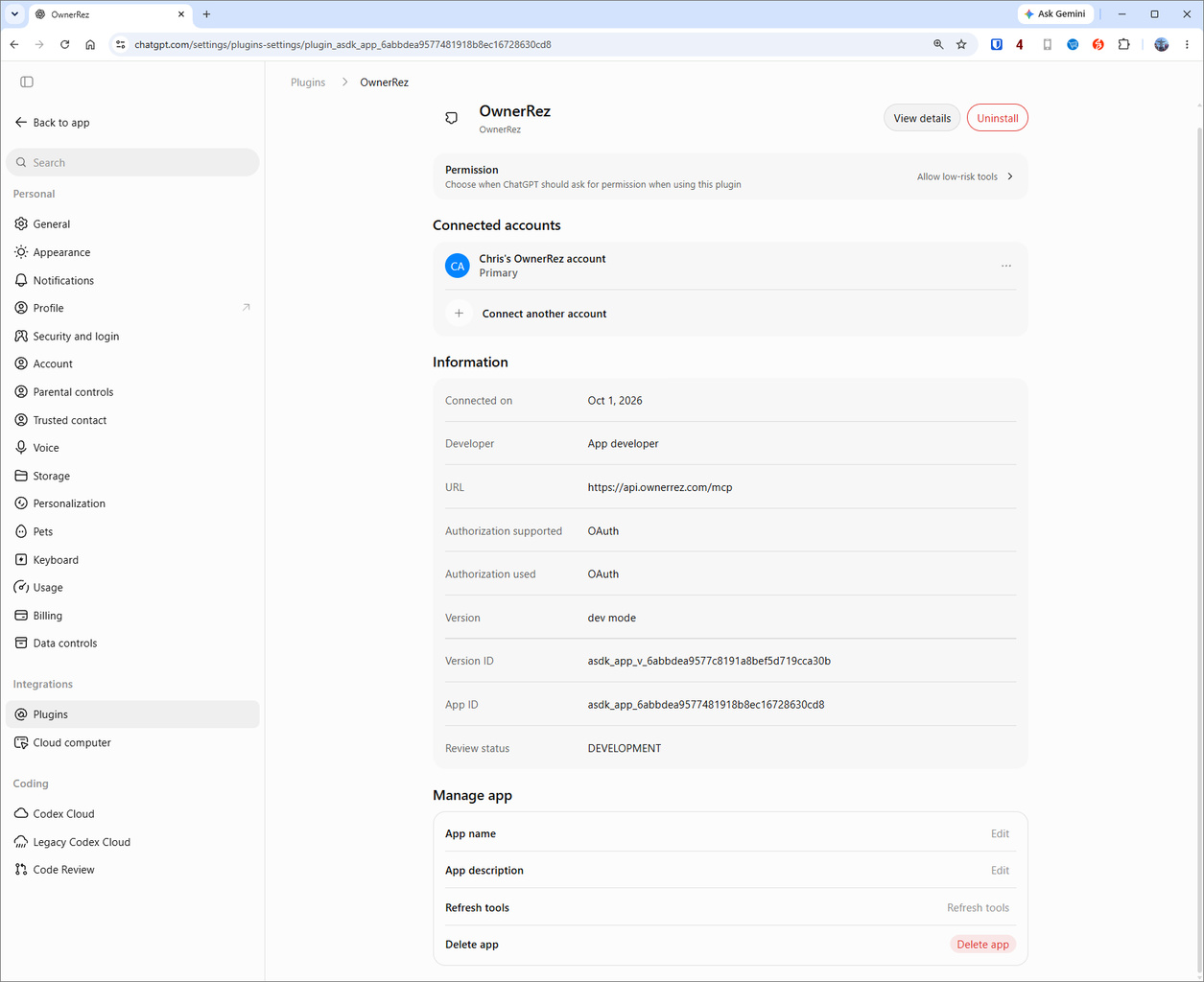
Then click on Plugins, then OwnerRez:
The scroll down to the bottom of the pane and click on the "Refresh" button:
Let us know if that fixes the issue with the miss-labeled tools.

I tried to prompt ChatGPT with the following:
Can you read all the messages that were exchanged today and identify all of them that were outside of the normal automated messages or basic discussion, that involved needing to respond to a particular issue or question?
I got the following:
The messages reviewed so far show several follow-ups: hot-tub testing, a bedroom TV fault, conflicting entry instructions, a lost-item shipment, and trash and package collection. OwnerRez has temporarily throttled further requests, so I’m pausing before checking the remaining conversations.
Thoughts on why this was throttled? Are we not able to call a days worth of messages at a time?
Thanks
Eddie
Let us know if that fixes the issue with the miss-labeled tools.
My plugin settings looks different than yours (Plugins is in a different place, and there's no "Refresh" button next to Information), but I clicked "Refresh tools" down near the bottom of the page and now the plugin does seem to be able to call message threads.
I tried to prompt ChatGPT with the following:
Can you read all the messages that were exchanged today and identify all of them that were outside of the normal automated messages or basic discussion, that involved needing to respond to a particular issue or question?
I got the following:The messages reviewed so far show several follow-ups: hot-tub testing, a bedroom TV fault, conflicting entry instructions, a lost-item shipment, and trash and package collection. OwnerRez has temporarily throttled further requests, so I’m pausing before checking the remaining conversations.
Thoughts on why this was throttled? Are we not able to call a days worth of messages at a time?
Thanks
Eddie
Hi Eddie,
Thanks for the details. It sounds like ChatGPT may be making a separate request for each conversation, which can quickly hit our API rate limit (300 requests per 5 minutes per IP). It may also be using a less efficient endpoint to pull messages.
To help us troubleshoot, could you ask ChatGPT to list the exact API endpoints and calls it made when pulling your messages, plus any error messages it may have received? Then email all of that to help@ownerrez.com along with a link to this thread, and our escalation teams can dig in from there.
Hi all,
AI assistants connected through our hosted MCP connector can now make changes in your OwnerRez account, not just read from it. You can now ask Claude, ChatGPT, or another connected assistant to create and update records for you.
When you connect, OwnerRez asks whether to grant Full read and write or Read-only (GET requests only) access. Full read and write is the default. With Full read and write, your AI assistant can make changes available through the OwnerRez API when you ask. See the Claude and ChatGPT articles for more detail. If you're interested in what the MCP can write to, ask your AI agent! They should have full access to our API docs.
You can change an assistant's access anytime under Settings > Connected Apps in OwnerRez, open the assistant's connection, and set the Access level. The change takes effect right away, whether you're raising or lowering access, so you don't need to disconnect and reconnect.
Now that the MCP feature is fully released, we're closing this thread. Thank you to everyone who voted and shared feedback along the way. It helped shape what we've built here.
Going forward:
- Issues or bugs: Email our helpdesk at help@ownerrez.com so our team can look into them.
- General feedback: Also welcome at help@ownerrez.com.
- Feature ideas: Post them in the Feature Requests forum so others can vote and weigh in.
Thanks again, everyone!
P.S. Command-line interface (CLI) is still a work in progress at this time. We'll share updates once it's ready.