
Feature Requests
Latest Activity...
Receive inbound email from guests on my OwnerRez site 0 replies

I am trying to keep all guest correspondance in one place and currently I can send messages to guests but when guests reply it comes into my main email box. It would be great if the would be directed to the email on the site so everything related to that booking was in one place.
Add-On Surcharges 2 replies

Has this been implemented yet? We have surcharges to offer the guests at the campground, and I would like to be able to include them in an email before their arrival.
WhatsApp Business Integration 48 replies

I'd like to upvote this :-) is this the place to add my support to this request?
WhatsApp is really great for guest and team communication - we could not run our properties in Greece without it and we're going to be embarking on adding it to our Chicago properties.
Management Dashboard 3 replies

This is an example of a dashboard page on another piece of software that we had used prior to OwnerRez. It was a link at the top of the page like all of the other sections. Called Dashboard or At A Glance. Each of the sections could be turned on or off (they were like widgets on a web page) and they could be configured with the little gear icon with date criteria colors and the like. They were all things that could be gathered from various reports on the system but they consolidated them into a single At A Glance page with links back to the booking, or guest so that further action could be taken as needed.
Would love to see something like this on OR. Yes we can run the Daily Checklist or Booking Detail reports or Booking Lists to get all of this information but you need to hunt and peck to get it.
Field Codes for Properties that can be used on multiple properties 1 reply

You can insert Field Codes into property Descriptions. Each Property type Field Code needs an entry for each property individually. Alternatively, you could set Account level Field Codes that can be referenced among multiple properties without needing separate entries for each as you'd need with the Property codes.
You can read more about Description Field Codes here - https://www.ownerrez.com/support/articles/property-descriptions#field
Multiple Owners Functionality in Property Management Module 5 replies

Status?
Logo of booking platform shown next to guest name on Calendar without having to hover on guest name. 3 replies

I don't know if this has been requested before I didn't see it the forum,
I would love to just look at my calendar and see where each guest booked from by having a logo next to their name. I don't want to have to click or hover on each guest to find out which platform they booked from. I had that previously and I miss it and it is very helpful when you do a quick glance at your calendar to know.
Merge Contacts in CRM 3 replies

Yes, but it isn't called that...
Go to the Booking which is associated with the wrong contact. Look for the Guest Record dropdown button, and select Associate with Different Contact, to move that booking into a different contact. Work through the affected bookings similarly until they are all correctly assigned.
Triggering surcharge for Early Check-in/Late Check-out 7 replies
Unfortunately, at present there is not, but this is planned for the future.
Triggering surcharge for Early Check-in/Late Check-out 7 replies

I'd like to automatically add a charge for early/late checkins/checkouts. I understand where to modify the checkin/out time, I can also see that I can create a trigger based on modifying the checkin/out time -- but that only can send an email template as far as I understand it. Is there a way for it to add one or more surcharges automatically?
Merge Contacts in CRM 3 replies

can they be unmerged?
Lynx 14 replies

Just been quoted $99/month for one unit 😂
Unbelievable.
Field Codes for Properties that can be used on multiple properties 1 reply

This request is for those of us who have multiple properties and information that is the same on two or more. Currently we have to manually add that same information for every property and when we make a change we have to go back and make the changes manually for each, proof each one and make corrections to each. This would make our Property listings so much easier to do.
Add option to export the Taxes Collected report in an Avalara MyLodgeTax-compatible format 6 replies

Excellent idea, Chris! And you presented it all so clearly. Kudos!
Upgrade Ribbon especially for Mobile app 1 reply

Hi Alex! Thanks for the ideas. We'll be doing a round of enhancements to the new Ribbon view later this year so more good things to come!
You can already change the Ribbon View colors to use more of the property colors under Display Preferences > Ribbon View. Also, you can set a Display Order under the Properties area which will also show up on Ribbon View. You can always revert back to the legacy Ribbon view if you'd like or toggle between as needed under Display Preferences.
Hope that helps!
Lynx 14 replies

Ben, you also get a branded guest portal where they can remotely control the locks and other connected devices like thermostats and garage door openers from their phones. There is also automated messaging, which was a bonus with the iCal integration as that's how my guest's codes were sent out. It's still how the portal goes out, which I find to be a good feature that my guests have enjoyed.
Ryan
Line Item Pivot and Line Item Detail Reports 1 reply
The Line Item Detail report(s) are not really about payments - if you use them for that, it would filter out any for bookings that weren't paid. Also, what if the booking was partially paid? What would the line items be - the regular full amounts or some pro-rated thing based on the payments?
Instead, we'd recommend using the Deposits feature (even if you have to manually curate deposits coming in). That will help do reconciliation better and more consistently over time.
Add option to export the Taxes Collected report in an Avalara MyLodgeTax-compatible format 6 replies

Like many OR users, I use Avalara MyLodgeTax to handle reporting and remitting my sales taxes.
The process of reporting figures to Avalara is relatively simple, but as a manual process, there's potential for transposition errors (I've previously reported the wrong property's totals in the wrong column and had to email them quickly to try to get it fixed before they finalize numbers). Especially for hosts with lots of properties, automating this would be both a big time-saver and also promote accuracy.
While both OwnerRez and Avalara have open APIs, which would be fantastic to implement, I'm guessing the dev work for one of them to write to the other's API is a non-starter at this time, so I'd like to propose a much simpler option for the time being:
Allow me to export the Taxes Collected report in an Avalara-compatible format.
The Taxes Collected report already has options to export in Excel, TSV, and CSV. It seems like it would be fairly trivial for OwnerRez to add another option that exports to an Excel file that is based on Avalara's published standard format, which I've uploaded here:
With that addition, the month-end tax reporting process would basically consist of exporting that report, importing it to Avalara, and hitting submit, taking only a few seconds and thereby removing the possibility of introducing an error in reporting the revenue totals.
As this should be a fairly simple option, I'm hoping this can be implemented pretty quickly as it shouldn't take a lot of dev resources to code. (The only issue I can foresee is that OR would need to store the Avalara property IDs somewhere so that they can be included in the exported file.) But if you use Avalara MyLodgeTax, please upvote this request so it gets on OR's radar!
Adjustable date range in Owners Dashboard view - Owners Portal 2 replies
Hi Scott: I can. tell you that change, to 12 month display, is on the road map of things that will be upgraded in the future. I cannot, though, give you an ETA yet.
Ability to Edit Owner Statement Email 1 reply

Hi,
Currently you are able to create an email template with the category of "Owner Statement" via Settings > Templates > Create Email Template > Owner Statement
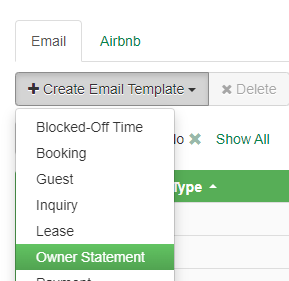
Then once its been created to your liking, you can set it to be the default for a specific owner via PM > Owners > Owner in question > Change > Preferences > Preferred Email.
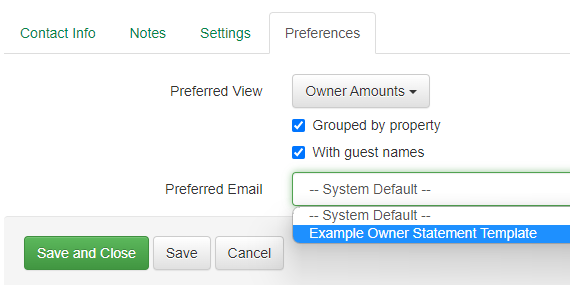
Does this satisfy what you're looking for?
~Caleb
Owner Dashboard Customization 5 replies

The Owner Dashboard currently raises more questions than answers for Owners, we had to disable it. We would like it to match what we see as managers from the Reports > Summary Reports > Bookings, Compare with Previous Year (yes).
Owner Dashboard Customization 5 replies

All of my owners have asked why the Owner Dashboard shows revenue that's not necessarily true to the payout. This is because the revenue includes the cleaning fee and only takes out the management fee. This creates a false dashboard of what is projected each month since they cannot see how much cleaning fee will be removed from their "Revenue." If we have the ability to customize the Owner Dashboard, it would really build trust with owners and be a more helpful tool. Today, it's just an overestimate of what they will actually get paid.
Ability to Edit Owner Statement Email 1 reply
It would save time if we could edit the owner statement email in advance. Each month, I need to go in and update the text in the pre-populated Owner Statement email for each client and property. Thanks in advance!
Comprehensive Fix for Accounting/Quickbooks - develop Roadmap 82 replies
The Airbnb Transactions API is still in testing, it's been complicated. We all, eagerly, await it's release.
Comprehensive Fix for Accounting/Quickbooks - develop Roadmap 82 replies
1) Is it possible to be part of the beta for AirBnB transactions API?
The Airbnb Transactions API is still in testing right now. There is no private beta yet, and we plan to release it to all when it gets through testing. Should be out in Q1 so just a couple more weeks, or maybe the beginning of April
Any updates? It's now the beginning of April. :)
Team Member System Alerts 11 replies

Third-party alerts - that's a good start, but it only sends alerts for bookings and any changes to it. My co-host, who is local/closer to my rental home, is responsible for all communications, especially inquiries, guest checkins, guest checkouts, and any issues that might occur during their stay.
Same here. I would love to for my staff to alerts for incoming messages.
Quote Email/SMS/Channel Triggers 17 replies
I just found this while looking for how to send sms for a quote, It would be beneficial to tell potential guests to look for an email from your email address.
Daily Checklist Report as auto-emailed PDF 2 replies
I'd like to have the Daily Checklist report and Date Range reports generated as a PDF and emailed to my staff at a set time each day.
Upgrade Ribbon especially for Mobile app 1 reply

1 highlight more Today column color.
2 make grids more prominent and add same color as the property
3 allow to drag and move listing order under bookings tab to arrange them as we wish
4 add feature to see daily price when hoovering over calendar
5 add feature to scroll around the calendar with the mouse
Adjustable date range in Owners Dashboard view - Owners Portal 2 replies

Currently the owners portal Dashboard graphs shows a fixed range of months (+/-5mo). Our owners would like to be able to see the FY for Rev and Occ. as many of our bookings are more than 5mo. in advance.