
Feature Requests
Latest Activity...
Data validation/standardization and additional name 2 replies

I’d like to suggest two enhancements to improve data consistency and search accuracy in OwnerRez:
-
Automatic Proper Case Formatting:
Please implement an automatic conversion so guest first and last names are stored in proper case (for example, “John Smith” instead of “JOHN SMITH” or “john smith”). -
Additional Guest or Company Name Field:
It would be very helpful to have an optional field for an additional guest or company name. Many bookings are made jointly (for example, “John Smith and Jane Doe”) or on behalf of a business (“John Smith – Smith Consulting”). Having a dedicated field would make it much easier to search for later.
Rezzy upsells 6 replies

Great idea and thank you! How would this work for Airbnb reservations?
The same way. Create a channel template and channel trigger (applicable to Airbnb). Make sure you are clear in your template that whatever percent discount is off the rate they booked with, and taxes still apply. If they agree, add an extra night in OwnerRez and bill them for the extra night by sending a payment request from OwnerRez (personally, I do not involve Airbnb in extra night extensions). I suppose you can do via the Airbnb resolution center too.
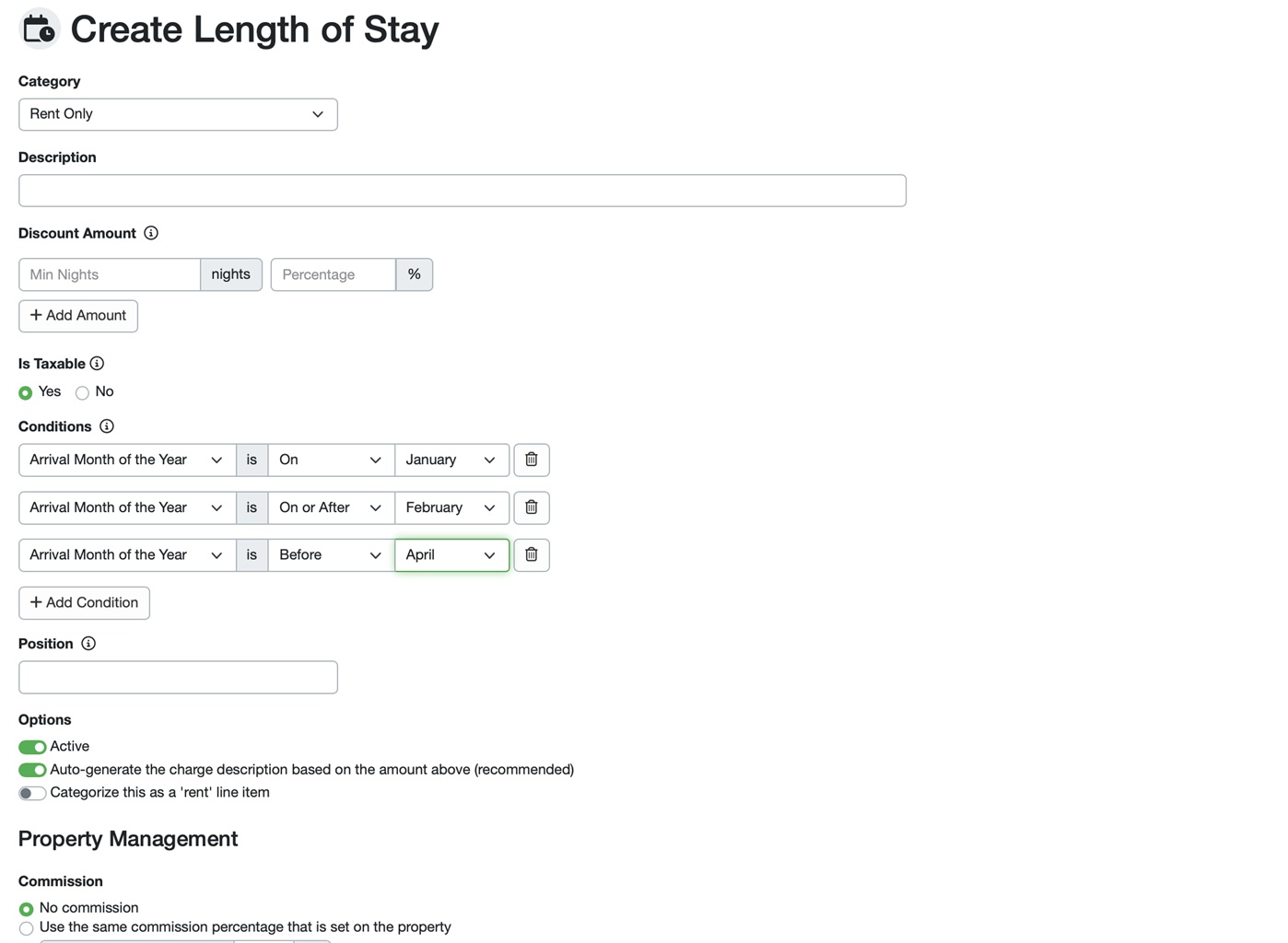
Allow Monthly Pricing by Month Instead of One Global Discount Yearly 5 replies

As this is getting to involve specifics to your account, it will need to be addressed by a Support ticket not public in the forums.
Please check your additional emails associated to your account, as we've been trying to reach you but your primary address has been bouncing back.
I am also putting you in queue for a callback in case you aren't receiving any of those emails.
Relative Seasonal Rates 6 replies

But I don't use it . . .
New Categories for Surcharges: Gate Passes and Credit Card Processing 1 reply

Please add surcharge categories for "Gate passes" and "Credit Card Processing".
Furhermore, the community we property manage for has a fee for a gate pass to allow cars into the community. Right now we don't have a great way to categorize these. Please add a multiplier option for this similar to pet fee. If people need more than 1 guest pass (which they frequently do) it would be great if they could request that with the multiplier so we can have the surcharge updated accurately.
Option to select "All Dates" or "Trailing 12-Month" in the report section 1 reply
It's wild to me that "all time" is not an option for reporting. I find it tedious having to use custom date ranges for this. You requested this a year ago so I'm not too optimistic it's important enough to add.
Allow Monthly Pricing by Month Instead of One Global Discount Yearly 5 replies

Can you EXPLAIN clear how to make the setup ? How can I put the different percentages for different apartments where do you assign the different percentages here?
Merger two or more bookings 6 replies

We have been using OwnerRez for our villa operations for over a year now and we love it. We have recently switch over our Hotel bookings to OwnerRez and want to have this feature because many times one guest will book all rooms / 2 or more rooms. This results in us having to create individual bookings instead of One booking for all the rooms.
This would be a great additional feature for us and for OwnerRez to expand its services for Hotel & Condo operations.
Thanks
CY
Add Remove All Other Discounts for all Discount Types 2 replies

Currently, the "Remove all other discounts when this code is applied" option is only available for Discount Codes, not for Optional Discounts or Automatic Discounts. I would be great if it could be applied to optional and automatic discounts as well.
Thanks!
Custom Fields: Grateful & There's Work To Do 3 replies

I did a quick screen capture to show how I use my custom fields as variables in my guidebooks.
First, it shows how I can place a single variable into all my guides and the relevant info for each property is displayed in each guide.
Then it shows how an edit in OwnerRez instantly updates what a guest sees in the guidebook.
Custom Fields: Grateful & There's Work To Do 3 replies

I appreciate the feedback.
Can you share with me an example of how you're using them in greater detail? I'm definitely open to not knowing what I don't know.
Custom Fields: Grateful & There's Work To Do 3 replies
I don't want to diminish your suggestions for custom field improvements. You've got lots of good ideas. However, I'd hardly call the current functionality "weak". I find the custom fields to be an exceptionally powerful tool as they are currently implemented. In addition to inserting variables into messages, I use the custom field variables extensively in my digital guidebooks to the point that I make almost no edits in my guidebook software. All changes are made in OwnerRez and my guidebooks are instantly updated.
Rezzy upsells 6 replies

Great idea and thank you! How would this work for Airbnb reservations?
Rezzy upsells 6 replies
In the meantime, you can do upsells without Rezzy. You can define a template and a trigger to run X days before arrival if you have nights before/after open. Here is an example of a template (my trigger runs 5 days prior). I also have a similar SMS trigger/template.
Relative Seasonal Rates 6 replies
If not mistaken, this can be set up in Pricelabs if you use it.
"Hold these dates" customize default 0 replies
I'd like to request that there be an option to make "Hold these dates" checkbox for quotes be checked by default, instead of having to check it for every single quote we send out (which is a large part of our business). It would also be super handy to be able to set what the default duration of the hold is.
Relative Seasonal Rates 6 replies
I would love to be able to set some seasonal rates to be relative to other seasons instead of a hard-coded number. For example, it would be great for Labor Day Weekend to just be 10% higher than whatever September is set to, instead of having to update 2 separate numbers. I realize this can be achieved by building a spreadsheet to do all my calculations in, and then import them. But it would be super handy to be able to skip that step.
Surcharge Rate Adjustment 2 replies

This would be amazing, the new airbnb fee is SUPER challenging on the book keeping side for PM's
Custom Field should be able to apply to more than one property 3 replies

[This topic has been merged with another topic (Custom Field applying to multiple properties). All unique votes have also been merged.]
Custom Field applying to multiple properties 6 replies
[Another topic was closed as a duplicate of this topic (Custom Field should be able to apply to more than one property)]
Custom Fields: Grateful & There's Work To Do 3 replies
TL;DR
Custom fields are great to have, and in their current state, offer very little value. There have been a considerable number of mentions of custom fields that have gone unanswered.
CONTEXT
I've reviewed SO many feature requests and various forum posts surrounding custom fields. Many, if not most, of these have gone with little notice or comment from the OR team or from other users. I can only imagine that it is because the current functionality of them is a) weak and b) misunderstood as to the possibilities.
- https://www.ownerrez.com/forums/requests/custom-field-should-be-able-to-apply-to-more-than-one-property#73624
- https://www.ownerrez.com/forums/requests/custom-field-applying-to-multiple-properties#73617
- https://www.ownerrez.com/forums/requests/custom-field-template-format-issues#75560
https://www.ownerrez.com/forums/requests/custom-fields-enhancement#72515- https://www.ownerrez.com/forums/general-help/custom-field-change-format-type#73063
- https://www.ownerrez.com/forums/requests/custom-field-to-link-to-trigger#64977
- https://www.ownerrez.com/forums/requests/custom-field-filter#76129
- https://www.ownerrez.com/forums/requests/custom-field#67592
An email exchange between me and a team member at OR:
There is room to improve the inclusion of non-booking fields in the pre-agreement form. As it stands, I need to open their license image and manually enter their birthday. It seems like unnecessary work for something that could be automated.
And I hear you: the perception of the powers that be at OR is that an agreement is the transactional part of the relationship. Really, it's so much more. Not to mention, what harm could there be in allowing non-booking fields to be inserted into the POC form? Why not give us the flexibility to collect any information we'd like?
I'd also like to make mention of the lack of creativity in the custom field design. Most notably, why are there no formatting options (e.g., MM/DD/YY, checkboxes, radials, etc.)?
In the end, there is considerable room for improvement regarding custom fields. I love the product and the team, and I hope to see more in this area to lay the groundwork for more automation.
To add further context, I want to invite guests to enter their DOB on the point-of-contact form (pre-contract). This field gets to stay with the contact, not the reservation. Unfortunately, only "booking" fields can be used on the POC form. And in case you don't know, booking fields are considered transactional and relevant only to the current booking. In other words, the information (e.g., Driver's License) doesn't remain with the contact.
Think about the potential use cases, especially in marketing and automation...
- Email a birthday card
- Mail a birthday card
- Obtain their dogs' names and send their dog treats
- Obtain their kids' names and send them holiday cards
- Known allergies
- Known preferences
All of this information (and undoubtedly much more I'm not considering at the moment) should be associated with the contact record, not just the one booking. The entire purpose of OR, in my opinion, is to create an incredible guest experience that does NOT end when the guest leaves.
As I said in my email exchange, there is considerable work to do regarding custom fields. As it stands, (respectfully) it feels like a slapped-together afterthought that was given very little consideration.
I very much hope that other users see value and possibility in custom fields and UPVOTE THIS POST in hopes of OR taking action.
Add Map Showing Each Home’s Location on the Booking Page 1 reply
showing the location of their home and its proximity to nearby ski resorts.
Are you asking for different functionality than the multi-property map on the site already, you want that to just show the properties but also have a map on the booking page showing nearby landmarks?
Give Team Member access to Rezzy Tasks via portal 1 reply
Hi Katie,
We do plan to surface those tasks via portal, yes. Thanks for submitting this. We'll take your thoughts here into consideration once we're ready to get work on this feature underway!
Rezzy upsells 6 replies
While we don't have plans for this at the moment, we're always open to suggestions!
Thanks for writing this up. Feel free to share with likeminded users who would be willing to vote for it as well.
Allow discount codes to stack with normal (e.g. LOS) discounts 9 replies

Hey Bri, any update when stacking will come back for VRBO? This was a core feature we relied on to fill empty space with longer bookings.
Schlage Integration billed to the property 2 replies

We are property managers that integrate schlage with OR. Can OR bill the cost of the lock as a expense in the property it is integrated with? Or is there a easier way to bill the owner for the cost of the lock integration each month through automation.
Owner Block Note 1 reply

A couple of things you can do:
Create a process that when you create a block for the property, or an Owner creates a block, you also add a descriptive title (i.e. Deep Cleaning Block). That title will show on the block in the ribbon calendar much easier than notes will.
Or, In their Team Access settings, you can check the box that allows the owner/team access user to view notes for calendar items.
If you have any issues finding that section, drop us a note at help@ownerrez.com and we'll be happy to assist!
UK calendars and widgets need to respect Monday start to the week. 8 replies
Ah, jeez. Yes, I see what you mean. Sorry about that, I was testing without rates visible on my widgets.
We'll discuss this internally. For now, this request remains open for voting! Feel free to share it with likeminded users who would be willing to give it an upvote.
UK calendars and widgets need to respect Monday start to the week. 8 replies

That doesn't work because Australian English changes the currency to $ not £.
Australian dollars are even more confusing than Sunday week start!
I did write a help ticket about this too.
UK calendars and widgets need to respect Monday start to the week. 8 replies
Hey Piers C,
Those calendar widgets should have a "Display Culture" setting available. While we don't have an option for English (UK), we do have English (Australia) which appears to display those calendars with Monday as the start of the week while keeping the language to English.
Looking at your current website configuration, you can play with this in Settings > Hosted Websites > select website > click into the Availability page, then click Change next to the Multi-Month Calendar widget, like so:
That's where you'll find the Display Culture setting:
I suggest giving that a try, and comparing the calendar view on the website to your Bookings calendar to make sure everything is still displaying as it should.
After speaking with our developers, we see no reason this shouldn't accomplish what you're after. If you run into any trouble, feel free to write to help@ownerrez.com so that our support team can investigate.