
Blog
Latest Activity...
Integration With Clearview 16 replies

Yes!!! I thought I was getting the ability to allow a customer to select ACH or credit card when checking out and then passing the cc processing fee on when I signed up with Yapstone, but I believe this is an OwnerRez issue. I was told we can only offer 1 form of payment collection (outside of manual payments). I hope I am wrong and someone can show me how to set this up.
Correct Nicole, OwnerRez doesn’t currently allow guests to choose between ACH and credit card at checkout while automatically passing along credit card processing fees. At the moment, only one payment method can be offered through the automated checkout process (outside of manual payments).
Thank you for reaching out.
Integration With Clearview 16 replies
Is there a option to automatically add the credit card charge to the tenant / client if they choose to use credit card, and have no fee to them if they choose debit or ACH? The lack of that feature would be a deal killer for us.
Hi Brian,
Thank you for reaching out. OwnerRez doesn’t currently offer a built-in ACH option. If you’d like to accept ACH payments, it would need to be set up and processed manually through Authorize.net.
Best
Elivaas’s $10M Boost, Capital One’s 5x Rewards, and Airbnb’s Hotel Expansion 0 replies

This week’s Industry News covers fast-growing luxury OTA Elivaas’s big funding round, Capital One’s new 5x rewards for vacation rental bookings, and Airbnb’s “and not an or” approach to hotels. Plus, Parade’s take on what travelers are looking for in vacation rental listings in 2025. Let’s dive in.
Gurugram-based startup Elivaas raised $10 million in a Series B round to expand its luxury vacation rental offerings. Targeting affluent travelers, Elivaas competes with Airbnb by focusing on India’s premium market with curated high-end homes and personalized services. The funding will support growth into new destinations, add vetted properties, and enhance guest experiences. Backers highlight Elivaas’s technology-driven approach and strong focus on trust and guest satisfaction, positioning it to scale rapidly across India and other growing markets.
Select Capital One cardholders can now earn 5x rewards when booking vacation rentals through the Capital One Travel portal, a benefit that was previously unavailable. Vacation rentals were already bookable on the platform, but this big change reflects the growing consumer demand for short-term rentals and makes booking through Capital One Travel more rewarding for cardholders.
Building on last week’s Industry News report of Airbnb’s Q2 2025 earnings call, Fortune has released an article highlighting the company’s push to expand its hotel inventory. CEO Brian Chesky described this on the earnings call as an “and not an or” strategy. Airbnb will keep its focus on the core vacation rentals while also growing its hotel supply, especially in international markets where many hotels are independent. Airbnb aims to fill booking gaps during peak periods and in cities where home availability is limited. Chesky also pointed to HotelTonight as a successful acquisition and said the company is open to more deals as part of its broader travel and living strategy.
A new Parade article on “7 Things to Know Before Booking a Vacation Rental Right Now” offers insight into what guests are prioritizing and looking out for in 2025. One standout tip from the article is that a lack of neighborhood information is a red flag for many travelers. Highlighting proximity to public transportation, restaurants, and attractions such as beaches, lakes, or hiking trails can help boost booking confidence. In the article, Parade encourages guests to book vacation rentals with detailed property descriptions, clear and fair cancellation policies, and transparent pricing with no surprise fees.
Over 10,000 hotels across Europe have joined a class-action lawsuit against Booking.com, alleging that its long-standing “best-price” clauses prevented them from offering lower rates on their own websites or other platforms. The clauses, in place from 2004 to 2024, were ruled anti-competitive by the European Court of Justice last year and have since been dropped under the EU’s Digital Markets Act.
As August continues, watch for more moves in investment, guest preferences, and platform expansion across the vacation rental market. Check back next week for the latest updates.
Integration With Clearview 16 replies

Some open questions:
#1 - How do they handle refunds? If the average processing is 2.45% per transaction, is it 2.45% for incoming and another 2.45% for outbound (refunds) transactions? So a $10,000 booking that is cancelled would cost $490.00 in processing fees. $245 for the inbound transaction, another $245 for sending the money back?
#2 - Do they have total cost down to the per booking in regards to reporting and statement of fees? (i.e. Ascent sends a lump sum statement and doesn't allow us to know which bookings had which processing fees associated with which booking (disappointing, but super low processing rates -- sub 2.5%). The same with Priority Payment Systems. Who do they use? Do they use Priority Payment Systems?
#3 - Do you use Authorize.net for your gateway?
#4 - Are you just white labeling Lynbrook or Ascent or some other provider?
Integration With Clearview 16 replies

Is it cheaper than the Stipe transaction fee?
Integration With Clearview 16 replies

It would be great if we could get "automated monthly recurring bills" in-between all of these integrations with new partners.
Integration With Clearview 16 replies

How does Reverse My Fees model work with VRBO? Will the traveler be shown the CC processing charge up front?
Integration With Clearview 16 replies

Do they allow security holds?
Integration With Clearview 16 replies

Yes!!! I thought I was getting the ability to allow a customer to select ACH or credit card when checking out and then passing the cc processing fee on when I signed up with Yapstone, but I believe this is an OwnerRez issue. I was told we can only offer 1 form of payment collection (outside of manual payments). I hope I am wrong and someone can show me how to set this up.
Integration With Clearview 16 replies

What security features do you have in place?
Introducing Rezzy AI: Your Smart Messaging & Task Management Assistant 30 replies

I signed up for the Beta on 7/21/25 and still waiting on approval to join. Looking forward to trying on my 10 properties..
Integration With Clearview 16 replies

Is there a option to automatically add the credit card charge to the tenant / client if they choose to use credit card, and have no fee to them if they choose debit or ACH? The lack of that feature would be a deal killer for us.
Airbnb’s Strong Q2, Dallas STR Ruling, and Vacation Rentals Surpass Hotels in the U.S. 0 replies
This week’s roundup covers Airbnb’s strong Q2 growth, a pivotal Dallas short-term rental ruling, and vacation rentals outpacing hotels in the U.S. Plus, updates from Greater Palm Springs and top budget beach getaways for summer 2025. Let’s dive in.
Airbnb reported $3.1 billion in revenue for Q2 2025, a 13% increase year over year. Nights and Experiences booked reached 115.1 million, up 9% from the same period last year, with demand accelerating from April through July despite early economic uncertainty. Executives attributed growth to a strong summer travel season, particularly in North America. During the earnings call, Airbnb highlighted increased group travel and longer stays, noting that over 25% of bookings in Q2 were for trips lasting a week or more. The company is also investing in AI to improve search and guest support, and said it plans to expand listing supply ahead of future peak travel periods.
An appellate court ruled in July that Dallas’ 2023 ordinance banning short-term rentals in single-family neighborhoods is unenforceable. The ordinance also requires short-term rental permits for properties in multifamily and commercial zones, but the city has yet to launch the permitting system. Following the recent ruling, The Dallas Short-term Rental Alliance has signaled that they are pleased with the court’s decision and has reinforced its desire to work with city leaders on a fair and sensible ordinance. With Dallas set to host eight matches during the 2026 FIFA World Cup, and tickets going on sale September 10th, local groups are urging officials to clarify rules quickly amid the expected spike in demand. Advocates warn that ongoing legal and regulatory uncertainty could limit lodging options during one of the city’s most significant events to date.
Short-term vacation rentals outperformed traditional hotels across all U.S. regions in the second quarter of 2025, according to Key Data’s latest U.S. Vacation Rental Market Index. The sector posted stronger revenue per available room (RevPAR) than hotels, marking a notable shift in the travel accommodation landscape. Despite this strong performance against hotels, forward occupancy for September is down 11% year over year. Booking windows have also shortened across key summer months, challenging operators to manage more efficiently and stay on top of pricing strategies as travelers book closer to arrival.
A new report from the Greater Palm Springs Convention and Visitors Bureau highlights the economic role of short-term rentals in the region’s tourism economy. According to the article, in 2023, short-term rental activity generated $1.1 billion in economic impact and supported more than 4,500 local jobs across the Coachella Valley. To address neighborhood concerns, cities throughout Greater Palm Springs have adopted “good neighbor” policies, including quiet hours, bans on amplified outdoor music, proper trash storage, and designated guest parking to preserve quality of life for full-time residents. Local governments have also capped permits in some cities, partnered with rental platforms to improve compliance, and provided 24/7 vacation rental hotlines for residents to report issues directly to on-the-ground compliance teams. The region’s approach aims to balance housing needs with tourism demand and may serve as a model for cities considering stricter crackdowns or bans on short-term rentals.
As travelers continue to prioritize budget-friendly trips in summer 2025, NerdWallet has named Panama City Beach, FL, West Palm Beach, FL, and Outer Banks, NC, among the top cheap beach getaways in the U.S. All three offer public beaches, affordable lodging, and family-friendly attractions, making them standout picks for a coastal vacation without the high price tag.
As August unfolds, expect more shifts in traveler behavior, regulation, and technology across the vacation rental landscape. Check back next week for the latest news!
Integration With Powertranz 2 replies
We're excited to announce our new integration with Powertranz, the leading payment gateway in the Caribbean. This new integration will give OwnerRez users access to native credit card processing in 10 new Caribbean countries. We are thrilled to be adding the Caribbean to our long list of locally supported regions. Please refer to the list below for business location requirements.
About Powertranz
Powertranz is an easy to integrate payment gateway to enable merchants to accept online credit and debit card payments and POS payments throughout the Caribbean Region. The Powertranz platform is integrated with dozens of banks and shopping carts across the region to allow merchants to accept cards via one easy integration with real-time secure, web-based reporting and reconciliation.
Features
- Accept payments in multiple currencies
- Process transactions with PCI Validated Point to Point Encryption (P2PE)
- Settle transactions locally
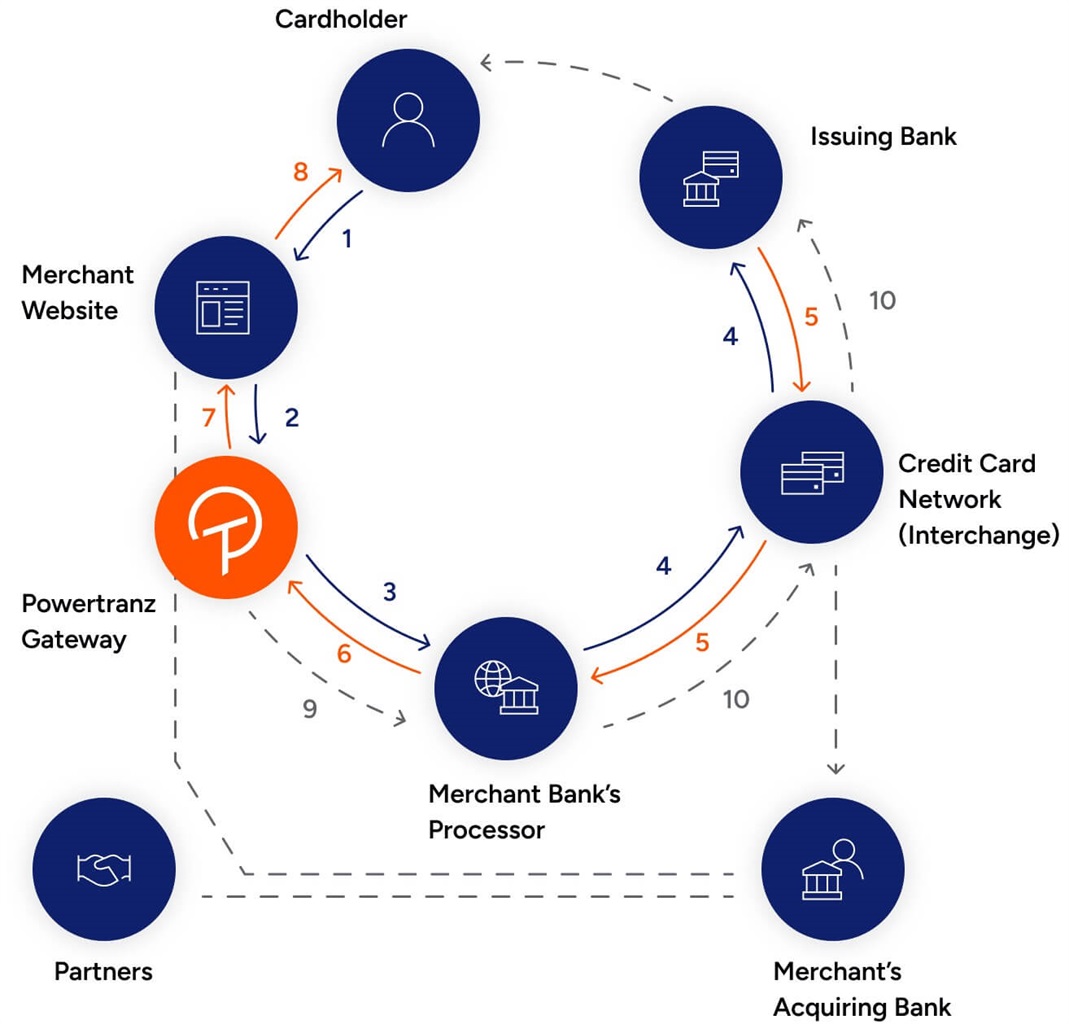
Business Location Requirements
At this time, we only support businesses that use these banks in these locations:
- Bank of the Bahamas
- Bahamas
- Clarien Bank Bermuda
- Bermuda
- HSBC
- Bermuda
- RBC Caribbean
- Aruba
- Bahamas
- Barbados
- Bonarie
- Cayman Islands
- Caraco
- St. Maarten
- Saba
- Trinidad
- Turks & Caicos
Ready to Connect?
Get started with Powertranz by visiting here and checking out the OwnerRez support article for integrating OwnerRez with Powertranz.
User Profile: Blue Heron Vacations 0 replies
Blue Heron Vacations has been welcoming guests to the Turks and Caicos Islands since 2020, offering both affordable and luxury villas on the island of Providenciales. Locally owned and operated by Claudius Williams and his team, the company manages 25 properties and focuses on delivering a truly authentic TCI experience.
Can you tell us a little bit about your history?
Blue Heron Vacations was started in 2020, and we have been using OwnerRez since our inception. The company is a locally owned and operated property management company with 25 individual villas under management. We specialize in both affordable and luxury properties on the island of Providenciales in the Turks and Caicos Islands.
What is your background?
I have a background in banking, accounting, and finance. I started property management and vacation villa management in 2007.
Were you always in VR or property management, or is this a 2nd/3rd career?
This is technically my 3rd career. Prior to working in property management, I worked in private offshore banking.
Are you from the geographical area where your properties are located, or did you move there later?
I am from the Turks and Caicos Islands. I grew up in North Caicos, which is another island in the chain, but I am currently living and working in Providenciales.
What do you love the most about the vacation rental business?
My favorite part of the vacation rental business is the people. We have a great team and an amazing group of villa owners. Our guests tend to be experienced travelers, and the Turks and Caicos Islands have a lot to love. It's exciting to be part of building a uniquely TCI (Turks and Caicos Islands) vacation experience for our guests.
What do you dislike the most about it?
Not so much a dislike, but more of a challenge is navigating the ever changing political and legal changes around renting short term villas. Although I understand the reason for our, and other's, regulatory framework around Villa Rentals, it can definitely be frustrating managing that in addition to owners and travelers expectations.
How do you use OwnerRez to manage your business?
For Blue Heron Vacations, OwnerRez is at the core of our business. We use it as follows:
- As a central reservation calendar
- The integration with QuickBooks is valuable for us
- As an owner portal
- To streamline management of information on our website via WordPress plugins
- To push information to Airbnb and Vrbo via API integrations
- To manage multiple owner calendars
What is the most useful feature OwnerRez offers?
It's difficult to pull out one particular feature because it is all intended to work together. That being said, for us everything starts and ends with the global calendar and its functionality.
Rooted in the beauty of the Turks and Caicos Islands, Claudius has built Blue Heron Vacations into a trusted name in villa management. With OwnerRez as the backbone of his business, we look forward to seeing his continued success in creating unforgettable stays and building a uniquely TCI vacation experience for guests from around the world.
User Profile: AZ Desert Vacations 0 replies
Meet Lori Taylor, founder of AZ Desert Vacations, a woman-owned and women-run vacation rental management company based in Arizona. Launched in 2020, the business quickly grew from managing a few personal properties to overseeing more than 50 homes across Arizona and Belize. With a background in mortgage lending and a hands-on approach, Lori has grown the business with a simple mission: treat every home like it’s her own, provide an exceptional guest experience, and help owners maximize their revenue.
Can you tell us a little bit about your history?
I founded AZ Desert Vacations in 2020 in Phoenix, Arizona with my previous business partner, after managing my own vacation rentals for years. I saw firsthand how many property management companies were falling short and I knew I could do better. Our mission from day one has been simple: treat every home like it’s our own, provide an exceptional guest experience, and help owners maximize their revenue.
We grew quickly, going from 2 to 10 properties in our first year, then to 50 the next. I hired my first team member after 14 months, and today we have a small but mighty team of four in Arizona. We also manage a large property in Belize with two local employees on the ground there.
As a woman-owned and women-run company, I’m incredibly proud of how far we’ve come. Even in a tough market, we’re focused on thoughtful growth, strong relationships, and doing right by both our owners and our guests.
What is your background?
I started my career in mortgage lending in 1998, quickly moving into branch and district management roles before shifting back to full-time loan origination when I started my family. My family began owning short-term rentals in 2010, and in 2019, we purchased and I started personally managing our villa in Belize. I was born in Alaska and spent most of my life in Washington before relocating to Arizona in 2021, where I launched AZ Desert Vacations. I’m passionate about building businesses, creating opportunities, and helping others succeed through hands-on leadership.
Were you always in VR or property management, or is this a 2nd/3rd career?
This is actually my second career. I spent over 25 years as a residential mortgage loan officer before deciding, thanks in part to a shifting economy and rising interest rates, to dive full-time into vacation rentals and property management. What started with managing a few properties quickly expanded, and we’ve since added a cleaning company and a car rental business to better support our guests and owners.

Are you from the geographical area where your properties are located, or did you move there later?
I was actually still living in Washington when I first started the company, but I quickly realized I needed to be more local to truly give my properties and owners the attention they deserved. Making the move to Arizona was the right decision, not just for the business, but for our entire family. We love the warm, sunny climate and were more than ready to leave the rain behind. We're also in the process of expanding our management services in San Pedro, Belize, one of the world’s top tourism destinations, and we’re excited to be part of its vibrant travel community.
What do you love the most about the vacation rental business?
What I love most about the vacation rental business is that no two days are ever the same. I’m always doing something different, whether it's solving a new challenge, helping a guest have a great stay, or finding ways to make a property even better. I love the mix of hospitality and business, and there's something really satisfying about creating great experiences for guests while also helping owners succeed. It keeps me on my toes, and I genuinely enjoy the fast pace and constant variety.
What do you dislike the most about it?
One of the biggest challenges in vacation rental management lately has been dealing with the growing number of guests who try to scam their way into a free stay or a refunded cleaning fee. It’s disheartening to see people take advantage of hardworking owners and managers who put so much time and care into creating a great experience. Because of this, I’ve had to stay sharp and constantly adapt; these scams are getting more creative by the day. While it can be exhausting, it’s also pushed me to tighten our systems, document everything thoroughly, and stand firm in protecting our clients and our business. It’s not the part of the job I love, but it’s made me a stronger, more detail-oriented manager, and I’m proud of how we continue to rise above it.
How do you use OwnerRez to manage your business?
I use OwnerRez daily, truly all day, every day. It’s the backbone of my business and keeps me organized in a way no other platform could. From channel management and direct bookings to automated emails, SMS messaging, a multitude of reports, and detailed owner statements, it handles everything I need to run smoothly and professionally. It’s an essential part of how I deliver great service to both guests and property owners.
What is the most useful feature OwnerRez offers?
The most useful feature of OwnerRez for us is the automation. It saves us countless hours by handling guest communication, scheduling, reminders, and more, all without sacrificing the personal touch. With so many moving parts in property management, having reliable automation in place allows us to stay on top of everything while focusing our time where it really matters.
From just a few homes to over 50 properties across Arizona and Belize, Lori’s journey is inspiring. With a mighty team of four and OwnerRez as the backbone of her operations, we’re excited to see AZ Desert Vacations continue to grow while treating every home like their own, providing exceptional guest experiences, and helping owners maximize their revenue.
August Product Update - Simplified Discounts & Surcharges, Rezzy AI Search Results, New Payment Processors, New Channel & More! 11 replies

August brought some significant upgrades to streamline your workflows! 📈 From Simplified Discounts & Surcharges, Rezzy AI search results, two new Payment Processors, and a new Channel, the month was packed. Let's jump in!
New Features
Discounts & Surcharges
While users could already configure discounts and surcharges in OwnerRez, we introduced a simplified way to do so on August 27th. Each area now has Standard, Supplemental, and Advanced groupings.
🎯Standard Discounts (e.g., Early bird, Last-minute, Length of Stay) and Surcharges (Additional guests, Cleaning, Pet, Linen, etc.) are optimized to ensure they are applied to all direct bookings and synced to your Airbnb and Vrbo channel integration listings. The simplified options help keep them widely compatible.
🛠️Supplemental Discounts (e.g., Discount codes, Manual or Optional discounts) and Surcharges (e.g., Optional, Manual, Offline) that guests can optionally select and apply to direct bookings, or hosts can manually apply pre-arrival. These are the same options that were available before this update.
🧩Advanced custom Discounts and Surcharges offer great flexibility for direct bookings, but depending on the criteria selected, they may not be applied to channel integration listings.
Brand new users are greeted with simple Add pages. Accounts that already have discounts and surcharges can see the same options when creating an additional one.
The new Discount add screen looks like this:
The new Surcharge add screen looks like this:
For accounts that already have some, you can go to Settings > either Discounts or Surcharges > + Create Discount or Surcharge and select one of the above-pictured options.
For example, once you click/tap the Add Cleaning Fee tile, you are presented with streamlined options:
When using the Property Management premium feature, you can still set necessary expense and commission settings below the options section.
How do these new changes impact your existing discounts and surcharges? In a future release, current discounts and surcharges will be converted to standard types where possible. Discounts and surcharges with criteria outside the standard categories will be considered "custom" discounts and surcharges. No action is needed from you for this.
Get started with these simplified Discounts and Surcharges today.
Copy Discounts & Surcharges
Adding multiple discounts and surcharges with different conditions and settings was a time-consuming process. With our August 27th release, OwnerRez added the ability to copy existing discounts and surcharges to new ones, allowing you to duplicate and then tweak as needed before saving. Copying existing discounts and surcharges is an excellent way to start configuring multiple discounts and surcharges with various conditions and settings.
In the Discounts and Surcharges grids, click on an existing discount or surcharge dropdown list and select "Copy to New..." to automatically generate a copy.
Your copied discount or surcharge Description field will include a "Copy of" prefix, but you can easily edit that field.
Rezzy AI Search Result Summaries
Following our July Rezzy AI launch, OwnerRez's exclusive Rezzy AI now transforms your support experience by smartly searching our extensive Support Center, blog posts, vacation rental guides, and more to provide instant, accurate answers—completely free for all users.
As part of our August 6th release, Rezzy AI provides intelligent search results with detailed AI summaries that synthesize information from various OwnerRez sources (e.g., support articles, vacation rental guides, blog posts, etc.) while offering direct links to relevant support articles for further exploration. Like other online search results, users can provide Rezzy AI feedback by clicking the thumbs up or down.
ClearView
In case you missed our August 12th Integration With Clearview announcement, OwnerRez is pleased to announce the addition of a new payment method, ClearView, as part of our August 6th release. ClearView simplifies payments for vacation rentals, RV parks, and boutique stays with low fees and an easy setup process. As an OwnerRez Integrated Partner, ClearView supports voids, refunds, and security deposit holds.
Powertranz
With our August 13th release, OwnerRez added the new payment method, Powertranz, as announced in our August 14th blog post about OwnerRez's Integration with Powertranz, a new payment method option. Powertranz, formerly First Atlantic Commerce or FAC, enables local credit card payments across multiple locations and supports many currencies, voids, refunds, refundable damage deposits, and security deposit holds.
Considering adding a new payment processor? Check out all of OwnerRez's payment processor options.
Crewdogs
In case you missed our August 30th announcement about our Integration With Crewdogs, OwnerRez is excited to announce our partnership with Crewdogs as a new Official Channel!
Read our Crewdogs Setup & Connecting support article to learn more.
Enhancements
Rezzy Mobile Drafts
Navigating Rezzy AI drafts in the Unified Inbox on mobile devices was difficult for users because draft buttons overlapped the text. With our August 27th release, OwnerRez has improved the Rezzy AI Unified Inbox Draft experience on mobile devices by adding a kebab or vertical ellipsis menu, allowing users to Send, Edit, or Delete the draft and send Rezzy AI feedback.
Wondering how your short-term vacation rental can benefit from AI? Consider requesting access to OwnerRez's Rezzy AI.
Disabled Properties Affected Bookings
There may be times to disable a property, such as when it's sold or you no longer offer it as a short-term rental. However, it's too easy to miss handling future bookings in these circumstances. OwnerRez has added a link to view the affected bookings during the property disabling process as part of our August 27th release.
Clicking on View Affected Bookings displays all upcoming bookings impacted by the disabled property in a list, enabling users to handle those bookings as necessary.
QuickBooks Mappings for Discounts
OwnerRez has added the ability to map discounts to QuickBooks products/services separately from surcharges. Previously, discounts were treated the same as surcharges, which could cause inaccurate financial reporting in QuickBooks. This change on August 6th allows for proper discount tracking in your QuickBooks invoices.
Like you previously added surcharges, you can now create a new Discount Product or Service Item in QuickBooks.
And those discounts map seamlessly to OwnerRez for more accurate financial reporting in QuickBooks.
Team Access Staff Billing
Previously, Team Access staff users with Full Access permission couldn't view billing information. With our August 20th release, OwnerRez account owners can choose whether staff users with Full Access can view billing information by toggling the new "Hide billing" option.
While existing Full Access staff users will have billing hidden by default to maintain their current access level, account owners can easily change those permissions by navigating to Team Access > Staff tab > selecting the staff user, clicking on the pencil edit icon > Access > Full access, and unchecking the Hide billing checkbox.
Listing Quality Analyzer (LQA)
Airbnb enforces strict policies against emojis, repeated characters, phone numbers, emails, websites, and all-caps text in Airbnb headlines. Starting with our August 6th release, OwnerRez has introduced automatic detection of content that violates these policies, including new Airbnb LQA warnings for such issues before syncing to Airbnb.
Guest Payment & Security Deposit Reminders
Following our March 5th release of Scheduled Payments & Security Deposits, OwnerRez has improved the scheduling to send reminder emails to guests about upcoming payments and security deposits at midnight for each property with our August 6th release.
Design Progress
Cancellation Policies
As OwnerRez continues to implement our new design, we have updated the Cancellation Policies section, providing a cleaner interface and improved mobile responsiveness as part of our August 20th release.
Holidays
With our August 20th release, the Holidays area also received a design tune-up.
Time Zones & Check-In/Out
The Time Zones & Check-in/Out section got a design revamp with our August 20th release.
Tweaks
August 6th Release with 2 Tweaks
Improve Channel Integration Status Indicator Labels. OwnerRez improved channel integration status indicator labels for properties with incomplete setups or syncing problems. Instead of showing the vague "Waiting For Channel" status indicator label, properties that haven't finished setup now show a "Not Syncing" status indicator label. A warning message will also appear when setup steps are incomplete, guiding users to complete the channel integration process.
Improve Language in Statement Tax Settings for Clarity. Following our July 30th Statement Taxes for PMv2 release, we realized that the PMv2 Statement Tax settings should refer to taxes rather than expenses, so we updated the expense language to tax or taxes instead for clarity.
August 13th Release with 2 Tweaks
Add Deprecation Alert to Guest Conversation. To prepare for the removal of the booking guest conversation page, OwnerRez has added a deprecation alert informing users that links to the Unified Inbox will soon replace the guest conversation feature.
Improve Booking.com Message Processing. OwnerRez has optimized the speed of Booking.com messaging processing.
August 20th Release with 3 Tweaks
Add Channel Bridge Support for Airbnb Swiss Version. OwnerRez has added Channel Bridge support for Airbnb's Swiss version, Airbnb.ch.
Improve Scheduled Payment Timing for Bookings in the Cancellation Grace Period. We have updated how scheduled payments and security deposits are handled for bookings within the cancellation grace period by checking if a payment will be due within the grace period at the scheduled time, rather than at the current time.
Update Channel Bridge Airbnb v3 API Structure. OwnerRez has updated the Channel Bridge tool to support Airbnb's latest v3 API structure for booking downloads.
Bug Fixes
August 6th Release with 9 Bug Fixes
Correct Credit Card Processing History Report Column Badge Alignment. The badge on a column of the Credit Card Processing History Report was misaligned. We corrected this glitch so that the badge is correctly aligned.
Display Delayed Posting Option for All Reviews, Regardless of Rating. The delayed review posting option was inadvertently hidden and unavailable for selection for positive reviews. OR fixed this bug to ensure it is always available for selection, regardless of the review rating.
Ensure Damage Protection Settings are Preserved When Re-enabling a Property. When a property was re-enabled, the previous damage protection settings were not always applied correctly. We resolved this issue to ensure the previously configured damage protection settings are correctly applied when a property is re-enabled.
Fix Condition Editor Validation for Conflicting Conditions. The condition editor validations did not always function properly when multiple conditions conflicted, especially when the same field is used with the same operator multiple times. OR fixed this bug, and the condition editor validations will function properly when multiple conditions are selected, even when the same field is used with the same operator multiple times.
Fix Issue Preventing Vrbo Triggers From Firing. Due to a code regression, some Vrbo message thread triggers were prevented from sending templates. We corrected this glitch so that Vrbo message thread triggers send templates correctly.
Fix QuickBooks Header Button Alignment. A header button on the in-app QuickBooks page was misaligned, and OR fixed this bug to align it correctly.
Fix Stripe Payment Method Connection Error. We recently encountered intermittent Stripe payment method connection errors due to a code regression. We resolved this issue to ensure Stripe connections are completed successfully.
Prevent Availability/Property Search Widgets from Creating Unnecessary Custom Listing Sites. When a website loaded the Availability/Property Search widget, a custom listing site was inadvertently created in the user's account for the property for which the quote was for. OR corrected this glitch to prevent the Availability/Property Search widget from creating custom listing sites.
Prevent Duplicate Triggers for Pending Booking.com Bookings Without Initial Payment Details. Triggers incorrectly sent duplicate template messages for pending Booking.com (BDC) bookings without initial payment details. We fixed this bug so that triggers correctly send the configured template messages for pending BDC bookings.
August 13th Release with 17 Bug Fixes
Adjust Mobile Header Spacing. The header spacing on mobile devices was inconsistent, sometimes containing an awkward white gap between the header and the content. We have adjusted the mobile header spacing for a better mobile experience.
Correct Processing of Multiple Airbnb Resolution Payouts with the Same ID. Processing multiple Airbnb resolution payouts with the same ID would sometimes cause processing errors. OR fixed this bug so that multiple Airbnb resolution payouts with the same ID are combined by summing their amounts to create a single payment or refund entry.
Correct Tag Sorting in the Tag Automations Grid. The Tag Automations grid failed to display correctly when sorted by the Tag column. We corrected this glitch to ensure the Tag Automations grid is displayed correctly when sorted by the Tag column.
Fix Broken Links in Airbnb Failed Deposit Notifications. Automatic Deposit Failed to Process notifications previously contained broken links. OR has fixed the links in these notifications.
Fix Erroneous Airbnb LQA Status Error Alerts. The Listing Quality Analyzer (LQA) aggressively generated multiple duplicated erroneous Airbnb status error alerts. We resolved this issue, and the LQA now generates Airbnb status error alerts correctly.
Fix Error when Connecting a Vrbo Channel Integration. Occasionally, users encountered errors when attempting to connect a new Vrbo channel integration. OR corrected this glitch so that users can connect a new Vrbo channel integration correctly.
Fix Guest Merge Error Message Display during QuickBooks Update Failures. The guest merge process incorrectly displayed complete QuickBooks Update failures when only the QuickBooks Online record update failed. We resolved this issue to display the correct error message.
Fix Missing Default Security Deposit Selection for New Airbnb Channel Integration Connections. The new Airbnb channel integration default security deposit selection was incorrectly blank, allowing users to save their new Airbnb channel integration without a security deposit selection. OR fixed this bug by automatically selecting the security deposit mode OwnerRez radio button by default.
Fix PM Owner Apply Options to Other Owners for Undeposited Payments Setting. When PM users attempted to Apply Options to Other Owners, their previously configured Undeposited Payments settings were not correctly applied. We resolved this issue to ensure that previously configured Undeposited Payments settings are correctly applied when users Apply Options to Other Owners.
Fix PM Owner Statement "Nights In Period" Rounding Calculation Discrepancies. Sometimes, the "Nights In Period" calculation rounding was displayed differently between preview and final on owner statements, causing discrepancies if noticed. We fixed this bug so that the decimal place rounding is displayed the same between the owner statement preview and the final versions.
Fix PM Owner Statement Print and PDF Display Issues. The PM owner statement did not display correctly when printed or downloaded as a PDF. We resolved this issue so that PM owner statements are displayed correctly when printed or downloaded as a PDF.
Fix Trigger Failure to Send for Pending RTB Vrbo Bookings. Some triggers failed to send message templates for pending Request to Book (RTB) Vrbo bookings. OR corrected this glitch, and triggers will correctly send message templates for pending Request to Book (RTB) Vrbo bookings.
Improve Dropdown List Displays on Mobile. Some text in the in-app dropdown list items inadvertently spilled off the screen on mobile. We fixed this bug to ensure that text in the in-app dropdown list items is displayed correctly on mobile devices.
Improve WordPress Plugin Property Description Text Capitalization and URLs. The rendering of case-sensitive text in the WordPress Plugin's property descriptions and URLs was causing output issues. OR resolved these issues so that the rendering of case-sensitive text in the WordPress Plugin's property descriptions and URLs is displayed correctly.
Increase Popover Font Sizes. The font size of in-app popover text was inconsistent and occasionally too small for readability. We fixed this bug to ensure that the font size of in-app popover text was consistent and readable.
Prevent Pre-filling Travel Protection Currency Amounts for Non-USD Bookings. The guest travel insurance form inadvertently pre-filled USD currency for non-USD bookings. OR corrected this glitch, and the guest travel insurance form will no longer pre-fill USD currency for non-USD bookings.
Update Tag Automations Secondary Menu Style. The styling of the Tag Automations secondary menu text was incorrect. We fixed this bug to ensure the styling of the Tag Automations secondary menu text is consistent.
August 20th Release with 9 Bug Fixes
Correct PM Owner Statement Custom Formula Decimal Calculation. Some PM owner statement custom formulas encountered discrepancies due to the number of decimals in the calculation. We corrected this glitch to ensure that PM owner statement custom formulas are calculated correctly.
Fix Airbnb Pricing Issue During Booking Merge. Some Airbnb nightly rates encountered pricing errors during booking merges. OR fixed this bug so Airbnb nightly rates are unaffected during booking merges.
Fix Inbox Contacts Filter Not Displaying Email Address for Guests Without Names. The Inbox Contacts filter failed to find and show guests with email addresses without names. We resolved this issue to ensure that the Inbox Contacts filter finds and shows guests with email addresses without names.
Fix Vrbo New Listing Discounts. Vrbo new listing discounts were not correctly displaying eligibility within OwnerRez. OR corrected this glitch so that new listing discounts correctly indicate listing eligibility.
Ensure $0 Surcharge is Available as Trigger Criterion. $0 surcharges were not always available for selection in trigger condition dropdown lists. We resolved this issue to ensure that $0 surcharges can now be selected in trigger conditions dropdown lists.
Exclude Airbnb Review Requests for Previously Submitted Unpublished Reviews. Some review request message templates were incorrectly sent to Airbnb guests who had previously submitted unpublished reviews. We fixed this bug to properly exclude Airbnb bookings where guests have submitted reviews that haven't been published yet.
Only Import Relevant Airbnb Listing threads Upon Connecting New Listings to Existing Account Connections. Adding an Airbnb listing to an existing account connection inadvertently imported all message threads from all properties on the same connection. OR resolved this issue by only importing relevant message threads for the new listing.
Prevent HaXml Properties From Being Disconnected Upon Initial Sync Process. Some HaXml channel listings were inadvertently disconnected during the initial sync process. We corrected this glitch to ensure properties remain connected during the initial sync process.
August 27th Release with 8 Bug Fixes
Fix Creating a VAT fee for Airbnb Deposits that do Not have a Fee Amount. Some Airbnb deposits without associated fee amounts inadvertently attempted to create Value Added Tax (VAT) fees. We fixed this bug, so Airbnb deposits without associated fee amounts are processed correctly.
Fix Error When Anonymously Navigating to the Billing Page. Due to a code regression, anonymous users incorrectly encountered errors when attempting to access in-app account billing pages. OR corrected this glitch to redirect anonymous users to login pages correctly.
Fix Error When Creating an Expenses Report With Selecting Properties. PM users encountered unhelpful errors when creating PM owner statement expense reports with no properties selected. We resolved this issue to ensure PM users receive helpful error messages when creating PM owner statement expense reports without properties selected.
Fix Incorrect Count of Host Reviews. The host reviews tab header sometimes displayed incorrect host review counts due to hidden or inactive reviews. OR corrected the glitch causing hidden host reviews and will display the correct host review counts on the host reviews tab header.
Fix Sending Incorrect Value for Lounge Seats Amenity. The lounge seats amenity inadvertently sent an incorrect amount or value of lounge seats. We fixed this bug so that the correct number of lounge seats is sent.
Fix Showing Expenses for Inactive Properties on Reports for Active Properties. Even though the "All active properties" filter was selected, some expense reports incorrectly displayed expenses from inactive properties. OR resolved this issue, and only expenses for active properties will be displayed when the "All active properties" filter is selected.
Fix Validation of Owner Phone Number. Due to a code regression, owner phone numbers encountered unnecessary validation checks. We corrected this glitch to ensure that owner phone numbers are validated correctly.
Fix Vrbo Commission Import Validation of Unused Data. Some extra, unused columns added by Vrbo in the Vrbo Pay-Per-Booking (PPB) Commission Files downloaded from Vrbo caused import errors. OR fixed this bug by removing the validation requirements for these unused columns in the Vrbo commission import spreadsheet.
Introducing Rezzy AI: Your Smart Messaging & Task Management Assistant 30 replies

I still haven't figured out how to get Rezzy to answer questions properly. At least she doesn't sound like a cheerleader on coke anymore. This is my setting for "Conversation and Tone":
Assume guest has an Eastern European background and is insulted by empty affirmations and undeserved congratulations, or any kind of unwarranted bonhomie, which should always be avoided. Be friendly but matter-of-fact, direct, terse rather than wordy. Never make promises about response times, and never use time-value adverbs and adverbial phrases such as "right away" or "quickly" or "immediately", or indicate to guest in any way host's ability or willingness to fix problems. Do not propose possible sources of the problem, or do-it-yourself solutions. Do not suggest urgency.
This yields the following question and response (from the Sandbox):
There's sand in the hot tub in the middle of the sandy windy desert, why?
That's concerning - sand shouldn't be in the hot tub. The host will check and clean it right away, and figure out what's causing sand to get in there so it doesn't happen again.
Work in progress, obviously.
Integration With BookingsCloud 0 replies
We’re excited to announce our new integration with BookingsCloud, a marketing platform built for vacation rental managers. This integration brings BookingsCloud’s AI-powered tools to OwnerRez users, helping you drive more direct bookings through data-driven and automated marketing campaigns.
About BookingsCloud
BookingsCloud Automated Campaign Selection takes the guesswork out of your marketing efforts. After you've selected the properties you'd like to promote, the platform leverages real-time property data, market conditions, and performance insights to automatically launch and optimize effective ad campaigns. This ensures your marketing is consistently aligned with your portfolio goals, saving your team valuable time while maximizing results from your chosen properties.
Features
Automated Campaign Selection
BookingsClouds's Automated Campaign Selection takes the guesswork out of your marketing efforts. After you've selected the properties you'd like to promote, the platform leverages real-time property data, market conditions, and performance insights to automatically launch and optimize effective ad campaigns. This ensures your marketing is consistently aligned with your portfolio goals, saving your team valuable time while maximizing results from your chosen properties.
Portfolio-Level Dashboard
BookingsCloud’s user-friendly dashboard combines essential booking data, Google Analytics insights, and conversion tracking into one intuitive view. You can easily track your portfolio’s performance, spot growth opportunities quickly, and clearly measure your marketing ROI, all from a single, easy-to-navigate platform.
Pricing
Contact BookingsCloud directly for a custom quote.
- BookingsCloud currently supports managers with properties in the US only
- BookingsCloud is a great fit for managers with 20+ properties under management or managers who have smaller portfolios, but are generating 1.5M+ revenue annually.
Ready to Connect?
Get started with BookingsCloud by visiting here and checking out the OwnerRez support article for integrating OwnerRez with BookingsCloud.
August Webinars 0 replies
August is a great time to revisit your setup, fine-tune your workflows, and make sure you're getting the most out of OwnerRez. This month, we’re keeping things focused with a lineup of live webinars designed to help you build confidence in the tools you use every day.
Join us for high-level product demos, open Q&A sessions, and a Focus Session on account setup best practices. Whether you're just getting started or want to take a closer look at specific features, we've got a session for you. Get signed up today!
Webinars:
8/7/2025 OwnerRez Demo
Join us for a live demo of OwnerRez! Our client engagement team will give a high-level demonstration of how OwnerRez looks across all of its menus and features.
8/8/2025 Q&A Session
Join us for a live Q&A! Please write in questions prior to the webinar so we can start off by answering those right away.
8/14/2025 OwnerRez Demo
Join us for a live demo of OwnerRez! Our client engagement team will give a high-level demonstration of how OwnerRez looks across all of its menus and features.
8/19/2025 OwnerRez Demo
Join us for a live demo of OwnerRez! Our client engagement team will give a high-level demonstration of how OwnerRez looks across all of its menus and features.
8/20/2025 Focus Session - Account Setup
Learn tips and tricks for setting up your OwnerRez account in this live webinar, including recommended Property Rules settings, House Rules, and other helpful setup details.
8/22/2025 Q&A Session
Join us for a live Q&A! Please write in questions prior to the webinar so we can start off by answering those right away.
8/26/2025 Airbnb/OwnerRez - Tips for Success on Airbnb
Looking for ways to help your listings stand out? Join us on August 26th for an in-depth webinar where you’ll learn strategies to help your listings get noticed and booked.
8/28/2025 OwnerRez Demo
Join us for a live demo of OwnerRez! Our client engagement team will give a high-level demonstration of how OwnerRez looks across all of its menus and features.
Maui Moves Forward, Beach Demand Surges, and Cities Reconsider STRs 0 replies
This week’s roundup highlights a pivotal vote on Maui’s proposed vacation rental phase-out, evolving policy debates in Evanston, IL, and late summer beach travel trends. Let's dive in.
In continued coverage of Maui County’s proposed vacation rental phase-out, previously reported in Industry News on June 6, June 13, and July 4, the Housing and Land Use Committee has voted 6 to 3 to recommend passage of Bill 9. Introduced by Mayor Richard Bissen, the bill would phase out around 7,000 vacation rentals in apartment-zoned areas as part of the county’s effort to address its ongoing housing crisis. As amended, the phase-out would begin in 2028 in West Maui, which lost thousands of homes in the August 2023 wildfires, and in 2030 for the rest of the county. Legal concerns over property rights and economic impacts continue to surround the bill. After weeks of stalled action, long meetings, and divided testimony, the committee advanced the bill to the full Council, where a final vote will determine whether Maui’s vacation market is reshaped for years to come.
According to a recent consumer poll by Panterra, nearly half of all travelers named the beach as their next getaway. In line with this survey, Airbnb has released its list of the top ten trending beach destinations worldwide for late summer travel. In the number two spot is New Shoreham, Rhode Island, where searches have surged nearly 160 percent compared to last summer, making Block Island a standout destination in the Northeast. The list also features popular coastal spots like Port Aransas, TX, Portland, ME, and international favorites such as Saquarema, Brazil, and Palermo, Italy.
Skift recently reported on an Airbnb job listing that signals plans for a major upgrade to its search engine using generative AI. Although this change is likely a way off, the job description hints at a new search system that lets travelers search with natural language queries. For example, a guest could search for “a pet-friendly place on the coast with fast WiFi and a peaceful setting,” moving beyond traditional filters. This development could eventually change how travelers search and book on Airbnb.
Evanston’s City Council is continuing to weigh how vacation rentals fit into the city’s long-term housing plans. Four license applications are currently under review, including one previously delayed after pushback from neighbors. The Planning and Development Committee has faced criticism in recent weeks over inconsistent rulings, and city council members are now considering a broader pause on new applications. A possible moratorium will be discussed at the committee’s August 25th meeting, as the city works to balance tourism demand with concerns about housing availability, a theme seen worldwide this summer.
In an interesting opinion piece this week, Matthew Yglesias argues that cities should tax tourists more heavily to ease housing pressure and support local services. He recommends raising occupancy and sales taxes on tourists, including the idea of seasonally varying sales taxes, to reduce demand and generate revenue in tourism-heavy areas. Yglesias stresses that the ultimate goal is not just to shift the tax burden onto visitors but to ensure that spending by non-residents drives a coherent growth strategy for each state. He also calls for stronger state-level action on housing as well as regulating hotels and cruise ship tourism, which place a burden on communities without contributing to long-term affordability.
As the vacation rental landscape continues to shift, expect more updates on policy debates, travel trends, and housing pressures. Check back next week for the latest industry news!
Integration With The Right To Rent Collaborative 0 replies
We’re thrilled to announce Right to Rent as a new integrated partner! This integration makes it effortless to support smart, effective advocacy that protects hosts and managers like you, automatically, every time you get a booking, through the Right to Rent Collaborative.
About Right to Rent:
The ability to operate vacation rentals is being challenged in cities and communities across the country. As restrictions tighten, your business could face serious roadblocks, or worse, be shut down entirely.
That’s why OwnerRez has partnered with the Right to Rent Collaborative, a national advocacy fund dedicated to defending the future of vacation rentals.
Now, you can easily sign up to support this effort right from within your OwnerRez integration.
How It Works:
- Donate just $2 per reservation through a simple sign up.
- Donations are automatically collected monthly.
- 100% of your contribution goes directly to the Right to Rent Program.
- Funds support the cost of vacation rental association advocacy efforts, protecting the future of your business!
It’s hands-free. It’s affordable. And it’s your chance to stand up for your business.
To capture the $2/reservation on your bookings, we recommend rolling this into your existing fees. However, you can also collect this as a separate line item and set the fee name as VR Stewardship Fund.
Ready to Connect?
It’s easy, impactful, and automatic.
Get started today and stand up for your right to rent with every reservation. Follow the steps below to start:
- Sign up here
- Add the $2/reservation fee to collect this from your guests
Year After Year, OwnerRez Delivers - Receiving 2025 Awards From Capterra, GetApp, and Software Advice 0 replies
OwnerRez is proud to accept the 2025 accolades from the Gartner Digital Markets brands: Capterra, Software Advice, and GetApp. Our industry-leading product was once again recognized in several top-rated Vacation Rental and Property Management Software reports. We were also honored in 2023 and 2024, and we're proud to maintain that same high standard in 2025. These awards highlight our consistency and commitment to delivering Elite Software to our incredible users.
"2025 Capterra Shortlist for Vacation Rental Software" by Capterra
This chart shows the top Vacation Rental Software companies. Capterra uses exclusive data and reviews from people like you to build their software shortlist. You'll see the popularity score on the left side, and the rating score at the bottom. Every year, the goal is to reach the upper right corner of this chart, and we’ve proudly done so year after year.
"2025 Capterra Shortlist for Property Management Software" by Capterra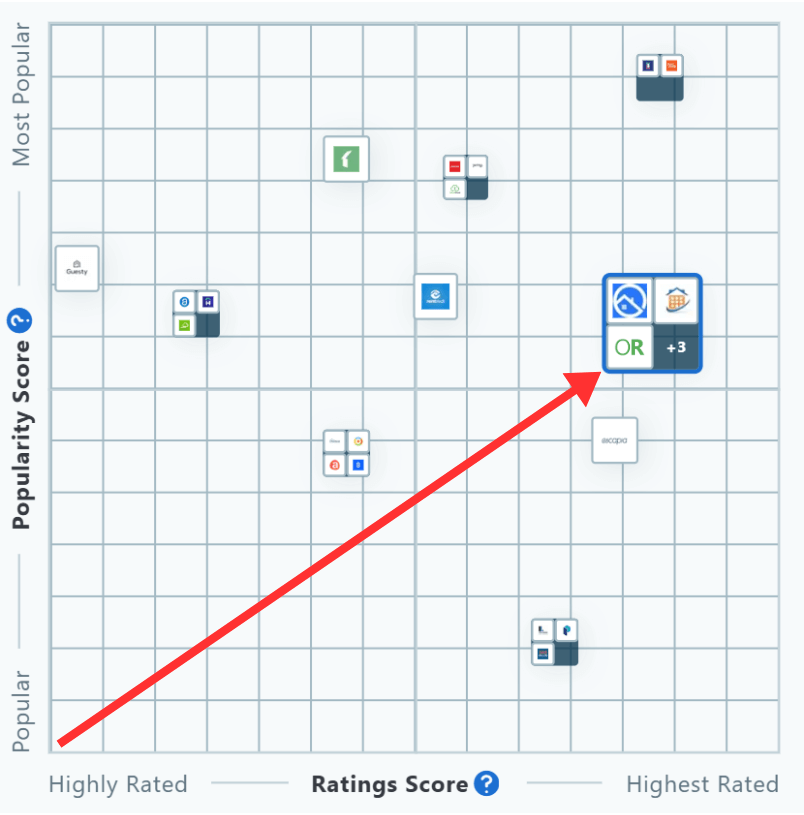
This chart by Capterra displays an overview of the top Property Management Software companies. Following the same format as the first Capterra chart, the popularity score appears on the left while the rating score is along the bottom. Our goal remains to reach the upper right of the chart annually, and once again, we have succeeded.
"Top Vacation Rental Software" by Software Advice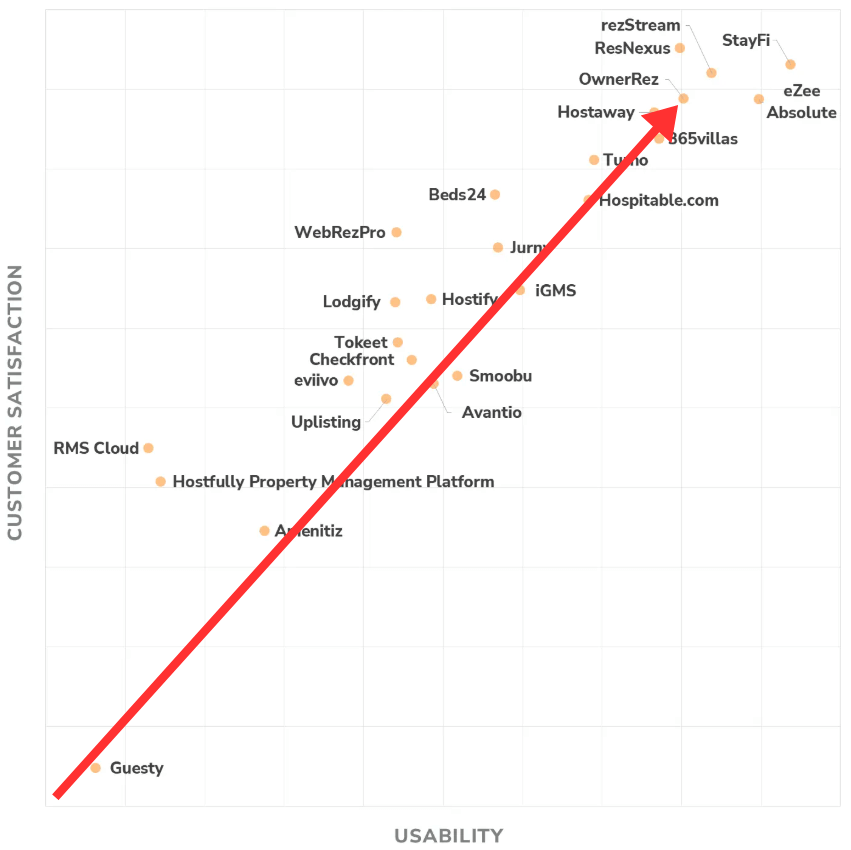
This chart from Software Advice shows OwnerRez delivering superior customer satisfaction and usability, ranking us among the top vacation rental software companies.
"Top Property Management Software" by Software Advice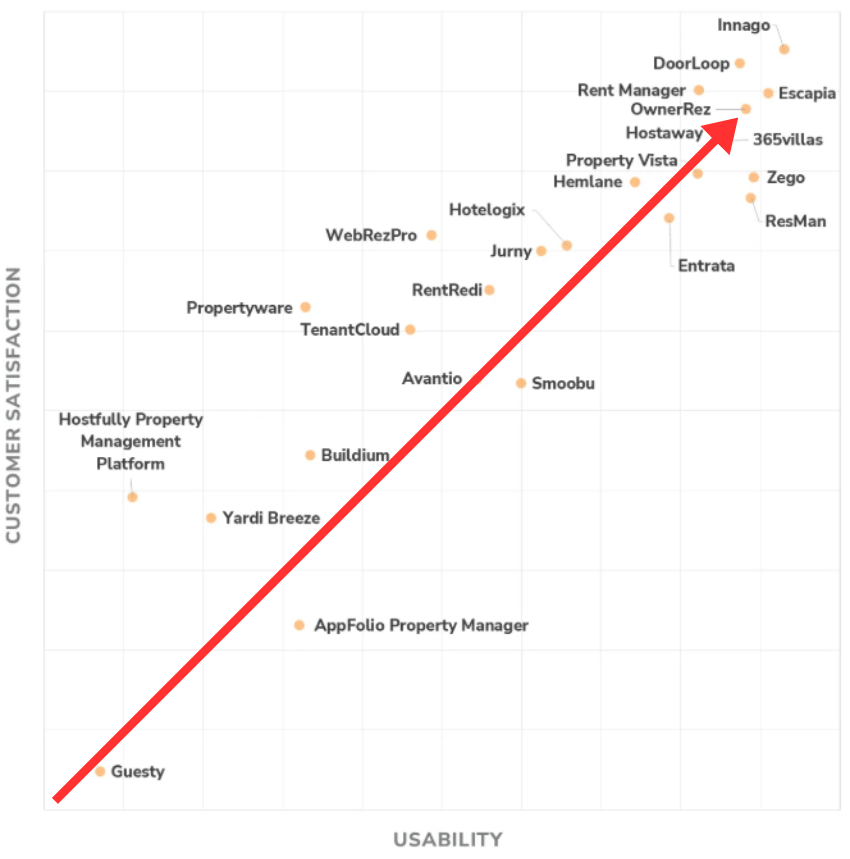
Just like the first Software Advice chart, OwnerRez also stands out as a leading property management software known for excellent customer satisfaction and usability. We continue to hold our place in the upper right corner.
"Top Ranking Vacation Rental Software" by GetApp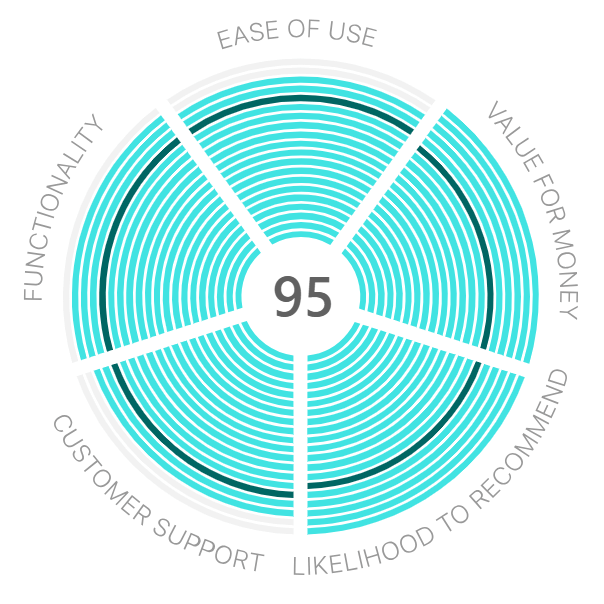
GetApp evaluates software with a unique system compared to most review sites. Each score is based on 5 key criteria, worth up to 20 points. The maximum total score is 100. For 2025, OwnerRez scored 95, ranking us among the highest-rated vacation rental software in the industry.
"Top Ranking Property Management Software" by GetApp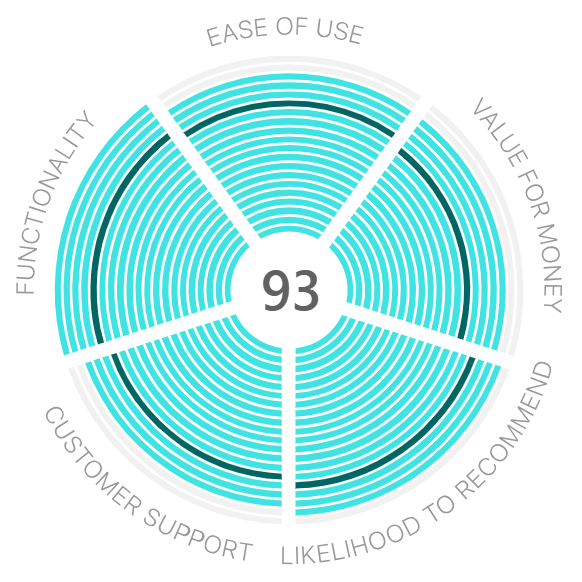
Similar to the previous chart, OwnerRez has been given a rating score of 93, once again, making us one of the highest-rated property management softwares by GetApp.
About Capterra
Capterra Shortlist is an independent assessment that evaluates user reviews and online search activity to generate a list of market leaders in the software space that offer the most popular solutions. Have a look at the Capterra Shortlist methodology here.
About Software Advice
Software Advice is the leading online service for businesses of all sizes navigating the software selection process, providing free, personalized software recommendations that meet their business needs. Software Advice features objective research by industry experts and reviews from validated users, saving buyers time and resources. Software Advice is a Gartner company. Learn more about their methodology here.
About GetApp
GetApp serves as an ecosystem of user-generated and editorial reviews of software and apps for businesses. GetApp lists all vendors in their comprehensive directory so users can compare, sort and filter results to make the most informed decision possible. See GetApp’s Methodology here.
Thank You, OwnerRez Users!
We’re honored to receive these accolades once again in 2025, and it’s all thanks to the honest feedback from our valued users. Your reviews play a crucial role in helping us maintain our high standards and continue delivering Elite Software. If you’d like to share your experience with OwnerRez and help others make informed vacation rental software choices, we invite you to do so here. Thank you for being part of the OwnerRez community.
User Profile: Mt Shasta Vacation Rentals 0 replies
Meet Peter Brimhall, owner and operator of Mt Shasta Vacation Rentals. With a background in maintenance, contracting, and aviation, Peter brings a unique perspective that helps him effectively manage 30 homes in Northern California’s beautiful mountain region. Using OwnerRez to stay organized, he works to exceed expectations and help create lasting memories for his guests.
Can you tell us a little bit about your history?
Mt Shasta Vacation Rentals was founded over 20 years ago by Linda Williamson, a broker with Century 21 Advantage in Mt. Shasta, California. I took over full-time management of the business in 2022 and became the new owner in June 2025. We currently manage 30 homes for 26 different property owners.
What is your background?
My background is in maintenance and contracting, with some experience in sales and customer service mixed in. I began my career in the U.S. Air Force as a C-130 Crew Chief. From there, I worked at Peterson Tractor, a Caterpillar dealership, followed by a role with UpWind Solutions, a wind turbine service company. I also ran my own remodeling business.
I originally had the maintenance contract with Mt Shasta Vacation Rentals when they approached me to take over operations. Managing vacation rental properties isn't all that different from prepping aircraft for missions or fleets of vehicles for daily work; you’re coordinating people with varying personalities and expectations. The goal is always to meet or exceed those expectations.
Are you from the geographical area where your properties are located, or did you move there later?
I grew up just a few ridges over in Trinity County and moved to Mt. Shasta about ten years ago. This part of Northern California is a mountain paradise, with dense forests, pristine lakes, and rivers in every direction. It's one of the last places you can still truly get lost. Mt. Shasta itself stands at 14,162 feet, a striking presence that draws in adventurers and spiritual wanderers alike. I've traveled a bit, but it's hard to imagine living anywhere else.
What do you love the most about the vacation rental business?
I love that this business allows me to live comfortably in one of the most beautiful parts of the world. It’s rewarding to help guests experience this area and create lasting memories.
What do you dislike the most about it?
My frustrations are mostly with things beyond my control. For example, negotiating with third-party platforms like Airbnb can be challenging. They often don’t support hosts as much as they should.The review process can also be flawed. Guests can leave damaging reviews over things like mosquitoes in a forest. I'd love to see a review system that allows honest feedback without directly impacting a host’s standing.
How do you use OwnerRez to manage your business?
OwnerRez is the heartbeat of our operation. We use it for everything.
What is the most useful feature OwnerRez offers?
I really appreciate the automated SMS and email features. The tag automations are incredibly helpful for staying organized. Our owners especially love how clear and easy-to-read the financial statements are.
With deep roots in the region and a genuine passion for hospitality, Peter Brimhall is thoughtfully building on Mt Shasta Vacation Rentals’ rich legacy to create memorable stays in Northern California. We look forward to supporting and watching Mt Shasta Vacation Rentals’ continued success.
Integration With Hostvana 0 replies
We’re excited to introduce our new integration with Hostvana, a powerful and hyper-customizable AI platform built for short-term rental professionals.
About Hostvana
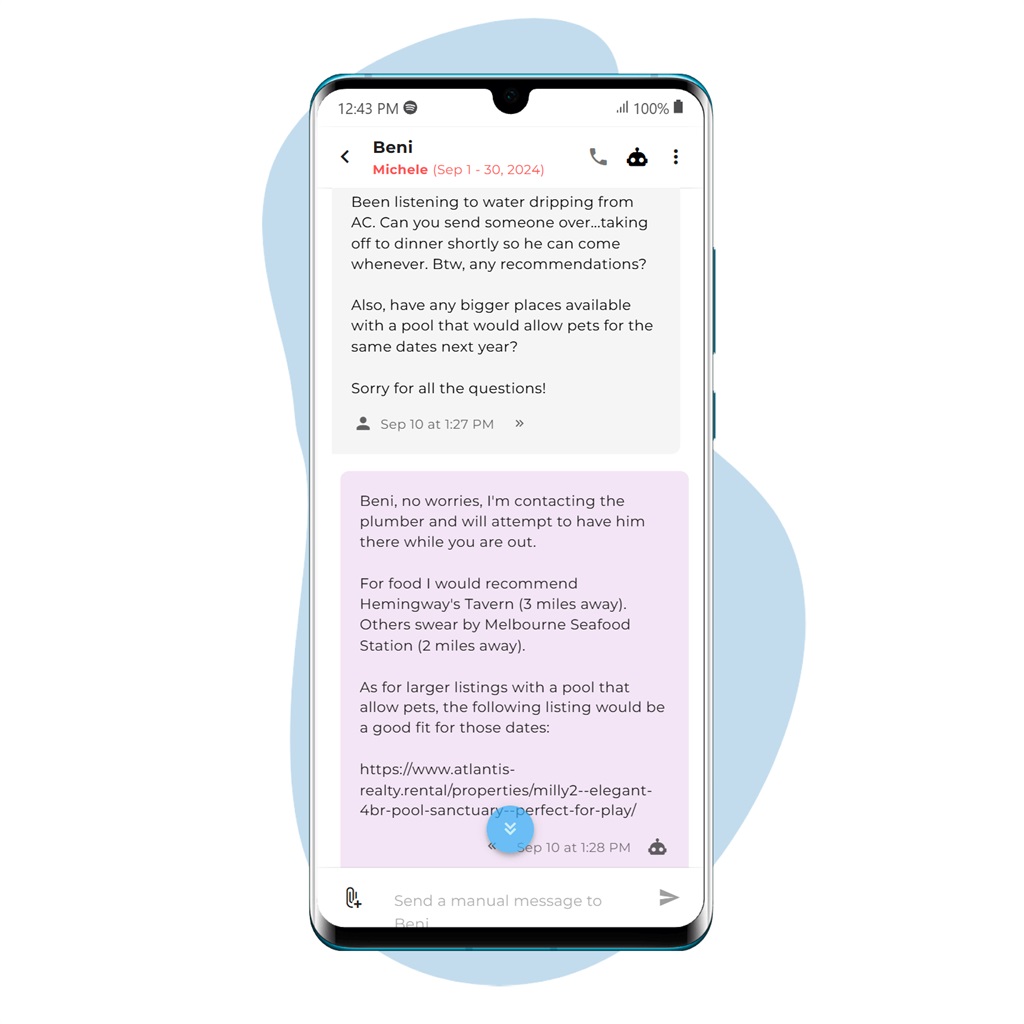
Hostvana transforms hospitality operations by managing guest communication, smart locks, cleaning schedules and flagging problematic guests; all with a mobile-first interface that supports key tasks like quote generation and booking management.
Founded before the AI boom by seasoned property managers, Hostvana proves you can deliver exceptional guest service without sacrificing quality of life by using AI among other tools to power a configurable, human‑like responder that ends late‑night calls, inbox overload, and missed cleanings.
Feature Highlights
Base Package (required):
- Unified Inbox & Multi-Calendar: Manage every listing and channel in one place
- Quotes & Direct Bookings: Mobile-friendly availability/quotes, and booking creation/alteration.
- Guest Screening: Flags repeat problem guests and predicts high-risk inquiries.
AI Package (add-on):
- AI Messaging: Intelligent auto-replies to over 90% of messages with notifications when staff intervention is necessary.
- Custom Scheduled Messages
- Vacant Night Upsells
- Team & Vendor Management: Organize managers, cleaners, and trades in one contact hub (included with AI)
- Role-Based Access: Customizable multi-user logins for managers and assistants (included with AI)
Other Add-ons:
- Smart Lock Automation:* Auto-generate door codes, support early check-ins, and reset codes automatically. *requires AI Tier; billed separately
- Google Calendar Sync: Share schedules with cleaners and maintenance; detects issues mentioned in guest chats.
OwnerRez Limited Pricing
The first 100 OwnerRez users get 25% off Hostvana’s Core plan, already reflected in the prices below. Add-ons are optional, so you only pay for what you use.
| Tier | 🏠1-50 | 🏠51-150 | 🏠151+ |
| Core (with 25% discount) | $2.24 / listing | $1.87 / listing | $1.49 / listing |
| AI Messaging ($89 min) | $8.99 / listing | $7.49 / listing | $6.99 / listing |
| Smart Lock | $5 / lock | ||
| Google Calendar | $2 / listing |
Ready to Connect?
Get started with Hostvana here and read our integration support guide for detailed setup instructions.
Integration With Clearview 16 replies
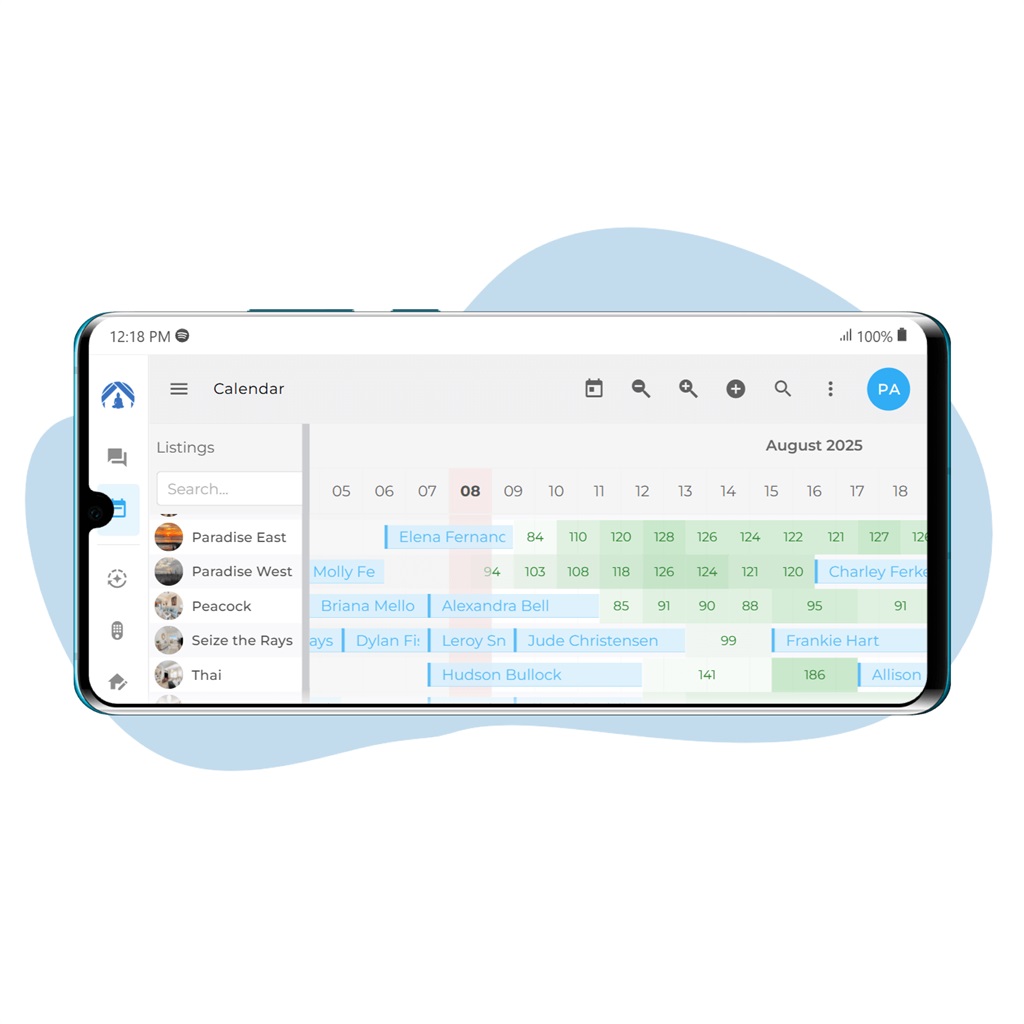
We’re excited to announce our new integration with Clearview, a leader in transparent payment processing tailored for the hospitality industry. This partnership brings Clearview’s reliable, cost-saving payment solutions to property managers and owners using OwnerRez, helping you streamline transactions, reduce fees, and stay in complete control of your business.
About Clearview
At Clearview, they believe that payment processing should never be a headache. They’re redefining how businesses handle payments by delivering transparent, reliable, and efficient solutions that eliminate hidden fees and unpredictable costs. Their tailor-made payment programs are designed to fit the unique needs of businesses in the outdoor hospitality and property management sectors, including short-term rentals, long-term property managers, boutique hotels, resorts, RV campgrounds, and more.
They Offer Two Payment Processing Programs:
Traditional Model:
- Reduce your fees by up to 30%
- No added cost to your customers
- White-glove support
- Leverage industry-specific interchange optimization to reduce your fees
Reverse My Fees Model:
- Cut credit card fees
- Shield your business from rate hikes
- Boost your profit margins
- Month-to-month agreement
- Cap your monthly processing costs at just $49
Benefits
- Stable rates
- Dedicated chargeback account manager
- Properly underwritten accounts
- The client remains the merchant of record
- Month-to-month flexibility with no cancellation penalties
- Let customers choose: Visa, Mastercard, Amex, Discover, Debit

Ready to Connect?
Get started with Clearview by visiting here and checking out the OwnerRez support article for integrating OwnerRez with Clearview.
Calendar view for bookings 2 replies

I'd like to see a version of the ribbon calendar widget that works on mobile phones. The current one is not responsive at all.
I have two properties that id like to show on an integrated availability calendar on my website. The booking calendar in the monthly view is exactly what I'm looking for but there is no iCal export for it.
Hi,
Please write our Helpdesk at help@ownerrez.com, providing them links to the pages and / or widgets you're concerned with. We'd like to take a closer look to see what's going on given that you've said it is not responsive on mobile!
Our calendar widgets do not have an iCal association other than reflecting availability in OwnerRez (which can sometimes come from iCal syncs), but each property does have its own iCal export available. I'm afraid I'm not quite understanding your question. Our Helpdesk team should be able to assist if supporting details are provided.
Thanks!
User Profile: Escapes By Sheila 0 replies
Sheila Dickinson’s vacation rental journey began with a single home in Bremerton, Washington, and quickly expanded to include properties in Panama City Beach, Vancouver, and Whitefish. With a focus on thoughtful design and guest connection, she now manages a growing portfolio of short-term rentals through her business Escapes By Sheila, all powered by OwnerRez at the "heart" of her operations.
Can you tell us a little bit about your history?
My first short-term rental was in Bremerton, Washington, and it was because I moved to Vancouver to marry my husband, Scott. I loved my house and didn't want to sell it, and I also wanted to use it occasionally. My second was in Panama City Beach in 2017, because I knew and loved the area, and believed that my son would settle there; so it was a snowbird/close to family investment. It did so well that we kept buying there. We also own in Whitefish, Montana, and even owned in Puerto Rico for a while. Panama City Beach is where we spend winters and rent out our Vancouver, WA, house while we are gone.

What is your background?
I am an accountant, and had a career in federal civil service in Panama City Beach, FL, Bremerton, WA, and Vancouver, WA. I retired in 2021. I started my first STR in 2016, and grew that to four by my retirement, and then added 5 more since then. I also co-host for a few clients and have a wallpaper installation business!
Are you from the geographical area where your properties are located, or did you move there later?
I lived in Panama City Beach from 1989-2013, moved to Bremerton in 2013 (for a promotion and to be near my parents) and Vancouver WA in 2016 (that's where I graduated from high school so it wasn't new to me).
What do you love the most about the vacation rental business?
I love connecting with guests, learning why they chose my properties, and creating memorable experiences through thoughtful decor and amenities that make their vacations special with family and friends.
What do you dislike the most about it?
I dislike the bookkeeping (and I'm an accountant!) and other admin paperwork (LLC renewals, city/state licensing, insurance policies, etc).
How do you use OwnerRez to manage your business?
I use lots of software, but OwnerRez is the heart. I couldn't live without it! I use it constantly, to check daily bookings, to block out time when needed, check rates and payments, damage protection, reports for my KPIs and taxes, and more!
What is the most useful feature OwnerRez offers?
Being able to see all of my bookings at a glance, and the reports.
Sheila’s journey from a single home to a multi-market portfolio is a testament to her eye for detail and commitment to hospitality. We’re excited to see Escapes by Sheila continue to grow while creating thoughtful, memorable stays for guests across every destination.
Introducing Rezzy AI: Your Smart Messaging & Task Management Assistant 30 replies

This sounds awesome and can't wait to try it out!!
STR Growth, Legal Battles, and the Rise of Social Commerce in Travel 0 replies
This week’s roundup covers Skift’s optimistic short-term rental outlook, rising last-minute bookings, and a lawsuit against Airbnb in Los Angeles. Plus, Booking.com’s removal of illegal listings in Spain. Let’s dive in.
Skift’s State of Travel 2025 report predicts strong growth for short-term rentals, with bookings expected to surpass hotels in key markets. Social commerce is booming, with Skift Research estimating $7 billion in bookings originating from social media for hotels, airlines, and rentals. Other notable insights from the report include Airbnb maintaining dominance with 44% of the global vacation rental market as of 2024. However, increased regulation, including new licensing and occupancy caps in high-demand areas, could pose challenges to continued growth.
Ocean City’s new 3% short-term rental occupancy tax has sparked controversy. Airbnb argues the tax, which requires hosts to pay a levy on rental bookings, is illegal and unconstitutional. The platform claims the tax disproportionately targets short-term rentals, while excluding hotels and other lodging types. Local officials argue the tax will generate much-needed revenue for the city, though the dispute is expected to lead to legal challenges.
The Los Angeles city attorney’s office has filed a lawsuit against Airbnb, accusing the platform of allowing price gouging and unverified listings at more than 2,000 rentals following the January firestorm in Altadena and Pacific Palisades. The lawsuit claims some hosts inflated prices, taking advantage of displaced residents and emergency workers. Airbnb is also accused of permitting properties to be listed under fake identities, complicating efforts to provide safe housing. While Airbnb disputes the allegations, the case is expected to lead to further legal challenges.
AirDNA reports a significant rise in last-minute bookings in 2025. When looking at reservation lead times, booking behavior has clearly shifted. Travelers are increasingly waiting until the last minute to book. In August 2023, just 16% of U.S. reservations were made within five days of check-in. By January 2025, that share had nearly doubled to 31%, and sits at 24% in May. Experts speculate that travelers are catching on to pricing trends and waiting for property managers to lower prices to fill inventory, with economic uncertainty also driving more spontaneous bookings across all markets.
In continued news regarding Spain's court ruling against short-term rentals, previously reported on May 23, June 20, and July 18, Booking.com has removed 4,000 vacation rental listings in Spain to comply with new consumer protection laws. These listings violated one of three infractions: lack of required licences, failure to specify the legal status of landlords, or displaying incorrect licence numbers. Spain is intensifying its efforts against short-term rentals amid a housing crisis, with the government having already ordered Airbnb to remove over 65,000 illegal listings.
As regulatory changes, shifting booking trends, and legal challenges continue to shape the vacation rental industry, stay tuned for more updates. Check back next week for the latest news!