
General Help and Questions
Latest Activity...
Portal access vs. notifications 1 reply

I have granted some people portal access but can't find the pathway to have notfications of new bookings sent to another email or sms. Where do I find that? I kind of think it should be on the same page as Portal Access..
Why aren't the links included with quotes? 1 reply

These are controlled in the System Messages. You can modify their templates to include the quote in the message.
What you want is the "Send Quote to Guest" message.
https://www.ownerrez.com/support/articles/system-messages
Strange VRBO issue wrong property 4 replies
Where did you receive the inquiry? If it came into OwnerRez, that's likely because Vrbo is configured to send inquiries to the wrong custom email address. Each property has its own custom email address, and that's how OwnerRez knows what property an inquiry is for.
https://app.ownerrez.com/inquiries/instructions
Strange VRBO issue wrong property 4 replies

I just had an inquiry for one property and it answered it automatically from my other property which isn't even listed on VRBO? Hoopers Island Bayside Haven IS listed on VRBO but Ventnor Happy Ours Cottage isn't, yet it answered from VHOC? I've never had this happen, is there a glitch I'm not seeing?
Google Nest Lock 14 replies

Is there a way to integrate the google nest lock with the key code option? I'm getting tired of manually creating the key codes for guests because of this I can't automate our pre check in email so it is a major pain.
Or is there a way I can create a key code field that is part of there phone number but not the entire phone number? Just thinking of ways to make this easier
Damage Waiver - ensure it's working for Airbnb and VRBO 7 replies
Do you mean, the damage protection insurance? I checked, and it will be. But there are a number of other settings you should add - please write in to the Helpdesk for an account review, and we'll send you the list.
Damage Waiver - ensure it's working for Airbnb and VRBO 7 replies

Can someone please confirm where I can check that the damage waiver I turned on will indeed apply to VRBO and Airbnb listings?
Why aren't the links included with quotes? 1 reply

Why aren't the links included with quotes? It's so frustrating to send quotes to potential guests and they have no reference for which properties they are. It seems so simple to include photos and a link with the quote we are sending out. I copy and paste the link but sometimes forget, and it simply doesn't make sense to not have these identifies with each quote.
Tags and message triggers 14 replies

Question about using tags in triggers: There are 2 types of tags, one related to bookings and one related to guests.
If we create a trigger to use "only" a specific tag, does the trigger look at ALL tags or only the tags related to bookings?
In the case of collecting IDs, it would make sense to add the "ID received" tag on the guest so that it is visible if the guest should book another stay in the future; we wouldn't have to ask them for a copy of their ID on subsequent bookings.
But if we create a trigger to automatically send Check-in instructions based upon "paid in full", "Rental agreement signed (yes)" and "ID received" will the system trigger the email if the tag is related ONLY to the guest? Or does it also need to be related to the booking?
Reporting for 1099 1 reply
I use the Line Item Pivot Detailed report....it has a LOT of information so maybe one of those options might be what you need?
AirBnB House Manual 6 replies
In many cases, yes. We do occasionally find some situations where that doesn't work.
AirBnB House Manual 6 replies

Just to clarify, when Everything sync is re-enabled, these non-API-controlled settings won't be overwritten? That's potentially very useful info.
API/Channel Bridge, do I have to use them? 1 reply
Channel Bridge and the APIs are still useful for small companies.
- They can bring in full guest and booking details, which are then stored in your OwnerRez account and can't be removed by the channels. They've started blocking viewing contact information for old bookings after awhile, but you never know when you may want to do marketing to all your past guests.
- You can set a Rate Adjustment on each channel to increase its rates by a given percentage compared to your OwnerRez rates. This saves you from having to manually set three different rates.
- With the APIs, if you get new photos or change the amenities in your properties, you only have to change that in OwnerRez. The changes are then automatically pushed to the channels.
AirBnB House Manual 6 replies

Ahh. There are a few areas like that where Airbnb doesn't allow them to be changed via API but also disables the option in the Airbnb site when API is connected.
To get around that:
1) Go to the Airbnb settings in OwnerRez, click "Change Property Mappings" and switch the sync for that property to "Limited". That will stop syncing listing content for the moment.
2) Go to Airbnb and make the changes you need for house manual -- those options will be re-enabled since the sync is in Limited mode
3) Once everything looks good on house manual, come back to OwnerRez and switch back to Everything mode to start syncing listing content again.
API/Channel Bridge, do I have to use them? 1 reply
Right now I only have 2 properties on OR. One I almost exclusively use "book direct" for my bookings, the other I use only HA/VRBO and sporadically abnb. I don't like using Chrome and it seems that I need chrome to use Channel Manager, and I see no real advantage for my small property that uses OTAs. I have different prices for Book Direct and don't want to have to keep on eye on what is "pushed" to the OTAs...am I missing something?
AirBnB House Manual 6 replies

Email sent.
It's under "Guest Resources," as "House Manual." When API connected, this is not editable.
AirBnB House Manual 6 replies
We're not familiar with anywhere in Airbnb where you can upload a PDF file for guests. Can you provide more information and screenshots, maybe in an email to the Helpdesk?
Is there a log that timestamps when you run Channel Bridge? 2 replies
Thanks, but what I was really hoping for was to see this info on the Channel Bridge pages.
There are two places I think it would be helpful:
1. The Channel Bridge Export page. The popup window gives me Export Criteria to export bookings / reviews "since" or "staying between," etc., but it would be helpful to know here on this page when the last export was done.
2. The specific Channel Bridge page where I push rates. I'd like to know when the last time was I pushed rates as I am getting ready to do it again.
Thanks!
AirBnB House Manual 6 replies
I have a .pdf file in the Guest Resources section of my AirBnB listing. I just updated it and want to upload it. I don't see a way to upload it and push it from Owner Rez. Also, since I am API, I am unable to edit that section on the AirBnB side.
Any suggestions?
Thanks!
Discount code? 1 reply
Sure!
https://www.ownerrez.com/support/articles/discount-codes
They only work on direct bookings though.
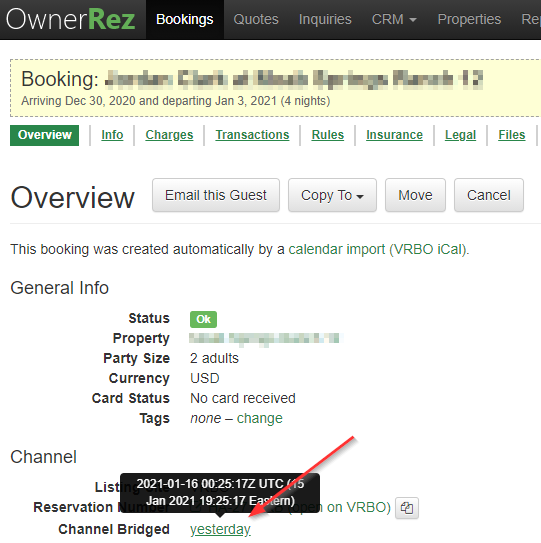
Is there a log that timestamps when you run Channel Bridge? 2 replies
Look on the Channel section of the booking overview and you can see when it was last channel bridged.
Discount code? 1 reply

I would like to network with vendors (wedding planners) (Morticians) Etc. Is there a method to give them a code for their clients who they refer to us?
Is there a log that timestamps when you run Channel Bridge? 2 replies
Question fit in the title. : )
Thanks
HTG/ HomeToGo integration 21 replies

During the webinar, are we going to go over step by step process on how to integrate OwnerRez with Home2Go ?
Are we also going to be discussing pricing after the trial is over ?
IB for channels but inquiry for direct? 2 replies

Thank you
IB for channels but inquiry for direct? 2 replies
Generally, yes. Here's how:
https://www.ownerrez.com/support/articles/instant-book-vs-request-to-book
IB for channels but inquiry for direct? 2 replies
Before I mess anything up. I want channels to be IB but my own site inquiry only. Possible? Thanks
Anyone know of any calendar/thermostat integrations available? 25 replies
I use Ecobee instead of Nest but honestly, this feature of Nest (which a family member uses at their personal residence) is one big plus to Nest over Ecobee. That said, it works in conjunction with their Nest app on their phone and their Vivint home alarm to determine occupancy, so I'm not sure how it would work in a VR setting.
HTG/ HomeToGo integration 21 replies
You'd have to check with them on that - as a matter of policy, we don't attempt to post the pricing of other companies because they can change at any time and we don't want to mislead.
HTG/ HomeToGo integration 21 replies
Ken T said:
Are you looking for this?https://www.ownerrez.com/support/articles/channel-management-api-integrations-hometogo-setup-connecting
That, thank you, plus their pricing after trial is over.