
Blog
Latest Activity...
April Product Update - Recurring Triggers, Tasks for Teams & Expansion, Ask Rezzy In-App, Rental Agreement Guest Form Redesign 0 replies

This is the release many have been waiting for... Recurring Triggers is here! Think "trash reminders" or other needs that benefit from a messaging reminder. But we didn't stop there. April brought along many more things: granularity to scheduled triggers, Tasks for Teams, Ask Rezzy now in-app, the redesign of the Rental Agreement guest form, Announcements revamp, simplified Taxes, and much more! Proceed on!
New Features
Triggers
You requested, OwnerRez delivered. With 200 votes, it was at the top of the list of open feature requests. Recurring Triggers for managing message-based reminders, such as trash reminders, was released on April 15th, enabling users to configure triggers on a recurring schedule (e.g., weekly, monthly) for guest-occupied and vacant properties. OwnerRez also included new Property templates to use when your property is vacant, but you still want to remind someone (e.g., neighbor, cleaner) about a task at your specific property.
Configure your own recurring trigger by navigating to Settings > Messaging > Triggers > + Create Trigger > Type > Recurring.
In the Recurring section, determine who you want to send your message template to: a current guest (Occupied), someone like a neighbor or cleaner (Vacant), or to the same contact regardless of the property occupancy status.When Occupied properties is selected, only Booking type email, channel, and SMS templates can be used. When Vacant properties or Occupied and Vacant properties are chosen, only Property type email and SMS message templates can be utilized.
In the Recurrence section, users can set up their trigger to send their message template to repeat weekly or monthly, on a specific day of the week or month, at a specific time of day, and on a specific start date.
Scheduled triggers send your selected message template at predetermined times based on booking events, such as before or after a Booking arrives or departs, or Blocked-off Time starts or ends. OwnerRez has improved Scheduled Triggers, enabling users to set a trigger to activate a specific number of minutes before or after an event, in 10-minute increments. This enhancement, introduced in our April 8th release, offers greater flexibility and precision in guest messaging.
To see this improvement in action, navigate to Settings > Messaging > Triggers > + Create Trigger or edit an existing trigger > Type > Scheduled.
When Minutes before or after are selected, you can specify how many minutes, in 10-minute increments, before or after the event you want your message template sent by your scheduled trigger.
There should never be any shame in your guest communication game. Explore all of OwnerRez's dynamic messaging options.
Tasks
OwnerRez allows users to grant Team Access to their Staff Members or Portal Users (owners, cleaners, maintenance staff, etc.) to view calendar availability and perform actions such as blocking time or viewing owner statements. With our April 8th release, we've expanded Team Access to include Task management, with configurable roles for both Limited Access Staff and Portal users: Manager to resolve Tasks or Worker to view, create/modify, or resolve assigned Tasks.
Configure your Team Access Tasks by navigating to Team Access > and + Invite Staff/Portal Member or edit an existing Staff/Portal Member > Tasks section, and check the Allow access to tasks with role of Worker or Manager checkbox.
Users can grant Managers permission to Limited Access Staff and Portal users to resolve Tasks by checking the Resolve tasks checkbox.
Users can grant Workers permission to Limited Access Staff and Portal users to view, create/modify, or resolve assigned Tasks by selecting the appropriate checkboxes.
Remember that Full Access Staff Members have complete access to your account and are essentially a duplicate of you, so there's no need to configure Tasks management for them.
In case you missed our April 23, 2026, 👀 First Look: Tasks just got a big upgrade (yes, another one!) email, OwnerRez added some powerful new improvements to Tasks with our April 22nd release. These enhancements make Tasks a more complete task management system, helping your team stay organized and communicate clearly by collaborating and documenting the work in one place, with attached documents (e.g., photos, invoices, project documents), sharing updates, and tracking maintenance projects.
Ask Rezzy
Ask Rezzy — free, in-app, and ready to help you anytime! OwnerRez implemented our free Ask Rezzy tool as an in-app popup, which remains accessible as users navigate between different pages within the app, with our release on April 29th.
Just click the in-app Help menu to activate Rezzy and get assistance.
You can also start a new chat, expand the Rezzy window, minimize or close Rezzy directly in her top menu.
WhatsApp for Business (Private Beta)
Used by over 2 billion users worldwide, WhatsApp Business supports vacation rental businesses of all sizes. In case you missed our April 6, 2026, You asked for WhatsApp. We built it. Still want in? email, OwnerRez released our WhatsApp Business (Private Beta) integration on April 15th for ad-hoc guest communication, letting you connect directly with your guests in the OwnerRez Inbox.
Rental Agreement Guest Form
A streamlined contact and rental agreement guest form reduces friction and offers guests a professional, hassle-free experience, building confidence in your property. With our April 29th release, OwnerRez redesigned the Rental Agreement guest form for enhanced user-friendliness, allowing guests to update contact information and sign agreements on a single page. This new one-step process captures the same data while maintaining signature verification, timestamping, and IP tracking. It also features real-time preview updates and improved phone number validation.
Users can see this new Rental Agreement guest form in action by navigating to a specific Booking > Legal > Request e-Signature, selecting an agreement from the dropdown list, and, on the Request an e-Signature from Guest Name, clicking Preview.
Guests can now also scroll through and read the entire rental agreement by either using the right scroll bar or clicking the Scroll to read entire agreement button at the bottom of the agreement.
Keeping up with OwnerRez news, new features, and important updates directly within the app ensures you don't miss anything critical. In case you missed our March 31st 👀 First Look: Smarter, cleaner announcements email blast, OwnerRez's announcement system was upgraded in our April 1st release to be less disruptive, more organized, and easier to respond to. Although the changes may seem minor, we believe they will greatly improve your daily workflow.
Taxes
After our August 27th Discounts & Surcharges release, OwnerRez shifted our focus to taxes. With our April 1st release, we simplified the tax creation and editing process, with a look and feel similar to our discounts and surcharges areas. Additionally, we added a dedicated section for Airbnb passthrough taxes, allowing property-specific registration numbers and business tax IDs to be added.
Experience the new tax functionality yourself by navigating to Settings > Pricing > Taxes. If fewer than ten taxes are configured, they will be displayed in a tile format. Accounts with more than ten taxes configured will appear in the previous grid format.
The new, simplified tax creation page is much more intuitive, allowing you to select the tax type from the dropdown list right at the top.
When Airbnb is selected in the Channels section, the Airbnb Passthrough Taxes section (if required) appears dynamically, allowing you to enter your Business Tax ID (EIN) and the property's tax jurisdiction Registration Numbers for each property when you click on the associated buttons.
Additionally, OwnerRez improved the display and new Tax Rate and Channel configurations for existing taxes.
- The Rate and Channel History opens and displays when the caret is clicked, and closes when the caret is clicked again.
- You can add upcoming Rate and Channel changes by clicking on the associated buttons.
Looking for accounting assistance? Explore OwnerRez Accounting integration options.
Quotes Overview
As a follow-up to our February 18th Booking Overview release, OwnerRez updated the Quotes Overview in our April 29th release to ensure alignment and consistency. Just like the Booking Overview, the improved Quote Overview is a more organized, visually structured Overview layout that includes the same types of information in the same places, making it simpler to locate and edit guest quotes.
Property Photos
High-quality property photos create a strong first impression, build trust, and can influence a traveler's decision to book your property over a competitor's. OwnerRez redesigned the property photo upload process for improved efficiency, uses existing embedded color profiles during processing for more accurate color reproduction, and visual fingerprinting technology to detect duplicate or similar images during upload with our April 29th release.
When you upload a photo that looks like one already in the gallery (even at different resolutions or compression levels), you'll see a side-by-side comparison noting duplicates. Clicking the Dismiss link automatically replaces lower-quality copies with your higher-quality version, keeping your property galleries clean and organized.You can now edit photos in either grid view (with drag-to-reorder) or the new list view (with inline batch editing for captions and metadata) by clicking on the top right Grid and List View icons.
Additionally, we resolved some photo-sorting issues that caused photos to go out of sync when deleting or saving changes, ensuring sequential numbering is maintained with this release.
Inbox Airbnb Video Attachments
Thinking about upping your guest communication game? Explore all of our dynamic messaging options.
Confirm & Pay Guest Forms
Online booking forms simplify reservations, reduce email back-and-forth, automatically capture guest information, provide instant confirmations, and operate 24/7. OwnerRez redesigned the Confirm & Pay guest form to show or hide sections based on host booking requirements with our April 15th release. This allows guests to finalize bookings more quickly and easily when options like travel insurance or security deposit sections may be unnecessary, with clearer labeling for a better guest experience.
Discounts
Strategic discounts can enhance your vacation rental's performance by attracting more guests, encouraging longer stays, and filling gaps in your booking calendar. OwnerRez reorganized and renamed some Discounts to enhance usability, simplify pricing rules, minimize errors, and improve promotion management as part of our April 29th release. Changes include the following.
✅ The Supplemental Discounts section was renamed to Guest Applied DiscountsPM Owner Statement Summary Report
The OwnerRez PM Owner Statement Summary is a summary report that contains owner income and expense totals based on your remittances. OwnerRez improved the Owner Statement Summary report Excel exports to include professional formatting with merged headers, proper indentation, grouped sections for Income and Expenses, and calculated totals using formulas with our April 29th release.
Check out the Owner Statement Summary report Excel export by navigating to PM > Reports > Owner Statement Summary > Run Report > Export.
Are you starting to manage vacation rentals on behalf of other property owners? Consider using OwnerRez's Property Management premium feature!
Nightly Rates
Setting nightly rates several years in advance lets you take advantage of peak pricing on high-demand dates before market conditions change and competitors respond. In our April 1st release, OwnerRez expanded the Nightly Rates calendar display from two to three years, enabling you to set rates for your market's busy periods.
Booking Overview
The OwnerRez booking overview page features a modern, organized layout. Following our February 18th Booking Overview release, OwnerRez identified additional improvements to enhance space efficiency on both mobile and desktop, and updated print formatting for better readability when printing booking details.
On desktop, we combined the financial information, Guest Balance, and Net Financials into a single section that you can toggle to view each individually.
Additionally, we moved the Booking Overview Source section under the Guests and Door Code sections for greater space efficiency.
On mobile, we condensed the Booking Overview layout to display essential information at the top, with collapsible financial details.
Property Channel Rules for Airbnb
OwnerRez long had channel rules that could be overridden at the property level, which often caused more confusion than clarity. In our April 1st update, OwnerRez moved the Airbnb-specific Required Gaps setting from the channel level to the property level for better clarity and flexibility. Additionally, the Professional Hospitality Business setting, which is no longer supported by Airbnb, has been removed, and all Airbnb property types can now be selected in the Property Accommodations Type dropdown list.
You'll notice the Required Gap update when you go to Properties > your specific Property > Listing Content > Channel Rules > Change > Required Gaps.
In the Property > Listing Content > Accommodations > Type > Airbnb dropdown list, you'll see that all Airbnb property types are now available for selection.
Account Billing Cycle
We value our users and aim to retain everyone, but we recognize our service might not suit everyone. Previously, canceling your OwnerRez subscription meant immediate loss of access to reports and important data. Rather than closing your account immediately, OwnerRez now allows users to retain access until the end of their current billing cycle, with our April 1st release.
After users close their accounts in the Billing section, the Pending account closure date will be displayed with a red label.
Authorize.net
Authorize.net has a Fraud Detection Suite that can detect some potential mismatches in card security code, a high rate of card attempts, and other scenarios. However, OwnerRez does not support Authorize.net's "Authorize and Hold for Review" option because they don't return the correct approval/decline code to OwnerRez, so the payment can't be recorded automatically.
OwnerRez added a system email notification to warn users when their Authorize.net account is configured with the unsupported "Authorize and Hold for Review" setting, which includes a link to OwnerRez's support article explaining how to properly configure Authorize.net's fraud settings as part of our April 15th release.
April 8th Release with 2 Tweaks
Improve layout in Quality Center reviews section. OwnerRez enhanced the layout in the Quality Center Reviews section by fixing tab misalignment and removing the Import/Export icon label text to match other in-app designs for smaller screens, improving the mobile experience.
Update Channel Rate Tester to show Promos not included when running for Vrbo. OwnerRez improved the Vrbo Promotions display in the Channel Rate Tester by listing them in the Notes section at the top of the results, with clearer messaging that explains they're not included in the rates and renamed "Adjustments" to "Notes" for clarity.
April 15th Release with 1 Tweak
Remove tax attestation checkbox for Airbnb integration. Following the April 1st Taxes release, OwnerRez removed the requirement to check the Airbnb tax attestation checkbox because it was causing errors due to missing Registration or Business Tax IDs.
April 22nd Release with 1 Tweak
Add warning alert for Airbnb Limited 14-day cancellation policy. Since Airbnb users must verify their eligibility for this policy in their region, OwnerRez has added a warning message that is displayed when selecting the Limited (firm_14) cancellation policy for Airbnb channels or property rules.
April 29th Release with 6 Tweaks
Add character limit and validation for Hosted Website blog posts.Instead of silently truncating excess content, OwnerRez has implemented a character limit and validation in the Hosted Website blog post editor to display a character counter and prevent saving when content exceeds 64 KB.
Convert large outgoing Unified Inbox SMS attachments to downloadable links. OwnerRez has improved SMS messaging by converting large file attachments into downloadable links when sent from the Inbox, preventing delivery failures, and ensuring consistent behavior with other SMS features.
Improve Booking Overview display of Booking.com and Vrbo reservation IDs. OwnerRez improved the display of the reservation ID in the Booking Overview for channel-integrated bookings. Booking.com now shows only the reservation ID (without room ID suffix), and Vrbo bookings display the OwnerRez booking ID instead of the channel reservation ID.
Mark Airbnb Channel Bridge as deprecated. As noted in-app and the support center, the OwnerRez Airbnb Channel Bridge is now deprecated in favor of our full-featured Airbnb channel integration. The Vrbo Channel Bridge tool continues to support bookings.
Prevent selection of damage deposit category for offline surcharges. OwnerRez improved the Offline Surcharge process by preventing the selection of the damage deposit category, which caused Vrbo sync errors.
Support search for more Contact phone number formats. OwnerRez implemented more phone number filtering in the contacts grid to support different phone number formats. In addition to the previously supported numeric-only formats, phone number filters in the contacts grid now support parentheses, dashes, and spaces.
Weekly Changelogs
OwnerRez's monthly Product Update blog posts summarize the new features, enhancements, tweaks, and design progress released throughout the month. Additionally, you can review our weekly Changelogs for a complete list of each week's releases.
Integration With Hopy Suite 0 replies

We’re pleased to introduce our latest integration with Hopy Suite, a platform built to help property managers automate guest communication and streamline messaging through WhatsApp.
About Hopy Suite
Hopy Suite is a platform designed for property managers who want to automate communication, especially on WhatsApp.
It allows you to:
- Centralize all conversations
- Automate repetitive messages
- Manage the full guest journey in one place
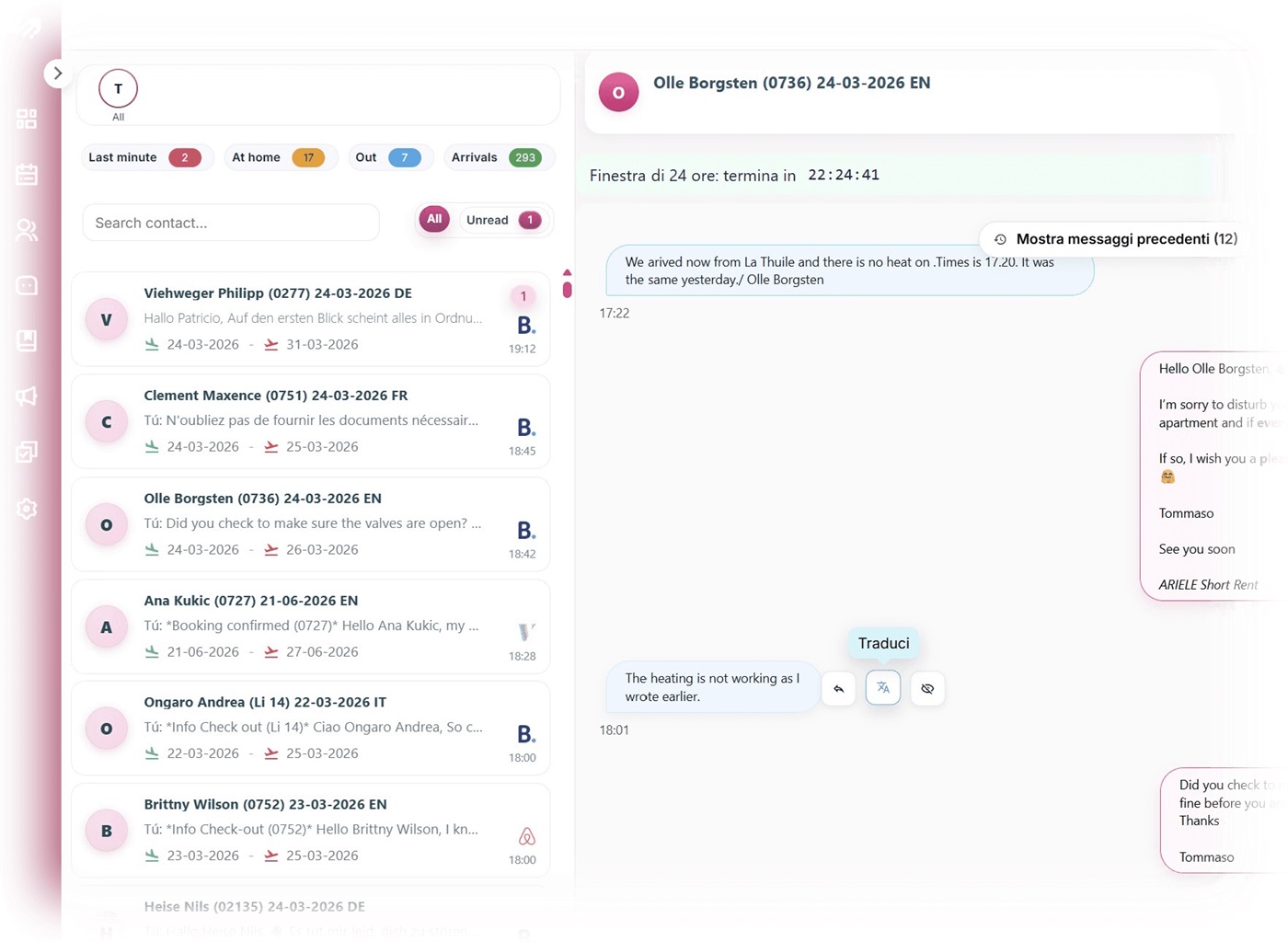
Features
Automate up to 70% of your messages
With Hopy, you can set:
- Automated check-in and check-out messages
- Customizable templates
- Scheduled sends
Write it once, and the system takes care of the rest.
Built around WhatsApp
Hopy is designed around WhatsApp:
- Guests actually read messages
- Response times are faster
- Communication feels natural
And you manage everything from a single platform.
Simple to use
No complex setup. No technical skills required.
Just:
- Create your messages
- Choose when they should be sent
- Automate the process
A key advantage: language and support
When you use a tool every day, working in your own language makes a real difference.
Hopy is available in 5 languages (Italian, English, Spanish, French, and German), so you can use the platform comfortably in your preferred language.
Customer support is available in Italian, English, and Spanish, a big plus when you need fast and clear assistance.
Pricing
Hopy Suite starts from €210 per month, with a 20% discount on annual plans. You can also add features, users, and roles as needed, without having to upgrade to a higher plan right away, giving you full flexibility as your business grows.
Ready to Connect?
Get started with Hopy Suite by visiting here and checking out the OwnerRez support article for integrating OwnerRez with Hopy Suite.
Integration With Pay With Cause 7 replies

Hey Jenny,
Following up here, we haven't been able to make contact with you per our reply. Is there a good number or email address to reach you at? If you prefer, you can also send an email to, Adam@PaywithCause.com
Airbnb Rental Cars, New STR Rules in South Lake Tahoe, and Advocacy Opportunities 0 replies
This week’s roundup covers Airbnb’s latest expansion beyond stays, new short-term rental regulations in South Lake Tahoe, fresh data on traveler preferences, and an upcoming industry rally focused on STR advocacy. Let’s dive in.
Airbnb announced this week that it is introducing private car services through a new partnership with Welcome Pickups, designed to make arrivals more seamless for guests. Airbnb says, “the best trips often start with one simple thing: getting there stress-free.” After booking a stay in an eligible city, guests will now be automatically prompted in the Trips tab to schedule a private ride directly to their listing. The service is now available in more than 125 cities across Asia, Europe, and Latin America, with additional cities and regions expected to roll out throughout 2026.
South Lake Tahoe’s City Council approved updates to its Vacation Home Rental regulations this week, introducing a new framework for short-term rentals in residential areas. The updated rules remove the previous 150-foot buffer required between vacation rentals and instead establish a cap of 900 permits. Additional changes include a new minimum renter age of 25, expanded eligibility for ADUs, and new reporting and enforcement measures such as room-night tracking and an updated appeals process. The ordinance is set to take effect in late April. Those previously disqualified due to the 150-foot buffer can reapply for permits starting April 23rd, opening up new opportunities for operators.
NerdWallet released the results from a recent survey this week examining traveler preferences between hotels and vacation rentals. The study found that 51% of Americans prefer vacation rentals over hotels. Digging into the data reveals a clear generational divide in those preferences. According to the survey, younger travelers and families are much more likely to favor vacation rentals, often driven by the need for more space and group accommodations, while older travelers tend to lean toward hotels for their consistency, amenities, and loyalty programs. It’s an interesting look into which travelers are choosing vacation rentals and how this generational divide may impact the industry in the coming years.
Beyond this week's announcement of private car services, Airbnb is already looking ahead to what’s next, including the potential addition of flights. In an interview this week with Skift, Airbnb's Chief Business Officer Dave Stephenson said the platform is considering adding flights as part of its long-term strategy, noting that “Airbnb’s goal is to provide guests with a better and more well-rounded travel experience.” The comments reflect Airbnb’s continued vision to expand beyond stays and to build toward a more complete travel platform.
In upcoming news, the Right to Rent Collaborative (R2RC) is hosting a live Industry Rally on April 8th, bringing together short-term rental operators and industry partners for a critical briefing on the future of STRs. Across the country, the rules of the short-term rental industry are being rewritten, often without hosts at the table, as local bans and unpredictable tax changes continue to impact operators. The open virtual event is designed to provide a blueprint to protect the right to operate, with a focus on how coordinated efforts are beginning to outperform fragmented approaches and what a long-term advocacy infrastructure could look like for the industry. The session will be led by Julie Marks of R2RC and Dana Lubner of Rent Responsibly. You can register for the event here.
As platforms roll out new offerings and look for new ways to reach guests, the vacation rental industry continues to evolve. Check back next week for the latest news.
Integration With ProhostAI 2 replies

The main advantage as I see it would be WhatsApp integration.
Integration With ProhostAI 2 replies

How is this different than Rezzy AI?
Integration With HelloHost 3 replies
How is HelloHost different than using Rezzy AI?
Integration with travelstaytion 1 reply
We’re pleased to introduce our latest integration with Travelstaytion, a global community of certified property managers, connecting OwnerRez users to a new booking platform and a wide network of B2B travel agents.
About Travelstaytion
Travelstaytion is a global collection of 150,000 properties meeting service and quality standards, powered by a guest-centric community of 2,500 professional property managers. Through their AI-powered quality assurance and extended distribution network, they have become one of the best-performing networks in vacation rentals.
Features
- Increase bookings - Grow your reservations by tapping into their booking platform and a wide network of B2B travel agents.
- Increase awareness - Boost your visibility through targeted property placements and strategic PR actions while empowering your brand recognition and value.
- Increase booking value - Unlock higher-value bookings from top markets where they have a strong presence and affiliates (e.g., US, UK, APAC).
- Diversify your revenue - Invest in your company’s viability by attracting more direct bookings, more partnerships, and traveler geographies.
- Differentiate yourself - Stand out from the competition, grow your inventory, and strengthen your brand and your partnerships by becoming a Certified Member of Travelstaytion, verified by TÜV AUSTRIA, the leading independent quality surveyor.
Pricing
There is a 15% commission + transaction fees.
Ready to Connect?
Get started with Travelstaytion by visiting here, and check out the OwnerRez support article for integrating OwnerRez with Travelstaytion.
Pennsylvania STR Proposal, Spain Court Ruling, and Lake.com’s New Pricing Model 0 replies
This week’s roundup covers new short-term rental legislation in Pennsylvania, a major court decision in Spain, Airbnb’s push into lesser-known U.S. destinations, and a new pricing model from Lake.com. Let’s dive in.
Pennsylvania lawmakers introduced House Bill 2303 this week, which would create a statewide regulatory framework for short-term rentals. The proposal, if passed, would require vacation rental operators to register their properties through countywide registries, designate a 24/7 local contact, and comply with baseline health, safety, and occupancy standards. It also establishes three separate regulatory categories: homestays, vacation rentals, and corporate STR operations, with stricter requirements applied to larger-scale operators. The bill aims to create consistent, baseline standards for short-term rental properties while preserving flexibility for local communities. A public hearing is scheduled for March 25th. If you are a vacation rental operator in Pennsylvania, now is a great time to get involved, as the bill is still in its early stages.
Previously reported in Industry News on December 19th, the Spanish government fined Airbnb 64 million euros, or about 75 million U.S. dollars, for advertising short-term rentals without valid licenses or accurate registration information. This week, a Spanish high court ordered Airbnb to pay the fine, rejecting the company’s request to delay payment while it appeals the ruling. Airbnb says it still plans to challenge the fine. The decision reflects Spain’s continued push to enforce short-term rental regulations and hold platforms accountable for compliance.
Airbnb released its first-ever “America Off-the-Map” list this week, spotlighting lesser-known destinations where short-term rentals are driving new opportunities for tourism. The report highlights the role short-term rentals play in dispersing travel across smaller communities, rather than concentrating demand in already crowded destinations. Airbnb reports that in 2025, hosts earned more than $9.9 billion in areas with no hotels, accounting for nearly 40% of all U.S. host earnings, as interest in rural getaways continues to grow. The list includes emerging markets such as Sekiu, Washington; Matador, Texas; and Sodus Point, New York, among others.
Lake.com announced this week the launch of a new tiered membership model designed to give vacation rental operators more control over distribution and revenue. The new structure introduces two annual subscription plans: a Premium tier for independent hosts at $499 per year and a Portfolio tier for professional hosts at $3,999, both offering 0% commission on bookings. Hosts can continue using Lake.com’s standard pay-per-transaction option with a 10% commission, or choose one of the new annual subscription models offering 0% commission and direct booking tools. CEO David Ciccarelli said in a statement, “We’re giving them the option to choose the approach that works best for their business, whether that’s a commission model or paying once for the year and keeping more of what they earn.”
As new regulations take shape in the U.S. and listing platforms look to innovate, the vacation rental landscape continues to evolve this spring. Check back next week for the latest news.
Concert Travel Surge, D.C. STR Proposal, and European Market Trends 0 replies
This week’s roundup highlights rising demand tied to concerts and festivals, new short-term rental legislation in Washington, D.C., fresh data from AirDNA on the European market, and a helpful glimpse into what travelers are looking for before they book. Let’s dive in.
Airbnb released a report this week that highlights a surge in concert and festival-driven travel, with major events fueling triple-digit increases in search demand across cities like Boston, New York, Chicago, and more. In Boston alone, searches are up nearly 600 percent for BTS and more than 200 percent for artists like Noah Kahan and Ariana Grande. Airbnb also points to an emerging trend of increased group travel among Gen Z guests during these events, as friends book larger homes and turn concerts and festivals into shared travel experiences. For vacation rental operators, now is a great time to identify major events in your area that could drive demand and adjust your pricing strategy accordingly.
A newly proposed bill in Washington, D.C. could have notable impacts on the vacation rental industry in the city by expanding access to short-term rentals for tenants and introducing a new “special event” license. The proposal would allow renters to operate short-term rentals in their primary residence, marking a shift from current rules that largely limit hosting to property owners. The bill also introduces a “special event” license that would allow residents to rent out their homes during designated events and holidays without being present during a guest’s stay, similar to the temporary event-based permits Kansas City put in place ahead of the World Cup, covered in Industry News on November 14th.
AirDNA released its latest European market review on Wednesday, showing a slower start to 2026 as short-term rental supply continues to grow while demand softens in the "shoulder seasons" across many markets. The report indicates a more stable growth rate across Europe in the year ahead, with demand expected to be more concentrated between May and September. It also highlights that the ongoing conflict in Iran is starting to drive higher cancellation rates across European countries. At the same time, the upcoming solar eclipse in August is driving a noticeable increase in demand across Iceland and inland Spain.
Reader’s Digest released an interesting article this week highlighting the importance of carbon monoxide detectors in short-term rentals and hotels. The article notes that they spoke with three experts to identify the “one thing” every traveler should always check before booking any temporary home away from home, pointing specifically to the presence of carbon monoxide detectors. For vacation rental operators, this serves as a great reminder to always have and clearly highlight safety features in property listings.
As traveler behavior shifts and new regulations emerge, the vacation rental landscape continues to evolve. Check back next week for the latest news.
Integration With Pay With Cause 7 replies
Yes, please. I would like to donate to my local P.E.O. chapter in Georgetown to be used forlocal scholarships for women.
That sounds great! Please shoot a quick email to adam@paywithcause.com and I can send you more info.
Adam Pierce
Sales Director
248-956-0434
Adam@paywithcause.com
Integration With Pay With Cause 7 replies

Yes, please. I would like to donate to my local P.E.O. chapter in Georgetown to be used forlocal scholarships for women.
Integration With HelloHost 3 replies
We’re excited to announce our new integration with HelloHost, which lets users automate guest messaging with AI.
About HelloHost
HelloHost is the premier AI platform built for operators who want to fully automate their inbox. Instead of suggesting replies or handling only simple questions, HelloHost’s AI agent integrates with OwnerRez conversations and sends messages automatically on your behalf.
This is what HelloHost calls Autopilot: conversations are handled end-to-end without you needing to review, edit, or manually send replies. You only get involved when a real decision is required.
Behind the scenes, multiple specialized AI agents collaborate to handle different types of requests with high accuracy. Messages are sent from your OwnerRez inbox, and when your attention is required, HelloHost notifies you through the tools you already use: Slack, WhatsApp, or SMS, along with context and suggested next steps.
This approach goes beyond tools that only draft responses or answer basic questions. HelloHost is designed to handle real-world, operational situations, such as:
- A guest asking to return after check-out to retrieve a forgotten item
- Coordinating with cleaners or maintenance after a guest reports an issue
- A guest locked out at night time
- Managing last-minute changes, extensions, or special approvals
In these cases, HelloHost either resolves the situation automatically or escalates it with clear context and a recommended action, so you can make a quick decision and let the AI execute it.The result is a new standard for inbox automation. Many operators describe it as finally being hands-free from the inbox while still staying in control of the guest experience.
Features
- Autopilot guest messaging (no drafts or review)
- Integrated AI reply agents integrate with OwnerRez messaging
- Integrated GX support agents sending you notifications and escalations via Slack, WhatsApp, email, and more
- Minimal setup with no complex rule building (users just need a standard 30-minute Q&A session as onboarding)
Pricing
HelloHost offers simple, per-property pricing designed for growing portfolios, starting at $20/mo and scaling for larger portfolios. OwnerRez users enjoy a 30-day free trial, no credit card required.
Ready to Connect?
Get started with HelloHost by visiting here, and check out the OwnerRez support article for integrating OwnerRez with HelloHost.
Integration With Pay With Cause 7 replies
Does Pay With Cause allow me to choose a local non-profit rather than choosing from a list?
Hi Sheron,
That is exactly how we do it! We don't have a set list of options. It's the merchant's choice.
I'd be happy to send you some info if you'd like.
Adam Pierce
Sales Director
248-956-0434
Adam@paywithcause.com
Integration With Pay With Cause 7 replies
Hello Jenny,
Yes, we use Authorize.net to link up with OwnerRez. Authorize.net is able to upload transaction data to QuickBooks automatically with the Commerce Sync plugin.
I'd be happy to get you some information on it if you'd like.
Adam Pierce
Sales Director
248-956-0434
Adam@paywithcause.com
Does Pay with Cause also handle integration of deposits to Quickbooks the way that Stripe and Lynnbrooke do?
Integration With Pay With Cause 7 replies
Does Pay With Cause allow me to choose a local non-profit rather than choosing from a list?
Integration With Pay With Cause 7 replies

Does Pay with Cause also handle integration of deposits to Quickbooks the way that Stripe and Lynnbrooke do?
Integration With Baileys Analytics 4 replies
We’re excited to announce our integration with Baileys Analytics, giving OwnerRez users a new way to turn their data into actionable dashboards for tracking revenue, occupancy, and more.
About Baileys Analytics
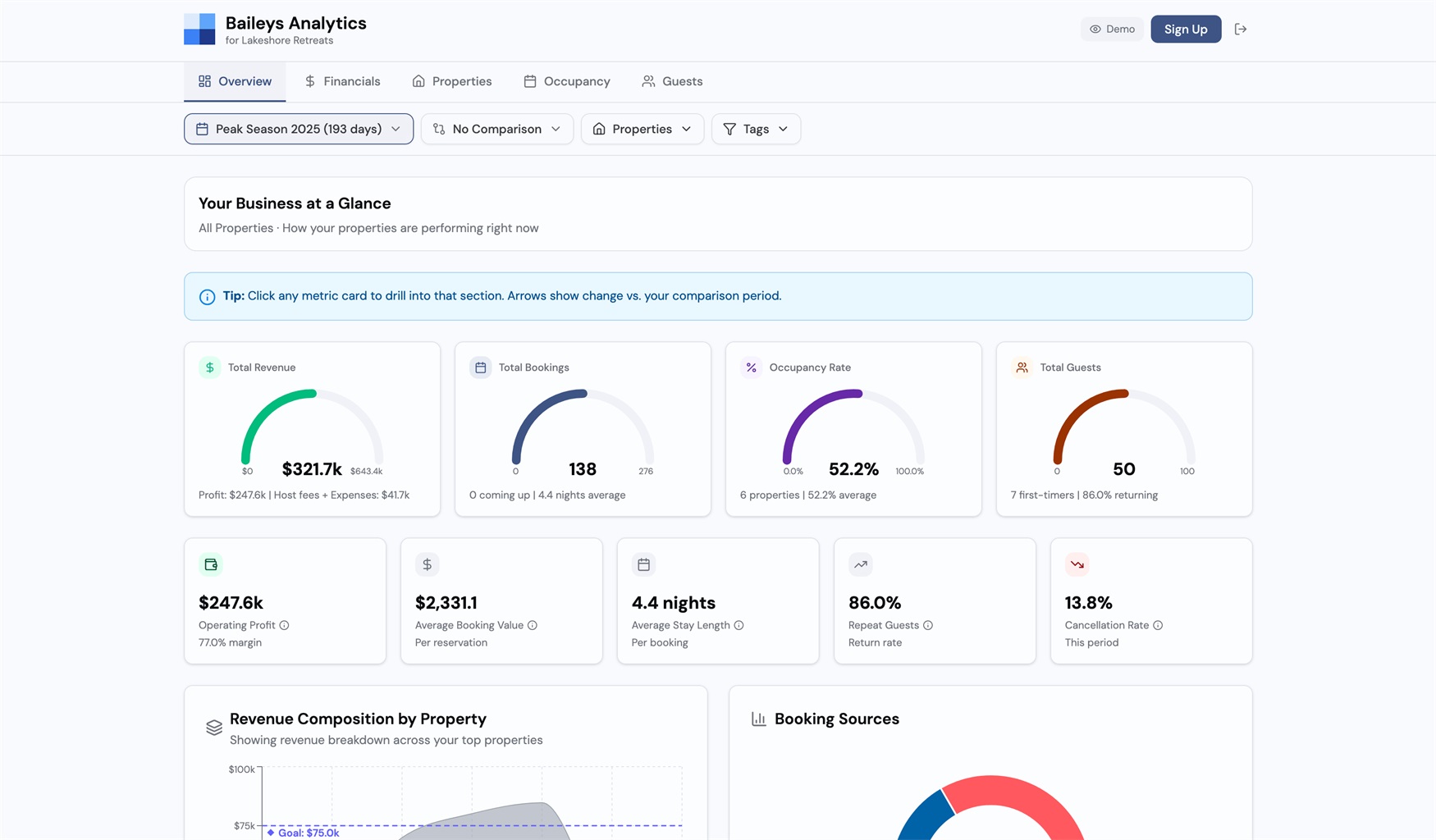
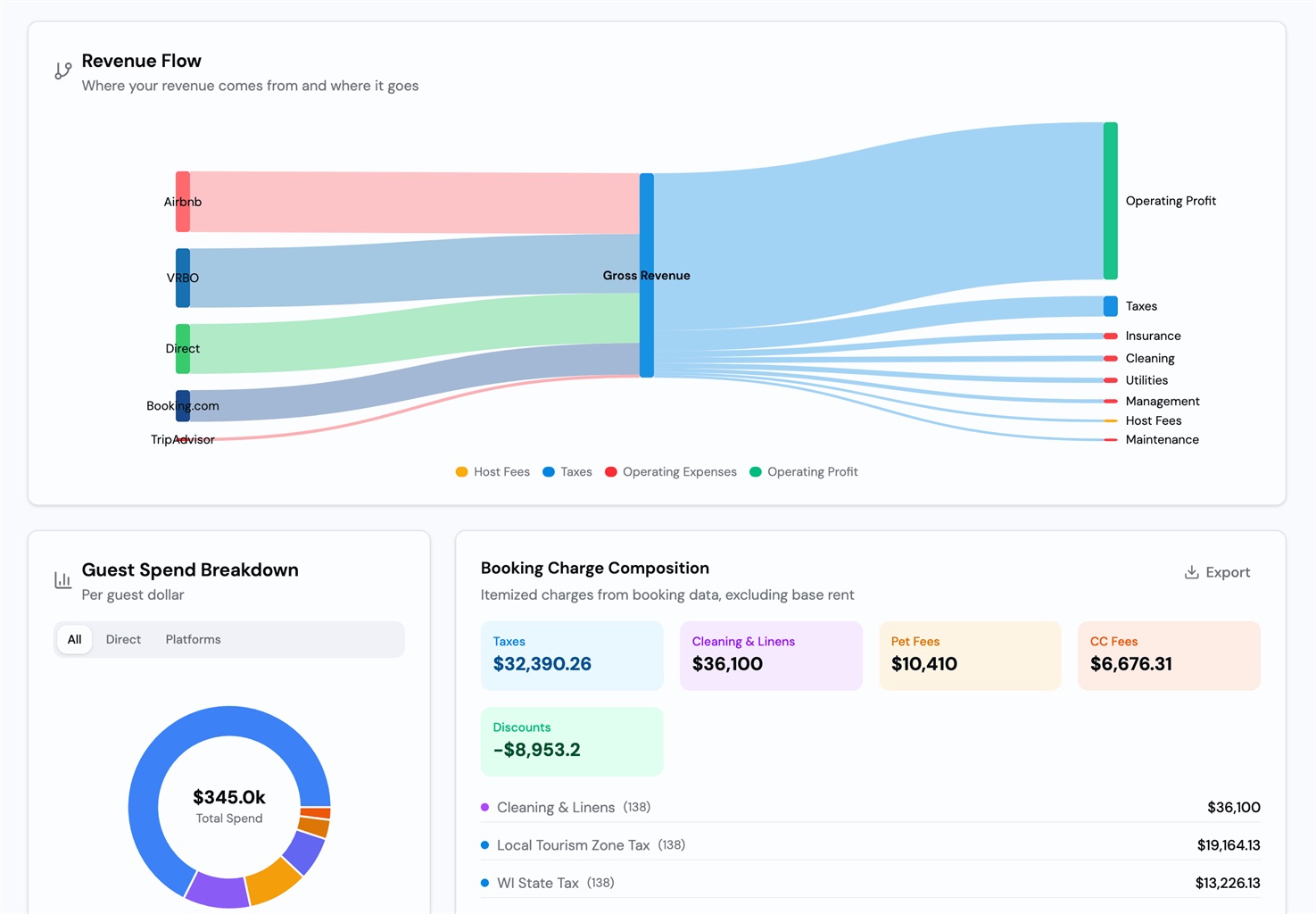
Baileys Analytics turns your OwnerRez data into actionable dashboards. Connect your account and see revenue, P&L, property performance, occupancy, and guest trends across all your properties. Track real net margins after platform fees, taxes, and operating costs. Filter by date, property, or tag. Compare seasons. Find your best and worst performers. Spot gaps before they cost you. No spreadsheets required.
Features
- 💵 See where your money actually goes: Track platform fees, cleaning costs, and taxes by property. Know your real margins, not just gross revenue.
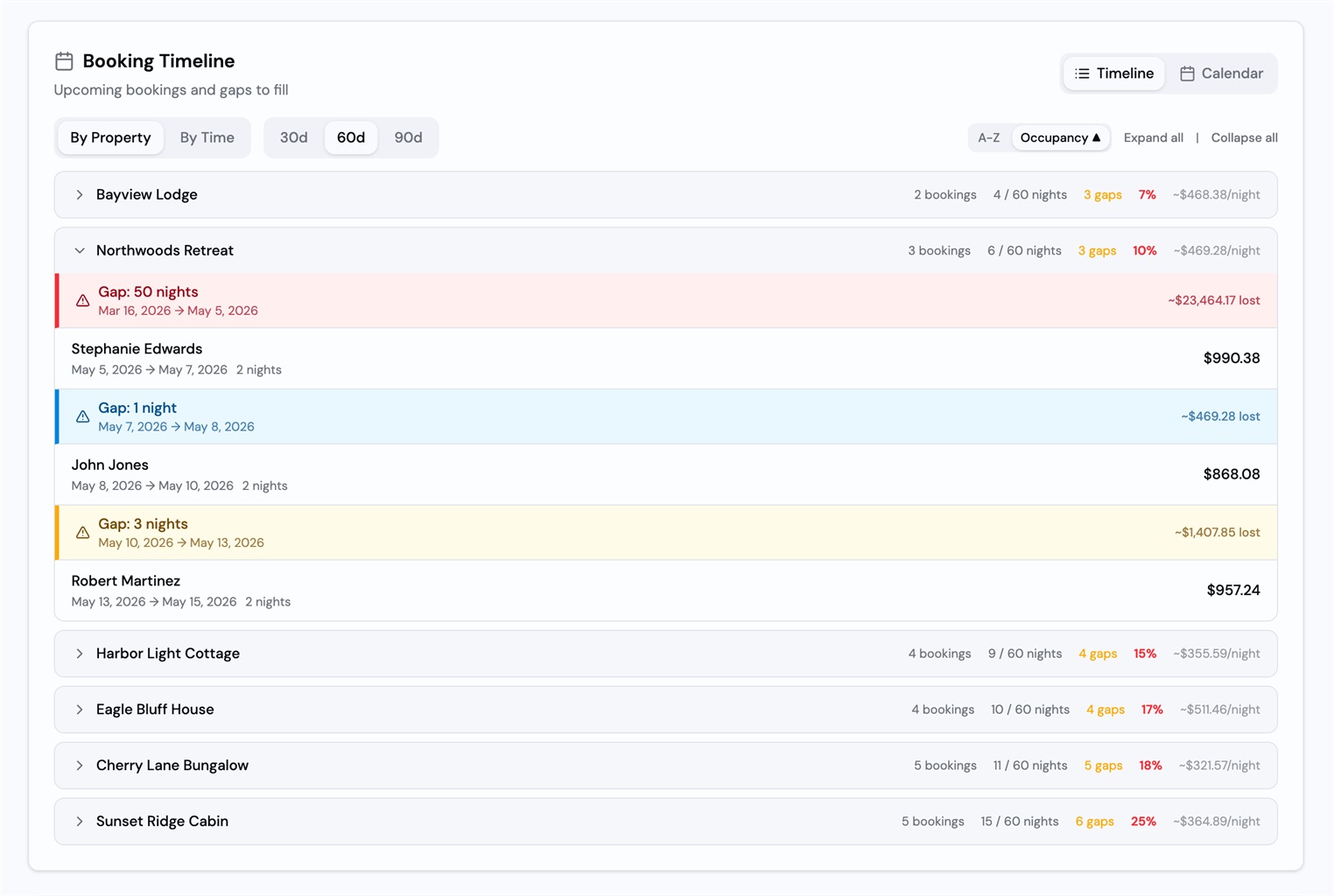
- 📊 Find your best and worst performers: Sort by occupancy, revenue, or profit. Compare properties side by side and know which ones are pulling their weight.
- 📅 Spot gaps before they cost you: Visualize booked vs. available nights. See seasonal patterns and year-over-year trends at a glance.
Pricing
$20/month or $192/year (save 20%). Cancel anytime. View more pricing info here.
Ready to Connect?
Get started with Baileys Analytics by visiting here and checking out the OwnerRez support article for integrating OwnerRez with Baileys Analytics.
User Profile: Vacation In Rocky Point 1 reply

Way to go!
Integration With Vidle Housing 10 replies

Can we integrate multiple times from Ownerrez? The use case being different finances needed for different properties.
Integration With ProhostAI 2 replies
We’re excited to share our latest integration with ProhostAI, an all-in-one AI assistant for vacation rental hosts, helping OwnerRez users automate guest communication and streamline daily operations.
About ProhostAI
ProhostAI is the all-in-one AI agent for vacation rental hosts. From automated guest messaging and cleaning scheduling to upsells, reviews, guidebooks, and analytics, ProhostAI handles the busywork so hosts can focus on growing their portfolio. Trusted by hundreds of hosts managing thousands of listings worldwide.
Features
The all-in-one platform includes:
- AI guest messaging & autopilot
- AI-powered workflows & automations
- Automated cleaning scheduling
- Smart task management
- Instant AI guidebook
- Ask AI agent with knowledge base
- AI memory & learning
- Gap night upsells
- Built-in team chat
- AI-generated guest reviews
- Cleaner autopay
- WhatsApp integration
- Gmail integration
- And much more...
Pricing
14-day free trial. No credit card required.
Starter: Free forever
- 📖 Guidebooks
- ✅ Task manager
- 📅 Calendars
- 💬 Team chat
- 📊 Dashboards
- 📱 Mobile apps
Pro: $15/listing/mo
- Everything in Starter, plus:
- ⚡ AI Workflows
- 💬 AI Messaging
- 🤖 AI Autopilot
- 🧹 Automated cleanings
- ⭐ AI Reviews
- 🧠 AI Memory
View more pricing info here.
Ready to Connect?
Get started with ProhostAI by visiting here and checking out the OwnerRez support article for integrating OwnerRez with ProhostAI.
April Webinars and Two Upcoming In-Person Events 0 replies
April is here!🌻 As the temperature outside and bookings start to heat up, now is a great time to sign up for one of our live webinars.
This month’s lineup includes live demos, Q&A sessions, and Focus Sessions diving deeper into brand-new OwnerRez features, including the Quality Center and Broadcast messaging. Come learn more about OwnerRez, ask questions, and see how you can start using these new features in your workflow.
We’ll also be attending two in-person events this month, the 2026 FAVR Spring Forum in Panama City Beach, FL, and the 2026 VRNation Annual Conference in Denver, CO. If you’re planning to be at either event, stop by our booth to meet the team!
Webinars:
4/2/2026 OwnerRez Demo
Join us for a live demo of OwnerRez! Our client engagement team will give a high-level demonstration of how OwnerRez looks across all of its menus and features.
4/8/2026 Focus Session - Quality Center & Reviews
Join us for a live webinar on the brand-new Quality Center and reviews in OwnerRez. We’ll walk through how to use this new feature to improve your business and share practical tips for managing reviews.
4/9/2026 OwnerRez Demo
Join us for a live demo of OwnerRez! Our client engagement team will give a high-level demonstration of how OwnerRez looks across all of its menus and features.
4/10/2026 OwnerRez Q&A
Join us for a live Q&A! Please write in questions prior to the webinar so we can start off by answering those right away.
4/14/2026 OwnerRez Demo
Join us for a live demo of OwnerRez! Our client engagement team will give a high-level demonstration of how OwnerRez looks across all of its menus and features.
4/16/2026 SuiteOp/OwnerRez - World Cup 2026: How to Capture Event-Driven Demand (Even If You're Not in a Host City)
In this webinar, we'll show you how to expand your distribution to reach European and South American fans through the channels they actually book on.
4/21/2026 OwnerRez Demo
Join us for a live demo of OwnerRez! Our client engagement team will give a high-level demonstration of how OwnerRez looks across all of its menus and features.
4/22/2026 Focus Session - Inbox & Broadcast Feature
Join us for a live webinar on the Unified Inbox and brand-new Broadcast feature in OwnerRez. We’ll walk through the Unified Inbox and show how the new Broadcast messaging feature lets you quickly notify guests during urgent situations.
4/24/2026 OwnerRez Q&A
Join us for a live Q&A! Please write in questions prior to the webinar so we can start off by answering those right away.
4/30/2026 OwnerRez Demo
Join us for a live demo of OwnerRez! Our client engagement team will give a high-level demonstration of how OwnerRez looks across all of its menus and features.
In-Person Events:
2026 FAVR Spring Forum
Join vacation rental professionals from across the region for a full day of connection, insight, and industry updates at the 2026 FAVR Spring Forum! Register here!
When: April 15, 2026
Where: Panama City Beach, FL
2026 VRNation Annual Conference
Where the vacation rental industry comes together to elevate standards, strengthen community, and build a world class future. This is the conference created by property managers, for property managers and hosts. It is education that matters, community that feels real, and collaboration that pushes the industry forward. Register here! Use Code OwnerRez for $75 off registration.
When: April 28-30, 2026
Where: Denver, CO
Integration With Vidle Housing 10 replies

Hello Joel - if you have questions on taxes - please feel free to contact us at support@vidlesupport.com and we would be happy to help. We also have live chat on the site. By way of transactions - everything is done via Stripe (payments) so you as a host have access to your account records/payments for tax purposes, etc. Hope that helps - thanks!
Integration With Vidle Housing 10 replies
Hello Linda - thank you for your comments. Regarding taxes - our transactions go thru Stripe so you have access to your records, etc. If you are having issues listing your properties, please feel free to contact us and we can have someone work with you directly to get set up - you can contact us here https://www.vidlehousing.com/host - thank you!
Integration With Vidle Housing 10 replies
Hello Nathan - thank you for your comments. For more insight - our mid-term fully furnished rental listing platform specializes in servicing the healthcare travel sector (travel RNs, Allied - including PTs, OTs, etc). This sector continues to grow - it's actually bigger than it was was pre-covid (there was obviously a spike in needs during covid). Travelers work 13 week assignments at hospitals/healthcare facilities and many of them (60% or so) extend to 26 weeks. They receive stipends from the staffing agencies that place them on assignments. Those stipends are based on the GSA schedule. Ideally (depending on the location) monthly rent would be around $2500 per month. Healthcare pros are great renters and are there to work. Our booking system using Stripe (online e-commerce). Both Host and Renter create an account and that's how payments are made. For applicable taxes Stripe provides each around with records. Hope that helps - thank you! Any other questions feel free to email support@vidlesupport.com
Integration With Vidle Housing 10 replies
Hello Navin - just to confirm - did you try to contact Vidle Housing at Support@VidleSupport.com? Was there a specific inquiry you had? Please let us know how we can help. Thank you!
Integration With Vidle Housing 10 replies

I tried contacting them. Still haven't heard back from them. It's been 2 days. Sigh.
Integration With Vidle Housing 10 replies

I don’t see the concern with taxes. For longer-term bookings, it’s acceptable to not use Instant Book. You can therefore just include in your listing that rates do not include xx% tax. Once you get an inquiry/booking, you can work out the final invoice.
An issue I’ve had with Furnished Finder is that their price filter only goes up to $2300+. I’ve reached out to them to try to get them to fix it with no luck. I don’t use their platform due to this issue. Too many guests trying to pay $2500 for a furnished monthly rental when the local market is $3000/month for an unfurnished annual lease.
Vidle goes up to $7500+ it appears which is appreciated to weed out people who have unrealistic expectations. Our monthly rates range from 4-10k/month.
I do think 12% commission is high for a platform that focuses on longer-term bookings. For example, a single booking could easily be a $1200 commission. Either way, the 12% will be passed on to the guest in the nightly rate. I think Vidle should look into the booking site “FloridaRentals” and see how they have things set up.
I don’t expect to get many/any bookings on this platform for a long time until there’s an increase on the demand side but I see no downside to setting up the integration.
Not sure why my post is showing up as “possible spam”. Maybe I should have been “glass half empty” instead.
Integration With Vidle Housing 10 replies
How are payments processed? OwnerRez is structured to take two payments (an initial payment and a subsequent payment). I have not found that to work well for monthly renters who would prefer to make monthly payments.
Walk ’n Talk Podcast: EP9 - Deep Work and the Need for Balance 0 replies
Episode nine of Walk ’n Talk: The Business Behind Vacation Rentals podcast is live!
Welcome to the Walk ’n Talk podcast, hosted by Paul Waldschmidt and Chris Hynes, CEO and CTO of OwnerRez. In this podcast, Paul and Chris share honest conversations about building a vacation rental software company and the lessons learned along the way. Whether you’re an experienced short-term rental host, manager, entrepreneur, or just curious how the industry works, this podcast is a great opportunity to listen in on real discussions and walk away with something that can make an impact on your business.
🎙️ Episode 9 Now Live
EP9 - Deep Work and the Need for Balance
In Episode Nine, Paul and Chris talk about deep work, the importance of creating that intentional space, and the balance between staying focused and staying available to the team. They discuss how this balance impacts growth, the need to stay lean, and how learning to delegate and trust the team creates space for higher-impact work.
You’ll hear about:
- The importance of making space for deep work
- Why it’s easy to fall into a reactive, always-available mode
- The balance between deep work and staying available to the team
- How stepping away and trusting the team creates space for growth
It’s a behind-the-scenes look at how Paul and Chris think about deep work, balance, and how they spend their time.
Listen Now
Watch Now
Walk ’n Talk: The Business Behind Vacation Rentals is available on:
New episodes are already in the works, and we can’t wait for you to join us on the walk.