
Feature Requests
Latest Activity...
Price comparison widget 66 replies

While some guest may value this tool, OwnerRez should combine the rate checker tools to show all channels at once, and allow us to see our total payout per channel so we can validate that our channel rate adjustments are working. With all of the adjustments to how fees are collected with AirBNb and now VRBO it would be helpful to run these in bulk against many properties.
More robust review data for the MCP 2 replies

Thanks for putting this feature request together! These ideas grow when more voices weigh in, so if you know other users who'd find this useful, send them the link and ask them to upvote.
As a note, this is not just a restriction of the MCP but of the OwnerRez API itself. There are no endpoints for review sub-details, only the overall rating is included.
Price comparison widget 66 replies

Quick update: BookDirectIQ is now live and no longer in private beta. It currently supports OwnerRez and helps hosts show guests their direct-booking price alongside estimated Airbnb and Vrbo totals so they can see the value of booking direct. Additional PMS integrations are planned.
https://bookdirectiq.com/
More robust review data for the MCP 2 replies

Hello,
I'm looking for the new MCP to be able to pull review scores across subcategories rather than just one overall score, for the purposes of targeting marketing to guests who gave 5 stars across all categories. I also want the MCP to be able to draft responses to reviews rather than having to use a browser to do so through Claude.
VAT to be included in booking Price 2 replies

[This topic has been merged with another topic (VAT TO BE INCLUDED IN BOOKING PRICE). All unique votes have also been merged.]
VAT TO BE INCLUDED IN BOOKING PRICE 4 replies
[Another topic was closed as a duplicate of this topic (VAT to be included in booking Price)]
VAT to be included in booking Price 2 replies

"Adding our vote — this isn't just a UX preference for us, it's a legal requirement. Under German consumer price law (Preisangabenverordnung/PAngV), the price shown to consumers must be the final, all-inclusive price (Endpreis); VAT can be itemized separately for the invoice, but it may not be added on top at checkout. Right now we have to store all our nightly rates and fees as VAT-exclusive values just so OwnerRez's tax engine arrives back at the correct gross total — which works, but means every price in the system is "wrong" on its face and has to be reverse-engineered. A genuine tax-inclusive pricing mode (enter the gross price, VAT is backed out and itemized for the invoice/confirmation) would remove that workaround entirely."
MCP Functionality 44 replies

Let us know if that fixes the issue with the miss-labeled tools.
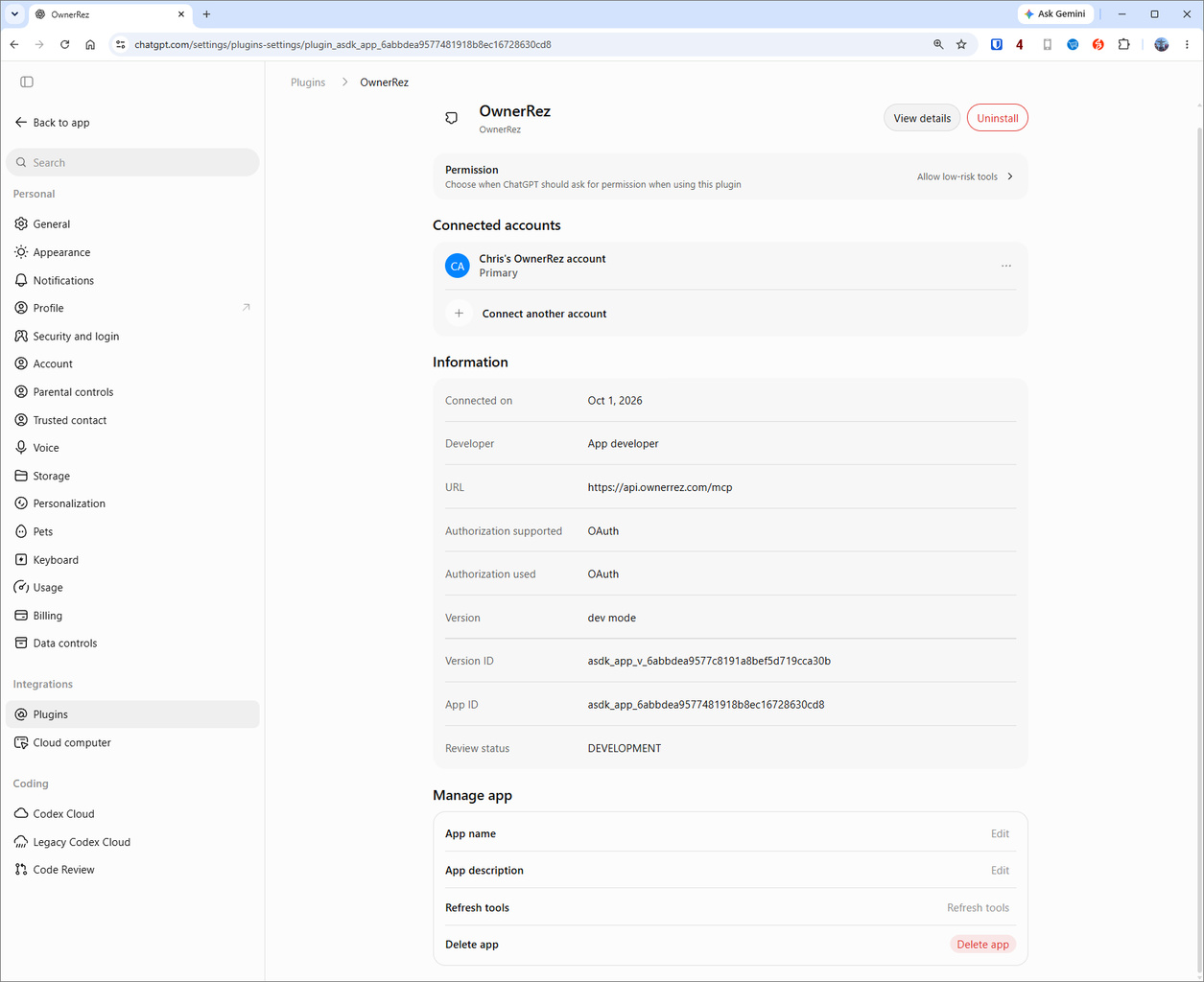
My plugin settings looks different than yours (Plugins is in a different place, and there's no "Refresh" button next to Information), but I clicked "Refresh tools" down near the bottom of the page and now the plugin does seem to be able to call message threads.
Need an option for different card fees 3 replies
[This topic has been merged with another topic (Payment type surcharges & discounts). All unique votes have also been merged.]
Payment type surcharges & discounts 14 replies
[Another topic was closed as a duplicate of this topic (Need an option for different card fees)]
MCP Functionality 44 replies

I tried to prompt ChatGPT with the following:
Can you read all the messages that were exchanged today and identify all of them that were outside of the normal automated messages or basic discussion, that involved needing to respond to a particular issue or question?
I got the following:
The messages reviewed so far show several follow-ups: hot-tub testing, a bedroom TV fault, conflicting entry instructions, a lost-item shipment, and trash and package collection. OwnerRez has temporarily throttled further requests, so I’m pausing before checking the remaining conversations.
Thoughts on why this was throttled? Are we not able to call a days worth of messages at a time?
Thanks
Eddie
Channel Rules - add an option for booking window 7 replies
Great news, this function is currently in development! We look forward to releasing it in the near future.
It will not have booking window options per season, but it will enable you to set different booking windows per channel on each property.
calendar-grid experience as a direct booking feature 2 replies

Does OwnerRez offer a calendar-grid experience where clicking dates immediately displays pricing? This is the guest experience on OTAs and especially younger persons are used to this handling more than going over an additional "Book now" button on our webpage. As a new user I asked whether this capability may be available in the future. Best, Kerstin
MCP Functionality 44 replies

Chris
Can you try this:
Go to your account settings in ChatGTP (click on your Profile -> Settings).
Then click on Plugins, then OwnerRez:
The scroll down to the bottom of the pane and click on the "Refresh" button:
Let us know if that fixes the issue with the miss-labeled tools.
Automated Expense behavior — percentage-based expense limited to 2 decimal places 1 reply

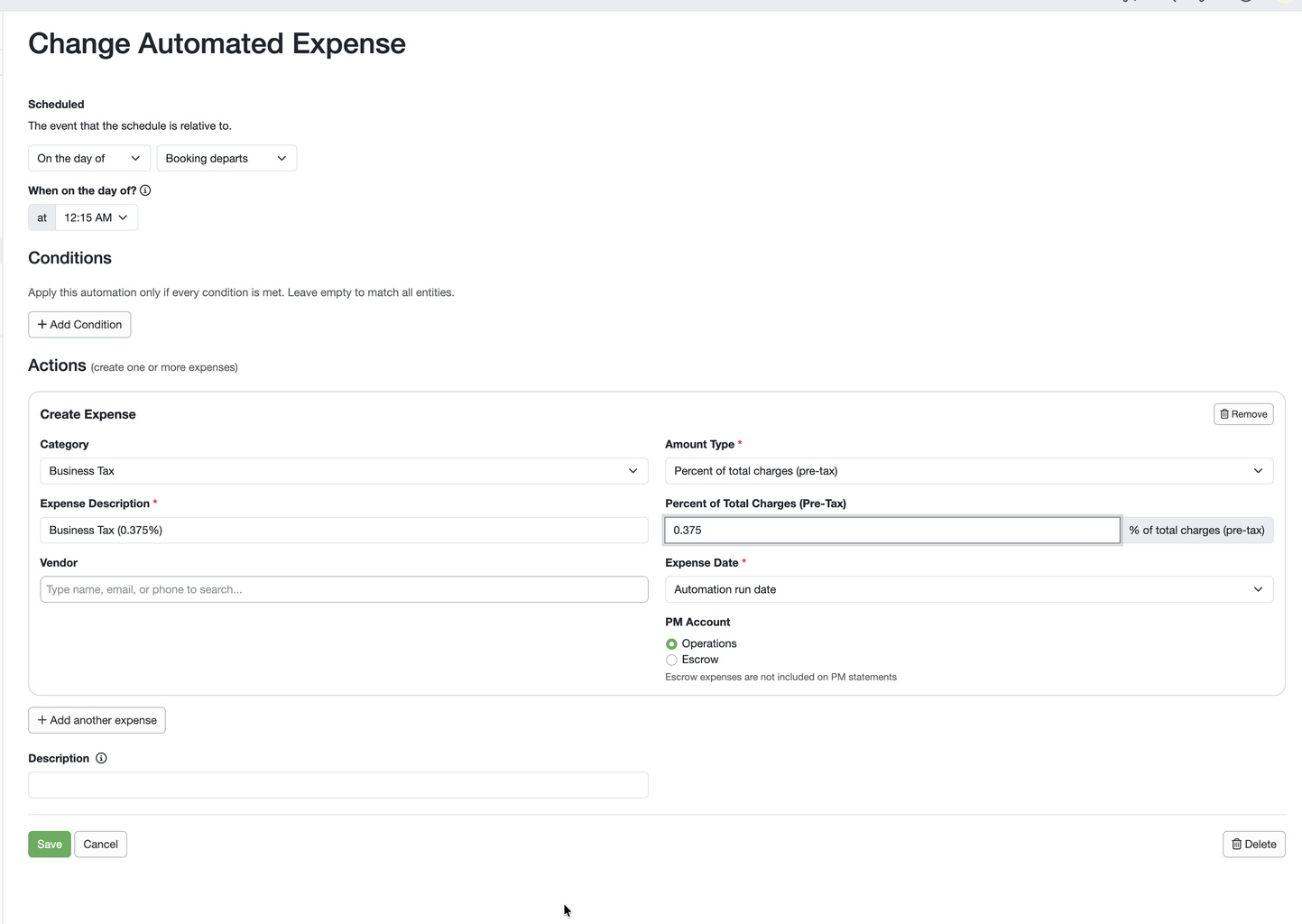
With the new automated expenses (YAY!), the percentage-based options round to 2 decimal digits. Our state-required business tax is 0.375% of the pre-tax revenue from STR rentals. (It's also not allowed to be charged to the guests, so this is separate from our per-booking typical tax structure.)
When I enter in 0.375%, however, OwnerRez rounds it up to 0.38%. As minor as that may seem, my homeowners will certainly not want to pay the government any more than they need to -- and it's an accounting discrepancy that will be impossible to defend.
Can y'all please expand the number of decimal points allowed here?
Integration with Mailchimp 54 replies
Hi all,
Thanks to everyone who's weighed in on this one over the years (some of you going back to 2012!).
We're closing this request. With the advancements in AI connectivity, we won't be pursuing a native connection to contact management tools like Mailchimp.
There's already a way to get your OwnerRez contacts where you need them. Our Zapier connection has worked for this for a long time. Zapier has a walkthrough here:
OwnerRez + Mailchimp on Zapier
Thanks again for all the feedback here!
Comprehensive Fix for Accounting/Quickbooks - develop Roadmap 84 replies

We are also on cash and would like to see OwnerRez offer a cash option... We cannot use the integration because it doesn't come into Quickbooks correctly and we aren't able to change it. :(.
I was just told by my CPA that we need to report on a Cash Basis. I think it comes in as accrual basis (arrival date), but the deposits reflect the cash basis so all you would need to do is change your reporting in QBO to cash for your CPA. What exactly is coming in wrong?
Comprehensive Fix for Accounting/Quickbooks - develop Roadmap 84 replies

We are also on cash and would like to see OwnerRez offer a cash option... We cannot use the integration because it doesn't come into Quickbooks correctly and we aren't able to change it. :(.
Need an option for different card fees 3 replies

If you check to offer the PayPal pay later option it doesn't tell you this but PayPal will charge you a 5%+.49 card fee.
Just had an incident with this and hope to get some feedback on how to avoid this besides the obvious of shutting down the PayPal pay later option.
We have our card fee surcharge set a 4% because we thought this would cover all options but not so as we found out.
An option to be able to set card fees for different cards would be great.
Record manual/offline security deposit (e.g. via Check) 4 replies

Adding our vote for this as well. We just ran into exactly this issue on a 61-night direct booking.
Our guest paid a $750 refundable security deposit via Venmo. We can record his rent payments as manual/offline payments, but there appears to be no way to record the $750 specifically as a security deposit received.
Recording it as a normal payment would incorrectly reduce his outstanding rent balance. Leaving it unrecorded means OwnerRez doesn’t reflect that we already hold the security deposit and may continue generating security-deposit reminders.
This is also relevant to our regular winter monthly rentals. We frequently have guests renting properties for several months during the winter season, and payments—including deposits—are commonly made through check, Venmo, or PayPal rather than by credit card.
A simple “Record Offline Security Deposit” option under Security Deposits would solve this. Ideally, it would allow us to enter the amount, date received, payment method (check, Venmo, PayPal, Zelle, ACH, cash, etc.), notes, and eventually the date and amount refunded.
This seems like an important addition as OwnerRez supports more hosts managing both short-term stays and monthly/mid-term rentals within the same system.
Payment Schedules 79 replies
Adding our vote for this, particularly for mid- and long-term stays.
We just encountered this with a 61-night direct booking. Our guest pays via Venmo/manual payment, and we needed a schedule with an initial payment, the remainder of the first month’s rent, and then the second month’s rent due during the stay.
We were surprised to discover that we couldn’t create multiple scheduled offline/manual installments with their own amounts and due dates or have OwnerRez send accurate reminders for each installment.
This is actually a regular need for our business. In addition to shorter stays, we rent several of our properties on a monthly basis during the winter season, often for multiple months at a time. These tenants typically pay us through offline/manual methods such as check, Venmo, or PayPal, rather than having monthly rent automatically charged to a credit card.
Ideally, we could create any number of payment installments, assign each an amount and due date—including dates after arrival—designate them as manual/offline payments, and mark each installment received when payment arrives. OwnerRez could then send reminders based on the actual installment due rather than the entire outstanding booking balance.
We’re increasingly doing 30–90+ day furnished rentals, so having the ability to properly track recurring monthly offline payments would make OwnerRez much more useful for this side of our business.
MCP Functionality 44 replies
Reconnected the OwnerRez account as suggested and then tested from a completely new ChatGPT conversation. Unfortunately, the same mismatch is still present.
ChatGPT is still being given an api_request tool, but when it invokes it the MCP server responds:
Unknown tool: api_request. Available: entity_list, entity_get, search, fetch, schema, api_get, api_write, api_docs_search, support_docs_search.
So this doesn’t appear to just be stale metadata in an existing chat—the reconnect + new conversation still picked up api_request while the live server is exposing api_get / api_write.
It does look like the hotfix changed the server side, but perhaps the MCP tool discovery/metadata being presented to ChatGPT is still serving the older definition?
export of all guest correspondence within the "Communication History" page 2 replies
[This topic has been merged with another topic (Downloading Communication History). All unique votes have also been merged.]
Downloading Communication History 8 replies
[Another topic was closed as a duplicate of this topic (export of all guest correspondence within the "Communication History" page)]
Export messages for AI 4 replies
[This topic has been merged with another topic (Downloading Communication History). All unique votes have also been merged.]
Downloading Communication History 8 replies
[Another topic was closed as a duplicate of this topic (Export messages for AI)]
export of all guest correspondence within the "Communication History" page 2 replies

It would be helpful for analyzing guest interactions to be able to download an export of all guest correspondence. I recently used AI to review all of my public OTA reviews and found it very insightful for my marketing efforts. All of our correspondence would be a step further and help me to understand patterns better.
MCP Functionality 44 replies
Hey Chris,
What I'm gathering is that there was a hotfix that went out about an hour ago that we think will get you sorted. Try disconnected and reconnecting and let us know if that gets you squared away.
MCP Functionality 44 replies

OwnerRez MCP / API: what an AI-run STR operation still needs
MCP via: Claude Code CLI
From Bliss Havens Retreats (Blisshavens.com) (4 properties: Airbnb, VRBO, Google VR, Whimstay, plus a direct-booking site), after a month running daily operations through the v2 API and, since 2026-09-29, the MCP connector. Every item below is a gap we hit in practice, with the workaround we use today.
Tier 1: blocks automation today
| # | Need | Today |
|---|---|---|
| 1 | Write listing content: headline, descriptions, bedrooms/bathrooms/sleeps, amenities, rooms, house rules, check-in instructions | UI only. Spec errors (one property shows 4 bedrooms instead of 3; occupancy is wrong on two) wait for a human, and every connected channel copies the errors |
| 2 | Read and write channel connections: per-property listing IDs for every channel (incl. Whimstay), the "Included?" flag, last push time, and sync errors | Can't see whether a channel is mapped or healthy. GET /v2/properties returns empty listing_numbers; only /v2/properties/{id} has them, and Whimstay never appears |
| 3 | Taxes endpoint: read and write tax rules and their property/channel scope | Not exposed; we infer taxes from a booking's charges. We can't verify a Maryland property isn't carrying Pennsylvania taxes |
| 4 | iCal imports: list per property (URL, last fetch, status, events imported) and trigger a refresh | Invisible. We found an import wasn't blocking anything only by reading 60 nights of calendar |
| 5 | Delete or cancel a block | DELETE returns 405 and status can't be changed, so released blocks are PATCHed into the past and parked in non-overlapping slots |
| 6 | Dry-run quote: full guest price (rent + fees + taxes − discounts) per channel, without creating a record | Can't prove a channel charges cleaning and tax before it goes live (Booking.com undercharged us ~$194 per 2-night stay) |
Tier 2: closes the loop on guests and revenue
| # | Need | Today |
|---|---|---|
| 7. | Webhooks: documented payload schema, HMAC signature, retry policy, string event names, delivery log | Payload is opaque, so we treat it as a trigger and re-fetch. type/action are undocumented bit flags; a body without action silently creates an inert subscription. The secret has to live in the URL |
| 8 | Airbnb actions: pre-approve, send Special Offer, accept/decline an inquiry, alter or extend a booking | UI only. A 245-night inquiry needed several manual steps |
| 9 | Messaging: host-copy option (email the owner what was sent), templates and automation read/write, scheduled sends | POST /v2/messages works; we email the owner a copy ourselves |
| 10 | Write discounts and surcharges, with an optional "never below the PriceLabs floor" guard | Read only, as far as we can tell. Airbnb discounts stack after dynamic pricing and cut below our December floors |
| 11 | Reviews: read and respond per channel | Read only |
| 12 | Housekeeping: turnover schedule, assign a cleaner, completion status | Not exposed |
Tier 3: owners and reporting
| # | Need |
|---|---|
| 13. | Owner statements and payouts API (co-hosting at a commission %) |
| 14 | Performance endpoint: occupancy, ADR, revenue by property × channel × month |
| 15 | Rental agreement, guest-verification and damage-protection status per booking |
MCP-specific asks
- Dry-run mode on every write (returns the diff), plus idempotency keys.
- Scopes per entity (for example: messages write yes, rates write no) instead of one read/full switch.
- Audit log of writes made through MCP, attributable to the connector.
- Event notifications (new inquiry, new booking, cancellation, sync error) pushed to the client.
- A "daily ops" resource: arrivals, departures, unanswered inquiries, unsigned agreements, sync errors.
API inconsistencies found
GET /v2/properties→listing_numbers: {}; the same field is populated on/v2/properties/{id}./v2/bookingswith an invalid filter returns 400 without anitemskey; naive clients read it as "0 bookings".GET /v2/spotrates?property_id=ignores the property filter.GET /v2/messagesrequires camelCasethreadId, while the rest of the API is snake_case; without it the endpoint returns 405, not 400.- Webhook registration needs snake_case
webhook_url; camelCasewebhookUrlfails.