
General Help and Questions
Latest Activity...
Earning a Commission on CFAR policy purchases 1 reply

Hi Donna!
OwnerRez does not offer a commission or revenue-sharing arrangement to hosts for CFAR or standard travel insurance policy purchases made through the platform.
Airbnb Cancellation poilicy 2 replies

I'm also keen for some clarification on this (currently on a super strict 30 day cancellation policy).
Airbnb Cancellation poilicy 2 replies

I’m wondering if there is any guidance on this for those of us on API connection.
I believe that we stay on our current policy but need to let people know one way or another.
Any success with the Stay Integration? 0 replies

Hey folks! I wanted to see if anyone else is trying the Stay integration. I've had it enabled for a while and I'm not seeing any conversion from it. I am seeing quite a lot of inquiries, but it doesn't convert.
Honestly, I think the integration is a bit clunky and I don't really see how this is supposed to work.
- Guest visits your Stay site
- Guest clicks the Contact Owner button
- It triggers a "Book Now" event in OR, but doesn't actually route the user to your direct booking site.
- User gets an email from Stay with a button to "Book now!"
- That just routes them back to the host's Stay site to start the cycle over again.
- In OR, the Inquiry is marked as "answered" saying OR sent the guest an email which DID NOT happen (they got an email from Stay in step 4 above, but not OR).
- Clicking "Answer guest with Quote" -> "Answer Again" DOES trigger an OR email with a quote. So now I have to be in the loop to answer an inquiry again.
This is all very clunky and I can see why users fall off from this flow. I think ideally it would flow like:
- Guest visits your Stay site
- There's a prominent "Book Now" button that routes to your direct booking site on the specific listing they were looking at. If there's guest information/dates they can pre-populate great, but if not, at least put them on the direct site.
- Book!
Curious if this is how it's supposed to work or if others have had better luck. I feel like there's a lot of potential here, but I probably won't renew the Stay service unless I see some improvements here.
Thanks in advance!
Anyone know what time the Support desk is open? 0 replies
Anyone know what time the Support desk is open?
I'm assuming it is in Canada but they have 6 time zones? Last I heard on a ticket was an I'll look into it and get back to you on Friday 18:38 GMT.
I've got a client whose portal isn't showing all of their bookings across 7 properties. Plus OR is also failing on some automated messages.
Re: Redesign the Host Workflow: Customizable Booking Actions, Faster Timeline Access, and a Solo-Host Mode 0 replies

A few weeks ago, I made some very detailed, comprehensive recommendations for unified communications/inbox, and got no comments or interest from the OR team.
What are your thoughts? Suggestions?
If you support this, please vote for it, and add your comments.
VRBO inquiry to quote 14 replies

"Pre-approving sends a quote to the guest that allows them to book. Your calendar dates will remain open until the guest makes a payment."
You are correctly interpreting the answers above.
*API connected hosts cannot pre-approve a quote
*Yes, that info on the inquiry is confusing!
URGENT: 5/20 "Tweak" needs to be undone - Rate Adjustments need to be seperate from RENT - Please vote this up 1 reply

I don't use this approach, but I agree that it should change back. Rolling it into rent is no different than adding the rate adjustment via the channel integration. What's the point of 2 different methods of accomplishing the exact same thing? I imagine a user adding the adjustment via the Surcharge method is anticipating that it will show up as a separate surcharge, just like all the rest of surcharges do.
(@Missy - make note that this isn't in the Feature Request forum, so there's no way for me to up-vote!)
VRBO inquiry to quote 14 replies

I agree that the inquiry process is confusing on Vrbo!
Think of inquiring guests as tire kickers- maybe they want a deal; maybe they wrote to ten hosts to see who replies, maybe they have special questions they need answered before being ready to book; perhaps they are just not serious.
Inquiries mean answering their questions and then directing them to book.
Adria - This is the bit that is super confusing and shows up at the top of the VRBO
Inquiry
Pre-approving sends a quote to the guest that allows them to book. Your calendar dates will remain open until the guest makes a payment.
Sun, Aug 2 — Wed, Sep 22 adults USD xx,xxx.xx
Total reservation amount: $xx.xxx.xx
MY PROPERTY Prop ID: 1234567
Booked through Vrbo on Wed, Jun 3
To make changes to this reservation, use your property management software.
I am not on instant book...
But what I am reading in this thread is that since it is an Inquiry, I am NOT able to pre-approve to allow them to book
So for now I have sent a message to the customer that they can feel free to Request to Book and that I will approve it right away.
Payment Processor for VRBO 2 replies

So the issue is that OwnerRez doesn't support the country I am in (Antigua and Barbuda). But PowerTranz does support our country.
Payment Processor for VRBO 2 replies
Hello!
We have an integration with Powertranz that might work! They're designed for Caribbean and Atlantic region businesses. We have this support article that goes over the banks they support and how to set up the integration: https://www.ownerrez.com/support/articles/payment-processing-gateways-powertranz
Vrbo would only stay the merchant of record if you don't API connect to them. If you were to API connect, you would become the merchant of record and be required to process payments.
URGENT: 5/20 "Tweak" needs to be undone - Rate Adjustments need to be seperate from RENT - Please vote this up 1 reply

on 5/20/26, OwnerRez made this change:
Tweaks
- Integrate rate adjustments directly into nightly rent calculations rather than display them as separate surcharges
We have enabled automatic rate adjustments for airbnb bookings, so that our "airbnb fee recapture" line item is not included in Rent line item. We configured this way so that we are comparing apples to apples when running line item pivot reports with YOY comparisons. (this is critical since airbnb raised commissions from 3% on rent to 15.5% on all charges).
However, the MOST IMPORTANT reason this rate adjustment needs to stay seperated because AIRBNB FEES ARE NOT COMMISSIONABLE TO OWNERS!
Community, please vote this up so that ORez knows it is important to keep rate adjustments seperate from the commissionable rent line item.
I have been emailing with support for 2 weeks with no results.
Please undo this Tweak and restore our rate adjustments to a seperate line item.
Thank you :)
Earning a Commission on CFAR policy purchases 1 reply

Is there a means of earning a commission percentage on every CFAR policy sold directly through OwnerRez as The Host Co offers its users?
see: https://thehost.co/cancel-for-any-reason-insurance
Modify a quote and discount close to arrival in VRBO after integration 9 replies
Hello!
If you need to change the booking dates, you can do so by going to the Overview tab > clicking the pencil in the far right corner (should say Change/Move when you hover over it). On the following page, you should see an arrival and departure date box where you can adjust the dates of stay and save the changes. We have this support article that goes over it: https://www.ownerrez.com/support/articles/extending-a-stay
If you're using dynamic pricing software like PriceLabs, when you save the changes, it would be best to keep the current charges. You'll keep the pricing the same if you don't want to change that.
Payment Processor for VRBO 2 replies
We are trying to sync our property to VRBO, however it asks for a card payment processor. We are based in the Caribbean and all of the payment processors do not work here (like stipe, authorize.net, etc.).
How can we get our properties to VRBO where they take payment and payout to your bank account? Kinda like Airbnb?
ID request and security 1 reply

For the short version, you can tell them this:
Photo IDs and other uploads are protected by SSL encryption in transit, strict access controls, isolated storage, secure data centers, and a no-sharing policy with third parties. OwnerRez also undergoes regular security reviews to identify and resolve any vulnerabilities.
is ther a plan to create a task to an expense conversion? 1 reply
It doesn't look like this is a feature we're working on, but we appreciate you taking the time to submit this feature request! If you know other users who would benefit from this, we'd encourage you to share it with them so they can add their support by way of an upvote at the top of the page.
Modify a quote and discount close to arrival in VRBO after integration 9 replies

I'm using the VRBO API. When I go to VRBO webpage, it states that changes to the reservation must be made on the property management software. How would I do this within OR?
I want to change the dates to a month or so later and leave the price the same. Thanks.
Redirect feature doesn't work for Facebook 5 replies
Hey LC House!
To confirm, are you using the redirect link configuration for hosted websites so that the ORP# isn't displayed at the end of the URL when you're sharing it? If so, you should be able to get rid of this without having to use redirects by disabling broken link protection. To turn this off, go to Settings > Hosted Websites > click on the site name > click Change Settings. On the following page, scroll down to the bottom, set Broken Link Protection to Disabled, and save the changes: After this has been disabled, you should no longer see the ORP# at the end of the URL (it'll still have the dashes between each word of the property name if the name is more than one word). We have this support article that goes over the feature: https://www.ownerrez.com/support/articles/hosted-websites#broken-link
Reordering Photos in Group By Room Completely changed my Group by None Order 2 replies
Apologies for any inconvenience this caused! We wanted to let you know that we released a fix for this issue, so if you arrange photos in the Grupe by None view, and then go to the Group by Room and make changes there, it shouldn't affect the Group by None view.
If you're still seeing an issue with the ordering, please submit a ticket to help@ownerrez.com.
Properties Title 1 reply

OwnerRez has a built-in Property Term setting that flows through both the hosted site pages and the Book Now / Inquiry widget's
Properties dropdown:
1. Go to Settings → Hosted Websites → [your site] → Edit
2. Scroll to the Property Term field
3. Pick Custom from the dropdown
4. Enter:
- Singular: Property & Experience
- Plural: Properties & Experiences
5. Save
Your properties page heading will then read "12 Properties & Experiences" (with whatever your actual count is), and the widget's Properties dropdown label will update to match. One setting, no code.
A couple of things to flag:
- This is one combined label with one count. If you specifically want the count repeated — i.e. "12 Properties & 12 Experiences" — that's not something the built-in setting can do, and it would need a custom theme tweak.
- If you actually have separate inventory for properties vs. experiences and want two different counts ("12 Properties & 4 Experiences"), that's a different conversation — OwnerRez treats all bookable inventory as properties under the hood, so we'd want to understand how you're modeling the experiences before recommending anything.
Redirect feature doesn't work for Facebook 5 replies

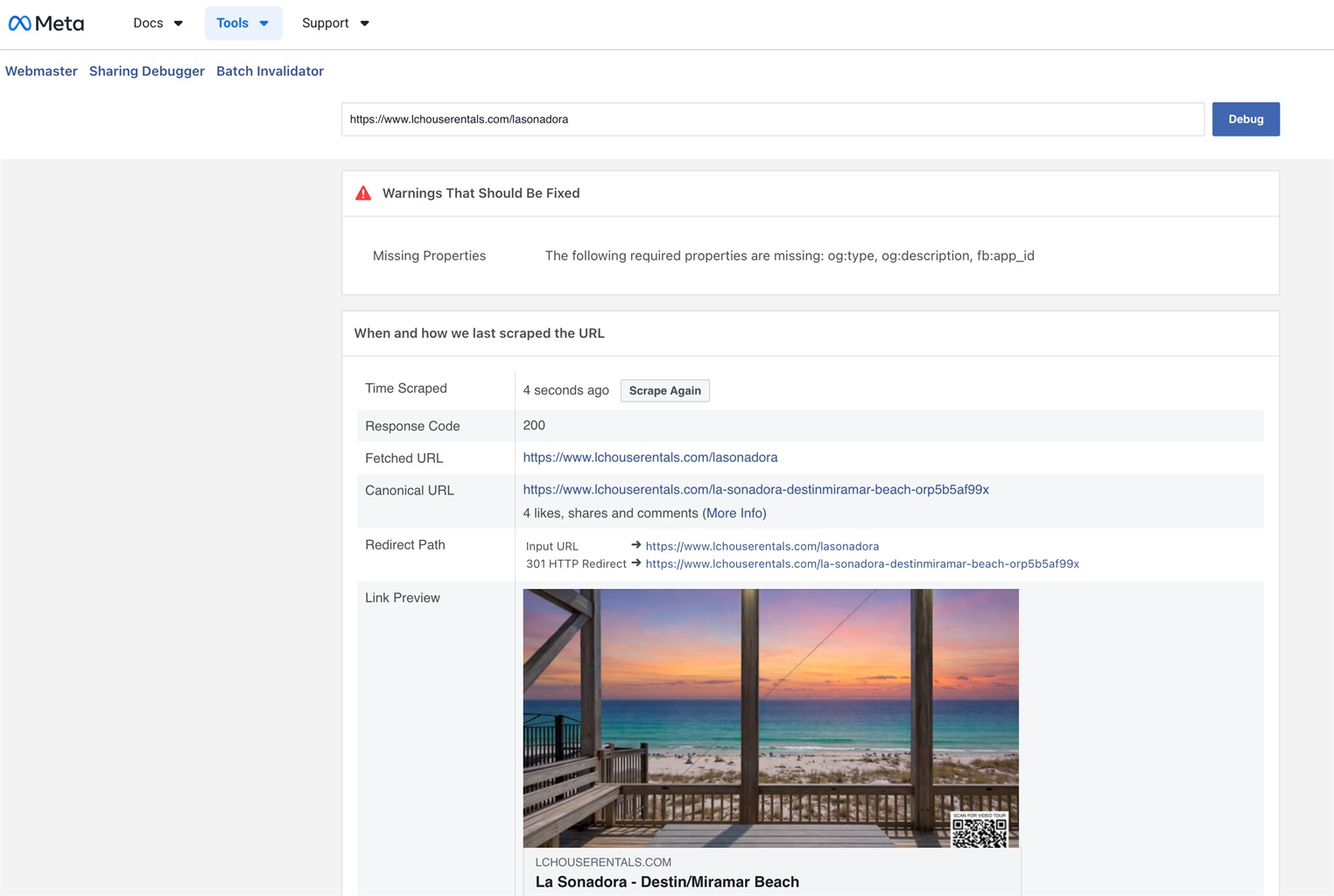
Yes I tried many times after debugging. Instead of taking me to the property’s page, it kept taking me to the “missing page showed in the original post.
Redirect feature doesn't work for Facebook 5 replies
Maybe I'm misunderstanding the issue. The FB debugger seems to be correctly grabbing your link (identifying the redirect path) and showing the right image and title. Have you tried sharing it on FB again? Where are you still seeing/getting the missing page error message?
Redirect feature doesn't work for Facebook 5 replies
It didn't work.
Redirect feature doesn't work for Facebook 5 replies
Try Facebook's Debugger to see if it helps: https://developers.facebook.com/tools/debug
After it populates the page from the first Debug, click Scrape Again.
Redirect feature doesn't work for Facebook 5 replies
I set up a redirect link and if I type out the pretty link in my browser, it redirects me to the ugly link and works just fine. However when I posted the pretty link on Facebook, and clicked on it, it took me to a "missing page" on my hosted website, instead of the property. There is sth in Facebook redirect functionthat is messing this up. How to fix this?
Reordering Photos in Group By Room Completely changed my Group by None Order 2 replies

I just noticed the same thing. This is terrible because the Group By: None order is what is pushed to channels like Airbnb and Vrbo.
I spent HOURS fixing my photo order on all my properties a few months ago and now I have to re-do them all from scratch. I was wondering why my booking volume suddenly dropped. This may well be a factor. Color me a very unhappy person!
This literally just happened without me even touching my photos for several weeks.
Properties Title 1 reply

Is it possible to change the Properties title from "X Properties" to "X Properties & X Experiences". If so, where is the CSS and/or HTML code located to change it?
Thanks,
Chris
More bed options needed 2 replies

This has changed. On VRBO it is now possible to select twin or double sofa bed. Writing to request this option be available in Owner Rez amenities.
ID request and security 1 reply

I have been collecting ID and rental agreement for my Airbnb. So far no issues thankfully but a guest is concerned about how the ID is stored. Anyone have any details?.I am mostly finding things about credit card data