Staff Reference » Debugging Steps
Updated today
Door Lock Integration Debugging
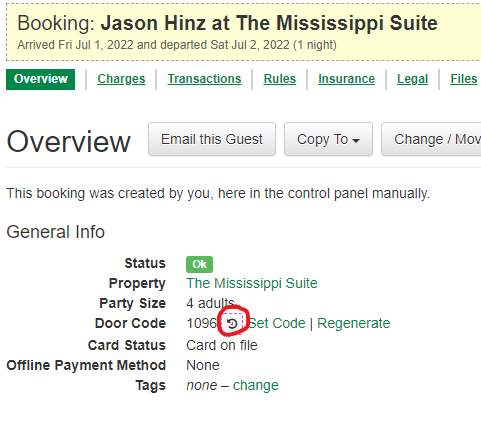
- Is there a code assigned on the booking in question? (I nearly always require a specific example of a booking that didn't work.)
- Are the locks mapped in an apparently correct way? (I often find they aren't, which of course means the codes won't go anywhere useful.)
- If using a third-party integration (e.g. RemoteLock), are all doors in the RemoteLock system mapped to a property in OwnerRez? You can check this in the Property Mappings page of the lock connection in OwnerRez - e.g. here's a lock that's not mapped to any OwnerRez property, which may be the source of the problem:

- From the client's description of the problem, does it sound like they have common door locks (e.g. one main entry door that's used by multiple separate apartments)? If so, is that lock properly mapped to the multiple individual OwnerRez properties, as well as each individual property's own private door lock being mapped to just the one property?
- Was the lock mapping setup AFTER the booking was created?
- Is there maybe a glitch in the template that sends the code to the guest?
- Is the door lock settings using the guests phone number, and does the booking guest have a phone number?
- You can View Door Code Change History