
Our Channel Management feature is extremely powerful and can greatly simplify your channel advertising. Learn how it works by reading our Channel Management overview article. The most powerful part of our Channel Management is the API Integrations we have with certain channel partners like Airbnb .
This article provides a list of common questions and answers for the Airbnb API integration that are not covered elsewhere. This article assumes you have already connected the Airbnb API to OwnerRez. If not, do that first.
Questions are added to this page if they are miscellaneous in nature and we have not already answered them in other Airbnb support articles. Please read the Airbnb overview , connecting and rules & settings support articles for Airbnb before coming to this page as those articles cover the normal workflow.
Once you go API, Airbnb disables fields on their control panel and you can no longer modify most settings on their side. This is true for all property content, rates, rules and availability. OwnerRez becomes the master record for all information so the channel turns off the ability for you to edit that directly and only communicates with OwnerRez for changes. If you don't know how to set something on the OwnerRez side, please read our rules & settings article or ask us .
Users may see "Opportunity Cards" displayed in the Airbnb app for users to add additional information. OwnerRez believes that most of the items you complete in these "Opportunity Cards" is remaining in place when completed on Airbnb.
There are a few select settings that still can be changed on the Airbnb side because they are not available to be set in OwnerRez. Also, for some content in Airbnb, such as their step-by-step instructions for check-in, things get stuck in limbo when the API is turned on and the feed from OwnerRez doesn't update properly within Airbnb.
If you have old info in a field that can't be changed in either OwnerRez or Airbnb, and wish to update or delete it after an API integration:
-
-
- Go to Settings > API Integrations > click on the appropriate Airbnb API channel.
- Click the Change Property Mappings dropdown button, and select Change Sync Mode.
- For the desired property, on the far right, click the dropdown and choose Limited. Then, scroll down and click Save.
- That change will unlock the descriptions, etc. for editing on the Airbnb side. Go into your Airbnb account and modify as needed. Note that some of these items cannot be modified in the Airbnb browser-based control panel either, only in the Airbnb app.
- Once you're done, go back into OwnerRez Follow the first three steps above, and put the sync back to Everything mode.
-
Alternatively, you can make updates to some of these items using the Airbnb mobile app under the listing you need to update.
Known elements that need to be changed this way:
-
- Amenity details (e.g., parking, facilities, safety)
- Check-in instructions
- Airbnb custom URL
- Snorkeling
- Location
- Changing the Guest Requirement of Profile photo required
- EV Charger Description . Note that the presence of an EV charger must still be set in OwnerRez, on the Accommodations page of the Property.
- Laptop Friendly Workspace
- Promotions and Rule-sets (sometimes)
Once your account is live, we will push updates in about 20 minutes after you finish making changes in OwnerRez. Additionally, availability is checked instantly just before booking so there is no risk of a double booking against the information in OwnerRez.
If you have made a change and want to trigger an immediate sync, go to the Airbnb channel in OwnerRez and use Actions > Trigger Full Sync. That will queue the update for the next push which will go through within a minute or two.
No. Airbnb does not allow this and will still be the merchant of record for all payments even after you go API. We discuss this in more detail on the overview article and functional comparisons article.
Airbnb has several different possible tax collection modes -- some where they remit all taxes, some where you remit all taxes, and some that are a hybrid where they remit some taxes and you remit some taxes. We've broken the details out to a separate Airbnb Taxes article -- read that and make sure you've got the taxes set up accordingly in OwnerRez.
⚡ WARNING:
DO NOT enable the custom taxes option directly in Airbnb! If you do it in Airbnb, the setting will be overwritten next time OwnerRez syncs.
If enabled, Airbnb Resolution transactions now come in via the Airbnb Transactions Sync .
Airbnb Resolution Center Transactions may result in the payment properly being recorded in OwnerRez under the booking transaction but without any corresponding charge entered. This leaves the possibility of the booking transactions displaying a guest overpayment.
OwnerRez recommends the following.
- Regularly check your booking transactions, especially bookings that appear to have an apparent guest overpayment.
- If a guest overpayment is found, users need to manually correct the overpayment by entering the appropriate charge.
However, you can still create resolution requests on Airbnb and the same process will continue to work. The resolution simply will not push into OwnerRez automatically. Instead, use our Channel Bridge tool to find and download payments from Airbnb and import them into OwnerRez.
Channel Bridge will continue to work even after you go API.
When you channel bridge, the payment will be imported in the Transactions tab and a generic charge will be added as well on the Charges tab. If you want to use a specific surcharge type, go to the Charges tab of the booking, hit "change charges" and "convert to manual charges". This will keep Channel Bridge from doing any further updates to the charges for that booking. Then you can set the specific information you want for that adjustment.
If users have enabled Airbnb Transaction Sync , t ransactions may take time to appear (up to 3 days) in OwnerRez.
OwnerRez users that have not enabled Airbnb Transaction Sync should use our Channel Bridge tool to find and download payments from Airbnb and import them via Channel Bridge into OwnerRez.
You cannot change the booking dates (ie. arrival, departure) in OwnerRez. Even after going API, the dates must be changed from the Airbnb side in the same way you did it before going API.
Find the booking in Airbnb and click the option to make changes or alterations. Click the "Change Reservation" option.
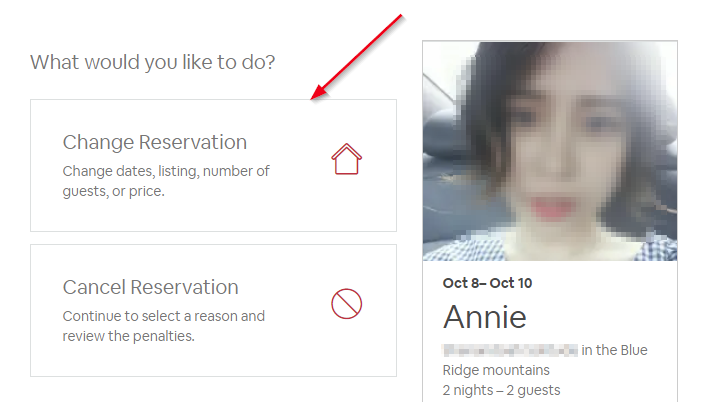
After the alteration page loads, change the dates first and then set the new price (if the price needs to also change). The price may automatically change after you change the dates, so make sure to change the dates first before fixing the price.

Once you have the new dates and price entered, click Continue and Airbnb will send a request to the guest to confirm on their side. The guest has to approve it in order for the booking to actually change. Once the guest approves it, the change will push into OwnerRez automatically.
Per Vrbo policy , bookings that are longer than 28 days and arrive more than 30 days in the future can be changed by the guest without your approval.
When you connect the Airbnb API, it will automatically pull over information on all your bookings past, present, and future. You do not need to run Channel Bridge to pre-populate your old bookings into OwnerRez. Also, the API automatically brings in all reviews past, present, and future with no further action required on your part.
However, you still need to run Channel Bridge occasionally, because payment data is not pushed to OwnerRez by Airbnb via the API (it's just not a supported feature). The charges are automatically brought into OwnerRez, but payments are not.
If you leave the API bookings in their default state, they will all show that the guest has an open balance because no payments were recorded. Running Channel Bridge will find the payouts in Airbnb and bring them over into OwnerRez so your accounting reports will be correct.
Learn more about Airbnb discounts by reading the following.
OwnerRez users should be aware that Airbnb does not necessarily interpret the discounts exactly as designed in OR, due to the limitations of Airbnb's rate engine.
- Airbnb does not support the Booked on Date criteria for discounts.
- Season criteria are supported for Airbnb discounts.
- OwnerRez recommends that users view their property on Airbnb to be assured that any discounts configured in OwnerRez are displaying correctly on Airbnb.
To create discounts in OwnerRez, navigate to Settings > Pricing > Discounts. Create a Discount to be applied automatically. Then use the Booking Fields to specify the criteria for when that discount should apply.
- This example would create a fixed (and taxable) $10 discount off per stay.
- Alternatively, users can create a Percentage of Rent or Percent of Subtotal discounts by selecting those.
- Weekly/monthly discounts will show in the week/month discounts settings on Airbnb if they are exactly 7 or 28 nights and have no date criteria .
Note that Airbnb does not necessarily interpret the discounts exactly as you design them, because of limitations in their rate engine. Your discounts as programmed into OwnerRez are mapped to Airbnb in the following ways:
- Weekly/monthly discounts will show in the week/month discounts settings on Airbnb if they are exactly 7 or 28 nights and have no date criteria . Otherwise (if they have date criteria or target a different length of time) they will be set as rules on the calendar.
- Other length of stay discounts will also be sent as rules to Airbnb. They must have a criteria of "number of nights" greater than and not be a 7 or 28 night discount. They may have date criteria. They can't have any other criteria than date and number of nights or they won't apply as rules in Airbnb -- you can't combine length of stay and other sorts of criteria like last minute or early bird.
- Last minute discounts will be sent as rules to Airbnb. Learn more by reading Last Minute Discounts on Airbnb . They must have a criteria of "arrival days from now" less than, where the number is 28 or less. They may have date criteria, but can't have any other criteria than date and arrival days from now or they won't apply as rules in Airbnb -- you cannot combine length of stay and last minute criteria.
4. Early bird discounts will be sent as rules to Airbnb. Learn more by reading Early Bird Discounts on Airbnb . They must have a criteria of "arrival days from now" greater than or equal to, where the number is a multiple of 28 or 30. They may have date criteria, but can't have any other criteria than date and "arrival days from now" or they won't apply as rules in Airbnb -- you can't combine length of stay and early bird criteria.
Generally, Airbnb doesn't support weekly/monthly type rates. Instead they support length-of-stay discounts .
If you do not have weekly or monthly rates, just use LOS discounts and leave it at that, they'll work in Airbnb and in your direct bookings.
If you already have weekly and/or monthly rates and are configuring the Airbnb API, you have two recommended approaches:
- Make the length-of-stay discounts only apply to Airbnb, by setting the Listing Site criteria on the discount to "only Airbnb". That way direct bookings will remain using the weekly/monthly rates you have set in your Seasonal Rates, and Airbnb will use the LOS discount.
- Use length-of-stay discounts everywhere, and remove all weekly and monthly rates from your Seasonal Rates.
⚡ WARNING:
Make sure you don't have both weekly/monthly rates and LOS discounts applying to direct bookings! If you do, both discounts will be applied - they will stack, and your direct-booking guests will get a super double discount. They'll be happy but you, not so much.
Airbnb supports special fees that can be configured in OwnerRez and will be calculated per stay. To trigger these fees, you can use one of the following keywords in your OwnerRez surcharge description :
- Cleaning
- Resort
- Community
- Management
- Linen
- Pet (additionally must select Pet as the multiplier, even though no actual multiplication is performed - Pet Fee is only allowed as per-stay )
These fees are handled specially by Airbnb, and operate with the following restrictions:
- The above surcharges can only be per stay (not per night).
- Everything but Cleaning and Linen can be either percent or amount. Linen can only be amount.
- There can only be one matching fee per category -- any category with multiple surcharges will only get a single one, and any surcharge fee without a matching keyword will be ignored.
- Criteria will not be honored. For instance, you can't create a surcharge to be applied only to bookings longer than a certain number of days, or with more than a certain number of guests.
On the guest display when a guest is looking for the quote, Airbnb will roll together all of these fees into the rate -- they do not show an itemized breakdown. So the rate as displayed to the guest will show the total of the following from OwnerRez:
- Nightly rate
- Channel rate adjuster
- Per night surcharges
- Matching per stay surcharges (except Linen), divided by number of nights and added to the nightly rate
- Linen fee, added to the cleaning fee
Airbnb includes the fees as follows:
| Fee name | Guest display (where each fee is mapped) |
|---|---|
| Cleaning fee | Cleaning fee |
| Resort fee | Nightly price |
| Community fee | Nightly price |
| Management fee | Nightly price |
| Linen fee | Cleaning fee |
| Pet fee | Nightly price |
OwnerRez surcharges can be set to apply to specific seasons - but, Airbnb doesn't honor that. You also cannot have multiple surcharges with the same name, you only get one per property per fee name.
Per-additional-guest surcharges are also supported by Airbnb, and don't have to have a special name. Note that they only work for "guests", because Airbnb doesn't distinguish between Adults and Children. Also, they are valid only per-night, not per-stay. These are added directly to the nightly rate pushed.
Unlike most channels, Airbnb supports same-day bookings. You don't have to accept them - you can prohibit them by setting your Property Rules to require 1 day minimum in advance.
But if you do want really last-minute bookings, Airbnb lets you set a time cutoff so you at least have a little warning - say, noon. You set this time in the Airbnb API configuration settings:
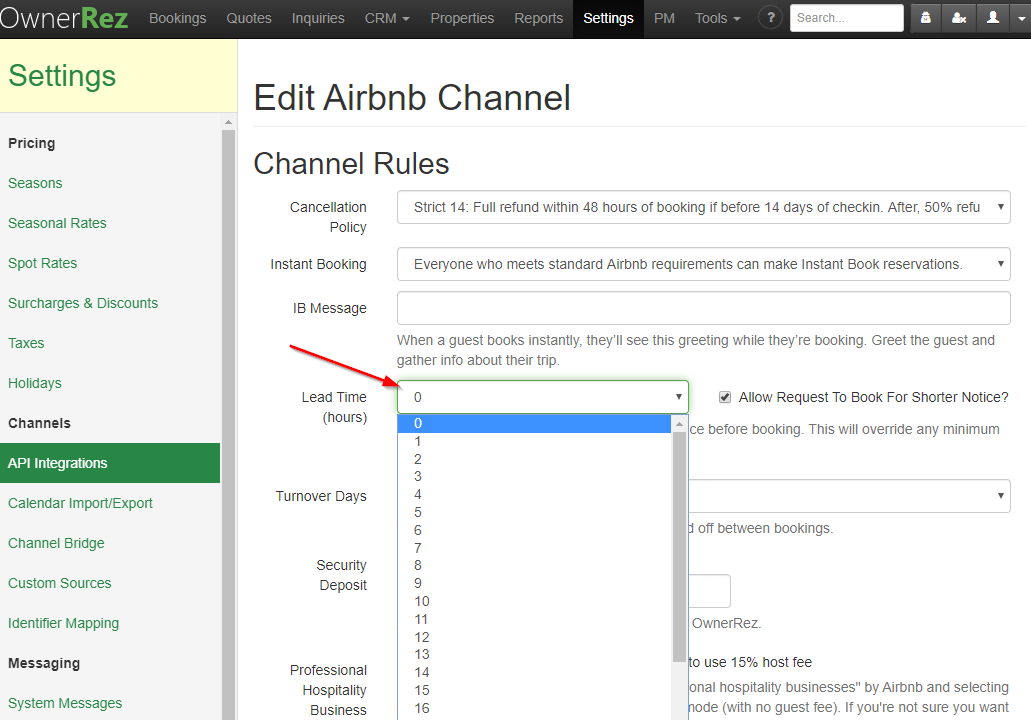
Don't forget that this setting can also be overridden on a per-property level, under Properties > pick a property > Channel Rules:

"Use Channel Setting" means what it sounds like - whatever is set in the main Edit Airbnb Channel screen will be used. But it can be overridden to a specific different time for an individual property.
Yes, our API connection supports multiple Airbnb accounts! Simply create two separate Airbnb API connections, one for each account.
- Make the connection to your first Airbnb account in the usual way , and map the properties that are in that account. Do not map any properties that are in a different Airbnb account.
- In a different tab in the same browser, open Airbnb. Log out of all Airbnb accounts . Then, log in to the second Airbnb account, that is not currently connected to your OwnerRez account via API.
- Switch back to the browser tab with OwnerRez in it. Go to Settings > API Integrations > Connect a Channel button > Connect another Airbnb button.

- You will be brought through the same Airbnb connection authentication, but this time, a second Airbnb API connection to the other account will be created.
- In this second account, map the properties that are in that account. The properties that are mapped to the first account will be marked accordingly, and will not be available - one OwnerRez property cannot be mapped on more than one Airbnb API connection.
Both (or more) of these Airbnb API connections will display all your properties. But some properties will display a message that they are associated with a different account, as appropriate. They won't overlap or get mixed up.
You can configure a pet fees that apply to Airbnb just like any other channel, with one important caveat: Airbnb only supports per-stay pet fees! Per-night pet fees will be ignored and excluded from your Airbnb listing. Also, Airbnb only charges one fee regardless of how many pets are coming -- so you may want to note any limitations or additional fees for additional pets in your house rules. Last, Airbnb requires your pet fee to be no higher than your lowest nightly rate - so at most, you can charge the cost of one additional night as a pet fee.
The OwnerRez setting of "no pets" or "pets allowed" is also transmitted to Airbnb via the API. Note that the setting is in two places -- the Suitability Pets option on the Amenities tab of the property, and the Pets Max of 0 (or otherwise) on the Rules of the property. Both of these are needed in order to make pets allowed, and when they are, that status will automatically update to Airbnb.
Please note that the pet fee is not enumerated separately like cleaning or service fees. The pet fee is added to the nightly rate like management, resort, and other types of fees. If you're looking to double-check that your pet fee is working, first select some nights without any pets and record what the nightly rate is. Then select a pet and compare the new nightly rate. You should see the price per night increase exactly by the amount of your pet fee.
Yes! It's called an "IB Message". You can set it in your Airbnb API connection settings.

Note that only plaintext is allowed (no HTML) and only 300 characters. This message will only be displayed if you have activated Instant Bookings on Airbnb.
Like this?

Airbnb only allows you to use their Super Strict cancellation policies if you have identified and verified your business account with them (BAVI), so they know you're real and aren't a scammer. This must be done by Airbnb and generally will happen if you take the following steps when that "Business Account Verification" box appears. (Please follow the steps exactly.):
- Click on the green words "Airbnb Business Account Verification & Identification (BAVI).
- A screen should open in your Airbnb account.
- If it does, simply click on the "Back Arrow" at the top, left of the screen and you will go back to the OwnerRez API setup.
- You can then continue with the remaining items on the Airbnb API page.
If the above process does not work, you can usually do this through your Airbnb dashboard , or by calling Airbnb support. Note that Airbnb support docs suggest that there may be an additional charge for using this option, but, we have not found this to generally be the case.
No and yes.
It is not possible to connect to an Airbnb account using cohost login credentials.
However, if you are a cohost, presumably you are on good terms with the actual owner of the Airbnb account. If they'll share their actual main credentials with you, you can use them to set up the API connection in OwnerRez using the main account , and it'll work thereafter.
This happens when you were previously using a different property management software, such as LiveRez. It is not possible to be connected to more than one such PMS at a time - so if you are now going to be using OwnerRez, make sure you've canceled your service with the old one so you aren't paying for both!
Having done that, here's how to disconnect the old one so you can connect Airbnb to OwnerRez.
- Go to Airbnb, in the account section
- Click on the "Privacy & sharing" section.

- Click over to the "Services" tab.
- Is there a connected app for anything other than OwnerRez there? If so, hit the "Remove access" link and remove the app.
- You should now be able to connect the Airbnb API in OwnerRez without errors.
You can do this, with certain requirements - here's how .
However, you may not need to. Airbnb offers you several choices as to exactly who is allowed to Book Now in the OwnerRez API - Settings > API Integrations > Airbnb entry > Change button > look for the Instant Booking selection:

Carefully read that third option. How many unsuitable parties will still qualify if they
- Have verified government ID
- Have traveled on Airbnb before
- Have been recommended by other hosts
- Have no negative reviews
Probably not many. So even for highly selective owners, it is almost always possible and safe to use the Airbnb API. Just use the most restrictive setting as described above - everybody else will still have to Request To Book. :-)
To select this option, go to Settings > API Integrations > select your Airbnb API channel > Change button > look for the Instant Booking dropdown selector, and select the desired option > Save.
That's right - they don't. Airbnb doesn't support an age limit field like OwnerRez, Vrbo and some others. They also don't have a separate rule for adults and children -- just one total max guests rule.
OwnerRez does allow you to specify which OwnerRez value to push for the Airbnb max guests rule -- you can either push max guests (the default) or max adults to Airbnb. To control that option, change the Max Guests Rule in the Airbnb channel settings in OwnerRez.
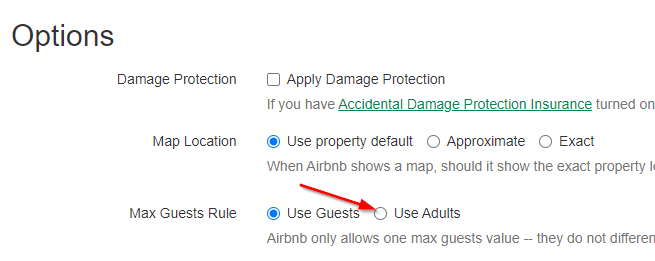
The only way to get more specific than that is to add a sentence to your House Rules about the detailed rules you have. Go to Settings > API Integrations, click on the Airbnb channel, and change the settings.

Airbnb won't automatically enforce this policy, but it will be displayed to your guests, and if you have problems or need to cancel a booking because it does not comply, Airbnb may honor it then - though depending on what it is, you may fall foul of Airbnb's nondiscrimination policies.
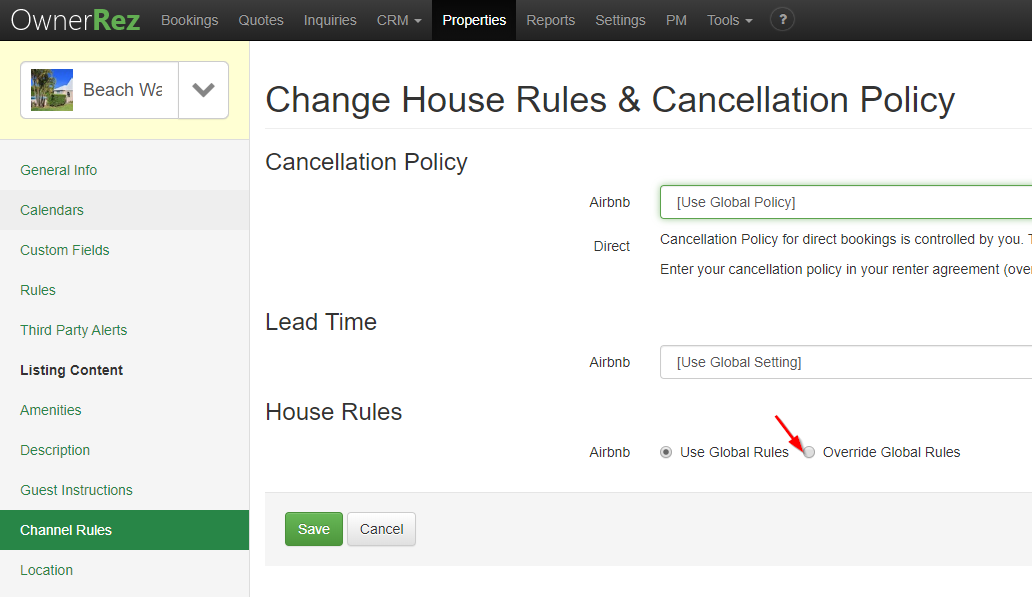
If you have different requirements for different properties (or other differing rules), you can set them separately for each property. Go to Properties > Pick a property > Channel Rules, in the left side menu. Select "Override Global Rules". Then enter the rules you want for that specific property.
Yes! You can create a one-time "special offer" for an Airbnb guest from either the Airbnb app or directly in OwnerRez which will result in a Quote for the special offer in OwnerRez.
If you modify this quote in OwnerRez, the changes will be pushed back into Airbnb via the API, until the guest accepts the Quote and a Booking is created.
You can do this under Settings > API Integrations > click the Airbnb entry > Change Property Mappings > Unpublish Listings. You'll get a list of active listings; click the checkbox to unpublish the ones you want to turn off, and Save your changes.
Note that this is not deactivating the API connection. This is deactivating the actual listing , so your property listing will now not appear in Airbnb searches by guests.
Like any online purchasing process, it takes time for a guest to complete a booking online. When a guest begins the process, they know what dates and property they want. Airbnb checks with OwnerRez to make sure they are available.
It may take a few minutes for the guest to complete the whole process, though. We want to make sure the requested dates are still available when the reservation is finalized, so we block off those dates to hold the calendar open until the guest is finished and the booking is made.
Normally, these blocks will not be visible for very long - they'll quickly turn into a real booking. Occasionally, however, a block may remain active for a few hours - such as, if there are issues with the guest's credit card. The guest is given an opportunity to provide a different payment method, and in the meantime, their dates are held available for them.
Note that this only occurs while an actual booking is in progress. Airbnb also offers guests the ability to make a "request", and blocks the dates for 24 hours. OwnerRez does not honor these requests or block your calendar for them. Don't worry about double bookings though - Airbnb does a final check before confirming a completed booking when a "request" is accepted, and if the dates have already been booked, it'll notify the guest and not allow the booking process to be completed.