
Connect your OwnerRez account with AirDNA Adapt to bring your listings into Adapt, see recommended rates, and (when you're ready) sync prices automatically. OwnerRez connects with a secure one-click authorization, so there are no keys or tokens to copy. You just sign in to OwnerRez and allow the connection.
Connecting is free, and you stay in full control. Connecting brings your listings and rates into Adapt so you can see recommendations. Your current rates won't change, nothing syncs to OwnerRez until you choose to, and you can disconnect anytime.
- Steps for Integration
- What happens after you connect
- What Data is Transmitted
- Support
- Troubleshooting
- How to Disconnect
Steps for Integration
Start the connection in AirDNA
Open the connection flow in any of these ways:
- If this is your first connection, select the connect prompt on the AirDNA Adapt home page.
- Click Adapt in the left-hand navigation.
- Go to your profile and click Add Channel.
Choose Property Management Software (PMS), then select OwnerRez.
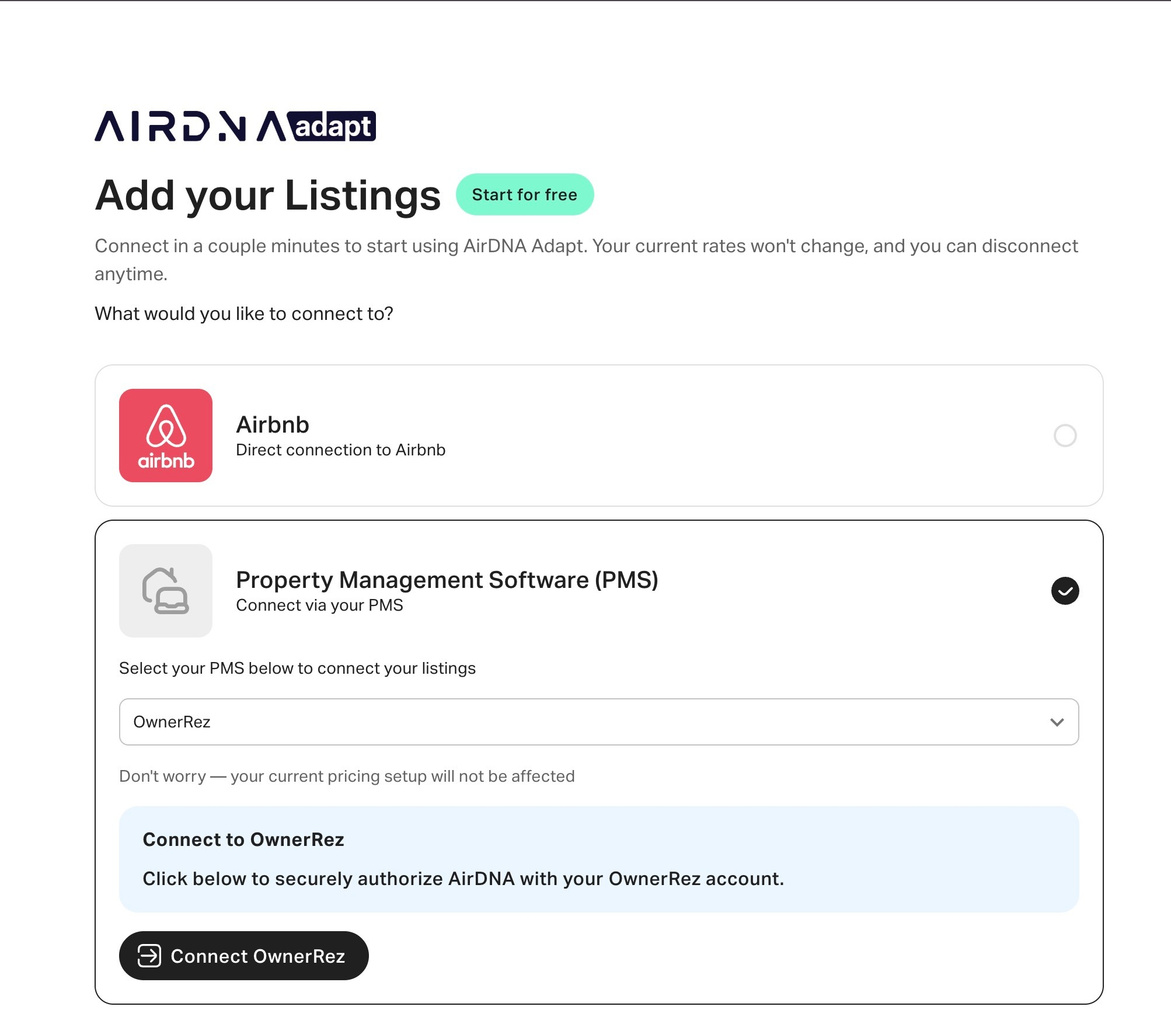
- Click Connect OwnerRez. You'll be taken to OwnerRez to approve the connection.
- Sign in to your OwnerRez account if you're not already signed in.
-
Choose Allow to grant AirDNA access to your listings.
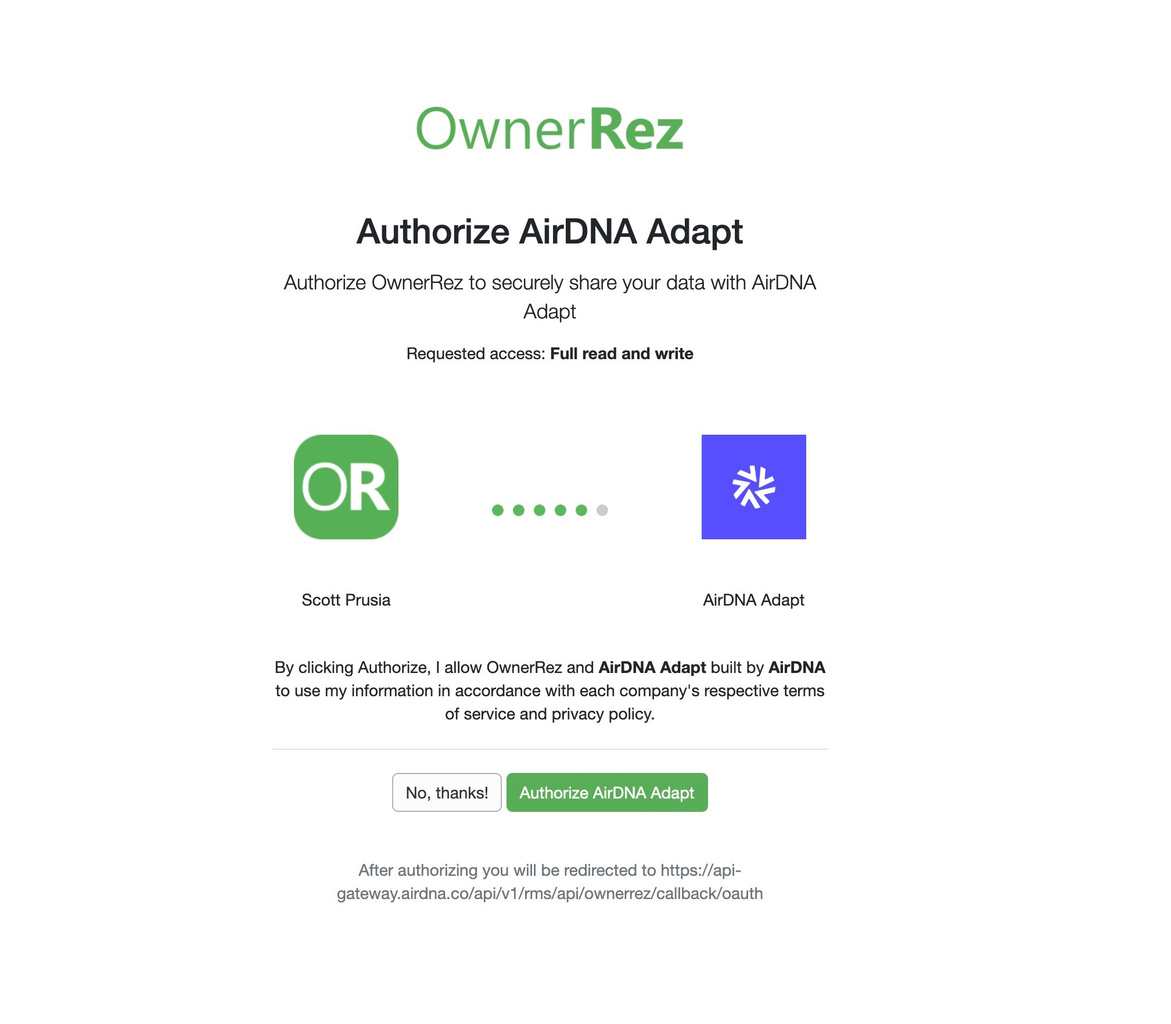
When it works, you'll be returned to AirDNA, and your listings will begin importing.
What happens after you connect
-
All listings on your OwnerRez account import automatically, along with their calendars. There's no need to select them one by one, and importing can take a few moments.
-
Recommended Adapt rates are generated within a few minutes.
-
Nothing is pushed back to OwnerRez yet. To start syncing prices, see How Rate Syncing Works.
What Data is Transmitted
When you connect OwnerRez, Adapt accesses the following.
What Adapt reads from OwnerRez
-
Account details (your name and email)
-
Properties and listing details
-
Bookings
-
Reviews
-
Rates and availability
-
Surcharges
What Adapt writes back to OwnerRez (only after you turn on rate syncing)
-
Nightly prices
-
Availability, including minimum night stay and check-in / check-out restrictions
-
Weekly and monthly discounts
-
Cleaning and extra-guest fees
Everything Adapt reads stays read-only. Adapt won't change your pricing or calendar until you turn on rate syncing.
Support
For support, contact AirDNA.
-
You weren't returned to AirDNA, or the connection didn't complete. Start the connection again from AirDNA and make sure you choose Allow on the OwnerRez authorization screen.
-
You don't see all of your listings. Importing can take a few moments. If a listing is still missing after that, confirm it's active in OwnerRez, then reconnect.
- Using another pricing tool? If you decide to sync rates with AirDNA Adapt, turn off any dynamic pricing or third-party pricing tool connected to OwnerRez first, since the two will otherwise overwrite each other.
-
Click your profile, then go to Connections.
-
Find your OwnerRez connection and choose to delete it.
-
Confirm when prompted.